


In the high-precision world of rubber extrusion manufacturing, the margin for error is virtually non-existent. A single miscalculation in die profile calibration can lead to wasted material, inconsistent product geometry, or even catastrophic line failures during the vulcanization process. Modern manufacturing lines rely on a delicate dance between mechanical extrusion parameters and thermal curing speeds. To maintain this balance, engineers must not only track physical measurements but also model the complex data relationships that govern the entire production workflow. This requires a clear, structured representation of how die specifications, calibration runs, material formulations, and line speed settings interact.
Traditional spreadsheet-based tracking often fails to capture the relational integrity required for such complex systems. When a calibration run is performed, it must be linked to a specific die profile, the operator who performed it, and the resulting line speed synchronization. Without a robust data model, tracing the root cause of a defect becomes a forensic nightmare. This is where the power of diagram-as-code shines. By defining the data architecture in code, teams can version their models, ensure consistency across documentation, and instantly visualize the dependencies between entities like Die Profile, Calibration Run, and Line Speed Sync.
Using VPasCode, a free web-based PlantUML editor, we can build this complex manufacturing ERD from scratch. This tutorial serves as a masterclass in modeling industrial data flows. We will walk through the design of a system that synchronizes extrusion die profiles with vulcanization line speeds, ensuring that every cured rubber profile meets its target specifications. By the end of this guide, you will understand not just the syntax, but the architectural logic behind connecting physical assets to digital records.
Understanding the Model: Purpose, Scope & Problem Framing
Diagram Abstraction & Representation
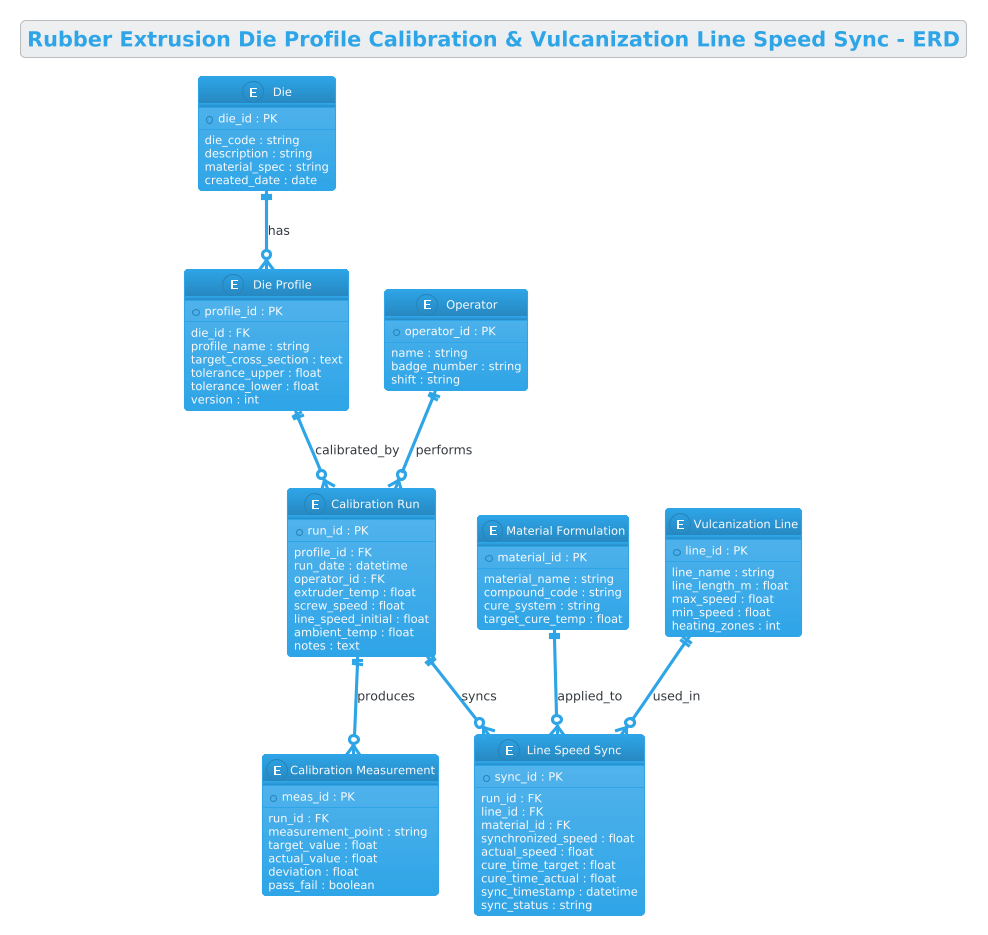
Entity Relationship Diagrams (ERDs) are the blueprint for data integrity. In this specific manufacturing context, the ERD serves as the logical schema for the database that will store production records. The diagram abstracts physical components (like the Die or Vulcanization Line) into database entities with defined attributes. It clarifies cardinality—how many calibration runs can be associated with a single die profile, or how a single calibration run triggers a specific line speed synchronization event. This visual abstraction allows architects to identify missing relationships before writing a single line of SQL or application code.
Target Domain Scope & Scenario
The scope of this model is strictly focused on the calibration and synchronization phase of the rubber extrusion process. It encompasses the lifecycle from the initial definition of a die cross-section, through the iterative process of measuring extrudate dimensions, to the final synchronization of the vulcanization line speed based on those measurements. It intentionally excludes upstream raw material sourcing or downstream packaging, focusing purely on the critical path where geometry and thermal dynamics intersect.
Key Takeaways & Educational Insights
By constructing this diagram, you will learn how to model one-to-many relationships (e.g., one die having many profiles), how to link transient process data (calibration runs) to static master data (materials), and how to use foreign keys to maintain referential integrity. You will gain insight into how to structure a schema that supports traceability, a critical requirement in manufacturing compliance.
Complete Diagram & Full Source Code
Before diving into the step-by-step construction, here is the complete visual result of the ERD we will build. This diagram illustrates the flow of data from the physical die to the final synchronization record.
Copy the following complete source code to replicate this diagram. This code is ready to be pasted directly into the VPasCode editor.
@startuml
!theme cerulean
title Rubber Extrusion Die Profile Calibration & Vulcanization Line Speed Sync - ERD

/'
Diagram Context:
This ERD models the core data structures used to calibrate rubber extrusion die profiles
and synchronize them with vulcanization line speed. The central entity is the Die Profile,
which defines the target cross-section geometry. Each profile requires calibration runs
where actual extrudate dimensions are measured and compared against the target. The
calibration results determine the optimal line speed for the vulcanization process,
ensuring proper cure time. Line Speed Sync records link the calibrated profile to the
vulcanization line parameters, capturing the synchronized speed setpoints and actual
achieved speeds. Material formulations and extruder settings are also tracked to provide
full traceability of the calibration and synchronization process.
'/

' Entities
entity "Die" as die {
  * die_id : PK
  --
  die_code : string
  description : string
  material_spec : string
  created_date : date
}

entity "Die Profile" as die_profile {
  * profile_id : PK
  --
  die_id : FK
  profile_name : string
  target_cross_section : text
  tolerance_upper : float
  tolerance_lower : float
  version : int
}

entity "Calibration Run" as cal_run {
  * run_id : PK
  --
  profile_id : FK
  run_date : datetime
  operator_id : FK
  extruder_temp : float
  screw_speed : float
  line_speed_initial : float
  ambient_temp : float
  notes : text
}

entity "Calibration Measurement" as cal_meas {
  * meas_id : PK
  --
  run_id : FK
  measurement_point : string
  target_value : float
  actual_value : float
  deviation : float
  pass_fail : boolean
}

entity "Material Formulation" as material {
  * material_id : PK
  --
  material_name : string
  compound_code : string
  cure_system : string
  target_cure_temp : float
}

entity "Vulcanization Line" as vulc_line {
  * line_id : PK
  --
  line_name : string
  line_length_m : float
  max_speed : float
  min_speed : float
  heating_zones : int
}

entity "Line Speed Sync" as speed_sync {
  * sync_id : PK
  --
  run_id : FK
  line_id : FK
  material_id : FK
  synchronized_speed : float
  actual_speed : float
  cure_time_target : float
  cure_time_actual : float
  sync_timestamp : datetime
  sync_status : string
}

entity "Operator" as operator {
  * operator_id : PK
  --
  name : string
  badge_number : string
  shift : string
}

' Relationships
die ||--o{ die_profile : "has"
die_profile ||--o{ cal_run : "calibrated_by"
cal_run ||--o{ cal_meas : "produces"
operator ||--o{ cal_run : "performs"
cal_run ||--o{ speed_sync : "syncs"
vulc_line ||--o{ speed_sync : "used_in"
material ||--o{ speed_sync : "applied_to"

@endumlStep-by-Step Architectural Walkthrough
Building a complex ERD requires a structured approach. We will deconstruct the diagram into four logical phases: setup, entity declaration, relationship mapping, and final polish.
Phase 1: Canvas Configuration & Layout Directives
Every PlantUML diagram begins with configuration directives that set the stage. In this manufacturing context, we want a clean, professional look that emphasizes clarity over flair. We start by defining the theme.
First, we initialize the diagram with @startuml. Immediately following this, we apply the !theme cerulean directive. This applies a blue-toned, corporate-style theme that is highly readable for technical documentation.
!theme ceruleanNext, we add a title directive to provide immediate context for anyone viewing the diagram. This is crucial for manufacturing documentation where diagrams are often archived and referenced later.
title Rubber Extrusion Die Profile Calibration & Vulcanization Line Speed Sync - ERDFinally, we insert the diagram context. In PlantUML, comments are enclosed in single quotes. We use a multi-line comment block to describe the business logic, ensuring that the “why” behind the data model is preserved alongside the “how”.
/'
Diagram Context:
This ERD models the core data structures...
'/
Phase 2: Declaring Core Entities, Actors, and Boundaries
With the canvas ready, we define the entities. In PlantUML ERD syntax, the entity keyword is used. We define the primary keys (PK) and foreign keys (FK) explicitly to ensure database schema accuracy.
We start with the Die entity. This is the physical tool. We define its attributes, using the * symbol to denote the Primary Key and -- to separate keys from other attributes.
entity "Die" as die {
  * die_id : PK
  --
  die_code : string
  description : string
  material_spec : string
  created_date : date
}
We then define the Die Profile. Notice the attribute die_id : FK. This explicitly links the profile to the die, establishing the hierarchical relationship that a die can have multiple profiles (e.g., different tolerances or versions).
We continue this pattern for Calibration Run, Calibration Measurement, Material Formulation, Vulcanization Line, Line Speed Sync, and Operator. Each entity represents a critical piece of the manufacturing puzzle, from the raw material to the human operator.
Phase 3: Mapping Data Flows & Key Interactions
Entities are static until we connect them. Relationships in PlantUML are defined using arrow syntax. We use the ||--o{ syntax to denote a “mandatory one” to “optional many” relationship.
For example, the relationship between Die and Die Profile is defined as:
die ||--o{ die_profile : "has"This translates to: One Die must have at least one Profile (or potentially many, depending on the specific business rule, but here modeled as a parent-child link), and a Profile belongs to exactly one Die. The o{ indicates the “zero or more” side of the relationship.
We then map the operational flow. The Calibration Run is the bridge between the design (Profile) and the execution (Sync). We link the Operator to the Calibration Run to track who performed the task. We also link the Calibration Run to the Line Speed Sync, indicating that a specific run triggers a synchronization event.
cal_run ||--o{ speed_sync : "syncs"
vulc_line ||--o{ speed_sync : "used_in"
material ||--o{ speed_sync : "applied_to"
This triad of relationships in the Line Speed Sync entity is critical. It shows that a synchronization event is a composite of a specific calibration run, the specific line used, and the material being processed.
Phase 4: Grouping, Annotations & Visual Polish
To ensure the diagram remains readable, we rely on PlantUML’s automatic layout engine. However, we can improve clarity by using descriptive labels for our relationships. The text after the colon in the relationship line (e.g., : "has") provides the semantic meaning of the connection.
We also ensure that data types are consistent. Using float for dimensions and speeds, datetime for timestamps, and boolean for pass/fail statuses helps developers understand the expected data schema immediately. The !theme cerulean directive handles the coloring, ensuring that the diagram looks cohesive and professional without manual styling of every box.
Syntax & Keyword Deep Dive
To master PlantUML ERD diagrams, it is essential to understand the specific keywords and symbols used in this model.
entity: The primary keyword used to define a table or object in the database schema. It is followed by a display name and an alias.PKandFK: These are custom labels used within the entity block to denote Primary Keys and Foreign Keys. While PlantUML doesn’t enforce database constraints, using these labels makes the diagram self-documenting for database architects.||--o{: This is the cardinality connector. The double bar||represents “one and only one” (mandatory), while the circle and curly braceo{represents “zero or more” (optional). This is standard Crow’s Foot notation.!theme: A directive that applies a predefined visual style (likecerulean,jungle, orplain) to the entire diagram, saving time on manual styling.entity "Name" as alias: Allows you to define a human-readable name for the box (e.g., “Die Profile”) while using a shorter alias (e.g.,die_profile) for the relationship lines, keeping the code clean.
Best Practices & Pitfalls to Avoid
When designing ERDs for complex systems like rubber extrusion, adherence to best practices ensures the model remains maintainable.
1. Consistent Naming Conventions
Always use lowercase aliases for entities (e.g., die_profile) in the code, even if the display name uses Title Case. This reduces syntax errors when writing relationships and makes the code easier to scan.
2. Explicit Cardinality
Never omit the cardinality symbols (||--o{). Ambiguity in relationships leads to database design flaws. Ensure you clearly define whether a relationship is mandatory or optional.
3. Avoid Circular Dependencies
While PlantUML can render circular references, in a real database schema, circular foreign keys can cause performance issues. Review your relationships to ensure data flows logically from master data (Die, Material) to transactional data (Runs, Syncs).
4. Document the “Why”
Don’t just list attributes. Use the comment block to explain the business logic, as we did in the context description. This helps future developers understand why a specific relationship exists.
Try It Yourself with VPasCode
Start Building Rubber Manufacturing ERDs Faster with VPasCode
Test, preview, and customize your PlantUML ERD diagrams instantly in the browser without installing any tools or configuring local environments.