


Introduction
Class diagrams are the backbone of object-oriented design, providing a static view of system structure by illustrating classes, their attributes, methods, and relationships. While traditional drag-and-drop tools can be cumbersome for version control and collaboration, PlantUML offers a text-based approach that treats diagrams as code.
When combined with Visual Paradigm, this approach transforms into a powerful ecosystem where natural language prompts, AI assistance, and professional-grade tooling converge. This guide explores how to master class diagram creation using PlantUML within the Visual Paradigm environment, enabling developers, architects, and product managers to document complex systems with precision and efficiency.
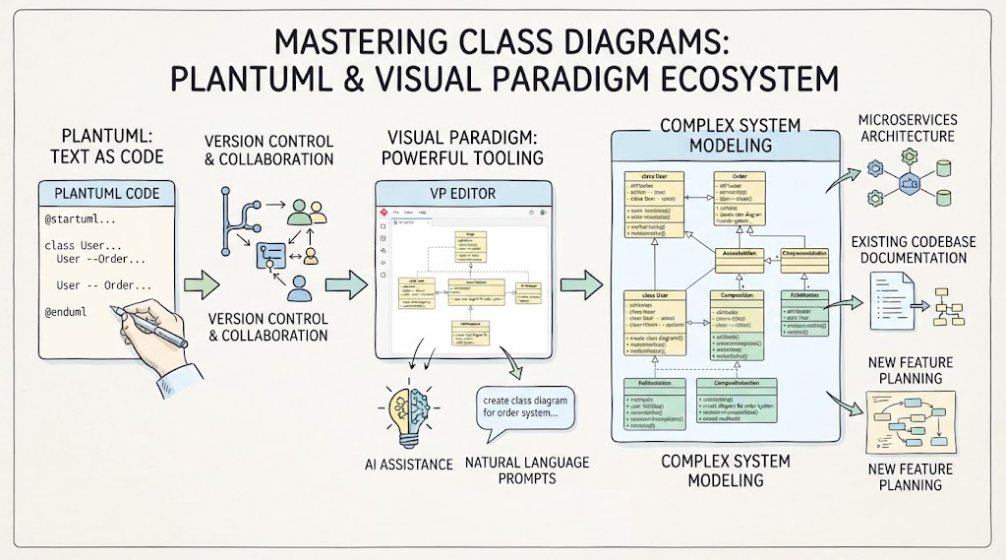
Whether you’re designing a microservices architecture, documenting an existing codebase, or planning a new feature, understanding the synergy between PlantUML’s simplicity and Visual Paradigm’s robust platform will significantly enhance your modeling workflow.
Why PlantUML + Visual Paradigm?
The Power of Diagrams-as-Code
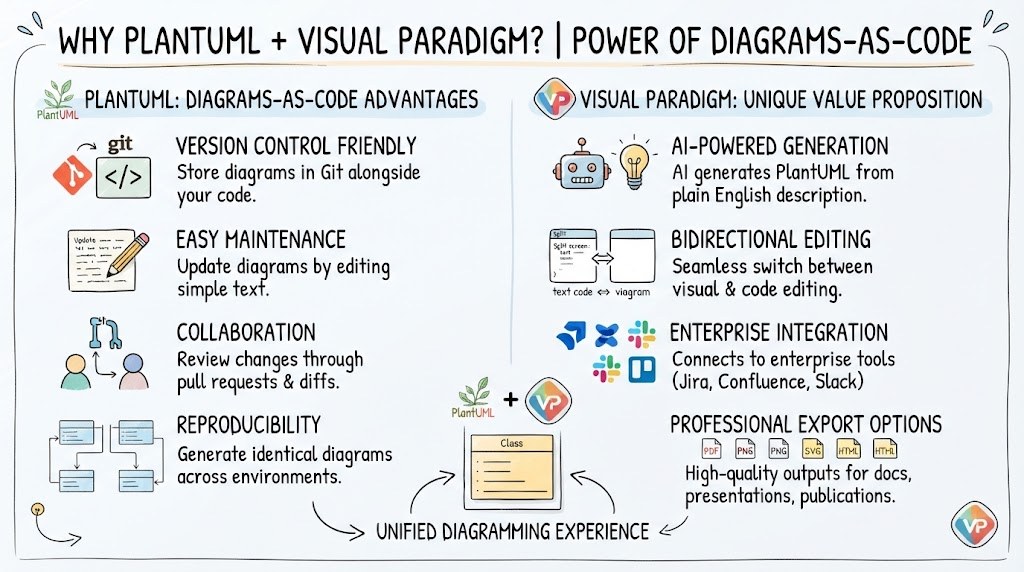
PlantUML allows you to define diagrams using a simple, intuitive text syntax. This approach offers several inherent advantages:
-
Version Control Friendly: Store diagrams in Git alongside your code
-
Easy Maintenance: Update diagrams by editing text rather than manipulating visual elements
-
Collaboration: Review changes through pull requests and diffs
-
Reproducibility: Generate identical diagrams across different environments
Visual Paradigm’s Unique Value Proposition
While PlantUML can be used standalone, Visual Paradigm elevates the experience through:
AI-Powered Generation: Describe your class structure in plain English, and Visual Paradigm’s AI generates accurate PlantUML code instantly.
Bidirectional Editing: Switch seamlessly between visual editing and code editing. Changes in one view automatically update the other.
Enterprise Integration: Native connections to Jira, Confluence, Slack, and other enterprise tools ensure your diagrams stay connected to your development workflow.
Multi-Engine Support: VPasCode supports not just PlantUML, but also Mermaid, Graphviz, and other diagramming languages in a unified interface.
Professional Export Options: Generate high-quality PNG, SVG, PDF, and HTML outputs suitable for technical documentation, presentations, and publications.
Basic PlantUML Syntax for Class Diagrams
Simple Class Definition
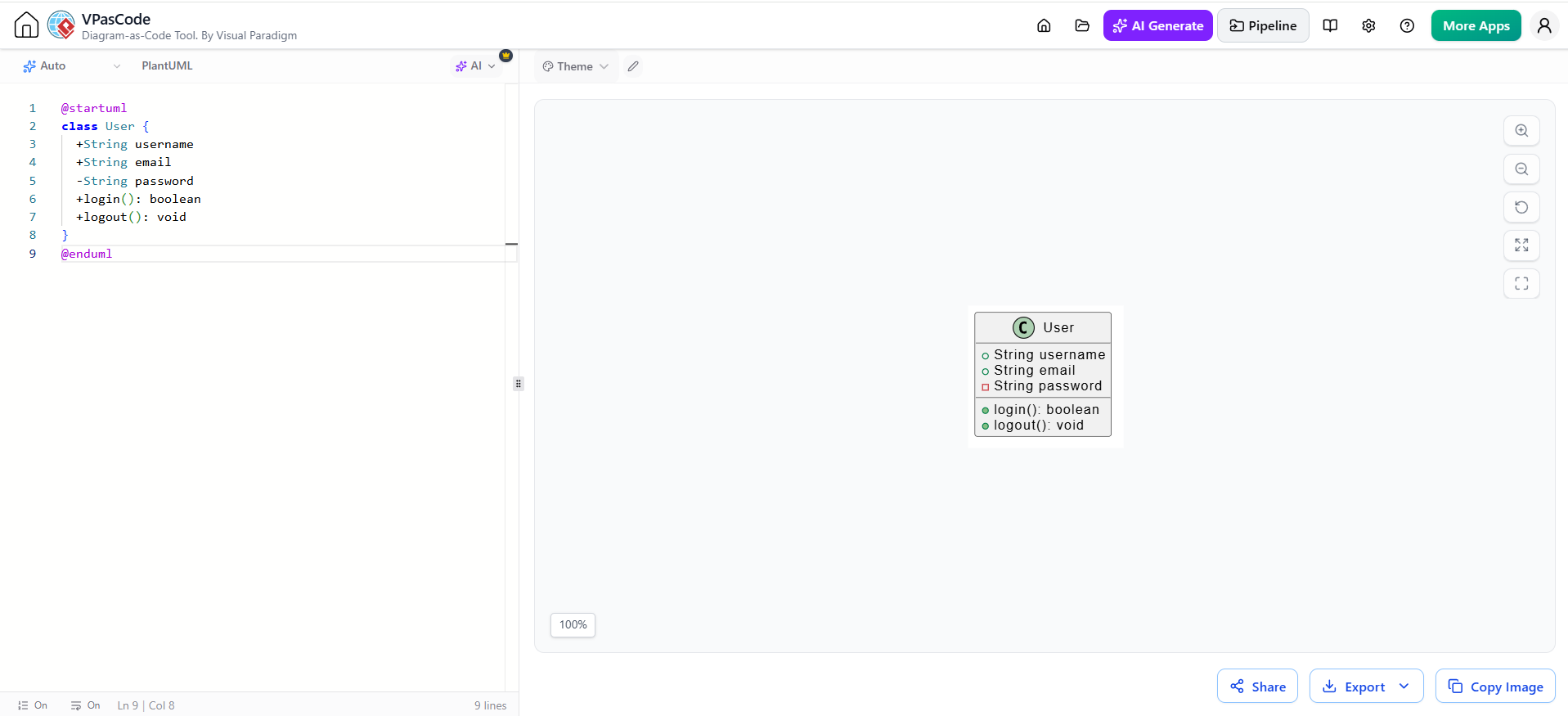
@startuml
class User {
  +String username
  +String email
  -String password
  +login(): boolean
  +logout(): void
}
@enduml
Key Elements:
-
classkeyword defines a class -
+denotes public visibility -
-denotes private visibility -
#denotes protected visibility -
Methods include parentheses
()
Multiple Classes
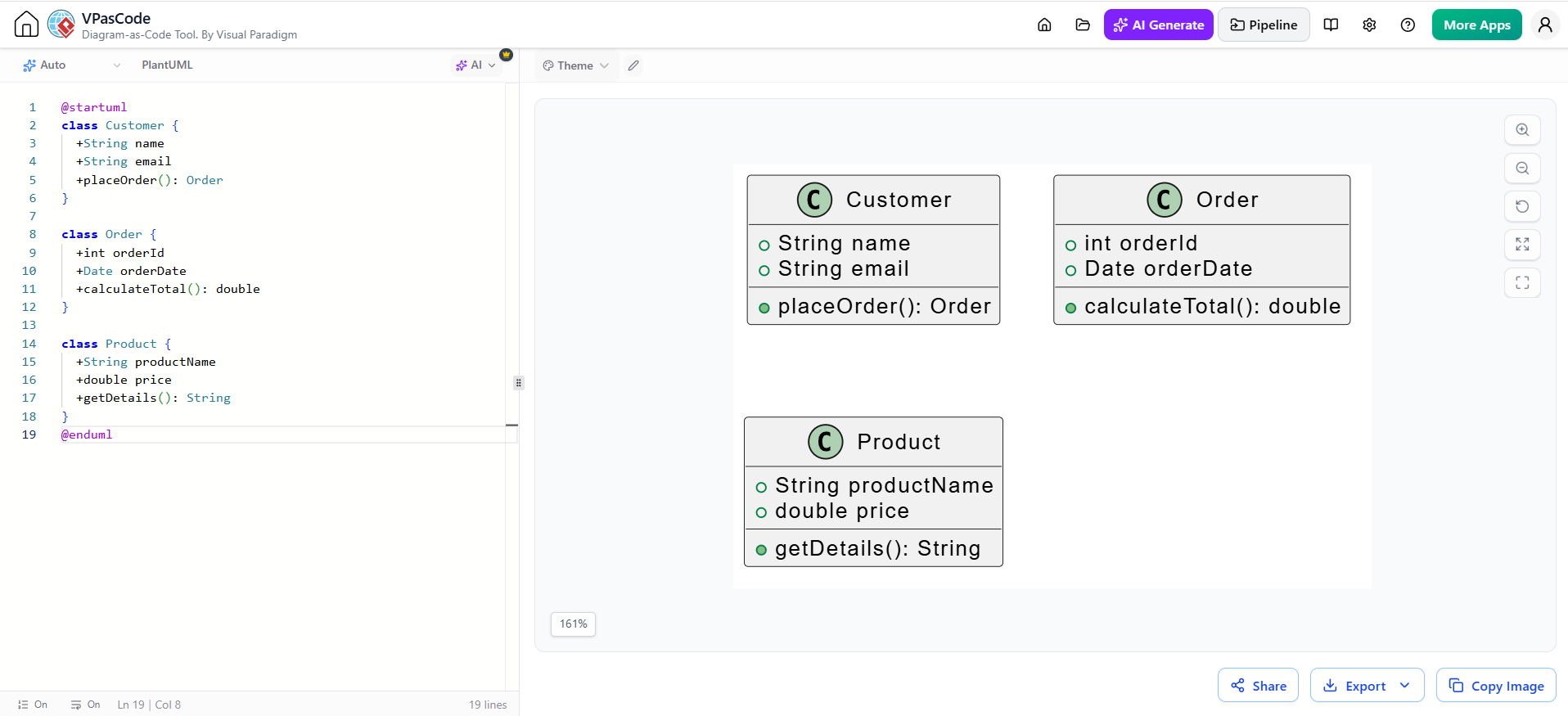
@startuml
class Customer {
  +String name
  +String email
  +placeOrder(): Order
}

class Order {
  +int orderId
  +Date orderDate
  +calculateTotal(): double
}

class Product {
  +String productName
  +double price
  +getDetails(): String
}
@enduml
Key Concepts & Relationships
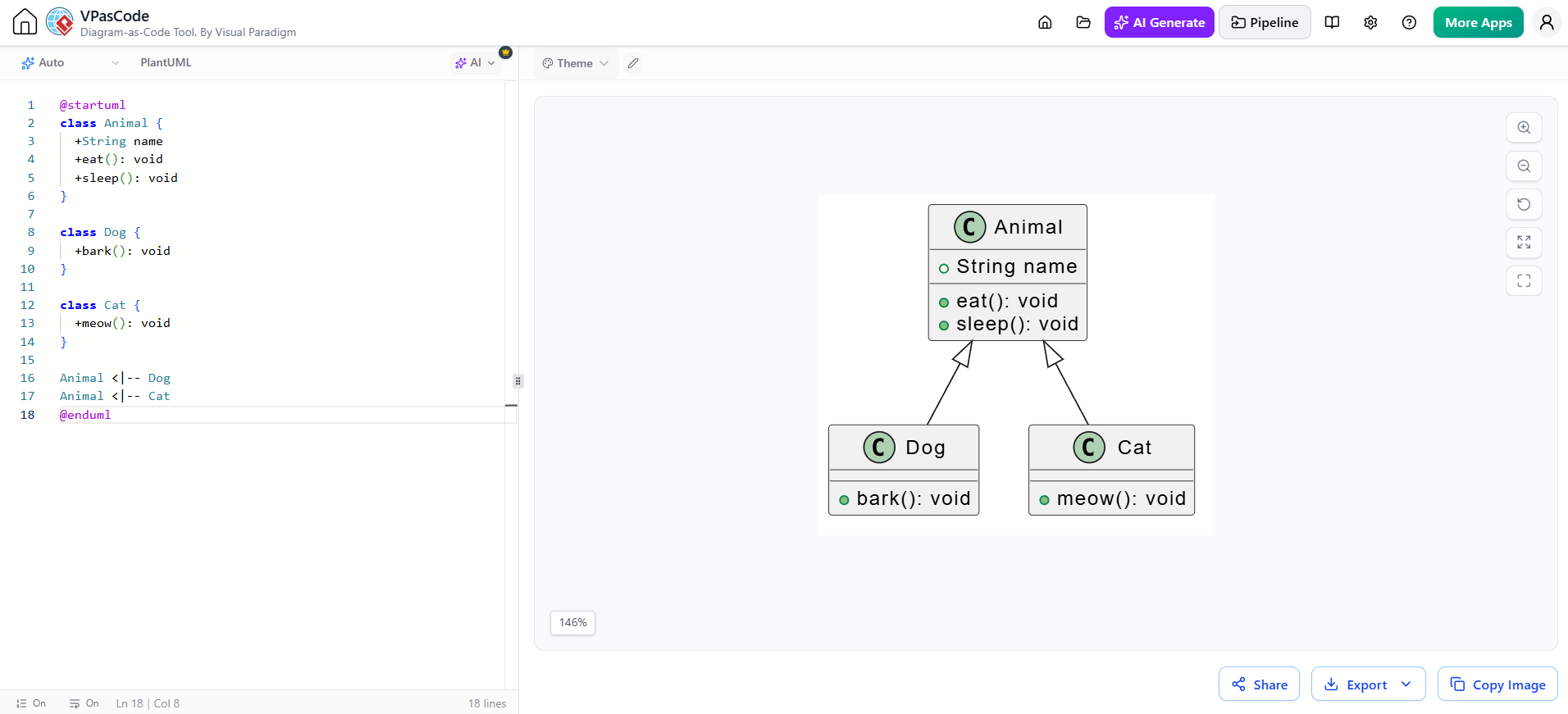
1. Inheritance (Generalization)
@startuml
class Animal {
  +String name
  +eat(): void
  +sleep(): void
}

class Dog {
  +bark(): void
}

class Cat {
  +meow(): void
}

Animal <|-- Dog
Animal <|-- Cat
@enduml
The <|-- arrow indicates inheritance, with the child class pointing to the parent.
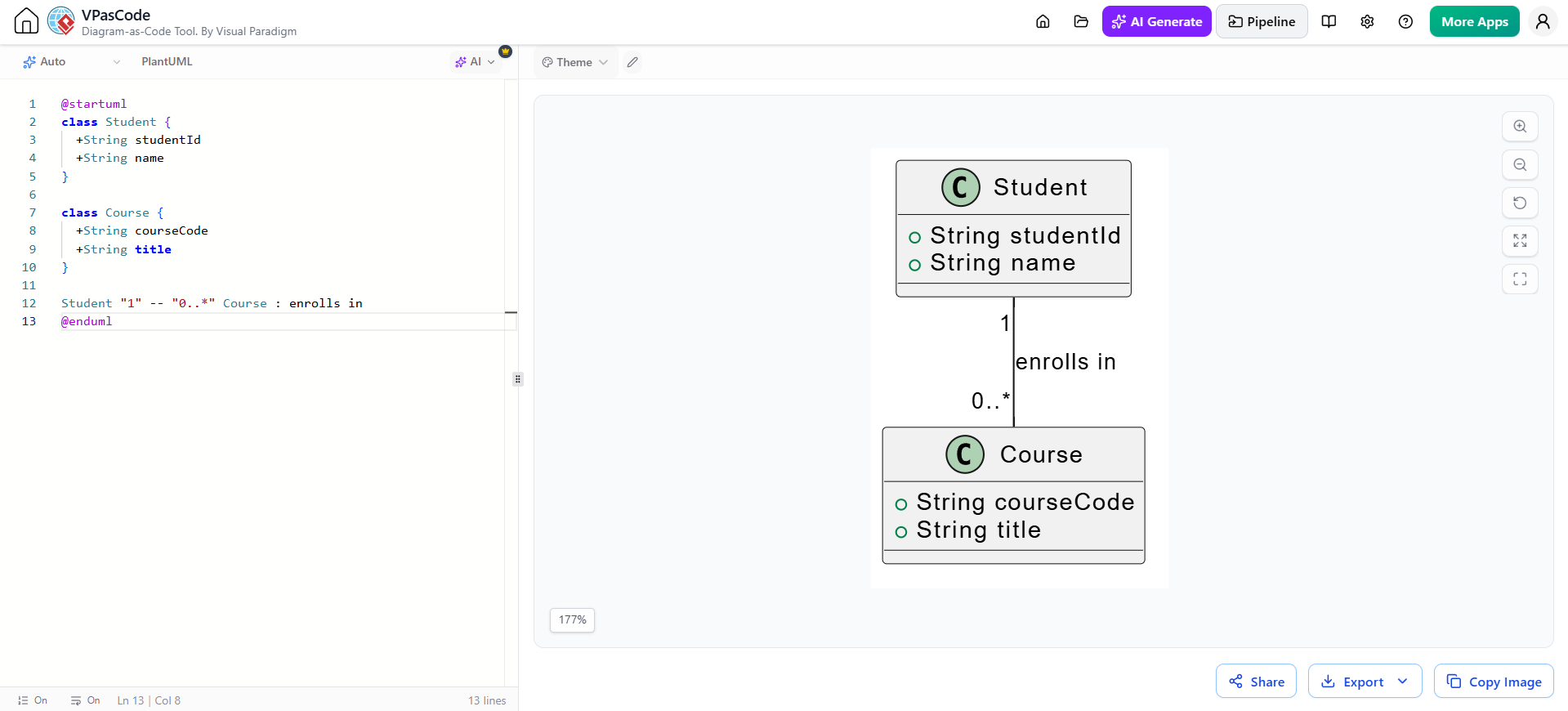
2. Association
@startuml
class Student {
  +String studentId
  +String name
}

class Course {
  +String courseCode
  +String title
}

Student "1" -- "0..*" Course : enrolls in
@enduml
Associations show relationships between classes. Multiplicity indicators like "1" and "0..*" specify cardinality.
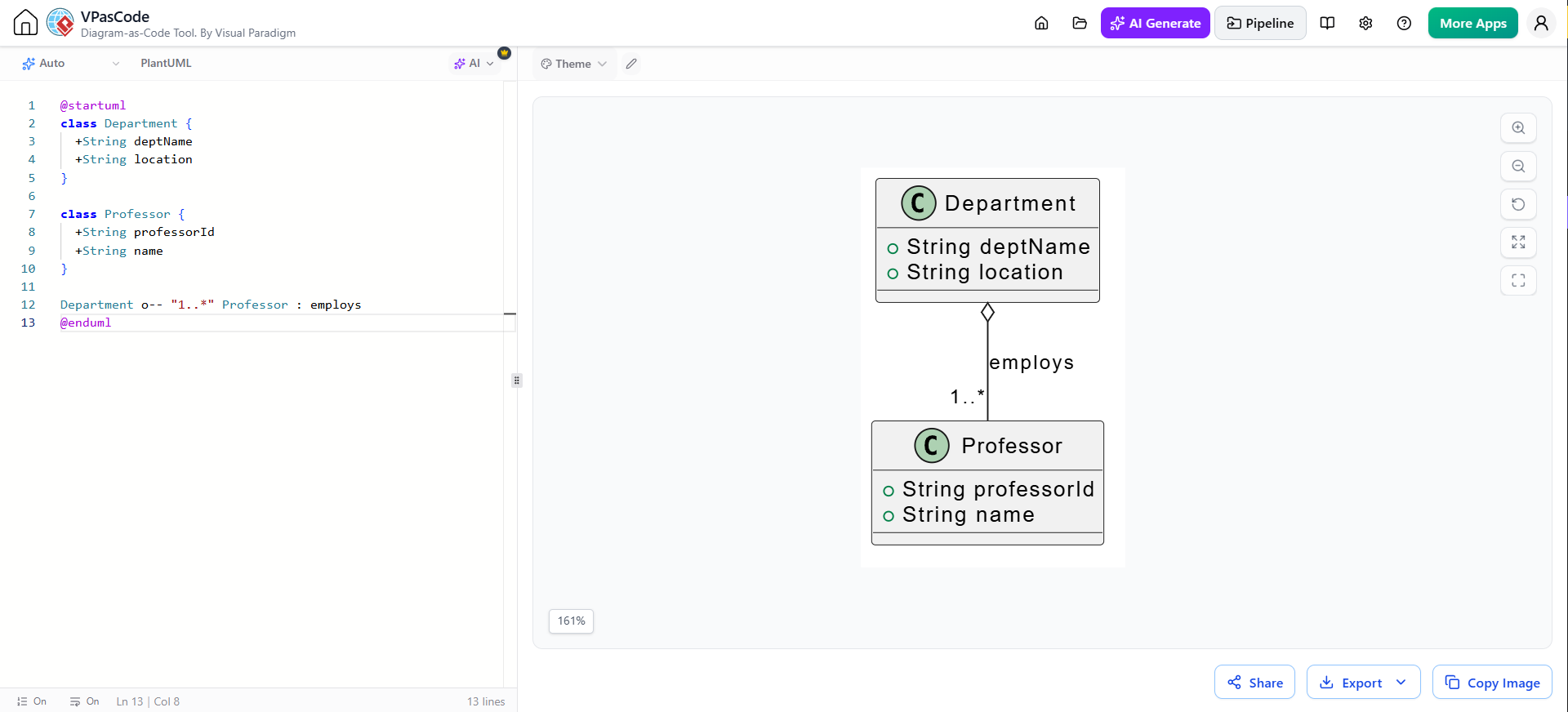
3. Aggregation
@startuml
class Department {
  +String deptName
  +String location
}

class Professor {
  +String professorId
  +String name
}

Department o-- "1..*" Professor : employs
@enduml
The hollow diamond o-- represents aggregation, indicating a “has-a” relationship where the part can exist independently.
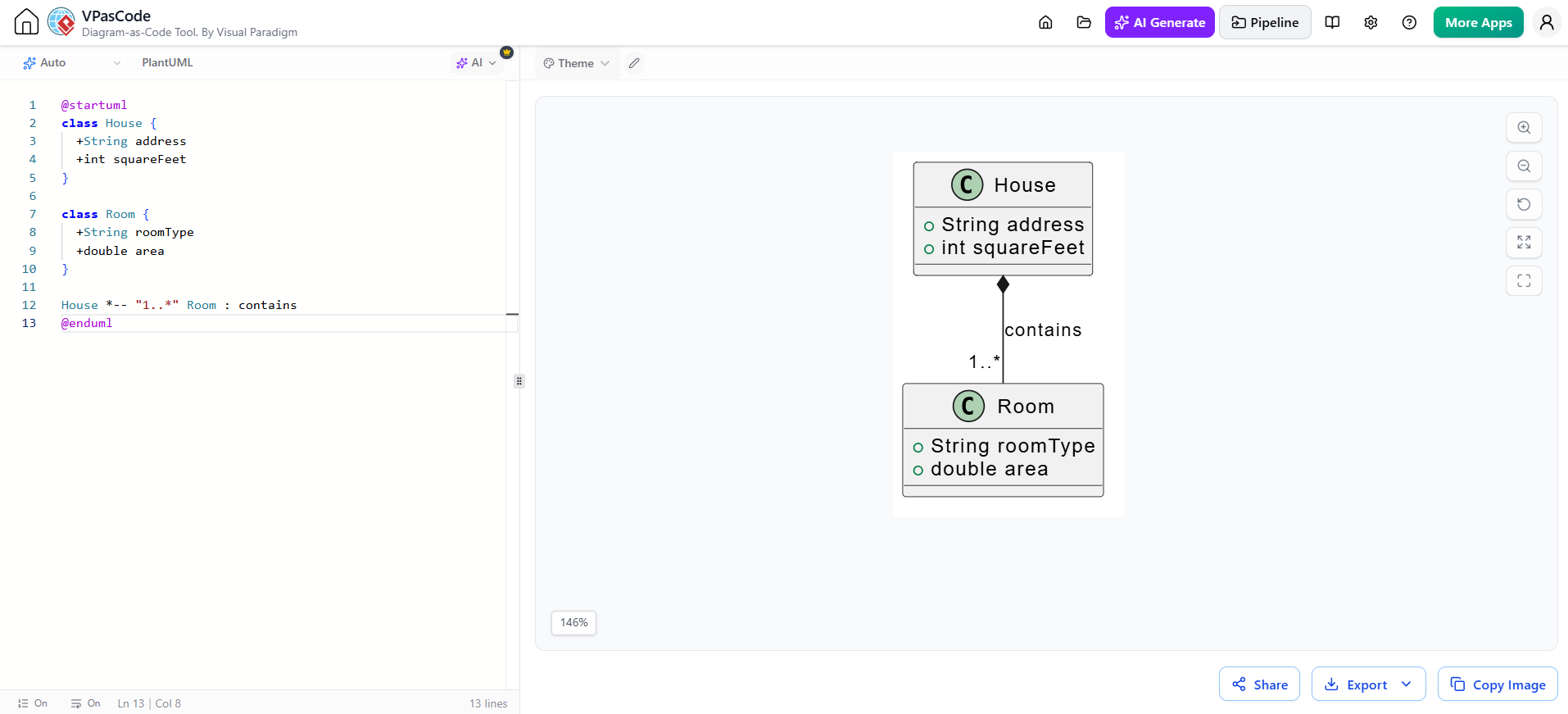
4. Composition
@startuml
class House {
  +String address
  +int squareFeet
}

class Room {
  +String roomType
  +double area
}

House *-- "1..*" Room : contains
@enduml
The filled diamond *-- represents composition, a stronger form of aggregation where parts cannot exist without the whole.
5. Dependency
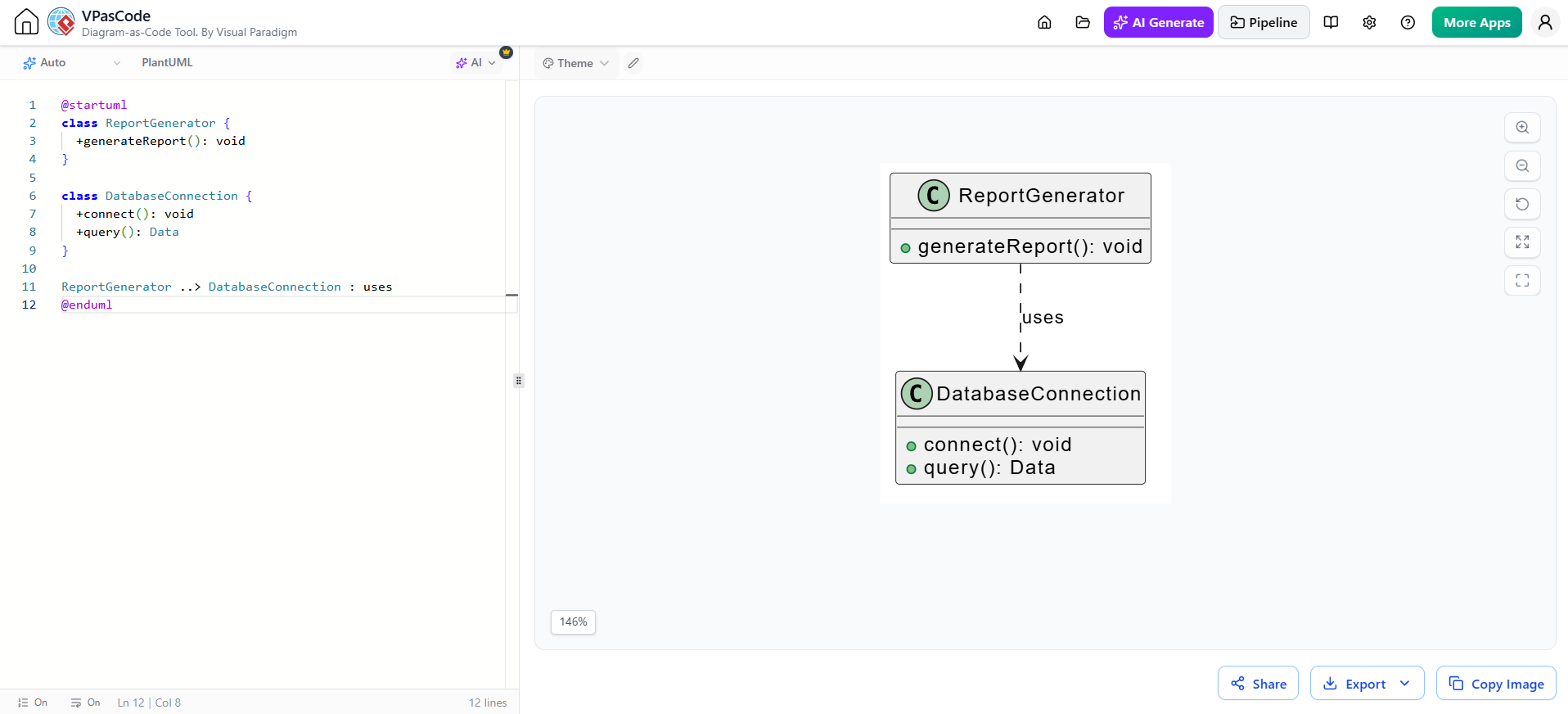
@startuml
class ReportGenerator {
  +generateReport(): void
}

class DatabaseConnection {
  +connect(): void
  +query(): Data
}

ReportGenerator ..> DatabaseConnection : uses
@enduml
The dashed arrow ..> indicates dependency, meaning one class uses another temporarily.
6. Interface Implementation
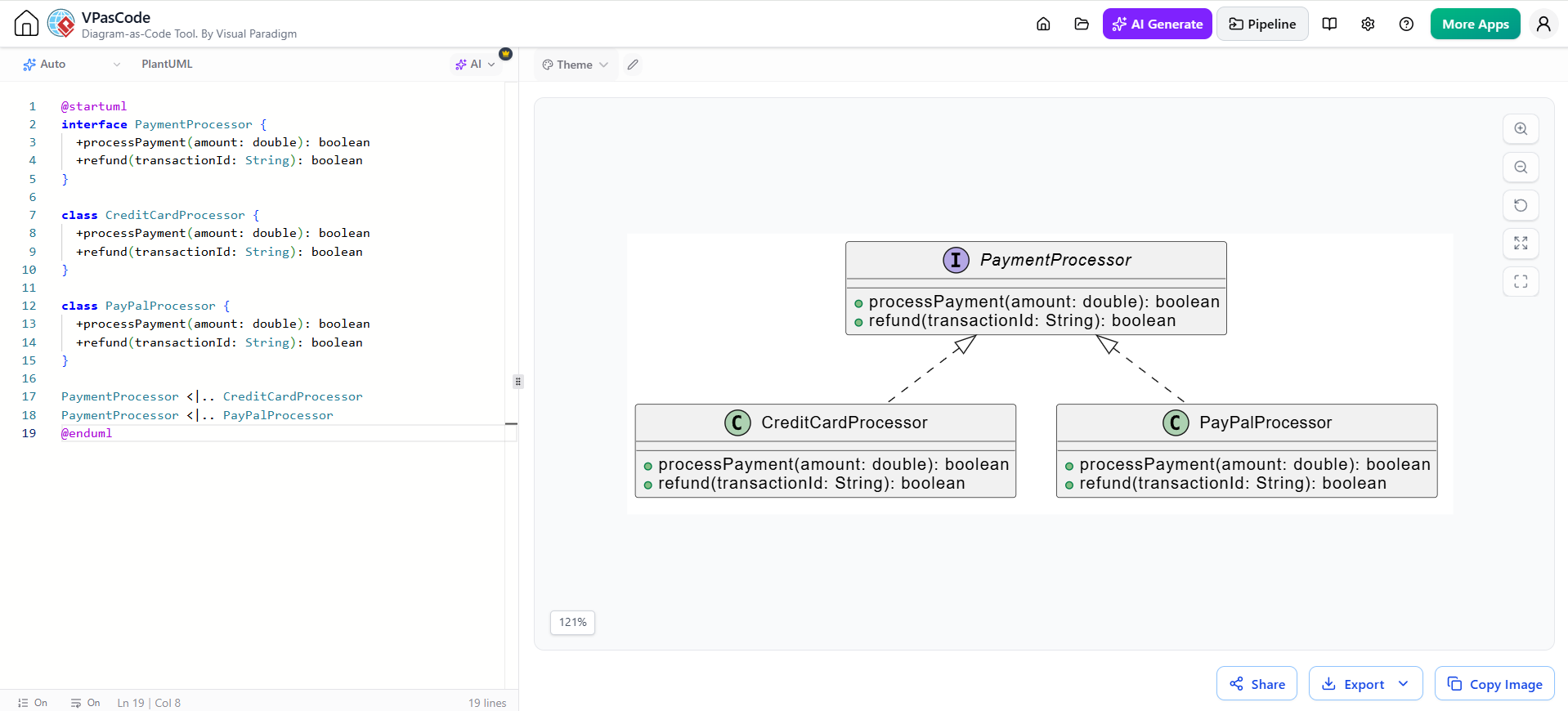
@startuml
interface PaymentProcessor {
  +processPayment(amount: double): boolean
  +refund(transactionId: String): boolean
}

class CreditCardProcessor {
  +processPayment(amount: double): boolean
  +refund(transactionId: String): boolean
}

class PayPalProcessor {
  +processPayment(amount: double): boolean
  +refund(transactionId: String): boolean
}

PaymentProcessor <|.. CreditCardProcessor
PaymentProcessor <|.. PayPalProcessor
@enduml
The dashed line with hollow triangle <|.. shows interface implementation.
7. Abstract Classes
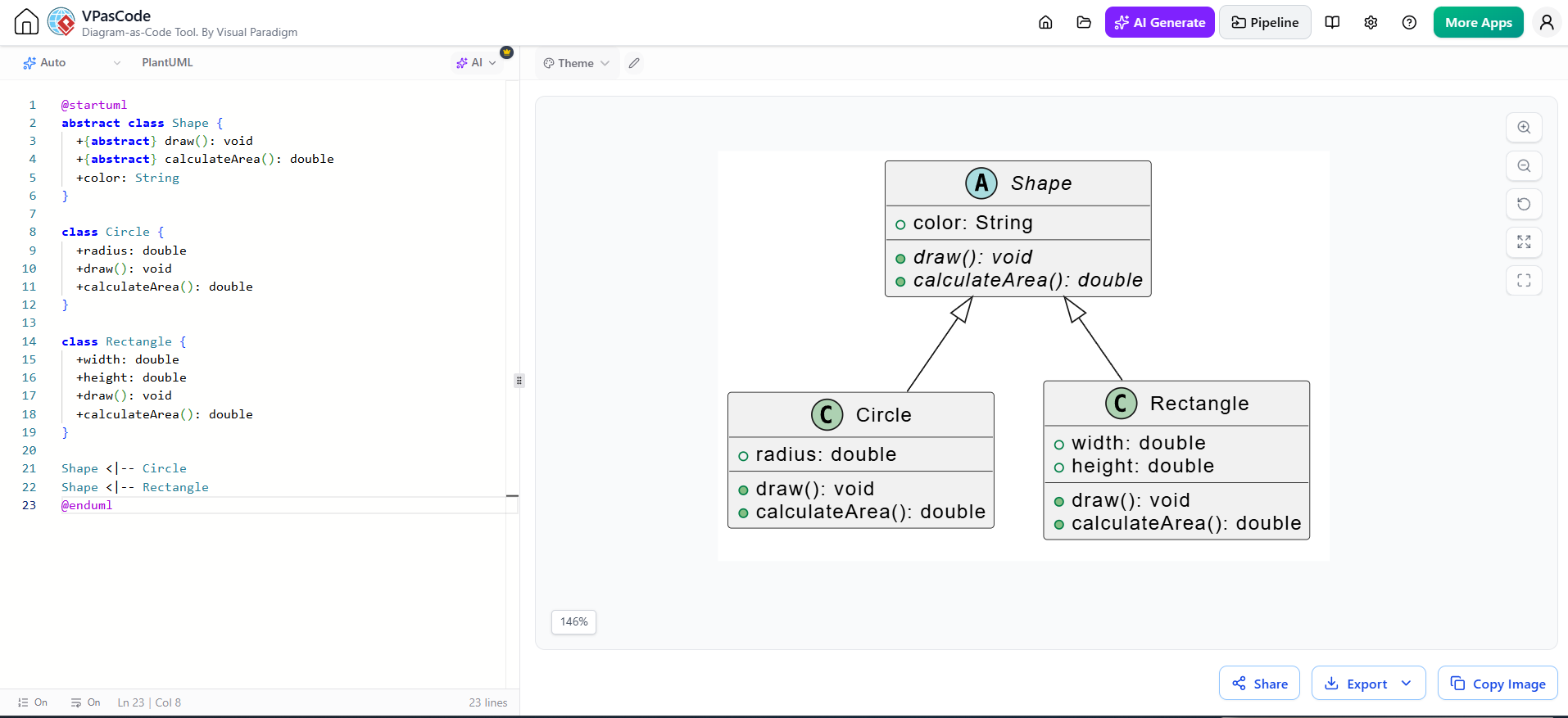
@startuml
abstract class Shape {
  +{abstract} draw(): void
  +{abstract} calculateArea(): double
  +color: String
}

class Circle {
  +radius: double
  +draw(): void
  +calculateArea(): double
}

class Rectangle {
  +width: double
  +height: double
  +draw(): void
  +calculateArea(): double
}

Shape <|-- Circle
Shape <|-- Rectangle
@enduml
Use the abstract keyword and {abstract} modifier for abstract methods.
Advanced Features
Packages and Namespaces
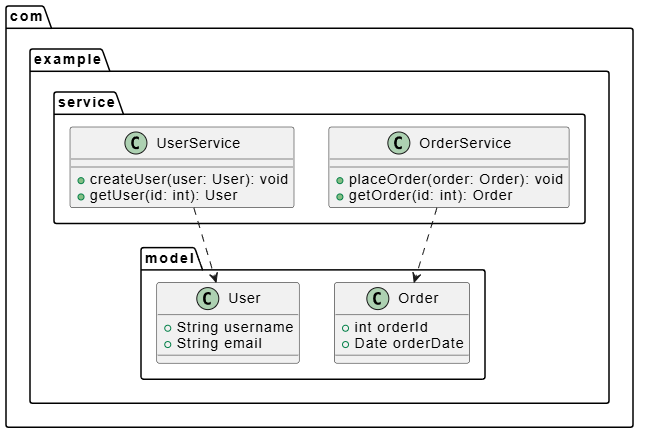
@startuml
package "com.example.model" {
  class User {
    +String username
    +String email
  }

  class Order {
    +int orderId
    +Date orderDate
  }
}

package "com.example.service" {
  class UserService {
    +createUser(user: User): void
    +getUser(id: int): User
  }

  class OrderService {
    +placeOrder(order: Order): void
    +getOrder(id: int): Order
  }
}

UserService ..> User
OrderService ..> Order
@enduml
Stereotypes and Custom Styling
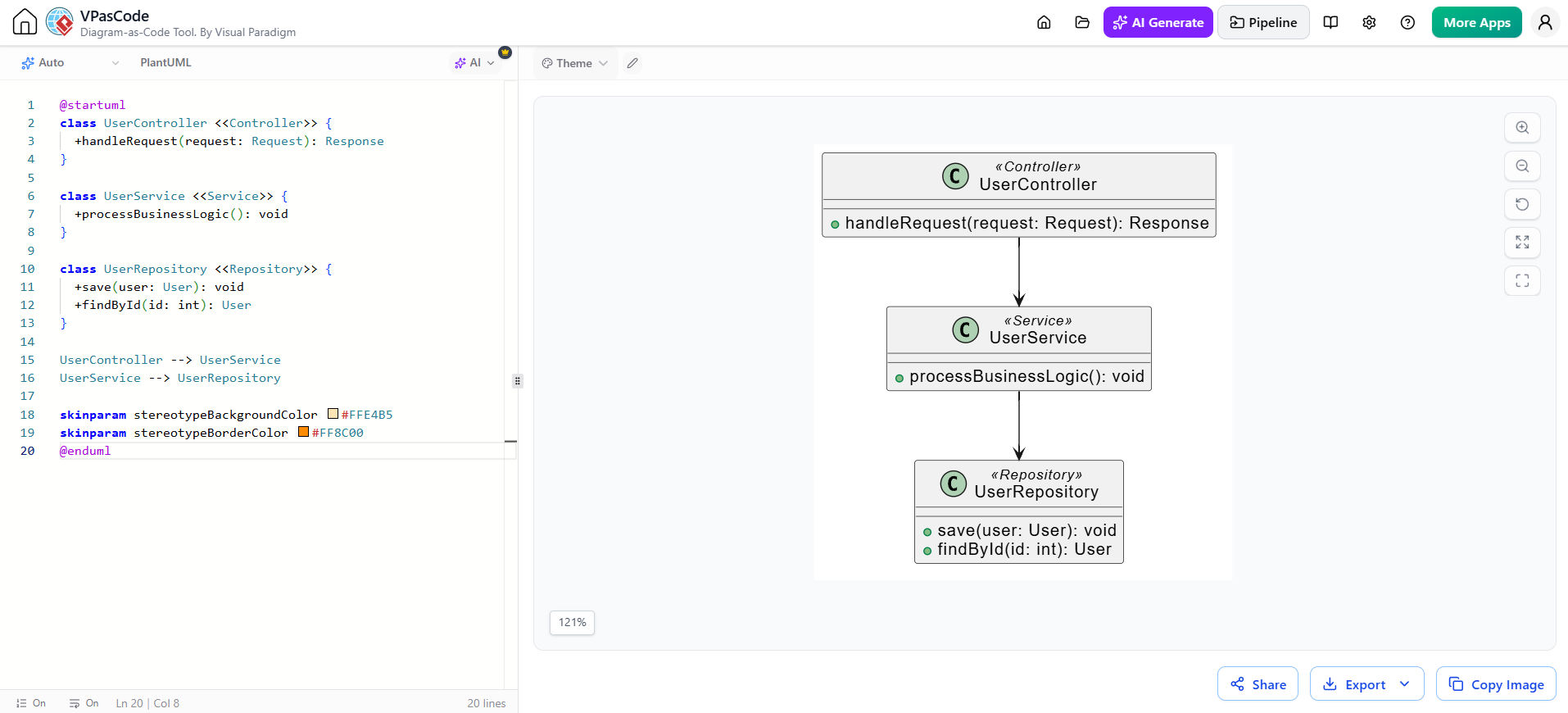
@startuml
class UserController <<Controller>> {
  +handleRequest(request: Request): Response
}

class UserService <<Service>> {
  +processBusinessLogic(): void
}

class UserRepository <<Repository>> {
  +save(user: User): void
  +findById(id: int): User
}

UserController --> UserService
UserService --> UserRepository

skinparam stereotypeBackgroundColor #FFE4B5
skinparam stereotypeBorderColor #FF8C00
@enduml
Notes and Comments
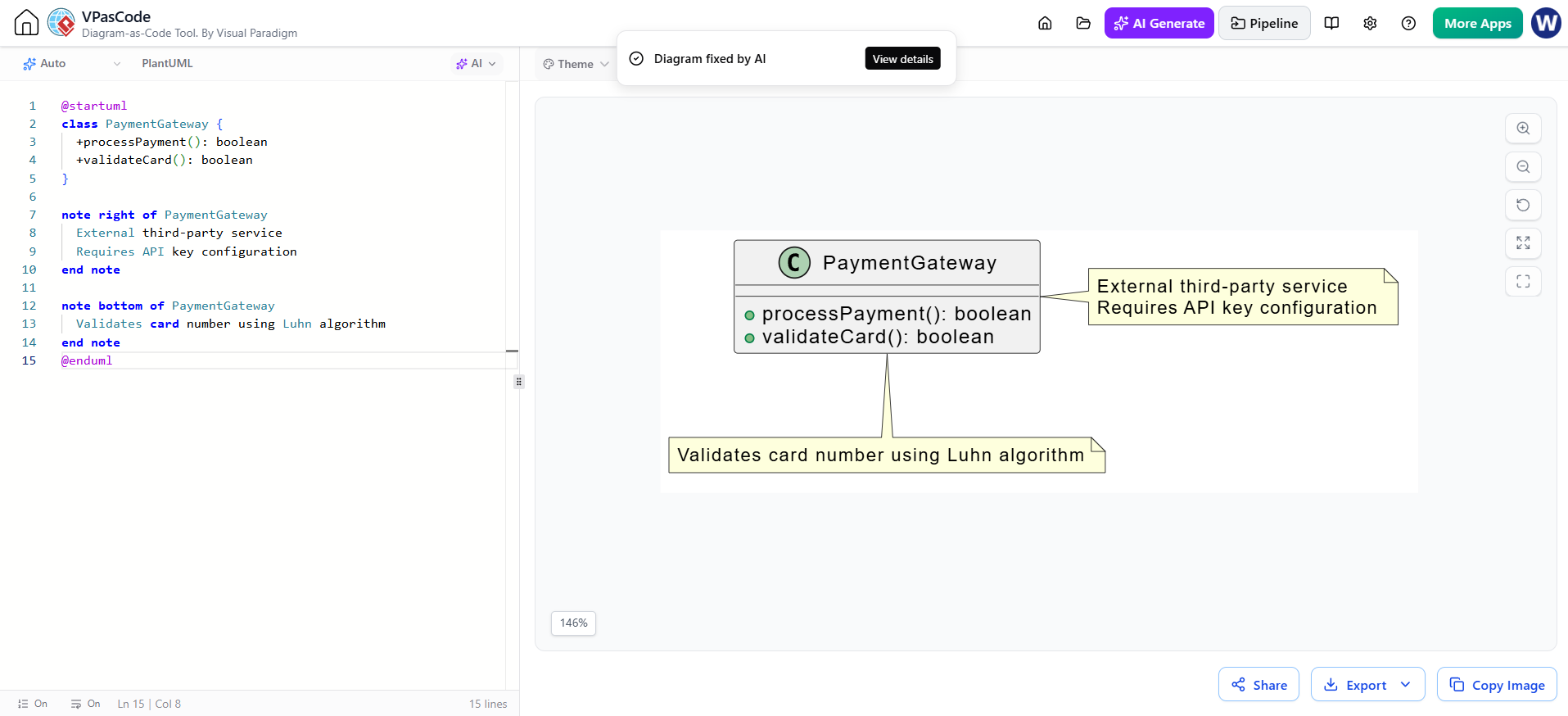
@startuml
class PaymentGateway {
  +processPayment(): boolean
  +validateCard(): boolean
}

note right of PaymentGateway
  External third-party service
  Requires API key configuration
end note

note top of PaymentGateway :: validateCard
  Validates card number using Luhn algorithm
end note
@enduml
Enumerations
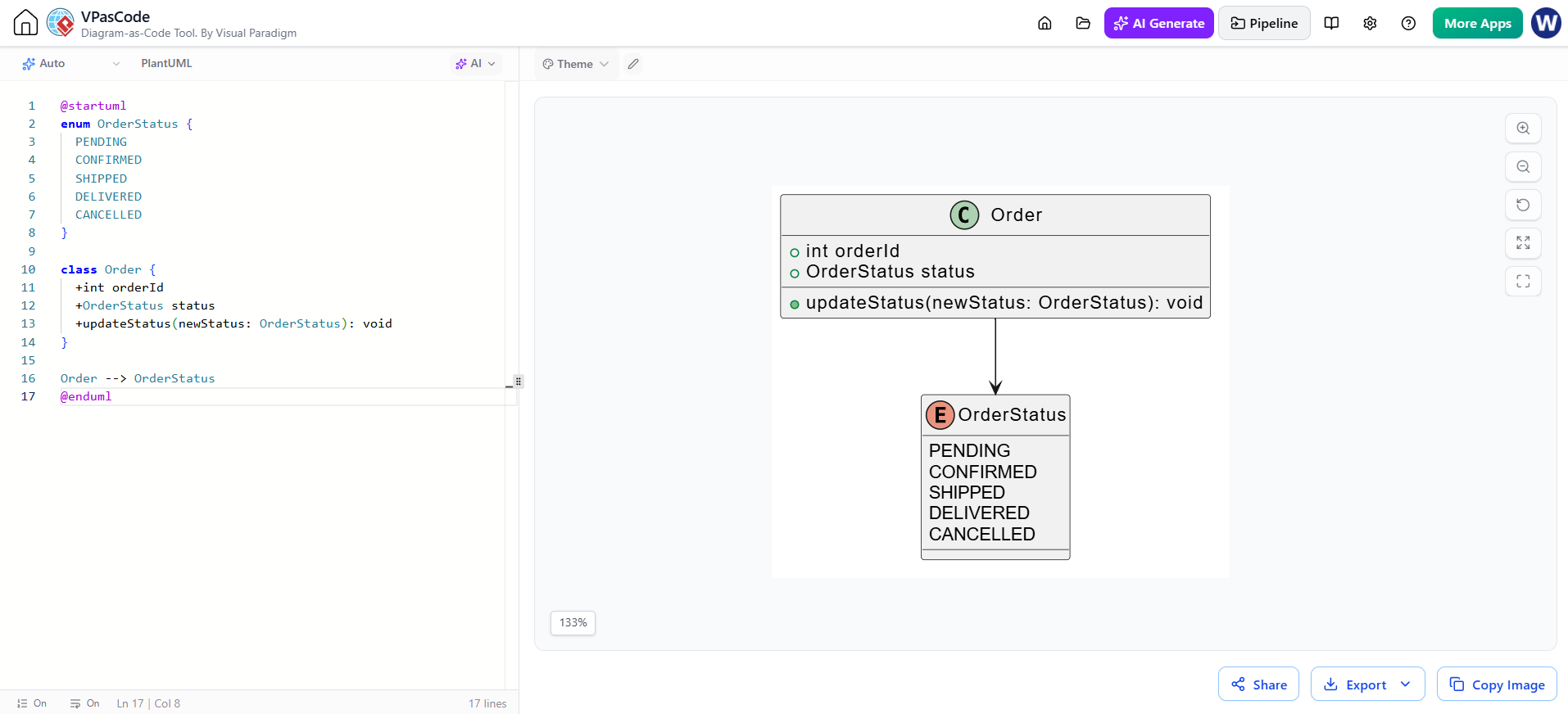
@startuml
enum OrderStatus {
  PENDING
  CONFIRMED
  SHIPPED
  DELIVERED
  CANCELLED
}

class Order {
  +int orderId
  +OrderStatus status
  +updateStatus(newStatus: OrderStatus): void
}

Order --> OrderStatus
@enduml
Generic Types
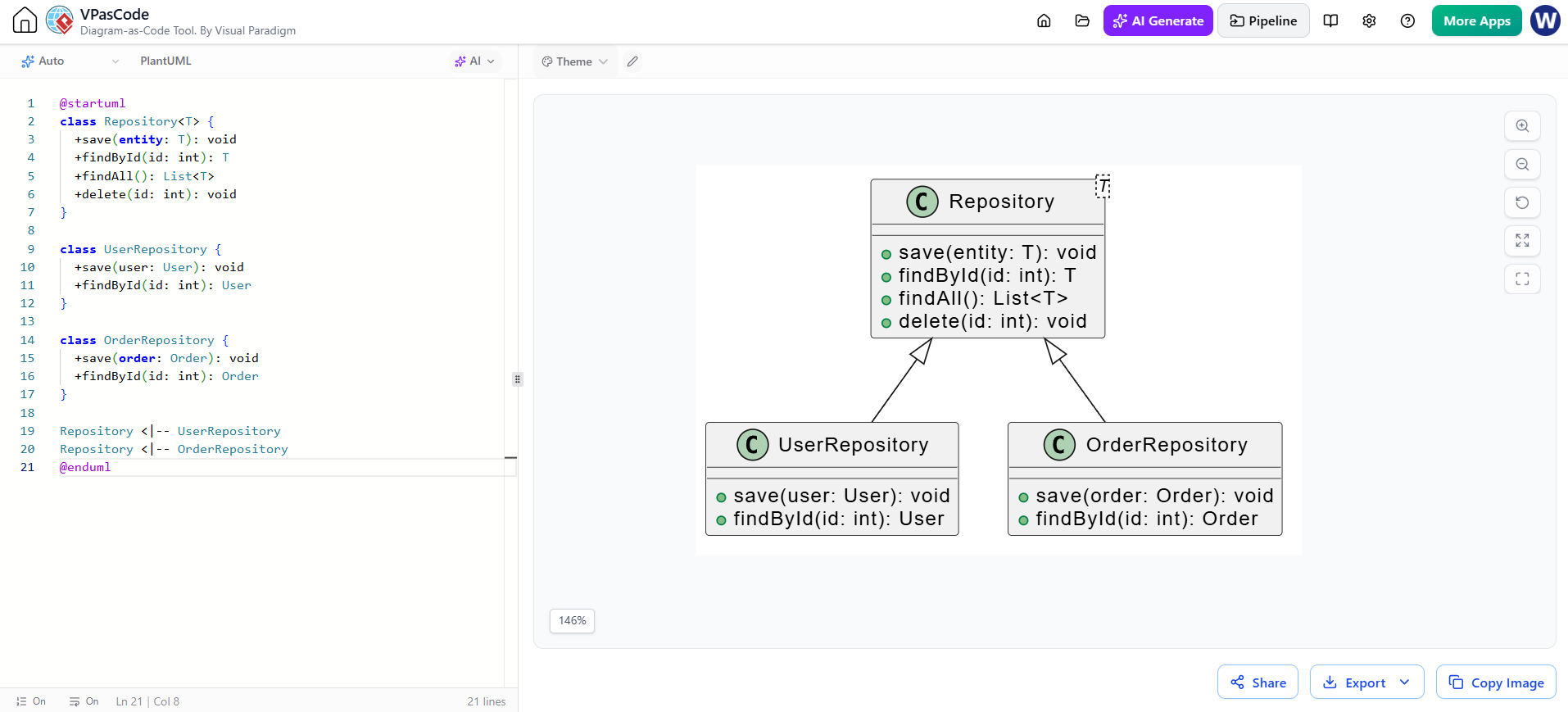
@startuml
class Repository<T> {
  +save(entity: T): void
  +findById(id: int): T
  +findAll(): List<T>
  +delete(id: int): void
}

class UserRepository {
  +save(user: User): void
  +findById(id: int): User
}

class OrderRepository {
  +save(order: Order): void
  +findById(id: int): Order
}

Repository <|-- UserRepository
Repository <|-- OrderRepository
@enduml
Complete Real-World Examples
Example 1: E-Commerce System
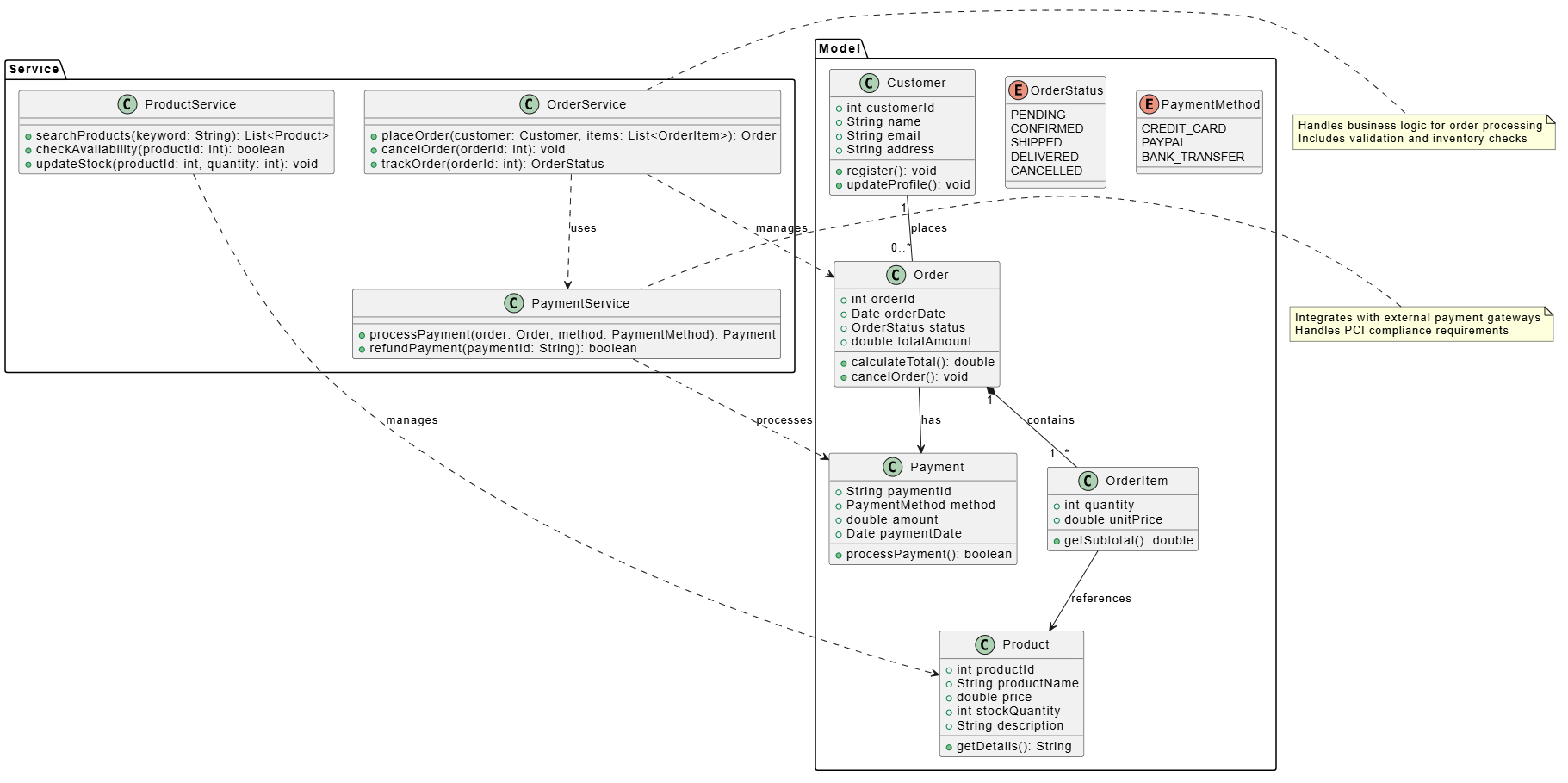
@startuml
skinparam backgroundColor white
skinparam shadowing false

package "Model" {
  class Customer {
    +int customerId
    +String name
    +String email
    +String address
    +register(): void
    +updateProfile(): void
  }

  class Product {
    +int productId
    +String productName
    +double price
    +int stockQuantity
    +String description
    +getDetails(): String
  }

  class Order {
    +int orderId
    +Date orderDate
    +OrderStatus status
    +double totalAmount
    +calculateTotal(): double
    +cancelOrder(): void
  }

  class OrderItem {
    +int quantity
    +double unitPrice
    +getSubtotal(): double
  }

  enum OrderStatus {
    PENDING
    CONFIRMED
    SHIPPED
    DELIVERED
    CANCELLED
  }

  class Payment {
    +String paymentId
    +PaymentMethod method
    +double amount
    +Date paymentDate
    +processPayment(): boolean
  }

  enum PaymentMethod {
    CREDIT_CARD
    PAYPAL
    BANK_TRANSFER
  }
}

package "Service" {
  class OrderService {
    +placeOrder(customer: Customer, items: List<OrderItem>): Order
    +cancelOrder(orderId: int): void
    +trackOrder(orderId: int): OrderStatus
  }

  class PaymentService {
    +processPayment(order: Order, method: PaymentMethod): Payment
    +refundPayment(paymentId: String): boolean
  }

  class ProductService {
    +searchProducts(keyword: String): List<Product>
    +checkAvailability(productId: int): boolean
    +updateStock(productId: int, quantity: int): void
  }
}

Customer "1" -- "0..*" Order : places
Order "1" *-- "1..*" OrderItem : contains
OrderItem --> Product : references
Order --> Payment : has
OrderService ..> Order : manages
OrderService ..> PaymentService : uses
PaymentService ..> Payment : processes
ProductService ..> Product : manages

note right of OrderService
  Handles business logic for order processing
  Includes validation and inventory checks
end note

note left of PaymentService
  Integrates with external payment gateways
  Handles PCI compliance requirements
end note
@enduml
Example 2: Library Management System
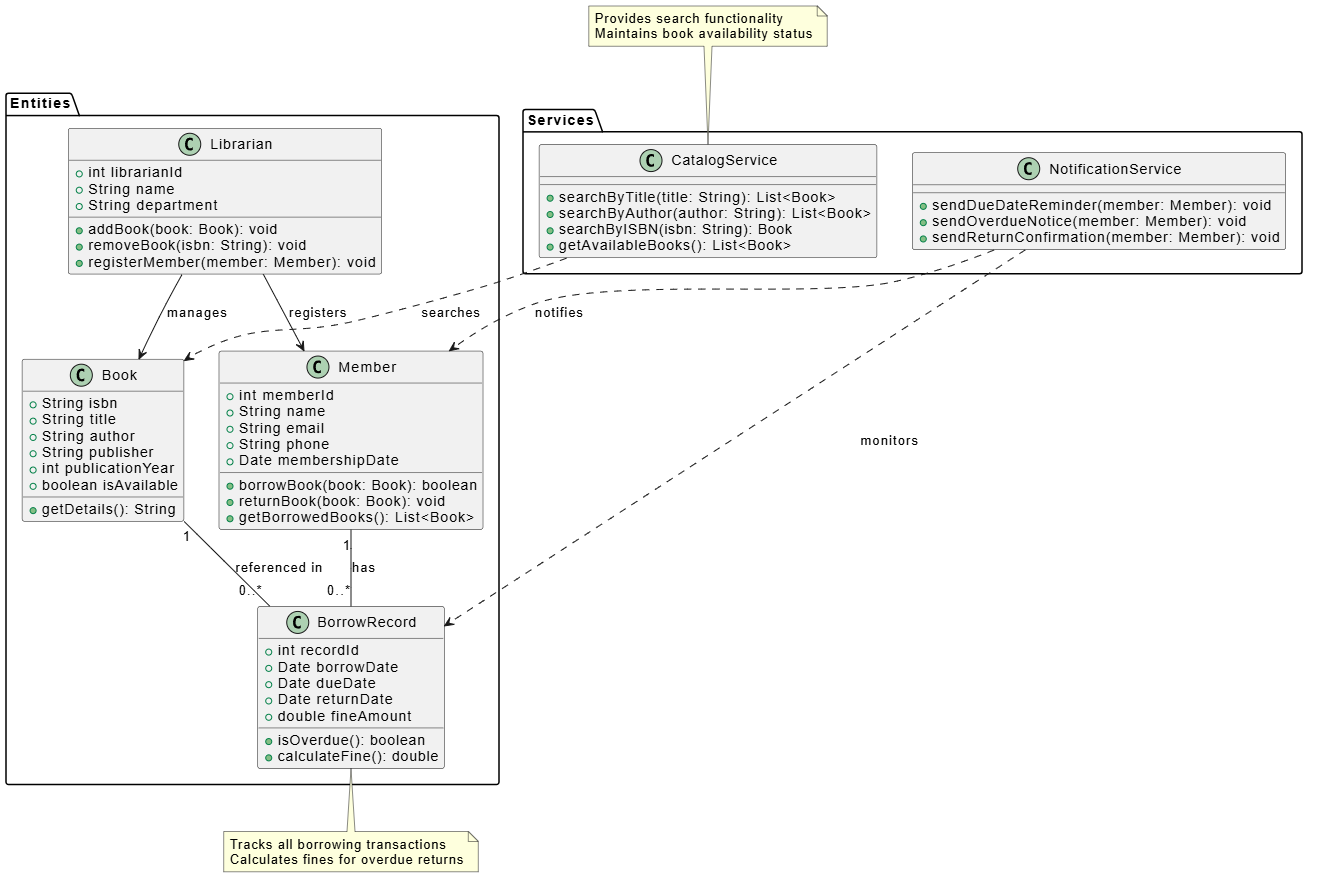
@startuml
skinparam backgroundColor white

package "Entities" {
  class Member {
    +int memberId
    +String name
    +String email
    +String phone
    +Date membershipDate
    +borrowBook(book: Book): boolean
    +returnBook(book: Book): void
    +getBorrowedBooks(): List<Book>
  }

  class Book {
    +String isbn
    +String title
    +String author
    +String publisher
    +int publicationYear
    +boolean isAvailable
    +getDetails(): String
  }

  class Librarian {
    +int librarianId
    +String name
    +String department
    +addBook(book: Book): void
    +removeBook(isbn: String): void
    +registerMember(member: Member): void
  }

  class BorrowRecord {
    +int recordId
    +Date borrowDate
    +Date dueDate
    +Date returnDate
    +double fineAmount
    +isOverdue(): boolean
    +calculateFine(): double
  }
}

package "Services" {
  class CatalogService {
    +searchByTitle(title: String): List<Book>
    +searchByAuthor(author: String): List<Book>
    +searchByISBN(isbn: String): Book
    +getAvailableBooks(): List<Book>
  }

  class NotificationService {
    +sendDueDateReminder(member: Member): void
    +sendOverdueNotice(member: Member): void
    +sendReturnConfirmation(member: Member): void
  }
}

Member "1" -- "0..*" BorrowRecord : has
Book "1" -- "0..*" BorrowRecord : referenced in
Librarian --> Book : manages
Librarian --> Member : registers
CatalogService ..> Book : searches
NotificationService ..> Member : notifies
NotificationService ..> BorrowRecord : monitors

note bottom of BorrowRecord
  Tracks all borrowing transactions
  Calculates fines for overdue returns
end note

note top of CatalogService
  Provides search functionality
  Maintains book availability status
end note
@enduml
Example 3: Microservices Architecture
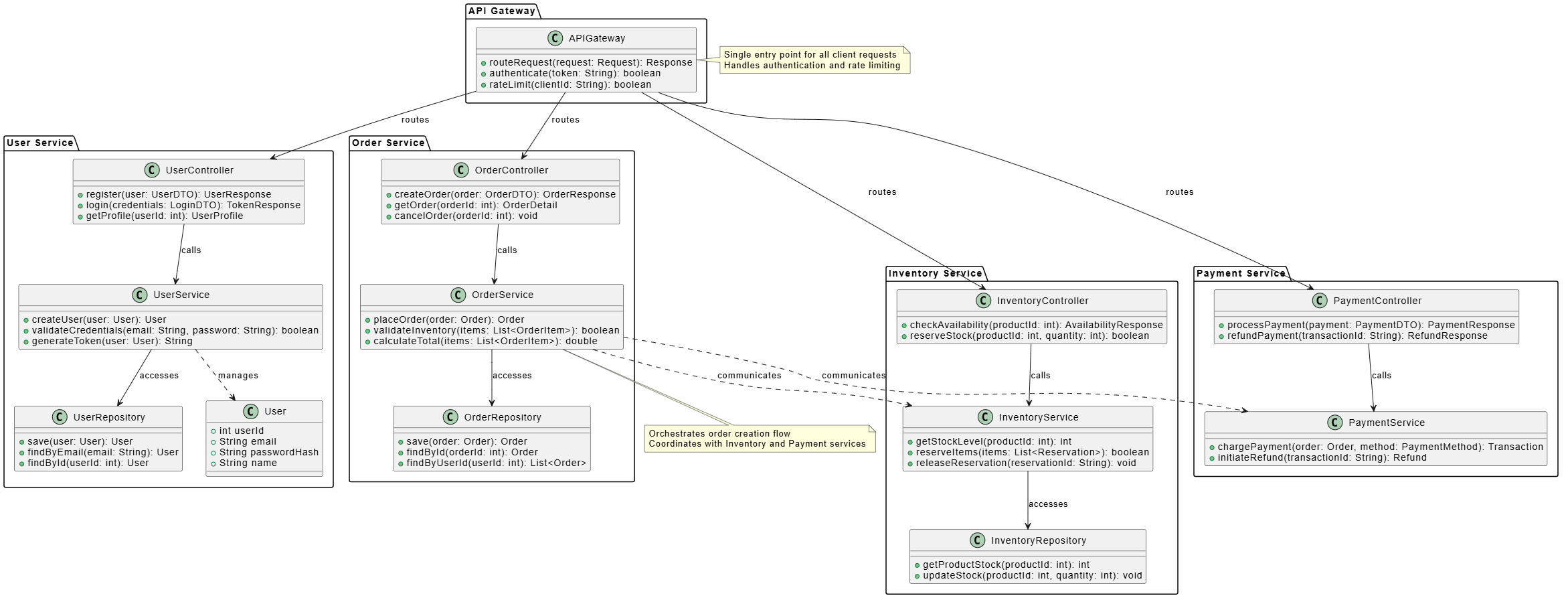
@startuml
skinparam backgroundColor white

package "API Gateway" {
  class APIGateway {
    +routeRequest(request: Request): Response
    +authenticate(token: String): boolean
    +rateLimit(clientId: String): boolean
  }
}

package "User Service" {
  class UserController {
    +register(user: UserDTO): UserResponse
    +login(credentials: LoginDTO): TokenResponse
    +getProfile(userId: int): UserProfile
  }

  class UserService {
    +createUser(user: User): User
    +validateCredentials(email: String, password: String): boolean
    +generateToken(user: User): String
  }

  class UserRepository {
    +save(user: User): User
    +findByEmail(email: String): User
    +findById(userId: int): User
  }

  class User {
    +int userId
    +String email
    +String passwordHash
    +String name
  }
}

package "Order Service" {
  class OrderController {
    +createOrder(order: OrderDTO): OrderResponse
    +getOrder(orderId: int): OrderDetail
    +cancelOrder(orderId: int): void
  }

  class OrderService {
    +placeOrder(order: Order): Order
    +validateInventory(items: List<OrderItem>): boolean
    +calculateTotal(items: List<OrderItem>): double
  }

  class OrderRepository {
    +save(order: Order): Order
    +findById(orderId: int): Order
    +findByUserId(userId: int): List<Order>
  }
}

package "Inventory Service" {
  class InventoryController {
    +checkAvailability(productId: int): AvailabilityResponse
    +reserveStock(productId: int, quantity: int): boolean
  }

  class InventoryService {
    +getStockLevel(productId: int): int
    +reserveItems(items: List<Reservation>): boolean
    +releaseReservation(reservationId: String): void
  }

  class InventoryRepository {
    +getProductStock(productId: int): int
    +updateStock(productId: int, quantity: int): void
  }
}

package "Payment Service" {
  class PaymentController {
    +processPayment(payment: PaymentDTO): PaymentResponse
    +refundPayment(transactionId: String): RefundResponse
  }

  class PaymentService {
    +chargePayment(order: Order, method: PaymentMethod): Transaction
    +initiateRefund(transactionId: String): Refund
  }
}

APIGateway --> UserController : routes
APIGateway --> OrderController : routes
APIGateway --> InventoryController : routes
APIGateway --> PaymentController : routes

UserController --> UserService : calls
UserService --> UserRepository : accesses
UserService ..> User : manages

OrderController --> OrderService : calls
OrderService --> OrderRepository : accesses
OrderService ..> InventoryService : communicates
OrderService ..> PaymentService : communicates

InventoryController --> InventoryService : calls
InventoryService --> InventoryRepository : accesses

PaymentController --> PaymentService : calls

note right of APIGateway
  Single entry point for all client requests
  Handles authentication and rate limiting
end note

note bottom of OrderService
  Orchestrates order creation flow
  Coordinates with Inventory and Payment services
end note
@enduml
Example 4: Design Patterns – Observer Pattern
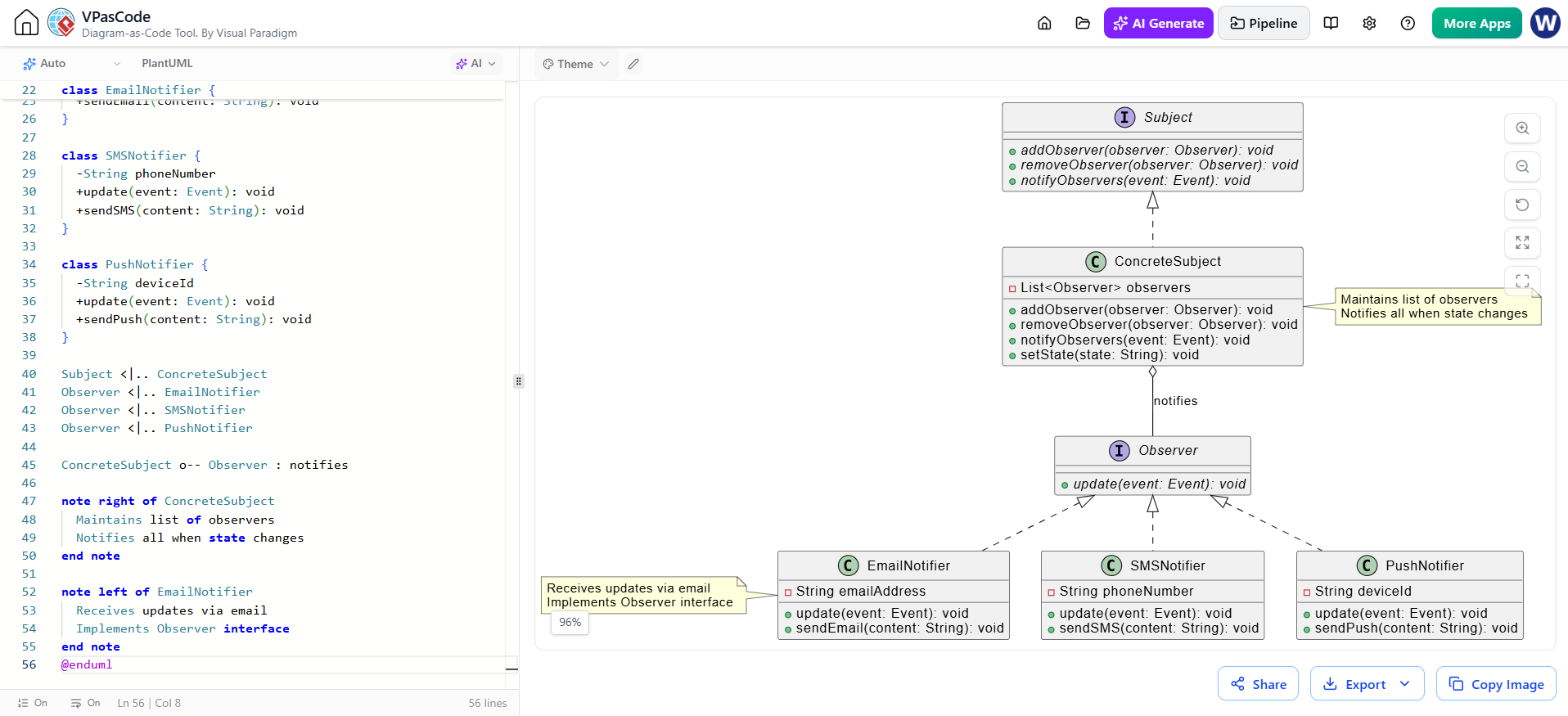
@startuml
skinparam backgroundColor white

interface Observer {
  +{abstract} update(event: Event): void
}

interface Subject {
  +{abstract} addObserver(observer: Observer): void
  +{abstract} removeObserver(observer: Observer): void
  +{abstract} notifyObservers(event: Event): void
}

class ConcreteSubject {
  -List<Observer> observers
  +addObserver(observer: Observer): void
  +removeObserver(observer: Observer): void
  +notifyObservers(event: Event): void
  +setState(state: String): void
}

class EmailNotifier {
  -String emailAddress
  +update(event: Event): void
  +sendEmail(content: String): void
}

class SMSNotifier {
  -String phoneNumber
  +update(event: Event): void
  +sendSMS(content: String): void
}

class PushNotifier {
  -String deviceId
  +update(event: Event): void
  +sendPush(content: String): void
}

Subject <|.. ConcreteSubject
Observer <|.. EmailNotifier
Observer <|.. SMSNotifier
Observer <|.. PushNotifier

ConcreteSubject o-- Observer : notifies

note right of ConcreteSubject
  Maintains list of observers
  Notifies all when state changes
end note

note left of EmailNotifier
  Receives updates via email
  Implements Observer interface
end note
@enduml
Example 5: Database Schema Representation
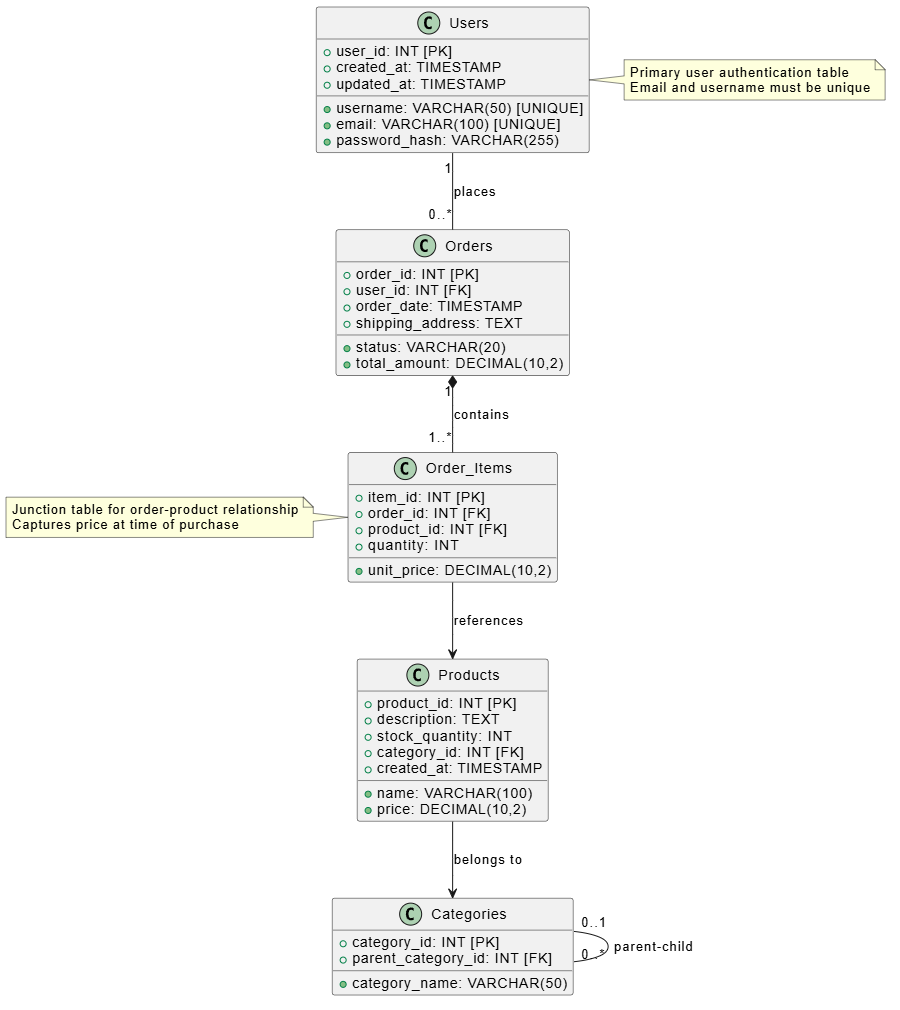
@startuml
skinparam backgroundColor white

class Users {
  +user_id: INT [PK]
  +username: VARCHAR(50) [UNIQUE]
  +email: VARCHAR(100) [UNIQUE]
  +password_hash: VARCHAR(255)
  +created_at: TIMESTAMP
  +updated_at: TIMESTAMP
}

class Products {
  +product_id: INT [PK]
  +name: VARCHAR(100)
  +description: TEXT
  +price: DECIMAL(10,2)
  +stock_quantity: INT
  +category_id: INT [FK]
  +created_at: TIMESTAMP
}

class Categories {
  +category_id: INT [PK]
  +category_name: VARCHAR(50)
  +parent_category_id: INT [FK]
}

class Orders {
  +order_id: INT [PK]
  +user_id: INT [FK]
  +order_date: TIMESTAMP
  +status: VARCHAR(20)
  +total_amount: DECIMAL(10,2)
  +shipping_address: TEXT
}

class Order_Items {
  +item_id: INT [PK]
  +order_id: INT [FK]
  +product_id: INT [FK]
  +quantity: INT
  +unit_price: DECIMAL(10,2)
}

Users "1" -- "0..*" Orders : places
Orders "1" *-- "1..*" Order_Items : contains
Order_Items --> Products : references
Products --> Categories : belongs to
Categories "0..1" -- "0..*" Categories : parent-child

note right of Users
  Primary user authentication table
  Email and username must be unique
end note

note left of Order_Items
  Junction table for order-product relationship
  Captures price at time of purchase
end note
@enduml
Visual Paradigm Tooling: The Game Changer
What Makes Visual Paradigm Stand Out?
1. VPasCode: Unified Diagram-as-Code Platform
VPasCode is Visual Paradigm’s browser-based platform that brings together multiple diagramming engines including PlantUML, Mermaid, Graphviz, and more. Key advantages include:
-
Zero Installation: Run entirely in your browser without local setup
-
Real-Time Preview: See instant visual updates as you type PlantUML code
-
Multi-Engine Support: Switch between PlantUML, Mermaid, and other formats seamlessly
-
Export Flexibility: Generate PNG, SVG, PDF, and HTML outputs with professional quality
2. AI-Powered Diagram Generation
Visual Paradigm’s AI Chatbot transforms how you create diagrams:
-
Natural Language to PlantUML: Describe your class structure in plain English, and the AI generates accurate PlantUML code
-
Intelligent Suggestions: Get recommendations for optimal class relationships and design patterns
-
Auto-Correction: AI identifies and fixes syntax errors in your PlantUML code
-
Code Explanation: Ask the AI to explain complex PlantUML constructs or suggest improvements
Example prompt:
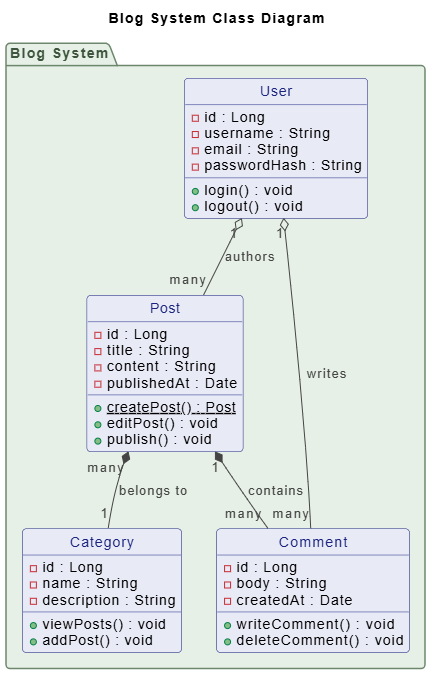
"Create a PlantUML class diagram for a blog system with User, Post, Comment,
and Category classes. Include proper relationships and common attributes."
VP AI Chatbot For Visual Modeling
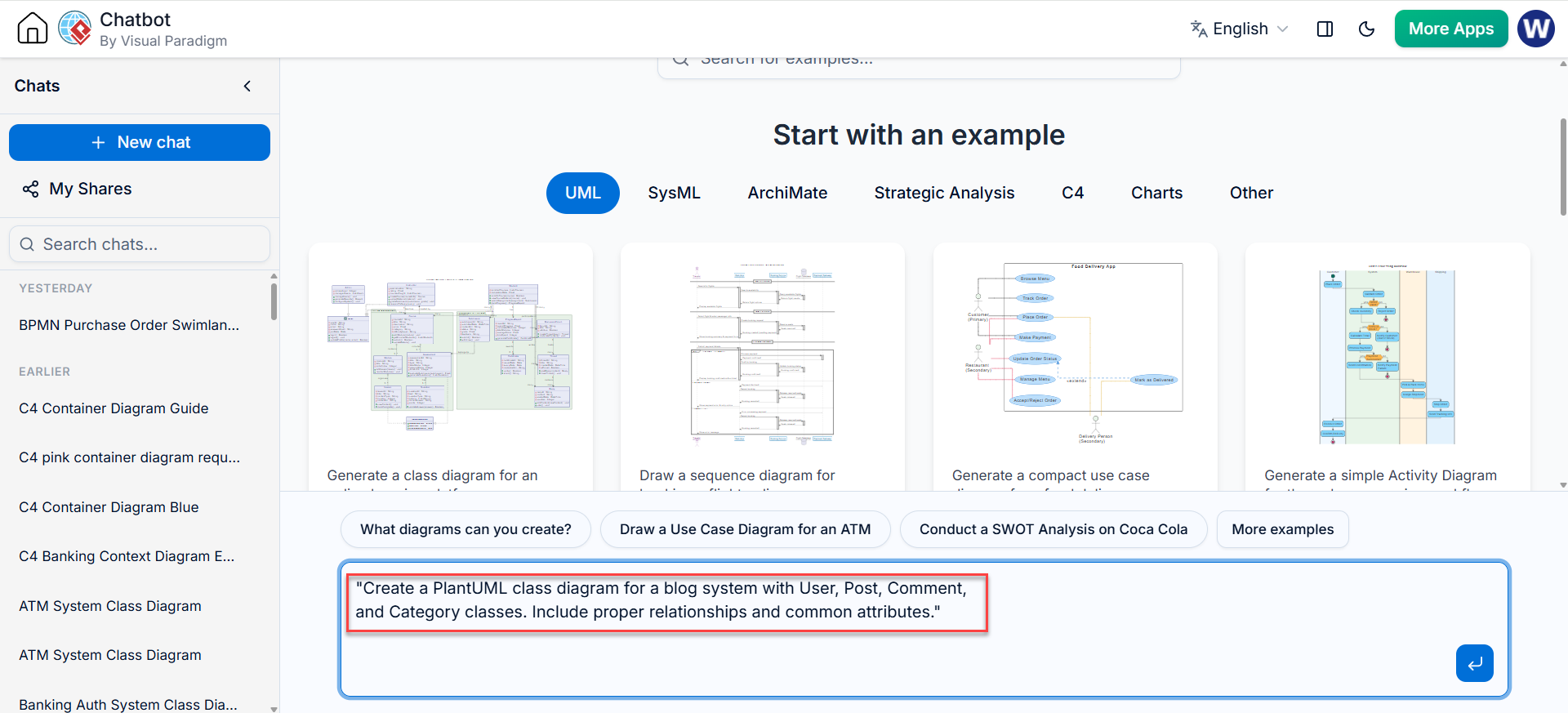
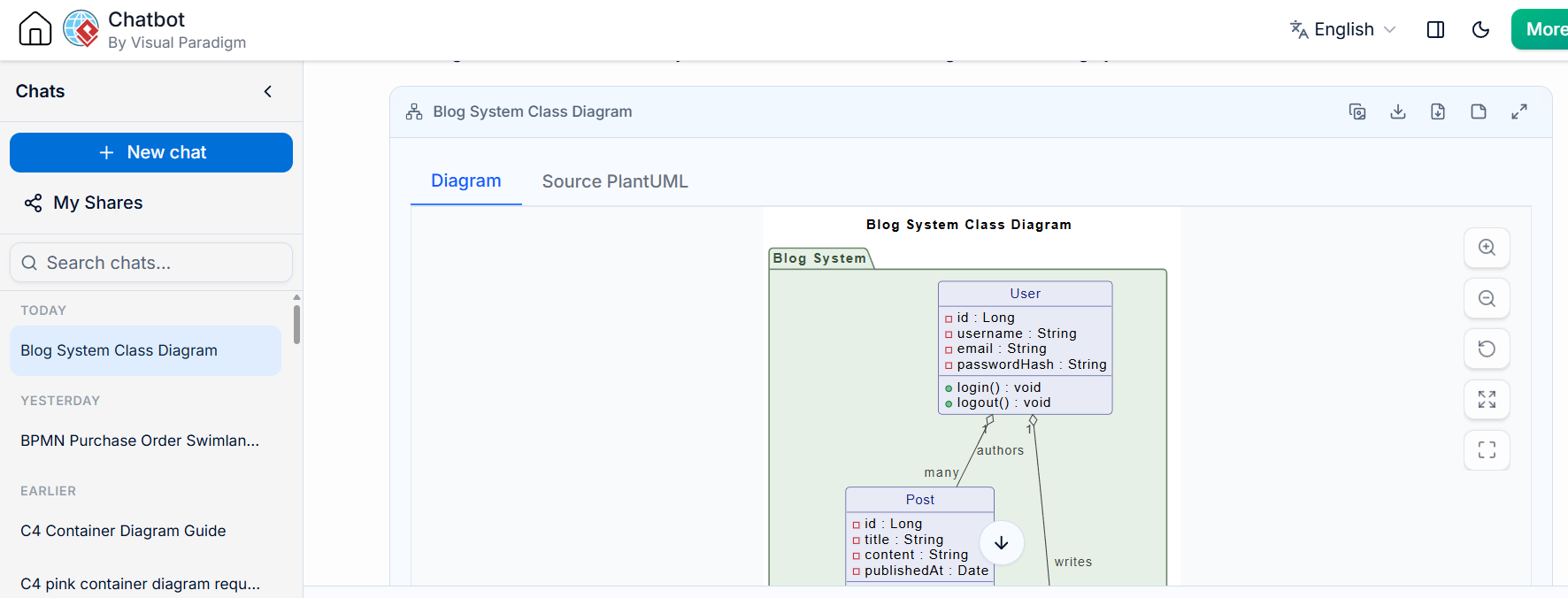
The AI generates complete, syntactically correct PlantUML code instantly.
3. Bidirectional Editing
One of Visual Paradigm’s most powerful features is seamless switching between visual and code views:
-
Visual to Code: Drag and drop classes in the visual editor, and clean PlantUML code is automatically generated
-
Code to Visual: Edit PlantUML code, and the visual diagram updates in real-time
-
Round-Trip Consistency: Changes sync perfectly in both directions without conflicts or data loss
This flexibility accommodates different working styles—visual thinkers can use the drag-and-drop interface, while code-focused developers can work directly with PlantUML syntax.
4. Enterprise-Grade Collaboration
Visual Paradigm provides robust collaboration features essential for team environments:
-
Version Control Integration: Store PlantUML files in Git repositories with meaningful diffs
-
Real-Time Collaboration: Multiple team members can work on diagrams simultaneously
-
Comment Threads: Add contextual comments to specific classes or relationships
-
Access Control: Role-based permissions ensure appropriate access levels
-
Audit Trails: Track who made changes and when for compliance requirements
5. Professional Template Library
Jump-start your diagramming with pre-built templates:
-
Common Design Patterns: Observer, Factory, Singleton, Strategy, and more
-
Architecture Templates: MVC, Microservices, Layered Architecture
-
Domain-Specific Templates: E-commerce, Banking, Healthcare, Education
-
Custom Templates: Create and share organization-specific templates
6. Integration Ecosystem
Visual Paradigm connects with your existing tools:
-
Jira Integration: Link diagrams to tickets and track requirements
-
Confluence Embedding: Insert live diagrams into documentation pages
-
Slack Notifications: Get alerts when diagrams are updated
-
REST API: Build custom integrations and automation workflows
-
CI/CD Pipeline: Automatically generate and validate diagrams in build processes
7. Advanced Validation and Quality Checks
Ensure your diagrams meet professional standards:
-
Syntax Validation: Catch PlantUML errors before rendering
-
Best Practice Recommendations: Get suggestions for improved diagram structure
-
Consistency Checks: Identify missing relationships or incomplete definitions
-
Performance Analysis: Detect potential design bottlenecks or anti-patterns
8. Learning Resources and Support
Visual Paradigm reduces the learning curve:
-
Interactive Tutorials: Step-by-step guides for PlantUML and class diagramming
-
Contextual Help: Inline documentation and examples
-
Community Forum: Connect with other users and experts
-
Dedicated Support: Professional support for enterprise customers
-
Video Courses: Comprehensive training on advanced features
Comparison: Standalone PlantUML vs. Visual Paradigm
| Feature | Standalone PlantUML | Visual Paradigm + PlantUML |
|---|---|---|
| Setup | Manual installation required | Browser-based, zero setup |
| AI Assistance | None | Built-in natural language generation |
| Visual Editing | None | Full WYSIWYG editor with bidirectional sync |
| Collaboration | Manual via Git | Real-time collaboration + Git integration |
| Templates | Community-driven | Curated enterprise library |
| Validation | Basic syntax only | Semantic validation + best practices |
| Export Options | Limited | Professional multi-format export |
| Enterprise Integration | Manual | Native Jira, Confluence, Slack integration |
| Learning Curve | Steep for beginners | Gentle with AI assistance and tutorials |
| Support | Community forums | Dedicated professional support |
When to Choose Visual Paradigm
Choose Visual Paradigm when:
-
Working in team or enterprise environments
-
Need AI-powered diagram generation
-
Require integration with project management tools
-
Team has mixed skill levels (developers, architects, business analysts)
-
Compliance and audit trails are important
-
Large-scale documentation projects
-
Need professional export quality for publications
Stick with standalone PlantUML when:
-
Small personal projects
-
Tight budget constraints (Visual Paradigm has free tier though)
-
Simple diagrams only
-
Already highly proficient with PlantUML syntax
-
No collaboration or integration needs
Best Practices
-
Keep Diagrams Focused: One diagram per logical module or subsystem. Avoid cramming too many classes into a single diagram.
-
Use Meaningful Names: Choose clear, descriptive class names that reflect domain concepts rather than technical implementation details.
-
Show Only Relevant Details: Include only attributes and methods necessary for understanding the design. Use
{abstract}markers and visibility modifiers appropriately. -
Document Relationships Clearly: Use proper UML notation for different relationship types (inheritance, association, aggregation, composition). Add labels to clarify relationship semantics.
-
Group Related Classes: Use packages to organize classes into logical groups. This improves readability and reflects architectural boundaries.
-
Add Notes for Context: Explain non-obvious design decisions, constraints, or assumptions using notes.
-
Maintain Consistency: Use consistent naming conventions, styling, and layout across all diagrams in a project.
-
Version Your Diagrams: Store PlantUML files in version control. Use Visual Paradigm’s integration features for change tracking and collaboration.
-
Validate Regularly: Use Visual Paradigm’s validation features to catch errors and ensure adherence to best practices.
-
Keep Documentation Updated: Treat diagrams as living documentation. Update them as the code evolves to prevent drift between design and implementation.
Conclusion
Class diagrams remain an essential tool for communicating software design, and PlantUML provides an elegant, code-based approach to creating them. When enhanced with Visual Paradigm’s powerful tooling—including AI-powered generation, bidirectional editing, enterprise integration, and professional collaboration features—the diagramming experience becomes significantly more productive and accessible.
Whether you’re a solo developer documenting a personal project or part of a large enterprise team maintaining complex systems, the combination of PlantUML and Visual Paradigm offers the flexibility, power, and professionalism needed to create high-quality class diagrams efficiently.
Start with the basics, leverage AI assistance to accelerate your workflow, and gradually explore advanced features as your needs grow. The investment in learning this approach pays dividends through better documentation, improved team communication, and more maintainable software designs.
Remember: great diagrams don’t just document what exists—they help teams think clearly about what should exist. With PlantUML and Visual Paradigm, you have the tools to make that thinking visible, shareable, and actionable.
References
-
Introducing VPasCode: The Ultimate Unified Text-to-Diagram Platform: Official announcement of VPasCode featuring multi-engine support for PlantUML, Mermaid, and Graphviz with zero-setup browser-based editing.
-
VPasCode Features Overview: Comprehensive breakdown of VPasCode capabilities including real-time rendering, export options, and frictionless sharing for team collaboration.
-
Revolutionize Your Workflow: Native AI Diagram Generation in VPasCode: Details on AI-powered natural language to diagram conversion and intelligent code completion features.
-
Mastering VPasCode: The Ultimate Guide to AI-Powered Diagram-as-Code: In-depth tutorial covering PlantUML integration, AI chatbot usage, and advanced diagramming techniques.
-
Visual Paradigm AI Chatbot for Software Engineers: How developers can leverage AI to generate UML diagrams from code descriptions and automate documentation workflows.
-
Diagram-as-Code Tool Features: Overview of Visual Paradigm’s diagram-as-code capabilities including version control integration and CI/CD pipeline support.
-
Generate and Visualize JSON with AI Chatbot and VPasCode: Demonstration of converting data structures to visual diagrams using AI and VPasCode bridge functionality.
-
Visual Paradigm AI Chatbot Overview: Complete feature list for the AI Chatbot including natural language processing, auto-correction, and cross-suite synchronization.
-
From Code to Clarity: Beginner’s Guide to VPasCode and OpenDocs: Step-by-step introduction for newcomers to diagram-as-code with practical PlantUML examples.
-
The Ultimate Text-Based UML Tool: Redefining Diagram-as-Code in 2026: Analysis of how VPasCode transforms UML modeling with modern development workflows and AI assistance.