


In the fast-paced world of digital retail, promotional campaigns are the lifeblood of customer engagement, yet they introduce complex data relationships that must be managed with precision. When a marketing team launches a digital coupon campaign, they are not just distributing codes; they are orchestrating a system of eligibility rules, validity windows, budget limits, and redemption validations that must occur in milliseconds at checkout. A single flaw in the data model can lead to revenue leakage, fraudulent redemptions, or a broken user experience where valid coupons are rejected.

To architect a robust solution, software engineers and data modelers need a clear, living blueprint of how entities like Customers, Campaigns, Coupons, and Orders interact. This is where diagramming-as-code with PlantUML becomes indispensable. By defining the schema in code rather than dragging and dropping shapes, teams ensure that the diagram remains synchronized with the actual database implementation. Using VPasCode, you can instantly visualize the flow of data from coupon issuance to final validation, ensuring that every foreign key, constraint, and relationship is logically sound before a single line of migration SQL is written.
Understanding the Model: Purpose, Scope & Problem Framing
This tutorial focuses on a specialized Entity Relationship Diagram (ERD) designed for a Digital Coupon Promotion Campaign and Redemption Validation Engine. Unlike a generic sales model, this diagram must handle the specific lifecycle of a promotional offer: creation, issuance, validation, and redemption.
Diagram Abstraction & Representation
An ERD is the foundational blueprint for relational databases, defining how data entities relate to one another through keys and constraints. In this specific context, the diagram models a many-to-many relationship between customers and orders, mediated by the Coupon and Redemption entities. It also introduces a Validation Engine pattern, where ValidationRules dynamically check the state of a redemption against campaign constraints (e.g., “Is the budget exceeded?” or “Is the user eligible?”). The diagram abstracts away physical implementation details (like specific data types) to focus on the logical flow of data integrity.
Target Domain Scope & Scenario
The scope of this model covers the end-to-end journey of a digital coupon within a retail ecosystem. It starts with the Campaign entity, which defines the rules (discount type, value, time window). It extends to the Coupon entity, which is a specific instance of a campaign issued to a Customer. The critical path involves the Redemption entity, which links a coupon to an Order and triggers the ValidationResult logic. Finally, the AuditLog entity ensures traceability for compliance and debugging.
Key Takeaways & Educational Insights
By constructing this diagram, you will gain insights into:
- Normalization Strategies: How to separate campaign rules from individual coupon instances to avoid data redundancy.
- State Management: Modeling the lifecycle of a coupon (issued, used, expired) through the
statusfield. - Validation Patterns: Implementing a dynamic rule engine by linking ValidationRules to Redemptions via ValidationResults.
- Auditability: The importance of an AuditLog for tracking who created campaigns and how redemptions were processed.
Complete Diagram & Full Source Code
Before diving into the step-by-step construction, here is the complete, finalized diagram. This visual representation shows the interconnected entities, primary keys (PK), foreign keys (FK), and the cardinality of relationships required for a production-ready retail coupon system.
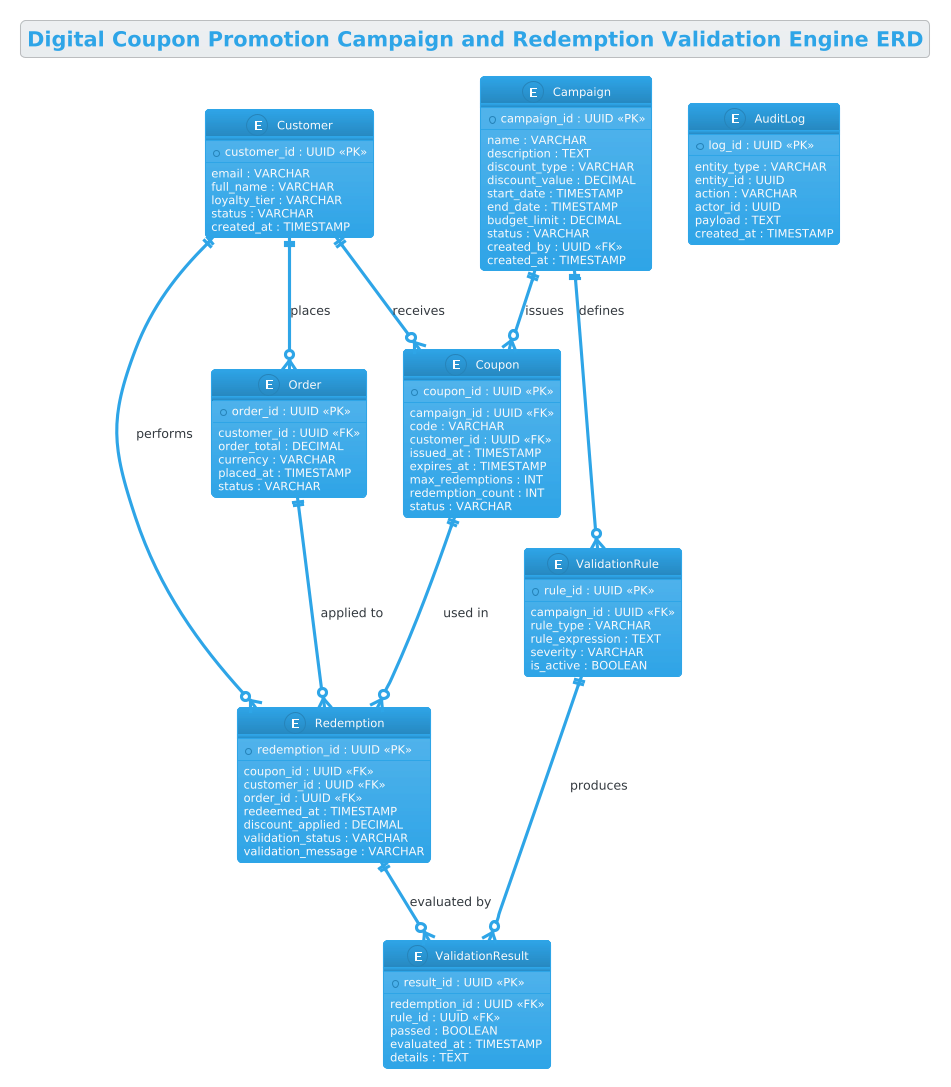
@startuml
!theme cerulean
title Digital Coupon Promotion Campaign and Redemption Validation Engine ERD

/'
Diagram Context:
This ERD models a digital coupon platform where marketing teams create promotion
campaigns that issue coupons to customers. Each campaign defines rules (discount
type, value, validity window, usage limits, eligibility) that govern how coupons
behave. Customers receive coupons, may redeem them against orders, and each
redemption is validated against campaign rules and coupon state before being
accepted or rejected. The diagram captures campaigns, coupons, customers, orders,
redemption attempts, validation rules, and audit logs so that issuance, redemption,
and rule enforcement can be traced end-to-end.
'/

' =====================
' Core Entities
' =====================

entity "Customer" as customer {
  * customer_id : UUID <<PK>>
  --
  email : VARCHAR
  full_name : VARCHAR
  loyalty_tier : VARCHAR
  status : VARCHAR
  created_at : TIMESTAMP
}

entity "Campaign" as campaign {
  * campaign_id : UUID <<PK>>
  --
  name : VARCHAR
  description : TEXT
  discount_type : VARCHAR
  discount_value : DECIMAL
  start_date : TIMESTAMP
  end_date : TIMESTAMP
  budget_limit : DECIMAL
  status : VARCHAR
  created_by : UUID <<FK>>
  created_at : TIMESTAMP
}

entity "Coupon" as coupon {
  * coupon_id : UUID <<PK>>
  --
  campaign_id : UUID <<FK>>
  code : VARCHAR
  customer_id : UUID <<FK>>
  issued_at : TIMESTAMP
  expires_at : TIMESTAMP
  max_redemptions : INT
  redemption_count : INT
  status : VARCHAR
}

entity "Order" as order {
  * order_id : UUID <<PK>>
  --
  customer_id : UUID <<FK>>
  order_total : DECIMAL
  currency : VARCHAR
  placed_at : TIMESTAMP
  status : VARCHAR
}

entity "Redemption" as redemption {
  * redemption_id : UUID <<PK>>
  --
  coupon_id : UUID <<FK>>
  customer_id : UUID <<FK>>
  order_id : UUID <<FK>>
  redeemed_at : TIMESTAMP
  discount_applied : DECIMAL
  validation_status : VARCHAR
  validation_message : VARCHAR
}

' =====================
' Validation Engine
' =====================

entity "ValidationRule" as rule {
  * rule_id : UUID <<PK>>
  --
  campaign_id : UUID <<FK>>
  rule_type : VARCHAR
  rule_expression : TEXT
  severity : VARCHAR
  is_active : BOOLEAN
}

entity "ValidationResult" as vresult {
  * result_id : UUID <<PK>>
  --
  redemption_id : UUID <<FK>>
  rule_id : UUID <<FK>>
  passed : BOOLEAN
  evaluated_at : TIMESTAMP
  details : TEXT
}

entity "AuditLog" as audit {
  * log_id : UUID <<PK>>
  --
  entity_type : VARCHAR
  entity_id : UUID
  action : VARCHAR
  actor_id : UUID
  payload : TEXT
  created_at : TIMESTAMP
}

' =====================
' Relationships
' =====================

customer ||--o{ coupon : "receives"
customer ||--o{ order : "places"
customer ||--o{ redemption : "performs"

campaign ||--o{ coupon : "issues"
campaign ||--o{ rule : "defines"

coupon ||--o{ redemption : "used in"
order ||--o{ redemption : "applied to"

redemption ||--o{ vresult : "evaluated by"
rule ||--o{ vresult : "produces"

@endumlStep-by-Step Architectural Walkthrough
Building a complex ERD requires a structured approach. We will deconstruct the diagram into four logical phases: configuration, core entity declaration, relationship mapping, and the validation engine architecture.
Phase 1: Canvas Configuration & Layout Directives
Every PlantUML diagram begins with global directives that set the tone and layout. In this tutorial, we use the !theme cerulean directive. This is a built-in PlantUML theme that provides a clean, professional look with blue-tinted headers and borders, ideal for technical documentation. We also define a title to give the diagram a clear identity. Finally, we include a comment block using /' ... '/ to provide immediate context for anyone reading the code or the rendered diagram.
@startuml
!theme cerulean
title Digital Coupon Promotion Campaign and Redemption Validation Engine ERD
/'
Diagram Context:
This ERD models a digital coupon platform...
'/
Phase 2: Declaring Core Entities, Actors, and Boundaries
The backbone of the ERD consists of the Core Entities. In PlantUML, we use the entity keyword to define a table. We assign an alias (e.g., as customer) to reference this entity later in relationships. Inside the entity block, we define attributes. The * symbol denotes a Primary Key (PK), and «FK» (or «<) denotes a Foreign Key. We use standard data types like UUID, VARCHAR, and TIMESTAMP to ensure the schema is database-agnostic yet specific enough for implementation.
entity "Customer" as customer {
  * customer_id : UUID <>
  --
  email : VARCHAR
  full_name : VARCHAR
  loyalty_tier : VARCHAR
  status : VARCHAR
  created_at : TIMESTAMP
}
We repeat this pattern for Campaign, Coupon, and Order. Notice how the Coupon entity links back to both Campaign and Customer via foreign keys, establishing the core issuance relationship.
Phase 3: Mapping Data Flows & Key Interactions
Once entities are defined, we must connect them using relationship arrows. PlantUML uses specific symbols to denote cardinality. The || symbol represents “one and only one” (mandatory one), while o{ represents “zero or many” (optional many). The syntax entity1 ||--o{ entity2 translates to: “One entity1 is associated with zero or many entity2s.”
For example, the relationship customer ||--o{ coupon : "receives" means a customer must exist, and they can receive zero or many coupons. We apply this to the critical paths: campaign ||--o{ coupon (campaigns issue coupons), order ||--o{ redemption (orders have redemptions), and customer ||--o{ redemption (customers perform redemptions).
customer ||--o{ coupon : "receives"
customer ||--o{ order : "places"
customer ||--o{ redemption : "performs"

campaign ||--o{ coupon : "issues"
campaign ||--o{ rule : "defines"

coupon ||--o{ redemption : "used in"
order ||--o{ redemption : "applied to"
Phase 4: Grouping, Annotations & Visual Polish
The final phase involves the Validation Engine and Audit components. These are critical for enterprise-grade systems. We define ValidationRule and ValidationResult to model the logic that checks if a redemption is valid. The relationship redemption ||--o{ vresult : "evaluated by" shows that a single redemption can trigger multiple validation checks (e.g., checking budget, checking eligibility, checking expiration). Finally, the AuditLog entity captures a generic log of actions, ensuring that every change to a campaign or redemption is traceable.
Syntax & Keyword Deep Dive
Understanding the specific PlantUML syntax used in this ERD is crucial for customization. Here is a breakdown of the key keywords and conventions:
entity: The primary keyword used to define a database table or entity. It accepts a display name and an alias for internal referencing.«PK»(Primary Key): The double-angle brackets with*before the attribute name (e.g.,* customer_id : UUID <) mark the unique identifier for the table.> «FK»(Foreign Key): The«FK»stereotype indicates that an attribute references the primary key of another entity, establishing the link between tables.||--o{(Relationship Cardinality): This is the standard notation for “One-to-Many” relationships.||means “Exactly One” on the source side, ando{means “Zero or Many” on the target side. This is the most common pattern in relational databases for parent-child relationships.«label»: The text inside quotes after the arrow (e.g.,: "receives") adds a semantic label to the relationship line, explaining the nature of the connection./' ... '/(Comment Block): A multi-line comment syntax that renders as a text block within the diagram, perfect for adding context without cluttering the visual layout.
Best Practices & Pitfalls to Avoid
When modeling complex systems like a coupon engine, following best practices ensures your diagram remains maintainable and accurate.
- Use Aliases for Readability: Always assign an alias to your entities (e.g.,
as customer) rather than using the full name in relationships. This makes the relationship lines shorter and easier to read, especially in large diagrams. - Separate Concerns: As seen in this tutorial, separating the Core Entities (Customer, Order) from the Validation Engine (Rules, Results) helps manage complexity. Do not mix business logic entities with transactional data entities in the same logical block if they serve different purposes.
- Consistent Naming Conventions: Stick to a consistent naming convention for attributes (e.g., always use
snake_caseorPascalCase) and data types. This reduces cognitive load when translating the diagram to SQL. - Document Cardinality Clearly: Don’t just rely on the arrow; always use the
: "label"syntax to explain the relationship. “places” is clearer than just a line between Customer and Order.
Start Building Your Retail ERD Faster with VPasCode
Instantly visualize, edit, and export your Digital Coupon ERD online with VPasCode, the free PlantUML editor that requires zero local setup.