


In the fast-paced environment of brick-and-mortar retail, the efficiency of daily operations hinges on precise workforce management. Retail managers face a complex challenge: ensuring the right number of staff with the correct skills are present at the right locations during specific time windows. Without a structured data model, scheduling systems become fragmented, leading to coverage gaps, payroll errors, and compliance issues. A well-designed Entity Relationship Diagram (ERD) serves as the architectural blueprint that translates these operational complexities into a relational database structure that is both scalable and maintainable.

Visualizing this system through diagram-as-code allows architects to define the rigid constraints of the business logic before writing a single line of SQL. By modeling the relationships between stores, employees, roles, and shifts, we create a living document that evolves with the business. Using PlantUML within the VPasCode editor provides an immediate way to prototype these schemas, ensuring that the many-to-many relationships between staff and shifts are correctly resolved through associative entities like Shift_Assignment. This approach bridges the gap between abstract business requirements and concrete database implementation.
Understanding the Model: Purpose, Scope & Problem Framing
This ERD is designed to solve a specific operational problem: managing the lifecycle of staff scheduling across multiple retail locations. The model moves beyond simple employee tracking to capture the dynamic nature of retail work, where an employee might hold different roles, work at different stores, and be assigned to shifts of varying types.
Diagram Abstraction & Representation
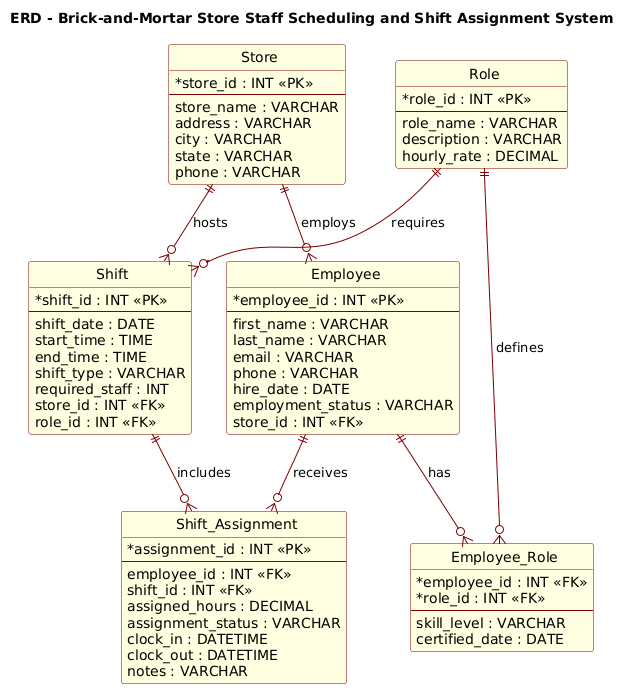
In this context, the ERD acts as a contract for data integrity. The Store entity represents the physical locations, serving as the root for all scheduling data. The Employee entity captures human resources, linked to a specific store but capable of holding multiple Roles (e.g., a cashier who is also a certified stock clerk). The core complexity lies in the Shift and Shift_Assignment entities. A shift represents a time-bound requirement for a specific role at a store, while the assignment entity resolves the many-to-many relationship, tracking who actually worked which shift and for how long.
Target Domain Scope & Scenario
The scope of this diagram covers the core entities required for a multi-store retail chain. It intentionally excludes peripheral systems like payroll processing or time-tracking hardware interfaces, focusing strictly on the scheduling logic. The model assumes a hierarchical structure where a Store hosts multiple Employees and Shifts, and a Role defines the job requirements. The Employee_Role associative entity is included to handle the many-to-many relationship between employees and roles, allowing for skill tracking and certification dates.
Key Takeaways & Educational Insights
By studying this diagram, you will learn how to normalize data to avoid redundancy while maintaining the flexibility to track complex employment histories. You will see how to implement foreign keys to enforce referential integrity between Store and Employee, and how to use associative tables to manage the intersection of Employee and Shift. This structure supports advanced queries for shift coverage analysis, role-based reporting, and attendance tracking.
Complete Diagram & Full Source Code
Below is the finalized Entity Relationship Diagram for the Retail Staff Scheduling System. This blueprint defines the schema for managing store operations, employee roles, and shift assignments.
@startuml
!include https://static.visual-paradigm.com/web/resources/plantuml-stdlib/themes/rose.puml

/'
The diagram models a brick-and-mortar store staff scheduling and shift assignment system.
Its purpose is to represent the core data structures needed to manage employees, store locations,
roles, shifts, and shift assignments. A store has many employees, and each employee may work
multiple shifts over time. A shift belongs to one store location and is tied to a specific role
requirement, such as cashier or stock clerk. The Shift_Assignment entity resolves the many-to-many
relationship between employees and shifts, and also records assignment-specific details like
attendance status and assigned hours. This structure supports schedule planning, shift coverage,
and day-to-day staffing operations across one or more store branches.
'/

title ERD - Brick-and-Mortar Store Staff Scheduling and Shift Assignment System

entity "Store" as store {
  *store_id : INT <<PK>>
  --
  store_name : VARCHAR
  address : VARCHAR
  city : VARCHAR
  state : VARCHAR
  phone : VARCHAR
}

entity "Employee" as employee {
  *employee_id : INT <<PK>>
  --
  first_name : VARCHAR
  last_name : VARCHAR
  email : VARCHAR
  phone : VARCHAR
  hire_date : DATE
  employment_status : VARCHAR
  store_id : INT <<FK>>
}

entity "Role" as role {
  *role_id : INT <<PK>>
  --
  role_name : VARCHAR
  description : VARCHAR
  hourly_rate : DECIMAL
}

entity "Employee_Role" as employee_role {
  *employee_id : INT <<FK>>
  *role_id : INT <<FK>>
  --
  skill_level : VARCHAR
  certified_date : DATE
}

entity "Shift" as shift {
  *shift_id : INT <<PK>>
  --
  shift_date : DATE
  start_time : TIME
  end_time : TIME
  shift_type : VARCHAR
  required_staff : INT
  store_id : INT <<FK>>
  role_id : INT <<FK>>
}

entity "Shift_Assignment" as shift_assignment {
  *assignment_id : INT <<PK>>
  --
  employee_id : INT <<FK>>
  shift_id : INT <<FK>>
  assigned_hours : DECIMAL
  assignment_status : VARCHAR
  clock_in : DATETIME
  clock_out : DATETIME
  notes : VARCHAR
}

store ||--o{ employee : employs
store ||--o{ shift : hosts
role ||--o{ employee_role : defines
employee ||--o{ employee_role : has
role ||--o{ shift : requires
shift ||--o{ shift_assignment : includes
employee ||--o{ shift_assignment : receives

@endumlStep-by-Step Architectural Walkthrough
Phase 1: Canvas Configuration & Layout Directives
The foundation of a professional PlantUML diagram lies in its setup. We begin by including the rose.puml theme, which provides a consistent, elegant visual style for the entities and relationships. This directive ensures that the diagram renders with a cohesive color palette and border styling, making it suitable for professional documentation.
We also define a global title for the diagram to provide immediate context. This is crucial for stakeholders who might view the diagram in isolation.
!include https://static.visual-paradigm.com/web/resources/plantuml-stdlib/themes/rose.puml
title ERD - Brick-and-Mortar Store Staff Scheduling and Shift Assignment System
Phase 2: Declaring Core Entities, Actors, and Boundaries
Next, we define the core entities. In PlantUML ERD syntax, the entity keyword is used to define a table. We use the as keyword to assign a short alias (e.g., store) which is used later for relationship definitions. Each entity is divided into two sections by a dashed line (--): the top section lists Primary Keys (marked with * and <<PK>>), and the bottom section lists standard attributes.
For the Store entity, we define the primary key store_id and essential contact details. For the Employee entity, we include a foreign key store_id to link the employee to their primary location, reflecting the business rule that an employee is typically hired by a specific store.
entity "Store" as store {
*store_id : INT <>
--
store_name : VARCHAR
address : VARCHAR
city : VARCHAR
state : VARCHAR
phone : VARCHAR
}
entity "Employee" as employee {
*employee_id : INT < >
--
first_name : VARCHAR
last_name : VARCHAR
email : VARCHAR
phone : VARCHAR
hire_date : DATE
employment_status : VARCHAR
store_id : INT <>
} Phase 3: Mapping Data Flows & Key Interactions
The complexity of this system lies in the many-to-many relationships. An employee can have multiple roles, and a shift can be assigned to multiple employees. To resolve these, we introduce associative entities: Employee_Role and Shift_Assignment.
The Employee_Role entity breaks the link between employees and roles, allowing us to store specific attributes like skill_level and certified_date for that specific combination. Similarly, Shift_Assignment links an employee to a specific shift, capturing critical runtime data like clock_in, clock_out, and assigned_hours.
entity "Employee_Role" as employee_role {
*employee_id : INT <>
*role_id : INT < >
--
skill_level : VARCHAR
certified_date : DATE
}
entity "Shift_Assignment" as shift_assignment {
*assignment_id : INT <>
--
employee_id : INT <>
shift_id : INT < >
assigned_hours : DECIMAL
assignment_status : VARCHAR
clock_in : DATETIME
clock_out : DATETIME
notes : VARCHAR
} Phase 4: Grouping, Annotations & Visual Polish
Finally, we define the relationships using PlantUML’s cardinality notation. The ||--o{ syntax indicates a mandatory one-to-mandatory-many relationship (or optional depending on the specific cardinality symbol used). Here, we use ||--o{ to show that a Store employs zero or many Employees, and a Shift includes zero or many Assignments.
We also add a descriptive comment block at the top of the code. In PlantUML, comments are wrapped in /' and '/, allowing us to document the business logic directly within the source file without affecting the rendering.
store ||--o{ employee : employs
store ||--o{ shift : hosts
role ||--o{ employee_role : defines
employee ||--o{ employee_role : has
role ||--o{ shift : requires
shift ||--o{ shift_assignment : includes
employee ||--o{ shift_assignment : receives
Syntax & Keyword Deep Dive
To build this ERD effectively, it is essential to understand the specific PlantUML keywords and syntax patterns used:
entity: The primary directive to define a database table. It takes a display name (e.g., “Store”) and an internal alias (e.g.,store).<<PK>>&<<FK>>: Stereotypes used to visually mark Primary Keys and Foreign Keys. The asterisk*prefix indicates a key attribute.--: A separator line within an entity block that divides keys from regular attributes.||--o{: A relationship connector.||represents the “one” side (mandatory), ando{represents the “zero or many” side (optional). This creates a crow’s foot notation on the right side./' ... '/: A multi-line comment syntax. This is used to embed human-readable documentation directly in the code, which is rendered as a note or ignored by the renderer depending on context.!include: A directive to load external resources, such as themes or standard libraries, to maintain consistency across diagrams.
Best Practices & Pitfalls to Avoid
When designing ERDs for complex systems like retail scheduling, adhering to best practices ensures your diagrams remain useful as the system evolves.
- Use Associative Entities for Many-to-Many Relationships: Never try to force a many-to-many relationship directly between two tables. Always introduce an intermediate entity (like Shift_Assignment) to hold the foreign keys and any additional attributes specific to that relationship.
- Consistent Naming Conventions: Use clear, singular names for entities (e.g.,
EmployeenotEmployees) and consistent data types (e.g., always useDECIMALfor currency) to prevent confusion during implementation. - Separate Concerns: Keep the Role definition separate from the Employee_Role assignment. This allows you to change a role’s description or rate without affecting the historical records of employees who held that role.
- Document the Logic: Use the comment block (
/' ... '/) to explain the “why” behind the model, not just the “what.” This is invaluable for future developers or auditors reviewing the schema.
Start Building PlantUML ERDs Faster with VPasCode
Instantly prototype and refine your database schemas with our free, browser-based PlantUML editor—no installation required.