


El desafío de la documentación
Al igual que muchos equipos de desarrollo de rápido movimiento, el grupo de ingeniería de una empresa fintech de tamaño mediano enfrentó un problema familiar: su documentación de arquitectura siempre iba detrás de su base de código real. Los editores visuales tradicionales dificultaban la conversión rápida de texto a diseños de diagramas, generando una fricción significativa en el mantenimiento.
«Perdíamos de 15 a 20 horas por semana solo por mantener nuestra documentación actualizada», dijo el arquitecto principal del equipo. «Y aun así, los diagramas a menudo estaban desactualizados para cuando llegaban a las partes interesadas.»

Descubriendo VPasCode
El equipo necesitaba una solución que pudiera optimizar su diagrama como código flujo de trabajo manteniendo la compatibilidad con su sintaxis existente de PlantUML y Mermaid. Fue entonces cuando descubrieron VPasCode — la plataforma unificada de texto a diagrama de Visual Paradigm.
VPasCode ofrecía todo lo que buscaban: soporte para múltiples formatos de diagramas, incluidos PlantUML, Mermaid.js y Graphviz, combinado con vista previa en tiempo real y asistencia impulsada por IA.
Estrategia de implementación
El equipo adoptó VPasCode como su herramienta principal de diagrama como código para optimizar su proceso de documentación. Mediante definiciones de código simples, los desarrolladores podían transformar rápidamente texto crudo en visuales de diagramas directamente dentro de su flujo de trabajo diario.
Fase 1: Migración de diagramas existentes
Comenzaron migrando sus diagramas de secuencia, diagramas de clases y diagramas de despliegue existentes a la plataforma VPasCode. La transición fue fluida ya que VPasCode admite todas las sintaxis estándar de PlantUML y Mermaid de forma nativa.
Fase 2: Aprovechamiento de la vista previa en vivo
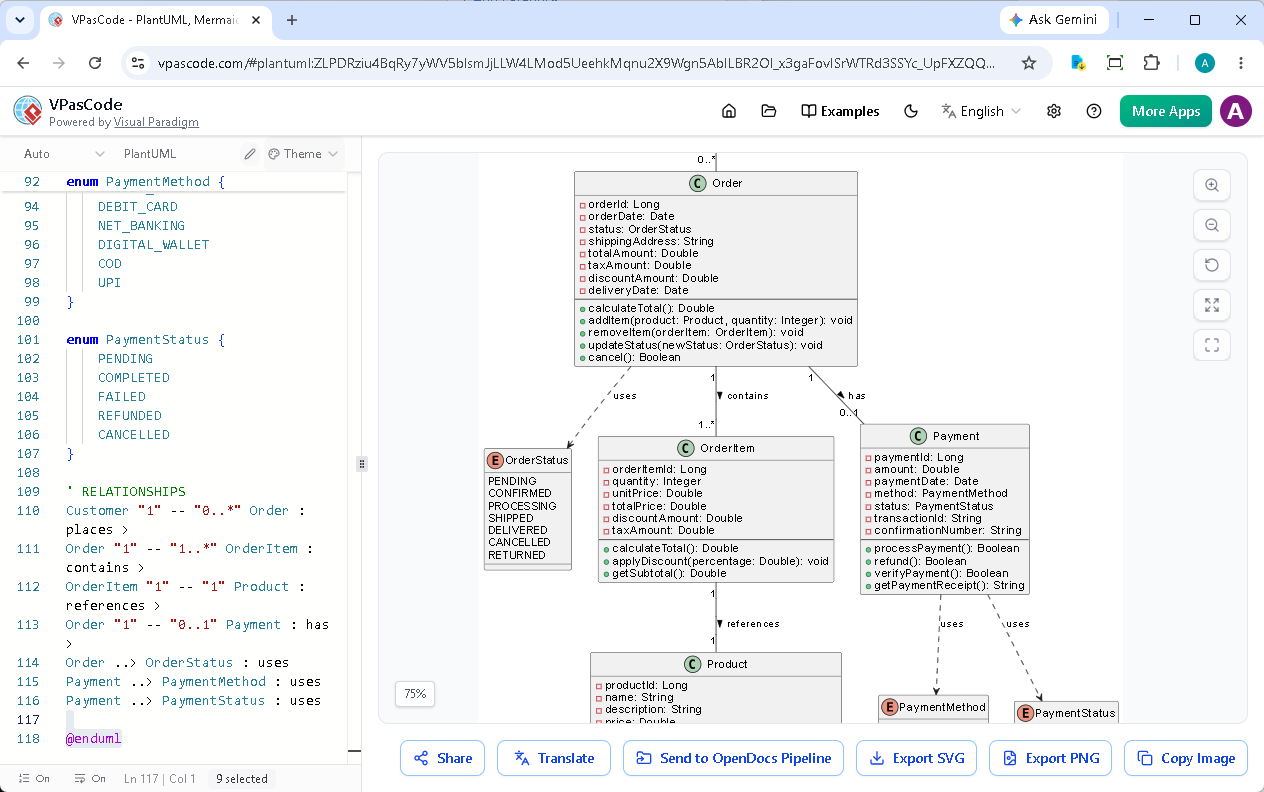
La vista previa de diagramas en tiempo real característica eliminó inmediatamente la incertidumbre. Los desarrolladores podían ver cómo sus diagramas de arquitectura se actualizaban instantáneamente mientras escribían, detectando errores antes de que se acumularan.
Fase 3: Resolución de errores impulsada por IA
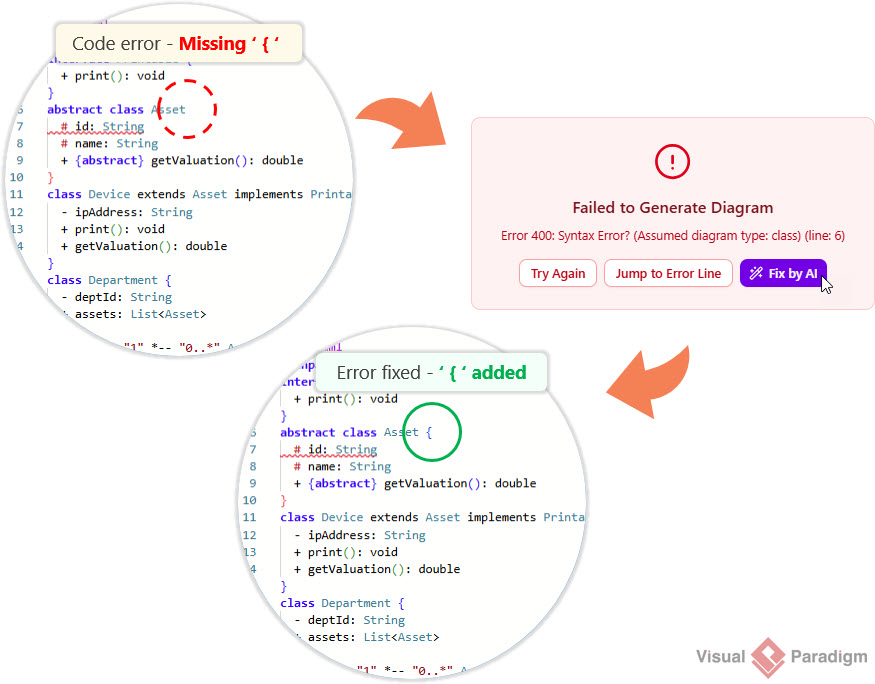
Cuando ocurrían errores de sintaxis, el equipo utilizó la función de corrección de errores de código con IA de VPasCode. En lugar de pasar minutos u horas depurando, podían hacer clic en «Corregir con IA» y obtener correcciones instantáneas con explicaciones.
Características clave que transformaron su flujo de trabajo
1. Soporte multiformato
El soporte de VPasCode para PlantUML, Mermaid, y Graphvizpermitía al equipo utilizar su sintaxis preferida sin tener que aprender nuevas herramientas. Crearon todo, desde diagramas de arquitectura C4 hasta diagramas de Gantt y mapas mentales, en un único entorno unificado.
2. Retroalimentación visual instantánea
El motor de renderizado en tiempo real proporcionaba retroalimentación visual inmediata, permitiendo a los desarrolladores iterar rápidamente en su documentación de arquitectura. Ya no era necesario esperar a renderizadores externos ni cambiar entre múltiples herramientas.
3. Desarrollo asistido por IA
Más allá de la corrección de errores, el equipo utilizó la función de traducción con IA de VPasCode para localizar su documentaciónpara partes interesadas internacionales, eliminando las barreras del idioma sin necesidad de reescrituras manuales.
4. Integración fluida
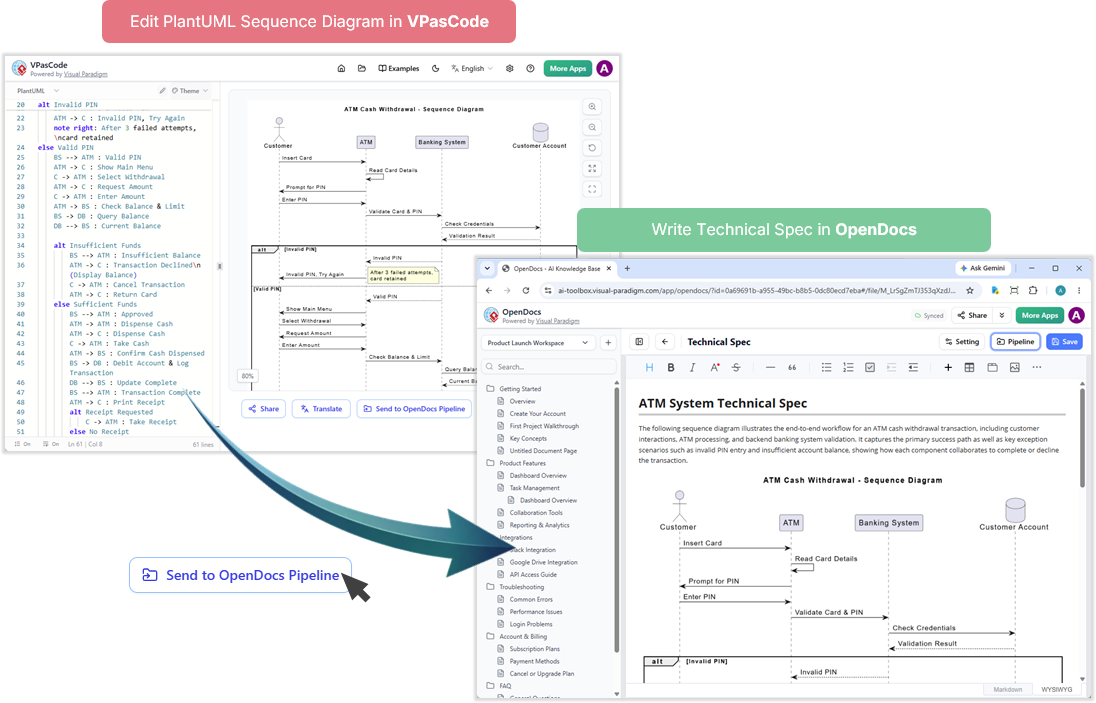
La capacidad de enviar diagramas directamente a Visual Paradigm OpenDocs optimizó su flujo de trabajo de documentaciónLos diagramas de arquitectura fluían de forma natural hacia una documentación técnica completa sin los inconvenientes de exportar o importar.
Resultados medibles
Después de tres meses de usar VPasCode, el equipo documentó mejoras impresionantes:
- Reducción del 60%en el tiempo de actualización de la documentación
- Disminución del 85%en las sesiones de depuración relacionadas con la sintaxis
- Colaboración en tiempo realcon las partes interesadas mediante URL compartibles
- 100% de precisión en los diagramas con vista previa en vivo que elimina sorpresas de renderizado
- Cero costos de licencia para funciones básicas de edición, vista previa y exportación de diagramas
“VPasCode transformó nuestra documentación de una carga en una parte fluida de nuestro flujo de trabajo de desarrollo. Las funciones de IA por sí solas nos ahorraron incontables horas, y la vista previa en vivo significa que nuestros diagramas son siempre precisos.”
— Arquitecto Principal, Equipo de Desarrollo Fintech
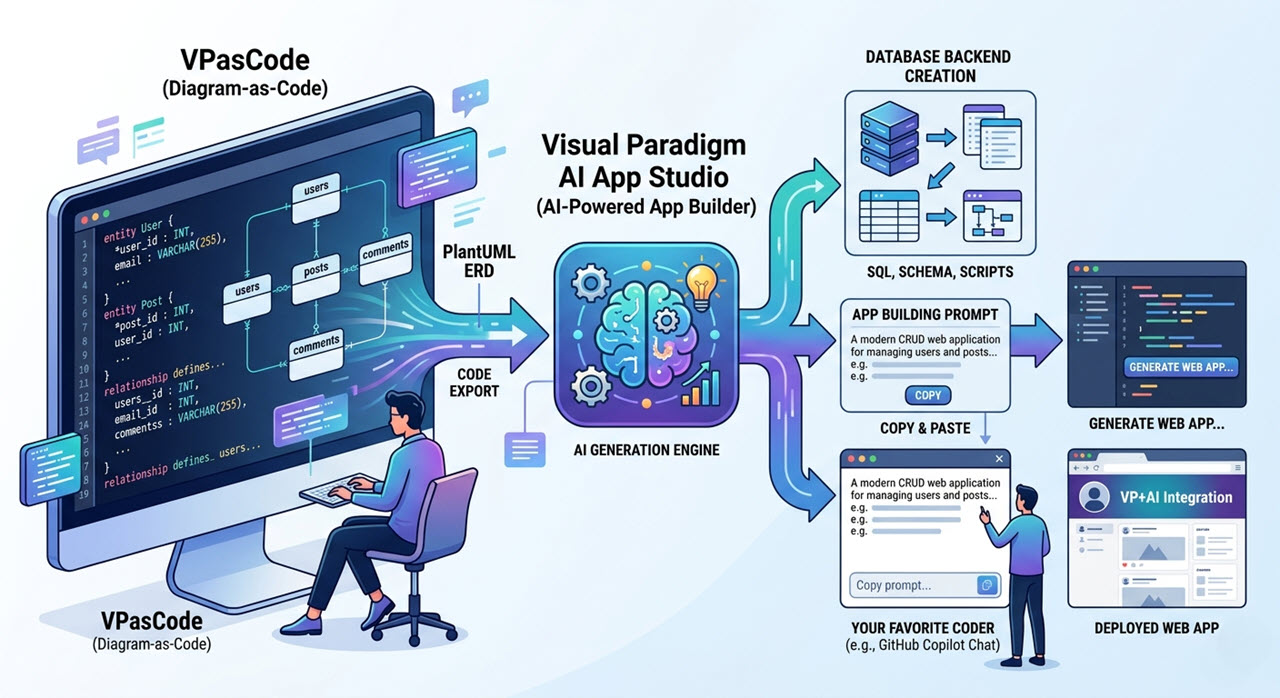
Ampliando el ecosistema con Visual Paradigm AI App Studio
El éxito del equipo demuestra cómo la adopción de una herramienta moderna de diagramas como código y una plataforma de texto a diagramas puede acelerar la documentación de la arquitectura de software. Ya sea que trabaje con diagramas de secuencia PlantUML, diagramas de flujo Mermaid o organigramas Graphviz, esta solución de texto a diagramas proporciona todo lo necesario para crear, editar y compartir diagramas de manera eficiente.
Inicio con VPasCode
El éxito del equipo demuestra el poder de las modernas plataformas de texto a diagramas en la aceleración de la documentación de la arquitectura de software. Ya sea que trabaje con diagramas de secuencia PlantUML, diagramas de flujo Mermaid o organigramas Graphviz, VPasCode proporciona las herramientas para crear, editar y compartir diagramas de manera eficiente.
Las funciones gratuitas incluyen:
- Edición de diagramas con renderizado en vivo
- Exportar como imágenes vectoriales SVG o PNG
- URLs de diagramas compartibles
- Soporte para PlantUML, Mermaid.js y Graphviz
Funciones avanzadas (disponibles con la edición Combo de Visual Paradigm Online o la edición Professional de Visual Paradigm Desktop con mantenimiento activo) incluyen corrección de errores de código con IA, traducción con IA e integración con OpenDocs.
¿Listo para acelerar la documentación de su arquitectura? Comience a crear diagramas con código en vpascode.com.
Conclusión
La reducción del 60% en el tiempo de documentación del equipo de desarrollo fintech demuestra que las herramientas adecuadas pueden transformar la documentación de la arquitectura de un cuello de botella en una ventaja competitiva. Al combinar la vista previa en vivo de VPasCode, la asistencia impulsada por IA y el soporte multi-formato, los equipos pueden mantener diagramas precisos y actualizados sin sacrificar la velocidad de desarrollo.
A medida que los sistemas de software se vuelven más complejos, elegir la herramienta adecuada de diagramas como código se vuelve cada vez más crítico. VPasCode ofrece la solución definitiva de texto a diagramas, uniendo el código y la visualización para hacer que los flujos de trabajo de diagramas como código sean accesibles, eficientes e inteligentes.
Acelere la documentación de su arquitectura
Optimice su flujo de trabajo de documentación con nuestra potente herramienta de diagramas como código. Convierta texto a diagrama al instante con asistencia de IA, vistas previas en vivo y soporte multi-formato.