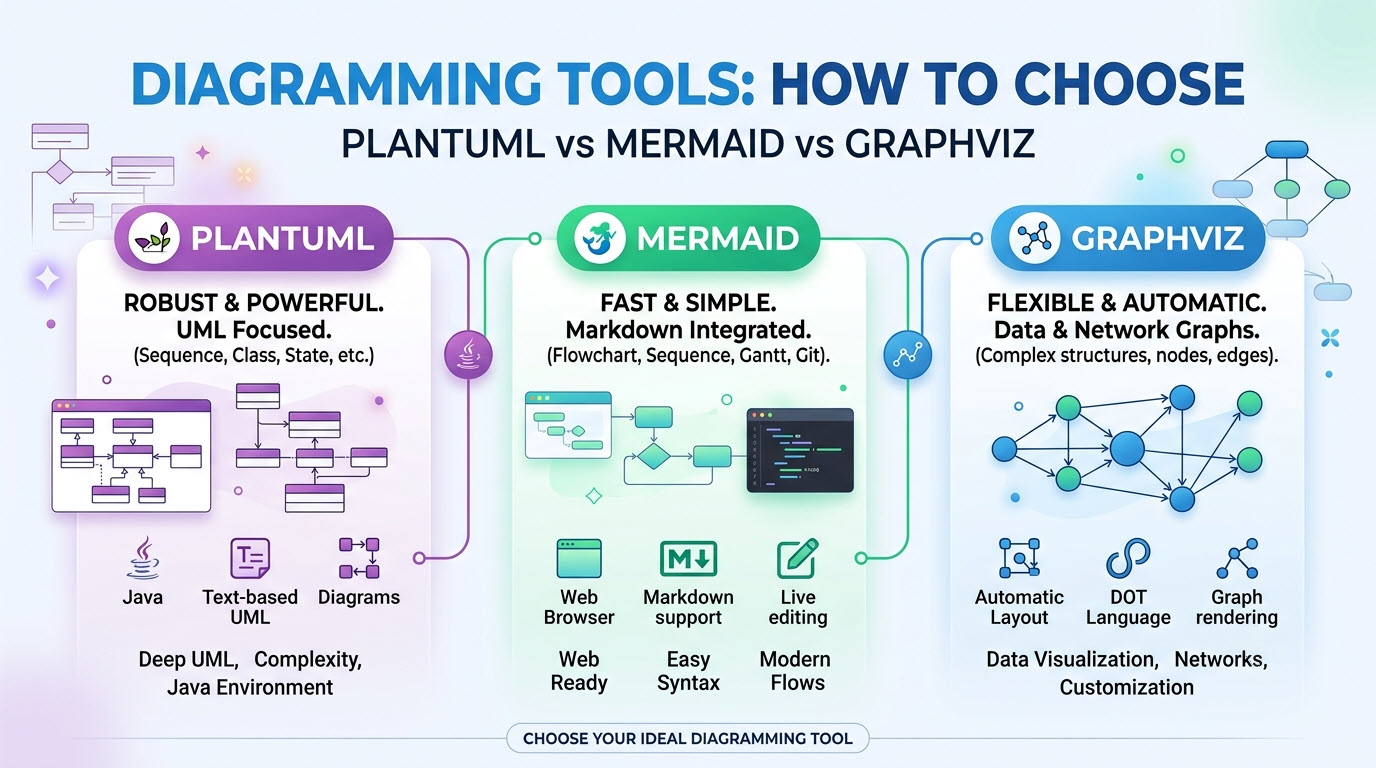
 In the world of software development, a picture truly is worth a thousand words. Architecture diagrams, flowcharts, and sequence diagrams are essential for documenting, planning, and communicating complex ideas. But the traditional drag-and-drop approach to creating these visuals can be slow, inconsistent, and difficult to version control. This is where the diagram-as-code paradigm shines, and three major players dominate this space: PlantUML, Mermaid, and Graphviz.
At Visual Paradigm, we understand that each of these tools has unique strengths. That’s why we created VPasCode, our unified platform that brings all three—and more—into a single, powerful, cloud-based editor. This guide will help you navigate the strengths of each syntax, making it easier to choose the right tool for your specific use case while maintaining a consistent workflow.
In the world of software development, a picture truly is worth a thousand words. Architecture diagrams, flowcharts, and sequence diagrams are essential for documenting, planning, and communicating complex ideas. But the traditional drag-and-drop approach to creating these visuals can be slow, inconsistent, and difficult to version control. This is where the diagram-as-code paradigm shines, and three major players dominate this space: PlantUML, Mermaid, and Graphviz.
At Visual Paradigm, we understand that each of these tools has unique strengths. That’s why we created VPasCode, our unified platform that brings all three—and more—into a single, powerful, cloud-based editor. This guide will help you navigate the strengths of each syntax, making it easier to choose the right tool for your specific use case while maintaining a consistent workflow.
A Unified Home for Diagram-as-Code
Before diving into the comparison, it’s worth noting the power of a unified platform. Historically, leveraging these tools meant managing fragmented local environments, installing dependencies, or switching between disconnected web tools. VPasCode eliminates this friction by providing a centralized editing canvas and versatile diagram-as-code tool that auto-detects and instantly converts text to diagram formats across Mermaid, PlantUML, and Graphviz syntax. Consider the typical workflow: a developer might use Mermaid for a quick flowchart in a README, PlantUML for a detailed UML class diagram, and Graphviz for a complex network topology. VPasCode allows them to do all three, ensuring consistent, real-time rendering and easy sharing .PlantUML: The Enterprise Standard
PlantUML is a mature and powerful diagram-as-code tool with roots deep in enterprise software engineering, specializing in turning complex architectural text to diagram models into clean visualizations.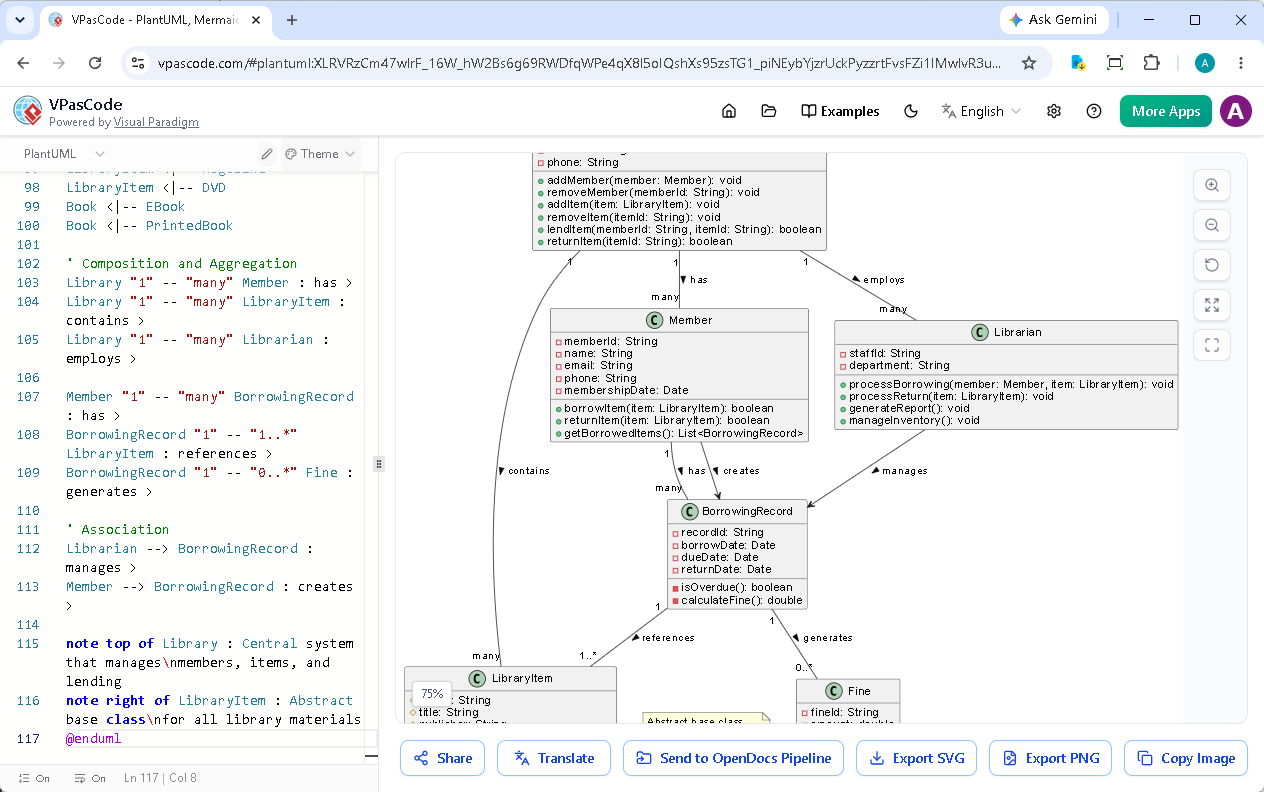 Its syntax, while sometimes seen as more verbose, is highly expressive. PlantUML uses the Graphviz layout engine by default, which has been a gold standard for hierarchical graph layout for decades. This ensures that even complex diagrams with many nodes maintain a professional, clean, and well-structured appearance .
Best Use Cases for PlantUML:
- Enterprise Architecture: Its support for ArchiMate and C4 makes it ideal for documenting large-scale system landscapes.
- Complex UML Modeling: For detailed class diagrams, component diagrams, and deployment diagrams, PlantUML is unparalleled .
- Large Diagrams: When you need to create diagrams with 30+ nodes, PlantUML’s robust layout engine shines, minimizing overlapping and crossing lines .
- Teams with Java/JetBrains Roots: PlantUML integrates seamlessly with JetBrains IDEs and is a familiar tool for the Java community .
PlantUML
Edit PlantUML in VPasCode
@startuml

class Library {
  - name: String
  - address: String
  - phone: String
  + addMember(member: Member): void
  + removeMember(memberId: String): void
  + addItem(item: LibraryItem): void
  + removeItem(itemId: String): void
  + lendItem(memberId: String, itemId: String): boolean
  + returnItem(itemId: String): boolean
}

class LibraryItem {
  # itemId: String
  # title: String
  # publisher: String
  # publicationYear: int
  # isAvailable: boolean
  + getDetails(): String
  + setAvailability(status: boolean): void
}

abstract class Book {
  - isbn: String
  - author: String
  - pageCount: int
  + getAuthor(): String
}

class EBook {
  - fileSizeMB: double
  - format: String
  - downloadUrl: String
  + download(): void
}

class PrintedBook {
  - shelfLocation: String
  - condition: String
  + getShelfLocation(): String
}

class Magazine {
  - issueNumber: int
  - volumeNumber: int
  - coverDate: Date
}

class DVD {
  - durationMinutes: int
  - director: String
  - language: String
  - subtitlesAvailable: boolean
}

class Member {
  - memberId: String
  - name: String
  - email: String
  - phone: String
  - membershipDate: Date
  + borrowItem(item: LibraryItem): boolean
  + returnItem(item: LibraryItem): boolean
  + getBorrowedItems(): List
}

class BorrowingRecord {
  - recordId: String
  - borrowDate: Date
  - dueDate: Date
  - returnDate: Date
  - isOverdue(): boolean
  - calculateFine(): double
}

class Fine {
  - fineId: String
  - amount: double
  - issueDate: Date
  - isPaid: boolean
  + payFine(): void
}

class Librarian {
  - staffId: String
  - department: String
  + processBorrowing(member: Member, item: LibraryItem): void
  + processReturn(item: LibraryItem): void
  + generateReport(): void
  + manageInventory(): void
}

' Inheritance relationships
LibraryItem <|-- Book
LibraryItem <|-- Magazine
LibraryItem <|-- DVD
Book <|-- EBook
Book <|-- PrintedBook ' Composition and Aggregation Library "1" -- "many" Member : has >
Library "1" -- "many" LibraryItem : contains >
Library "1" -- "many" Librarian : employs >

Member "1" -- "many" BorrowingRecord : has >
BorrowingRecord "1" -- "1..*" LibraryItem : references >
BorrowingRecord "1" -- "0..*" Fine : generates >

' Association
Librarian --> BorrowingRecord : manages >
Member --> BorrowingRecord : creates >

note top of Library : Central system that manages\nmembers, items, and lending
note right of LibraryItem : Abstract base class\nfor all library materials
@endumlMermaid: The Markdown-Friendly Champion
Mermaid has exploded in popularity, largely due to its native integration in tools like GitHub, GitLab, Notion, and Obsidian . Its syntax is designed to be Markdown-adjacent, making it incredibly easy to learn and use, especially for developers who are already comfortable writing in plain text.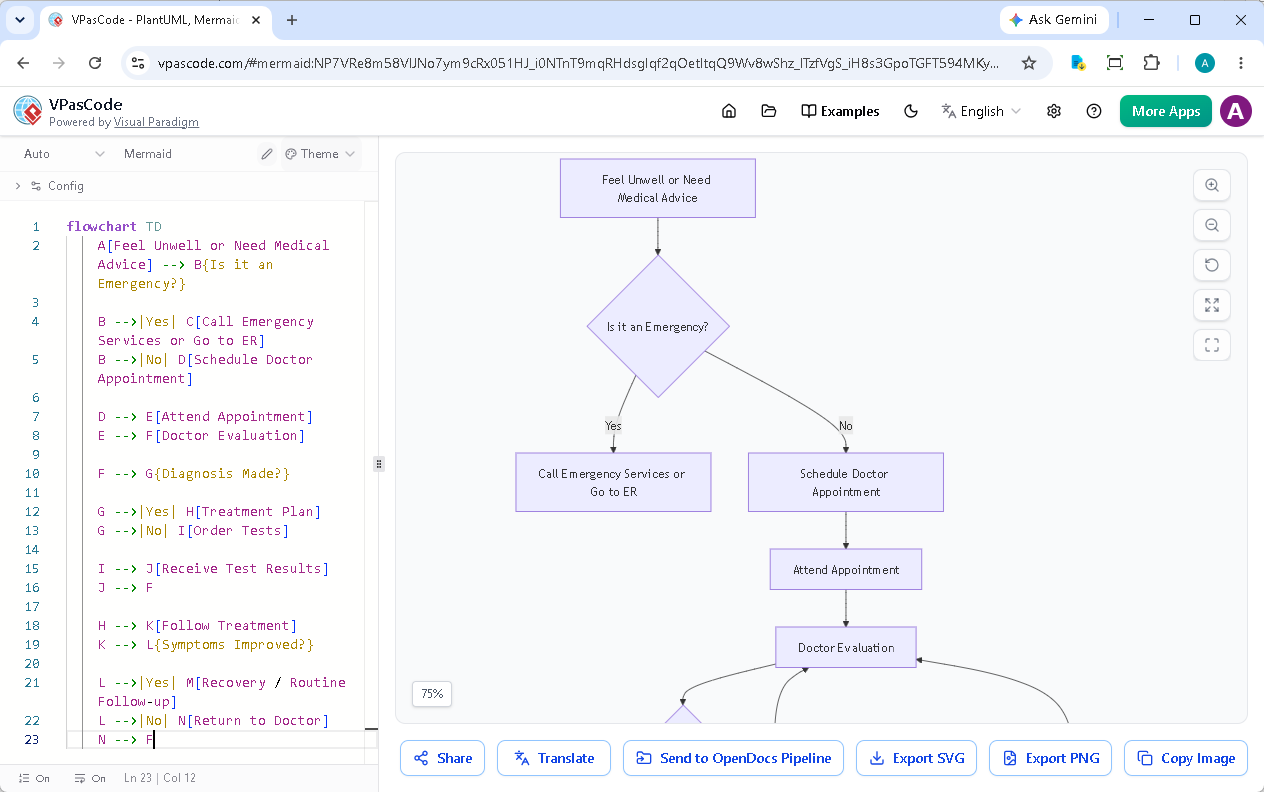
Best Use Cases for Mermaid:
- Documentation in Repositories: For README files, wikis, and markdown documentation, Mermaid is the default choice due to its native rendering on GitHub and GitLab .
- Quick Prototyping & Ideation: Its low learning curve makes it perfect for sketching out ideas quickly. When you ask an AI LLM for a text to diagram solution, it almost always returns Mermaid syntax, making it an accessible diagram-as-code tool for fast developer documentation.
- Agile & Frontend-Focused Teams: It’s a favorite among frontend developers and agile teams who prioritize speed and simplicity over complex enterprise modeling.
- User Journeys and Simple Workflows: For flowcharts and user journey maps, Mermaid is fast, clean, and effective .
Mermaid
Edit Mermaid in VPasCode
flowchart TD
    A[Feel Unwell or Need Medical Advice] --> B{Is it an Emergency?}

    B -->|Yes| C[Call Emergency Services or Go to ER]
    B -->|No| D[Schedule Doctor Appointment]

    D --> E[Attend Appointment]
    E --> F[Doctor Evaluation]

    F --> G{Diagnosis Made?}

    G -->|Yes| H[Treatment Plan]
    G -->|No| I[Order Tests]

    I --> J[Receive Test Results]
    J --> F

    H --> K[Follow Treatment]
    K --> L{Symptoms Improved?}

    L -->|Yes| M[Recovery / Routine Follow-up]
    L -->|No| N[Return to Doctor]
N --> FGraphviz: The Grandfather of Automatic Layout
Graphviz is the oldest and most established of the three, using the DOT language. While its syntax can be the most complex and is often described as having a steeper learning curve, its layout engine is legendary .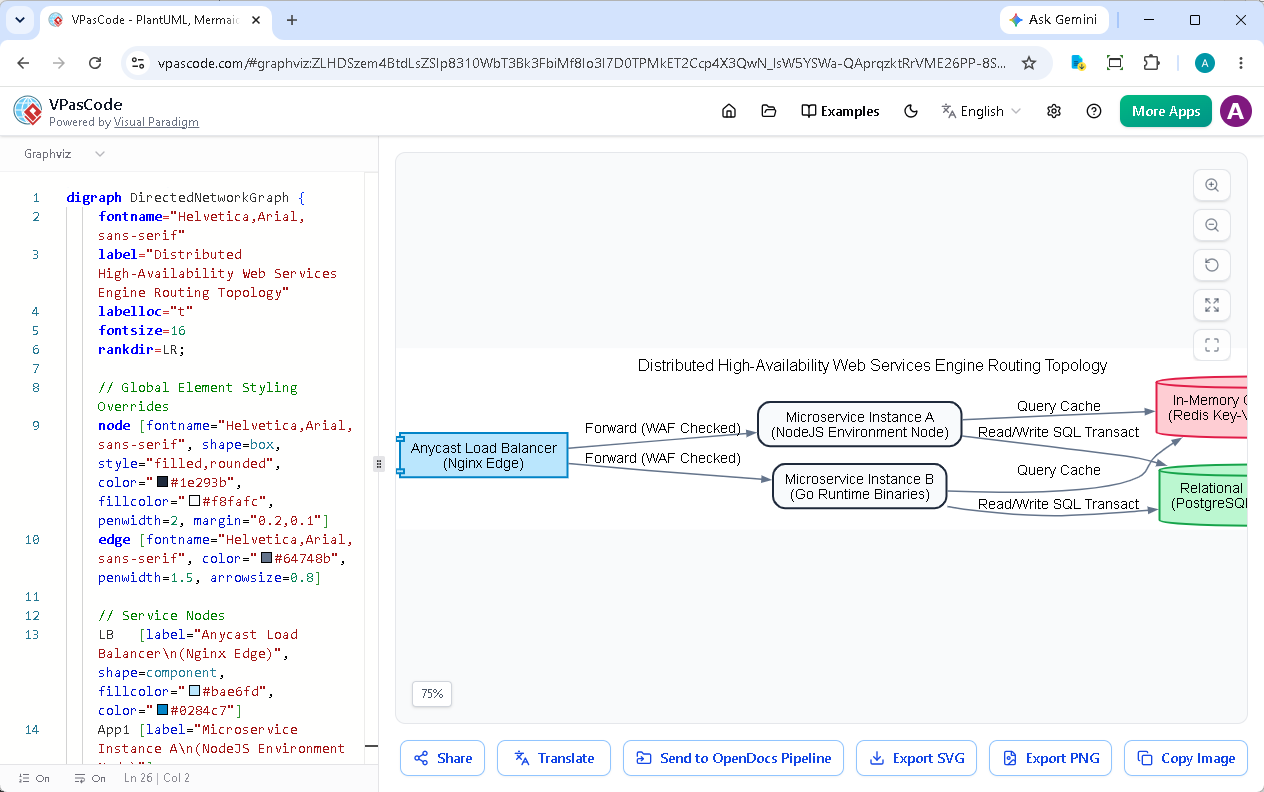
Best Use Cases for Graphviz:
- Complex Network Topologies: For network diagrams, data flow, and intricate dependencies, Graphviz is unmatched.
- Non-Linear and Complex Graphs: When your diagram is not a simple linear flow but a dense web of relationships, Graphviz’s algorithm can handle it beautifully .
- Academic and Research Purposes: Its precision and control over layout make it a favorite in academic settings for visualizing computational graphs, automata, and decision trees.
Graphviz
Edit Graphviz in VPasCode
digraph DirectedNetworkGraph {
    fontname="Helvetica,Arial,sans-serif"
    label="Distributed High-Availability Web Services Engine Routing Topology"
    labelloc="t"
    fontsize=16
    rankdir=LR;

    // Global Element Styling Overrides
    node [fontname="Helvetica,Arial,sans-serif", shape=box, style="filled,rounded", color="#1e293b", fillcolor="#f8fafc", penwidth=2, margin="0.2,0.1"]
    edge [fontname="Helvetica,Arial,sans-serif", color="#64748b", penwidth=1.5, arrowsize=0.8]

    // Service Nodes
    LB   [label="Anycast Load Balancer\n(Nginx Edge)", shape=component, fillcolor="#bae6fd", color="#0284c7"]
    App1 [label="Microservice Instance A\n(NodeJS Environment Node)"]
    App2 [label="Microservice Instance B\n(Go Runtime Binaries)"]
    Redis [label="In-Memory Cache Cache\n(Redis Key-Value Primary)", shape=cylinder, fillcolor="#fecdd3", color="#e11d48"]
    DB   [label="Relational Persistence\n(PostgreSQL Shard Pool)", shape=cylinder, fillcolor="#bbf7d0", color="#16a34a"]

    // Architectural Edge Relationships
    LB -> App1 [label=" Forward (WAF Checked)"];
    LB -> App2 [label=" Forward (WAF Checked)"];
    App1 -> Redis [label=" Query Cache"];
    App2 -> Redis [label=" Query Cache"];
    App1 -> DB [label=" Read/Write SQL Transact"];
    App2 -> DB [label=" Read/Write SQL Transact"];
}The Unified VPasCode Experience
So, which one should you choose? The answer often depends on where the diagram lives and its level of complexity . The 60-second decision rule often comes down to: if it needs to render on GitHub, use Mermaid; if it’s a complex class or deployment diagram, use PlantUML; if it’s a complex network, use Graphviz . The beauty of VPasCode is that you no longer have to choose just one for your entire project. You can leverage the strengths of all three. This unified approach not only saves time but also ensures consistency across your documentation. You get real-time preview, AI-assisted error fixing, and easy sharing via a URL, all within a single, modern interface . Furthermore, when you need to take your diagrams to the next level for deeper documentation and collaboration, VPasCode integrates seamlessly with Visual Paradigm OpenDocs. You can send your diagrams directly to OpenDocs for further refinement and documentation, creating a powerful, end-to-end documentation pipeline . Ready to experience the power of a unified diagram-as-code tool and effortless text to diagram rendering? Try VPasCode today—the core editing and rendering features are absolutely free.Build Diagrams Faster with VPasCode
Transform text to diagram instantly with our unified diagram-as-code tool supporting PlantUML, Mermaid, and Graphviz.
Start Diagram-as-Code for FREE