


In the modern financial sector, security is not merely a feature; it is the foundation of trust. When a user accesses an Online Banking Portal, the system must rigorously verify their identity before granting access to sensitive assets. A Two-Factor Authentication (2FA) login scenario is a critical architectural component that balances security with user experience. However, documenting these complex interaction flows in text-only specifications often leads to ambiguity regarding timing, state transitions, and error handling.

This is where diagramming-as-code becomes indispensable. By modeling the authentication sequence using PlantUML within VPasCode, architects can create a living, executable specification of the security protocol. This approach allows developers to visualize the exact temporal order of messages between the User, Web Browser, Authentication Services, and Gateways. It transforms abstract security requirements into a clear visual blueprint that can be instantly rendered, tested, and shared without the overhead of local installation.
Using VPasCode, a free web-based diagram-as-code editor, engineers can prototype these financial workflows in real-time. The browser-based rendering engine ensures that the sequence diagram accurately reflects the logic of credential validation, OTP generation, and session management, making it an ideal tool for documenting compliance-critical systems.
Understanding the Model: Purpose, Scope & Problem Framing
Diagram Abstraction & Representation
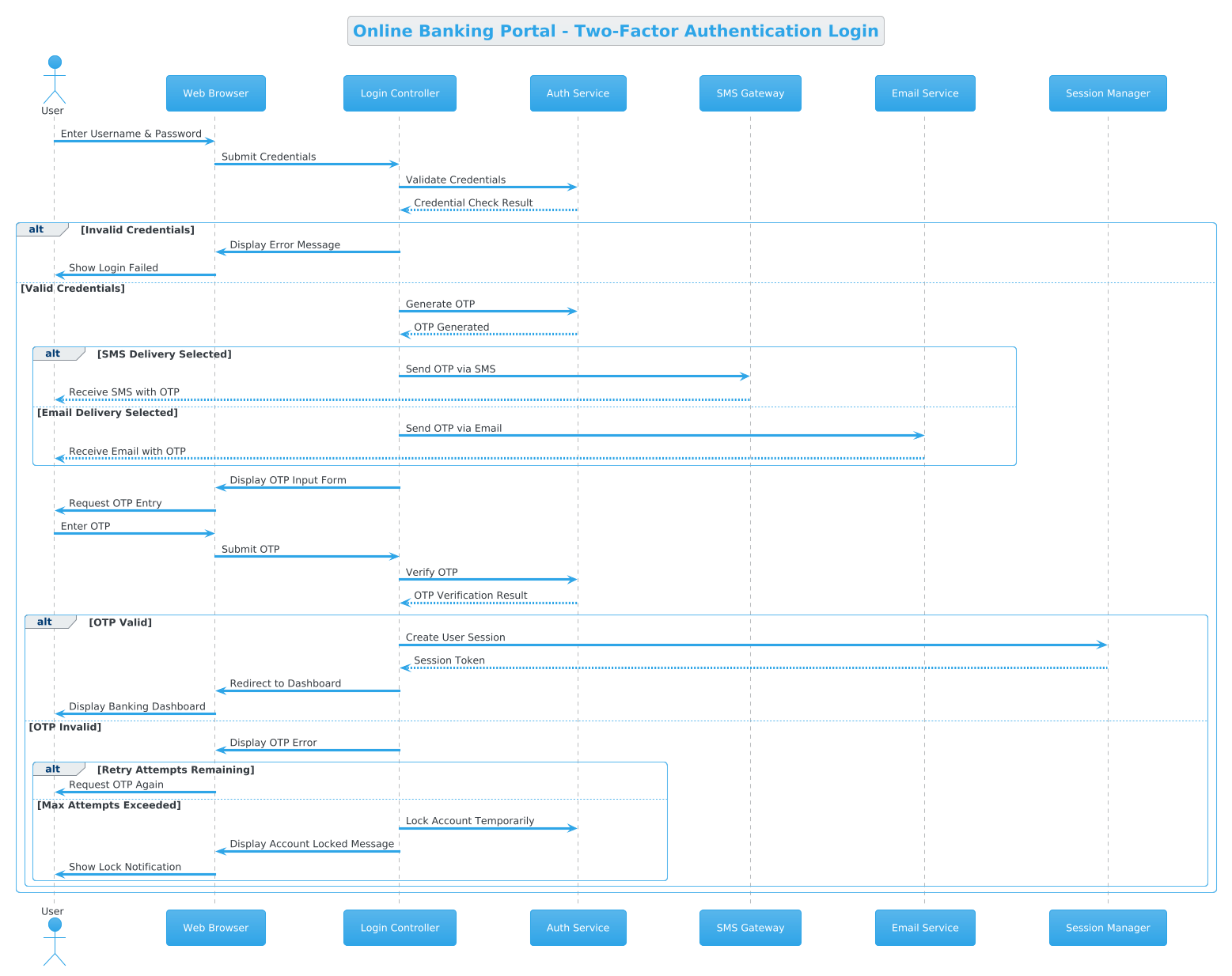
A Sequence Diagram is the premier notation for modeling time-ordered interactions between objects or actors. In this specific context, the diagram abstracts the login process into discrete lifelines representing system components. Each vertical line represents an entity (like the Auth Service or SMS Gateway), and horizontal arrows represent the messages exchanged. This abstraction is crucial for finance because it highlights the dependencies between the frontend (Browser) and backend security services (Auth Service, Session Manager).
The diagram specifically models the Control Flow rather than the internal logic of each service. It answers critical questions: Does the OTP request happen before or after credential validation? How does the system handle a failed OTP attempt? By using PlantUML within VPasCode, we can define these flows declaratively, ensuring that the visual output matches the intended logic exactly.
Target Domain Scope & Scenario
The scope of this model is strictly limited to the authentication phase of the Online Banking Portal. It does not cover account management, transaction processing, or dashboard rendering after login. The scenario begins when a user attempts to log in and concludes when they are either redirected to the Dashboard or locked out due to security failures. This focused scope allows architects to isolate security vulnerabilities and verify that every path (success, SMS error, email error, lockout) is accounted for.
Key Takeaways & Educational Insights
By following this tutorial, you will gain the ability to:
- Define complex conditional logic using
altandelseblocks in PlantUML. - Visualize asynchronous communication patterns, such as SMS delivery versus synchronous API calls.
- Implement visual theming (e.g.,
!theme cerulean) to match enterprise branding standards. - Leverage VPasCode to instantly validate syntax and render the diagram without environment setup.
Complete Diagram & Full Source Code
Below is the complete blueprint for the Two-Factor Authentication flow. This code encapsulates the entire lifecycle from credential submission to session creation or account locking.
@startuml
!theme cerulean

title Online Banking Portal - Two-Factor Authentication Login

actor "User" as user
participant "Web Browser" as browser
participant "Login Controller" as loginCtrl
participant "Auth Service" as authService
participant "SMS Gateway" as smsGateway
participant "Email Service" as emailService
participant "Session Manager" as sessionMgr

user -> browser: Enter Username & Password
browser -> loginCtrl: Submit Credentials
loginCtrl -> authService: Validate Credentials

authService --> loginCtrl: Credential Check Result

alt Invalid Credentials
    loginCtrl -> browser: Display Error Message
    browser -> user: Show Login Failed
else Valid Credentials
    loginCtrl -> authService: Generate OTP
    authService --> loginCtrl: OTP Generated

    alt SMS Delivery Selected
        loginCtrl -> smsGateway: Send OTP via SMS
        smsGateway --> user: Receive SMS with OTP
    else Email Delivery Selected
        loginCtrl -> emailService: Send OTP via Email
        emailService --> user: Receive Email with OTP
    end

    loginCtrl -> browser: Display OTP Input Form
    browser -> user: Request OTP Entry
    user -> browser: Enter OTP
    browser -> loginCtrl: Submit OTP

    loginCtrl -> authService: Verify OTP
    authService --> loginCtrl: OTP Verification Result

    alt OTP Valid
        loginCtrl -> sessionMgr: Create User Session
        sessionMgr --> loginCtrl: Session Token
        loginCtrl -> browser: Redirect to Dashboard
        browser -> user: Display Banking Dashboard
    else OTP Invalid
        loginCtrl -> browser: Display OTP Error
        alt Retry Attempts Remaining
            browser -> user: Request OTP Again
        else Max Attempts Exceeded
            loginCtrl -> authService: Lock Account Temporarily
            loginCtrl -> browser: Display Account Locked Message
            browser -> user: Show Lock Notification
        end
    end
end
@endumlStep-by-Step Architectural Walkthrough
Phase 1: Canvas Configuration & Layout Directives
Every PlantUML diagram begins with setup directives that define the canvas behavior and visual style. In this example, we utilize the !theme directive to apply the cerulean theme, which provides a professional, clean look suitable for financial documentation.
Additionally, the title directive sets the caption for the diagram, ensuring that anyone viewing the rendered output immediately understands the context without needing to read the code. This is essential for documentation that may be exported to PDF or shared across teams.
@startuml
!theme cerulean

title Online Banking Portal - Two-Factor Authentication Login
Phase 2: Declaring Core Entities, Actors, and Boundaries
The next step is defining the participants. In PlantUML, actor represents an external human user, while participant represents system components. We assign aliases (e.g., as user) to make the message syntax cleaner later in the code.
This phase establishes the system boundaries. Notice how we include the SMS Gateway and Email Service as external participants. This explicitly models the reliance on third-party infrastructure for the 2FA mechanism, a critical detail for architects assessing system resilience.
actor "User" as user
participant "Web Browser" as browser
participant "Login Controller" as loginCtrl
participant "Auth Service" as authService
Phase 3: Mapping Data Flows & Key Interactions
With participants defined, we map the synchronous and asynchronous flows. Solid arrows (->) indicate synchronous requests, while dashed arrows (-->) indicate return messages.
The core logic begins with the user entering credentials. The flow then moves to the Auth Service for validation. This phase demonstrates how to chain interactions logically. For instance, the OTP generation only occurs if the credentials are valid, which we enforce using the alt block structure.
user -> browser: Enter Username & Password
browser -> loginCtrl: Submit Credentials
loginCtrl -> authService: Validate Credentials
authService --> loginCtrl: Credential Check Result
Phase 4: Grouping, Annotations & Visual Polish
The final phase involves handling complex logic branches. We use alt (alternative) blocks to represent conditional flows. In this 2FA scenario, we have nested alt blocks to handle the choice between SMS and Email delivery, as well as the retry logic for OTP failures.
Grouping these flows ensures the diagram remains readable. Without alt blocks, the diagram would become a spaghetti of lines. This structure clearly delineates the “Happy Path” (Valid Credentials -> Valid OTP -> Dashboard) from the “Exception Paths” (Invalid Credentials -> Account Lock).
alt SMS Delivery Selected
    loginCtrl -> smsGateway: Send OTP via SMS
else Email Delivery Selected
    loginCtrl -> emailService: Send OTP via Email
end
Syntax & Keyword Deep Dive
To effectively model this architecture, it is vital to understand the specific PlantUML syntax features used in this diagram.
actor: Defines a human user interacting with the system. It is typically drawn as a stick figure in the rendered output.participant: Defines a system component, service, or interface. These are drawn as rectangles.->(Arrow): Represents a synchronous message or request. The sender waits for a response.-->(Dashed Arrow): Represents a return message or an asynchronous notification.alt/else/end: These keywords create combined fragments. They allow you to define multiple alternative flows (e.g., Success vs. Failure) within a single diagram section.!theme: A directive to apply a pre-defined visual theme to the entire diagram canvas.
Best Practices & Pitfalls to Avoid
When creating professional diagrams with VPasCode, adhere to these modeling best practices to ensure clarity and maintainability:
- Modularize Complex Flows: If a sequence diagram becomes too crowded, consider splitting it into multiple diagrams (e.g., one for “Login Success” and one for “Login Failure”). However, for 2FA, keeping the retry logic in one diagram is acceptable due to its logical connection.
- Consistent Naming Conventions: Use clear, domain-specific names for participants (e.g.,
Auth Serviceinstead ofService1). This makes the diagram self-documenting. - Manage Visual Complexity: Use
altblocks effectively. Avoid nesting more than 2-3 levels deep, as this can make the diagram hard to read. In our example, we nest the SMS/Email choice inside the Valid Credentials block, which is a logical depth. - Validate Early: Use the live preview in VPasCode to check for syntax errors immediately. This prevents the frustration of debugging a diagram after it has been exported or shared.
Start Building PlantUML Diagrams Faster with VPasCode
Test, preview, and customize your 2FA authentication flows instantly in your browser with zero local installation required.