


In the fast-paced world of fintech and enterprise finance, data integrity and system architecture are paramount. A Billing and Invoicing System is not merely a collection of forms; it is a complex web of interconnected entities where financial transactions, customer data, and tax regulations converge. For software architects and developers, visualizing these relationships before writing a single line of production code is critical to preventing costly logical errors.

Traditional drag-and-drop diagramming tools often lack the precision required for complex financial modeling. This is where diagram-as-code shines. By using PlantUML within VPasCode, you can define your system’s structure using text-based syntax, ensuring consistency, version-free portability, and instant browser-based rendering. This tutorial walks you through building a comprehensive Class Diagram for a Billing and Invoicing System, demonstrating how to model inheritance, composition, and complex associations typical in finance applications.
Understanding the Model: Purpose, Scope & Problem Framing
Diagram Abstraction & Representation
A Class Diagram is the backbone of Object-Oriented Design (OOD). In the context of a Billing System, it serves as the blueprint for your database schema and backend code. It defines:
- Entities: The core objects like
Invoice,Customer, andProduct. - Attributes: The data properties (e.g.,
totalAmount,taxId). - Methods: The behaviors (e.g.,
calculateTax(),processPayment()). - Relationships: How these entities interact, such as one customer having many invoices.
This specific diagram models a hierarchical billing structure where different invoice types (Standard, Recurring, Credit) inherit from a common base, ensuring code reusability and consistent behavior across the finance domain.
Target Domain Scope & Scenario
This model focuses on the core transactional loop of a billing platform. It intentionally excludes external integrations (like payment gateways or ERP systems) to focus on the internal data model. The scope includes:
- Invoice Lifecycle: From generation to payment and credit adjustments.
- Customer Management: Handling billing and shipping addresses alongside tax compliance.
- Financial Calculations: Tax application, discounts, and line item aggregation.
Key Takeaways & Educational Insights
By completing this tutorial, you will gain the ability to:
- Model abstract base classes and concrete implementations using PlantUML inheritance syntax.
- Distinguish between Composition (
*--) and Aggregation (o--) relationships for accurate ownership modeling. - Apply cardinality constraints (e.g.,
1..*) to define strict business rules.
Complete Diagram & Full Source Code
Below is the complete, production-ready PlantUML code for the Billing and Invoicing System Class Diagram. This blueprint utilizes the Visual Paradigm theme for professional styling.
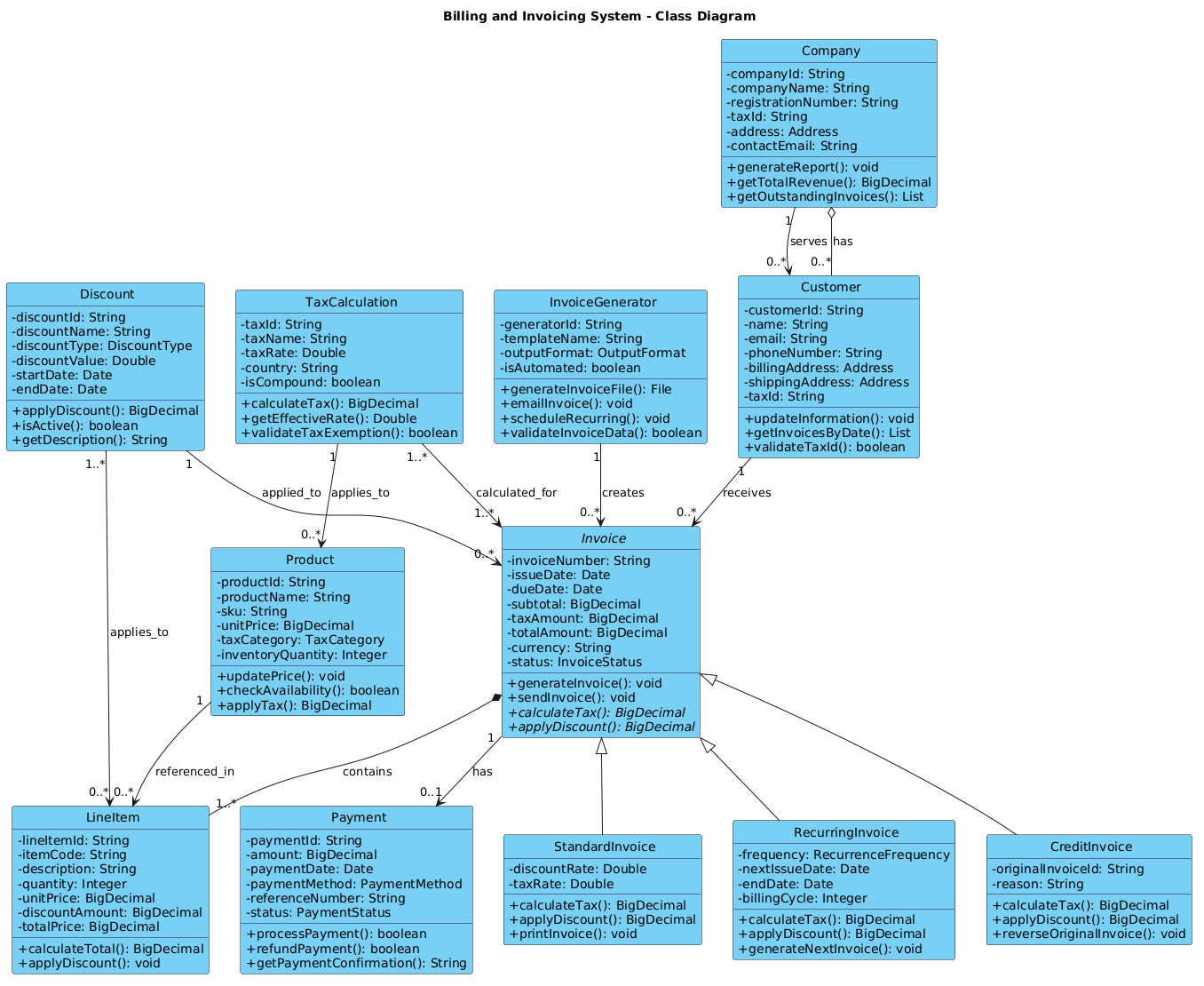
@startuml

!include https://static.visual-paradigm.com/web/resources/plantuml-stdlib/themes/vp.puml

title Billing and Invoicing System - Class Diagram

' Abstract base class
abstract class Invoice {
  - invoiceNumber: String
  - issueDate: Date
  - dueDate: Date
  - subtotal: BigDecimal
  - taxAmount: BigDecimal
  - totalAmount: BigDecimal
  - currency: String
  - status: InvoiceStatus
  + generateInvoice(): void
  + sendInvoice(): void
  + {abstract} calculateTax(): BigDecimal
  + {abstract} applyDiscount(): BigDecimal
}

' Derived classes from Invoice
class StandardInvoice {
  - discountRate: Double
  - taxRate: Double
  + calculateTax(): BigDecimal
  + applyDiscount(): BigDecimal
  + printInvoice(): void
}

class RecurringInvoice {
  - frequency: RecurrenceFrequency
  - nextIssueDate: Date
  - endDate: Date
  - billingCycle: Integer
  + calculateTax(): BigDecimal
  + applyDiscount(): BigDecimal
  + generateNextInvoice(): void
}

class CreditInvoice {
  - originalInvoiceId: String
  - reason: String
  + calculateTax(): BigDecimal
  + applyDiscount(): BigDecimal
  + reverseOriginalInvoice(): void
}

' Customer class
class Customer {
  - customerId: String
  - name: String
  - email: String
  - phoneNumber: String
  - billingAddress: Address
  - shippingAddress: Address
  - taxId: String
  + updateInformation(): void
  + getInvoicesByDate(): List
  + validateTaxId(): boolean
}

' Company class
class Company {
  - companyId: String
  - companyName: String
  - registrationNumber: String
  - taxId: String
  - address: Address
  - contactEmail: String
  + generateReport(): void
  + getTotalRevenue(): BigDecimal
  + getOutstandingInvoices(): List
}

' Payment class
class Payment {
  - paymentId: String
  - amount: BigDecimal
  - paymentDate: Date
  - paymentMethod: PaymentMethod
  - referenceNumber: String
  - status: PaymentStatus
  + processPayment(): boolean
  + refundPayment(): boolean
  + getPaymentConfirmation(): String
}

' LineItem class
class LineItem {
  - lineItemId: String
  - itemCode: String
  - description: String
  - quantity: Integer
  - unitPrice: BigDecimal
  - discountAmount: BigDecimal
  - totalPrice: BigDecimal
  + calculateTotal(): BigDecimal
  + applyDiscount(): void
}

' Product class
class Product {
  - productId: String
  - productName: String
  - sku: String
  - unitPrice: BigDecimal
  - taxCategory: TaxCategory
  - inventoryQuantity: Integer
  + updatePrice(): void
  + checkAvailability(): boolean
  + applyTax(): BigDecimal
}

' TaxCalculation class
class TaxCalculation {
  - taxId: String
  - taxName: String
  - taxRate: Double
  - country: String
  - isCompound: boolean
  + calculateTax(): BigDecimal
  + getEffectiveRate(): Double
  + validateTaxExemption(): boolean
}

' Discount class
class Discount {
  - discountId: String
  - discountName: String
  - discountType: DiscountType
  - discountValue: Double
  - startDate: Date
  - endDate: Date
  + applyDiscount(): BigDecimal
  + isActive(): boolean
  + getDescription(): String
}

' InvoiceGenerator class
class InvoiceGenerator {
  - generatorId: String
  - templateName: String
  - outputFormat: OutputFormat
  - isAutomated: boolean
  + generateInvoiceFile(): File
  + emailInvoice(): void
  + scheduleRecurring(): void
  + validateInvoiceData(): boolean
}

' ============ Relationships ============

' Generalization (Inheritance)
Invoice <|-- StandardInvoice
Invoice <|-- RecurringInvoice
Invoice <|-- CreditInvoice

' Composition (Invoice - LineItem) - Strong ownership
Invoice *-- "1..*" LineItem : contains

' Association (Customer - Invoice) - One-to-Many
Customer "1" --> "0..*" Invoice : receives

' Association (Company - Customer) - One-to-Many
Company "1" --> "0..*" Customer : serves

' Association (Invoice - Payment) - One-to-One
Invoice "1" --> "0..1" Payment : has

' Association (Product - LineItem) - Many-to-One
Product "1" --> "0..*" LineItem : referenced_in

' Aggregation (Customer - Company) - Weak ownership
Company o-- "0..*" Customer : has

' Association (TaxCalculation - Product) - Many-to-One
TaxCalculation "1" --> "0..*" Product : applies_to

' Association (Discount - Invoice) - Many-to-One
Discount "1" --> "0..*" Invoice : applied_to

' Association (InvoiceGenerator - Invoice) - One-to-Many
InvoiceGenerator "1" --> "0..*" Invoice : creates

' Association (TaxCalculation - Invoice) - Many-to-Many
TaxCalculation "1..*" --> "1..*" Invoice : calculated_for

' Association (Discount - LineItem) - Many-to-Many
Discount "1..*" --> "0..*" LineItem : applies_to

@endumlStep-by-Step Architectural Walkthrough
Phase 1: Canvas Configuration & Abstract Foundation
Every professional diagram starts with a consistent theme and a solid architectural foundation. In this phase, we load the vp.puml theme to ensure the diagram renders with the clean, modern styling characteristic of Visual Paradigm tools. We then define the Invoice class as an abstract class.
This is a critical design decision. In finance, not every invoice is the same; some are standard, some are recurring, and some are credits. By making the base class abstract, we enforce a contract that all specific invoice types must fulfill without dictating the implementation details.
abstract class Invoice {
  - invoiceNumber: String
  - issueDate: Date
  ...
  + {abstract} calculateTax(): BigDecimal
  + {abstract} applyDiscount(): BigDecimal
}
Phase 2: Declaring Core Entities & Financial Attributes
Next, we define the concrete entities that make up the system. We create StandardInvoice, RecurringInvoice, and CreditInvoice as children of the base Invoice class. This inheritance structure allows developers to write polymorphic code that treats all invoices uniformly while handling specific logic for each type.
We also model the Customer and Company entities. Notice the inclusion of financial-specific attributes like taxId, BigDecimal for currency, and PaymentStatus. Precision in data types is vital in finance to prevent rounding errors.
class Customer {
  - customerId: String
  - taxId: String
  - billingAddress: Address
  + validateTaxId(): boolean
}
Phase 3: Mapping Data Flows & Key Interactions
The power of a Class Diagram lies in its relationships. We use specific PlantUML arrow syntax to define how objects interact.
- Composition (
*--): TheInvoicecontainsLineItems. If the invoice is deleted, the line items are irrelevant. This is strong ownership. - Association (
-->): ACustomerreceivesInvoices. This is a standard relationship. - Aggregation (
o--): ACompanyhasCustomers. If the company dissolves, the customer data might still exist for compliance reasons. This is weak ownership.
Invoice *-- "1..*" LineItem : contains
Customer "1" --> "0..*" Invoice : receives
Phase 4: Grouping, Annotations & Visual Polish
Finally, we add utility classes like TaxCalculation and Discount. These are often independent services in a microservices architecture but are modeled here as classes to show their logical dependency on products and invoices. We also define many-to-many relationships, such as how a Discount can apply to multiple LineItems across different invoices.
TaxCalculation "1..*" --> "1..*" Invoice : calculated_for
Discount "1..*" --> "0..*" LineItem : applies_to
Syntax & Keyword Deep Dive
To master PlantUML class diagrams, you must understand the specific syntax keywords used in this finance model:
abstract class: Declares a class that cannot be instantiated directly. It serves as a blueprint forStandardInvoice,RecurringInvoice, etc.<|--: The inheritance arrow. It points from the child class to the parent class (e.g.,Invoice <|-- StandardInvoice).*--: Composition. A filled diamond indicates strong ownership. The child cannot exist without the parent.o--: Aggregation. An empty diamond indicates weak ownership. The child can exist independently."1..*": Cardinality notation. It specifies that oneInvoicemust have at least one (1..*)LineItem.{abstract}: A method modifier indicating that the method must be overridden by any concrete subclass.
Best Practices & Pitfalls to Avoid
When modeling complex finance systems, follow these best practices to maintain clarity:
- Use BigDecimal for Currency: Never use
DoubleorFloatfor financial calculations in your diagram. It signals a potential for rounding errors. Explicitly stateBigDecimalin your attribute types. - Separate Concerns: Do not mix billing logic with payment processing logic in the same class. Keep
InvoiceandPaymentdistinct, as shown in this model. - Define Cardinality Explicitly: Ambiguity leads to bugs. Always specify
1,0..1, or1..*on your relationships to enforce business rules. - Leverage Themes: Use the
!includedirective to load a theme (likevp.puml). This ensures your diagrams look professional and consistent without manually styling every element.
Start Building Class Diagrams Faster with VPasCode
Instantly visualize your Billing and Invoicing System architecture with zero setup. Test your PlantUML syntax, customize themes, and export professional diagrams directly from your browser.