


In the high-stakes world of financial services, clarity in transaction workflows is not just a matter of convenience; it is a regulatory and operational necessity. The chargeback dispute process represents one of the most critical and complex interaction flows in card processing systems. It involves multiple stakeholders\u2014cardholders, merchants, issuing banks, acquiring banks, and card networks\u2014each with distinct responsibilities and timelines.

When architects attempt to document these flows using traditional drawing tools, the diagrams often become static, difficult to update, and disconnected from the actual system logic. Diagramming-as-code with PlantUML transforms this process. By defining the sequence interactions in text, financial architects ensure that the visual model remains synchronized with the system requirements. Using VPasCode, the free web-based diagram-as-code editor, teams can prototype these complex financial workflows instantly without local setup, ensuring that every credit, debit, and validation step is accurately represented.
Understanding the Model: Purpose, Scope & Problem Framing
Diagram Abstraction & Representation
This model utilizes a PlantUML Sequence Diagram to capture the temporal flow of a chargeback dispute. In this context, the diagram is the right visual tool because it answers two critical questions: “Who is talking to whom?” and “In what order?”.
- Lifelines: Represent the active participants (e.g., Issuer, Acquirer, DRS) over time.
- Messages: Represent the synchronous and asynchronous requests (e.g., “File chargeback dispute”, “Retrieve original transaction”).
- Activation Bars: Indicate when a participant is processing a request, crucial for understanding processing bottlenecks in high-volume finance systems.
Target Domain Scope & Scenario
The scope of this diagram covers the end-to-end lifecycle of a dispute, from the initial filing by the Cardholder to the final financial reconciliation (credit or debit). It intentionally excludes the initial purchase transaction, focusing strictly on the post-transaction dispute resolution mechanism. This includes the validation logic, the merchant’s right to contest, and the final arbitration by the Dispute Resolution System.
Key Takeaways & Educational Insights
By studying this model, readers will gain architectural clarity on how financial systems handle exceptions. You will understand how to model conditional logic (using alt blocks) for valid vs. invalid disputes, and how to represent nested decision trees for merchant contests versus acceptance.
Complete Diagram & Full Source Code
Before diving into the construction phases, review the complete blueprint below. This diagram uses the sunlust theme to provide a professional, high-contrast visual style suitable for technical documentation.
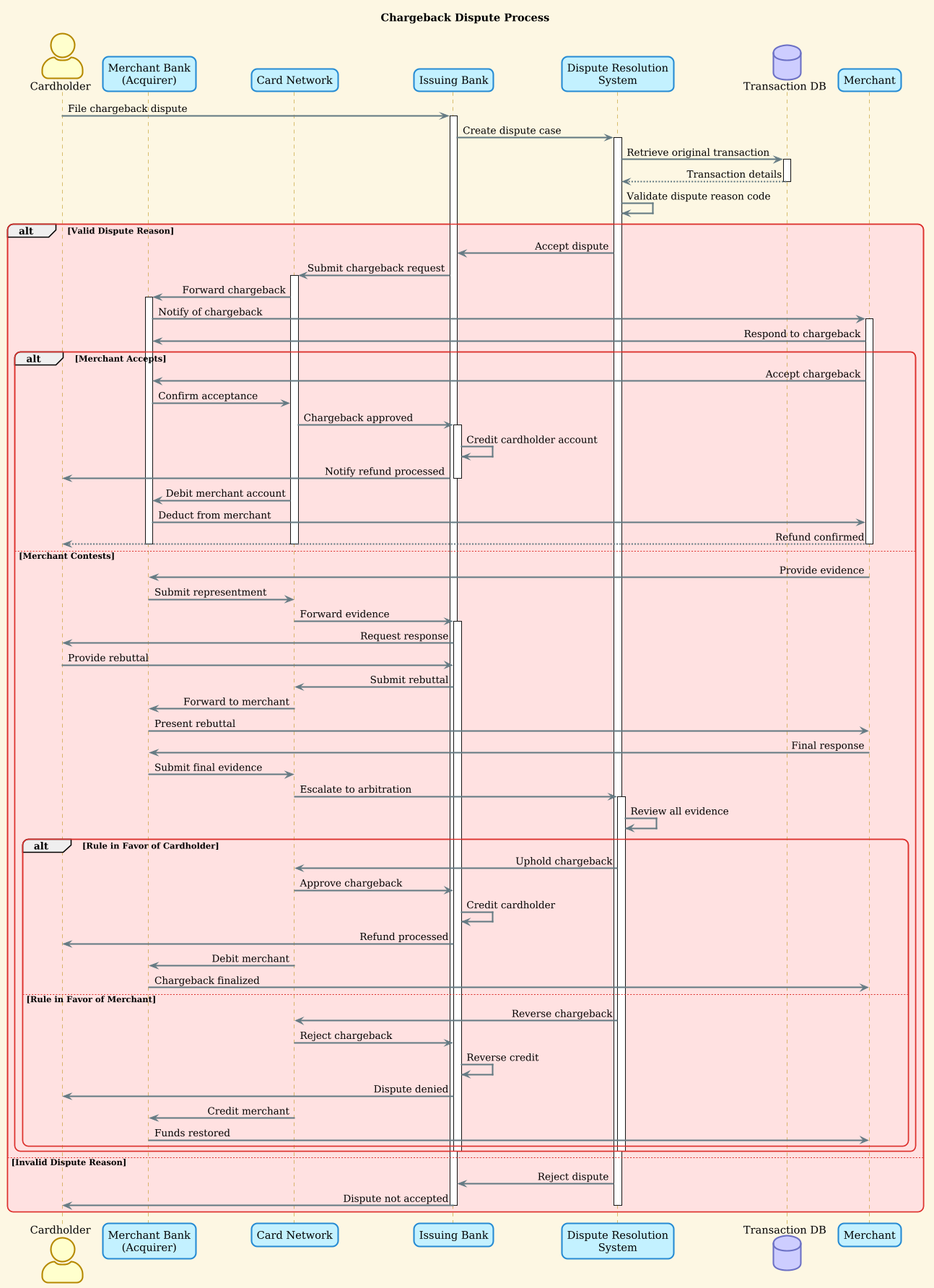
@startuml
!theme sunlust

title Chargeback Dispute Process

actor "Cardholder" as Cardholder
participant "Merchant Bank\n(Acquirer)" as Acquirer
participant "Card Network" as Network
participant "Issuing Bank" as Issuer
participant "Dispute Resolution\nSystem" as DRS
database "Transaction DB" as TDB
participant "Merchant" as Merchant

Cardholder -> Issuer: File chargeback dispute
activate Issuer
Issuer -> DRS: Create dispute case
activate DRS
DRS -> TDB: Retrieve original transaction
activate TDB
TDB --> DRS: Transaction details
deactivate TDB

DRS -> DRS: Validate dispute reason code

alt Valid Dispute Reason
    DRS -> Issuer: Accept dispute
    Issuer -> Network: Submit chargeback request
    activate Network
    Network -> Acquirer: Forward chargeback
    activate Acquirer
    Acquirer -> Merchant: Notify of chargeback
    activate Merchant

    Merchant -> Acquirer: Respond to chargeback

    alt Merchant Accepts
        Merchant -> Acquirer: Accept chargeback
        Acquirer -> Network: Confirm acceptance
        Network -> Issuer: Chargeback approved
        activate Issuer
        Issuer -> Issuer: Credit cardholder account
        Issuer -> Cardholder: Notify refund processed
        deactivate Issuer

        Network -> Acquirer: Debit merchant account
        Acquirer -> Merchant: Deduct from merchant
        Merchant --> Cardholder: Refund confirmed

        deactivate Merchant
        deactivate Acquirer
        deactivate Network

    else Merchant Contests
        Merchant -> Acquirer: Provide evidence
        Acquirer -> Network: Submit representment
        Network -> Issuer: Forward evidence
        activate Issuer
        Issuer -> Cardholder: Request response
        Cardholder -> Issuer: Provide rebuttal
        Issuer -> Network: Submit rebuttal
        Network -> Acquirer: Forward to merchant
        Acquirer -> Merchant: Present rebuttal
        Merchant -> Acquirer: Final response

        Acquirer -> Network: Submit final evidence
        Network -> DRS: Escalate to arbitration
        activate DRS
        DRS -> DRS: Review all evidence

        alt Rule in Favor of Cardholder
            DRS -> Network: Uphold chargeback
            Network -> Issuer: Approve chargeback
            Issuer -> Issuer: Credit cardholder
            Issuer -> Cardholder: Refund processed
            Network -> Acquirer: Debit merchant
            Acquirer -> Merchant: Chargeback finalized
        else Rule in Favor of Merchant
            DRS -> Network: Reverse chargeback
            Network -> Issuer: Reject chargeback
            Issuer -> Issuer: Reverse credit
            Issuer -> Cardholder: Dispute denied
            Network -> Acquirer: Credit merchant
            Acquirer -> Merchant: Funds restored
        end

        deactivate DRS
        deactivate Issuer
    end

else Invalid Dispute Reason
    DRS -> Issuer: Reject dispute
    Issuer -> Cardholder: Dispute not accepted
    deactivate Issuer
    deactivate DRS
end

deactivate DRS
@endumlStep-by-Step Architectural Walkthrough
Phase 1: Canvas Configuration & Layout Directives
Every professional PlantUML diagram begins with configuration. In this financial scenario, we set the visual theme to sunlust to ensure high readability for stakeholders. We also define the title to provide immediate context.
@startuml
!theme sunlust

title Chargeback Dispute Process
This setup ensures that the diagram renders with a consistent color palette suitable for enterprise documentation.
Phase 2: Declaring Core Entities, Actors, and Boundaries
The next step is defining the participants. In a finance sequence diagram, accuracy in naming is vital. We distinguish between the Acquirer (Merchant Bank) and the Issuer (Issuing Bank), as their roles are legally distinct.
actor "Cardholder" as Cardholder
participant "Merchant Bank\
(Acquirer)" as Acquirer
participant "Card Network" as Network
participant "Issuing Bank" as Issuer
participant "Dispute Resolution\
System" as DRS
database "Transaction DB" as TDB
participant "Merchant" as Merchant
Note the use of actor for the human element (Cardholder), participant for system components, and database for data storage. The \
character is used to force line breaks in participant labels for better layout.
Phase 3: Mapping Data Flows & Key Interactions
Now we map the primary flow. The Cardholder initiates the process by contacting the Issuer. We use activate to show when a participant is busy processing.
Cardholder -> Issuer: File chargeback dispute
activate Issuer
Issuer -> DRS: Create dispute case
activate DRS
DRS -> TDB: Retrieve original transaction
activate TDB
TDB --> DRS: Transaction details
deactivate TDB
The use of --> (dashed arrow) for the response from the database indicates an asynchronous or return message, a standard convention in PlantUML sequence diagrams.
Phase 4: Grouping, Annotations & Visual Polish
The complexity of a chargeback lies in the conditional logic. We use alt blocks to represent the decision points. For example, if the dispute reason is invalid, the flow terminates early.
alt Valid Dispute Reason
    ... (processing flow)
else Invalid Dispute Reason
    DRS -> Issuer: Reject dispute
    deactivate DRS
end
Nested alt blocks are used to handle the Merchant’s response (Accept vs. Contest). This structure allows the diagram to remain readable while capturing deep logical branching.
Syntax & Keyword Deep Dive
To replicate this diagram in VPasCode, you must understand the core PlantUML syntax used here.
actor: Represents a human user interacting with the system (e.g., Cardholder).participant: Represents a system component or service (e.g., Issuer, Network).database: Represents persistent data storage (e.g., Transaction DB).->: Solid arrow indicates a synchronous message or request.-->: Dashed arrow indicates a return message or response.activate/deactivate: Explicitly controls the activation bar length on lifelines, crucial for visualizing processing load.alt/else/end: Defines alternative execution paths based on conditions.!theme sunlust: Applies a specific visual style to the diagram elements.
Best Practices & Pitfalls to Avoid
When modeling complex financial workflows in PlantUML, adhere to these guidelines to maintain clarity:
- Limit Nesting Depth: While this diagram uses nested
altblocks, try to keep nesting to 2-3 levels. Deeper nesting becomes unreadable. Consider splitting into multiple diagrams if the logic exceeds this. - Consistent Naming: Use the same aliases (e.g.,
Acquirer) throughout the diagram. Do not switch between “Merchant Bank” and “Acquirer” in the message lines. - Manage Activation Bars: Always pair
activatewithdeactivate. Leaving a lifeline active at the end of a diagram can confuse the reader about the state of the system. - Use Descriptive Labels: In finance, precision matters. Instead of “Send message”, use “Submit chargeback request”. This ensures the diagram serves as valid documentation.