


In the rapidly evolving landscape of Fintech, security and clarity are paramount. When designing a Peer-to-Peer (P2P) money transfer feature for a digital wallet, the complexity lies not just in moving funds, but in orchestrating a secure, compliant, and responsive interaction between multiple microservices. A mobile app cannot simply debit one account and credit another; it must validate identities, check balances, assess fraud risk, and notify all parties involved.
Visualizing these interactions is critical for software architects and developers. A sequence diagram provides a time-ordered view of these interactions, making it easier to identify bottlenecks, security gaps, or race conditions before a single line of production code is written. By leveraging diagram-as-code with PlantUML in VPasCode, teams can treat their architecture documentation as living code—versioned, tested, and instantly rendered directly in the browser.
This tutorial walks you through building a comprehensive P2P transfer sequence diagram. We will model the flow from a user opening the app to the final receipt of funds, including critical safety checks like fraud detection and alternative flows for high-risk transactions. All of this is achieved using VPasCode, the free web-based diagram editor that requires zero local setup.
Understanding the Model: Purpose, Scope & Problem Framing
Diagram Abstraction & Representation
A sequence diagram is the ideal tool for modeling the temporal flow of a P2P transaction. Unlike a class diagram which shows static structure, or a flowchart which shows decision logic, a sequence diagram captures when and how components communicate. In this model, vertical lines (lifelines) represent the persistence of an object or actor over time, while horizontal arrows represent synchronous or asynchronous messages exchanged between them.
We are specifically modeling the Interaction Layer. This diagram abstracts away the internal database logic of the Wallet Service or the specific algorithms of the Fraud Detection engine, focusing instead on the API contracts and message passing between the Mobile App and backend services.
Target Domain Scope & Scenario
The scenario covers the end-to-end lifecycle of a transfer initiated by a Sender via a Mobile App. The scope includes:
- Authentication & Lookup: Verifying the sender and finding the recipient.
- Validation: Checking balances and initiating fraud analysis.
- Execution: Debiting the sender and crediting the recipient.
- Feedback: Sending notifications and displaying success or failure screens.
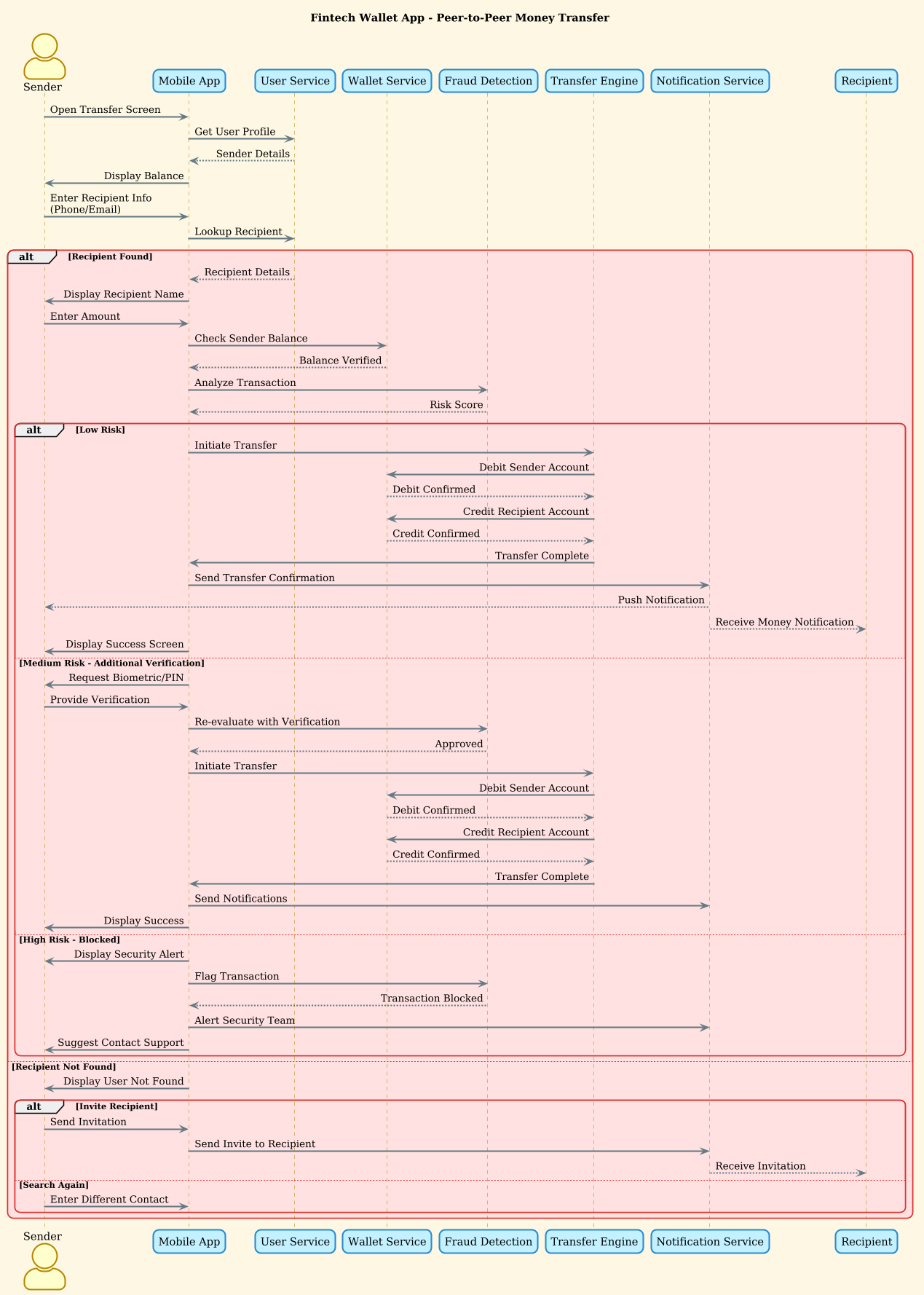
Crucially, this model includes combined fragments (alt/else blocks) to handle non-linear paths, such as when a recipient is not found or when a transaction is flagged as high-risk.
Key Takeaways & Educational Insights
By constructing this diagram, you will gain:
- Boundary Clarity: Clear definition of which service owns which responsibility (e.g., Wallet Service handles money, Fraud Service handles risk).
- Error Handling Strategy: Visualizing how the system reacts to missing data or security flags.
- Asynchronous Design: Understanding where push notifications occur relative to the transaction completion.
Complete Diagram & Full Source Code
Below is the complete blueprint for the Fintech Wallet P2P transfer sequence. This diagram utilizes the sunlust theme for a professional, high-contrast look suitable for technical documentation.
@startuml
!theme sunlust

title Fintech Wallet App - Peer-to-Peer Money Transfer

actor "Sender" as sender
participant "Mobile App" as app
participant "User Service" as userService
participant "Wallet Service" as walletSvc
participant "Fraud Detection" as fraudDetect
participant "Transfer Engine" as transferEng
participant "Notification Service" as notifier
participant "Recipient" as recipient

sender -> app: Open Transfer Screen
app -> userService: Get User Profile
userService --> app: Sender Details

app -> sender: Display Balance
sender -> app: Enter Recipient Info (Phone/Email)
app -> userService: Lookup Recipient

alt Recipient Found
    userService --> app: Recipient Details
    app -> sender: Display Recipient Name
    sender -> app: Enter Amount
    app -> walletSvc: Check Sender Balance
    walletSvc --> app: Balance Verified

    app -> fraudDetect: Analyze Transaction
    fraudDetect --> app: Risk Score

    alt Low Risk
        app -> transferEng: Initiate Transfer
        transferEng -> walletSvc: Debit Sender Account
        walletSvc --> transferEng: Debit Confirmed

        transferEng -> walletSvc: Credit Recipient Account
        walletSvc --> transferEng: Credit Confirmed

        transferEng -> app: Transfer Complete
        app -> notifier: Send Transfer Confirmation
        notifier --> sender: Push Notification
        notifier --> recipient: Receive Money Notification

        app -> sender: Display Success Screen
    else Medium Risk - Additional Verification
        app -> sender: Request Biometric/PIN
        sender -> app: Provide Verification
        app -> fraudDetect: Re-evaluate with Verification
        fraudDetect --> app: Approved

        app -> transferEng: Initiate Transfer
        transferEng -> walletSvc: Debit Sender Account
        walletSvc --> transferEng: Debit Confirmed

        transferEng -> walletSvc: Credit Recipient Account
        walletSvc --> transferEng: Credit Confirmed

        transferEng -> app: Transfer Complete
        app -> notifier: Send Notifications
        app -> sender: Display Success
    else High Risk - Blocked
        app -> sender: Display Security Alert
        app -> fraudDetect: Flag Transaction
        fraudDetect --> app: Transaction Blocked
        app -> notifier: Alert Security Team
        app -> sender: Suggest Contact Support
    end
else Recipient Not Found
    app -> sender: Display User Not Found
    alt Invite Recipient
        sender -> app: Send Invitation
        app -> notifier: Send Invite to Recipient
        notifier --> recipient: Receive Invitation
    else Search Again
        sender -> app: Enter Different Contact
    end
end
@endumlStep-by-Step Architectural Walkthrough
Now, let’s break down how we constructed this diagram in VPasCode, moving from basic setup to complex logic flows.
Phase 1: Canvas Configuration & Layout Directives
Every PlantUML diagram begins with configuration directives. We start by defining the theme to ensure the visual output matches our documentation standards.
!theme sunlust

title Fintech Wallet App - Peer-to-Peer Money Transfer
The !theme sunlust directive applies a specific color palette and styling without needing external CSS. The title directive provides a clear caption for the diagram, which is essential for sharing with stakeholders.
Phase 2: Declaring Core Entities, Actors, and Boundaries
Before drawing arrows, we must define the participants. In sequence diagrams, actor represents a human user, while participant represents system components.
actor "Sender" as sender
participant "Mobile App" as app
participant "User Service" as userService
participant "Wallet Service" as walletSvc
We assign aliases (e.g., as sender) to keep the message arrows clean and readable. This separation of display name and internal reference is a best practice in diagram-as-code.
Phase 3: Mapping Data Flows & Key Interactions
With participants defined, we map the primary success path. Solid arrows (->) indicate synchronous calls where the sender waits for a response. Dashed arrows (-->) indicate return messages.
sender -> app: Open Transfer Screen
app -> userService: Get User Profile
userService --> app: Sender Details
This establishes the initial handshake. The Mobile App requests the profile, and the User Service returns the data. Notice the strict ordering; PlantUML renders these chronologically from top to bottom.
Phase 4: Grouping, Annotations & Visual Polish
The complexity of a Fintech transaction lies in its conditional logic. We use alt (alternative) and else blocks to represent decision points, such as fraud checks or recipient validation.
alt Recipient Found
    userService --> app: Recipient Details
    ... logic ...
else Recipient Not Found
    app -> sender: Display User Not Found
end
Within the alt block, we nest another alt block to handle the Fraud Detection logic (Low, Medium, High Risk). This nesting allows us to visualize the branching paths of security protocols without cluttering the main flow.
Syntax & Keyword Deep Dive
Understanding the specific PlantUML syntax used in this diagram is essential for replicating and modifying it.
actor: Defines a human user interacting with the system. In this diagram, it represents the Sender and Recipient.participant: Defines a software component, service, or external system (e.g.,Wallet Service,Fraud Detection).->(Solid Arrow): Represents a synchronous message call. The sender blocks until the receiver responds.-->(Dashed Arrow): Represents a return message or asynchronous response.alt / else / end: Combined fragments used to define conditional logic. Thealtblock starts a region where multiple alternatives exist, andelsedefines the fallback path.title: Adds a caption to the top of the diagram for clarity.
Best Practices & Pitfalls to Avoid
When building complex sequence diagrams for Fintech applications, keep these guidelines in mind to maintain clarity:
- Limit Nesting Depth: While the example shows nested
altblocks, try to keep nesting to two levels. If logic becomes deeper, consider splitting the diagram into separate flows (e.g., one for “Happy Path”, one for “Fraud Handling”). - Use Descriptive Aliases: Always use
as aliasfor participants. It makes the code cleaner and easier to update if participant names change. - Group Related Logic: Use
grouporparif you need to show parallel processes, though for P2P transfers, sequential validation is usually more accurate. - Validate Early: Use VPasCode’s live preview to ensure your
altblocks close correctly. Mismatchedendtags are a common syntax error in PlantUML.
Try It Yourself with VPasCode
Start Building Fintech Sequence Diagrams Faster with VPasCode
Instantly prototype, test, and visualize complex P2P money transfer flows in your browser with VPasCode, the free PlantUML editor for software architects.