


In the high-stakes environment of financial technology, clarity is not just a design preference—it is a compliance requirement. A Foreign Exchange (FX) Trading System is a complex ecosystem where real-time data, strict risk management, and user security intersect. For software architects and developers, documenting this architecture through static text or informal sketches often leads to ambiguity, miscommunication, and technical debt.

Diagramming-as-code with PlantUML offers a robust solution. By treating diagrams as living code, teams can version their architectural intent, automate documentation generation, and ensure that the visual representation of the system always matches the implementation. VPasCode, the free web-based VPasCode editor, provides an instant environment to prototype these diagrams without local setup, enabling architects to iterate on the class structure of critical financial systems in real-time.
Understanding the Model: Purpose, Scope & Problem Framing
Diagram Abstraction & Representation
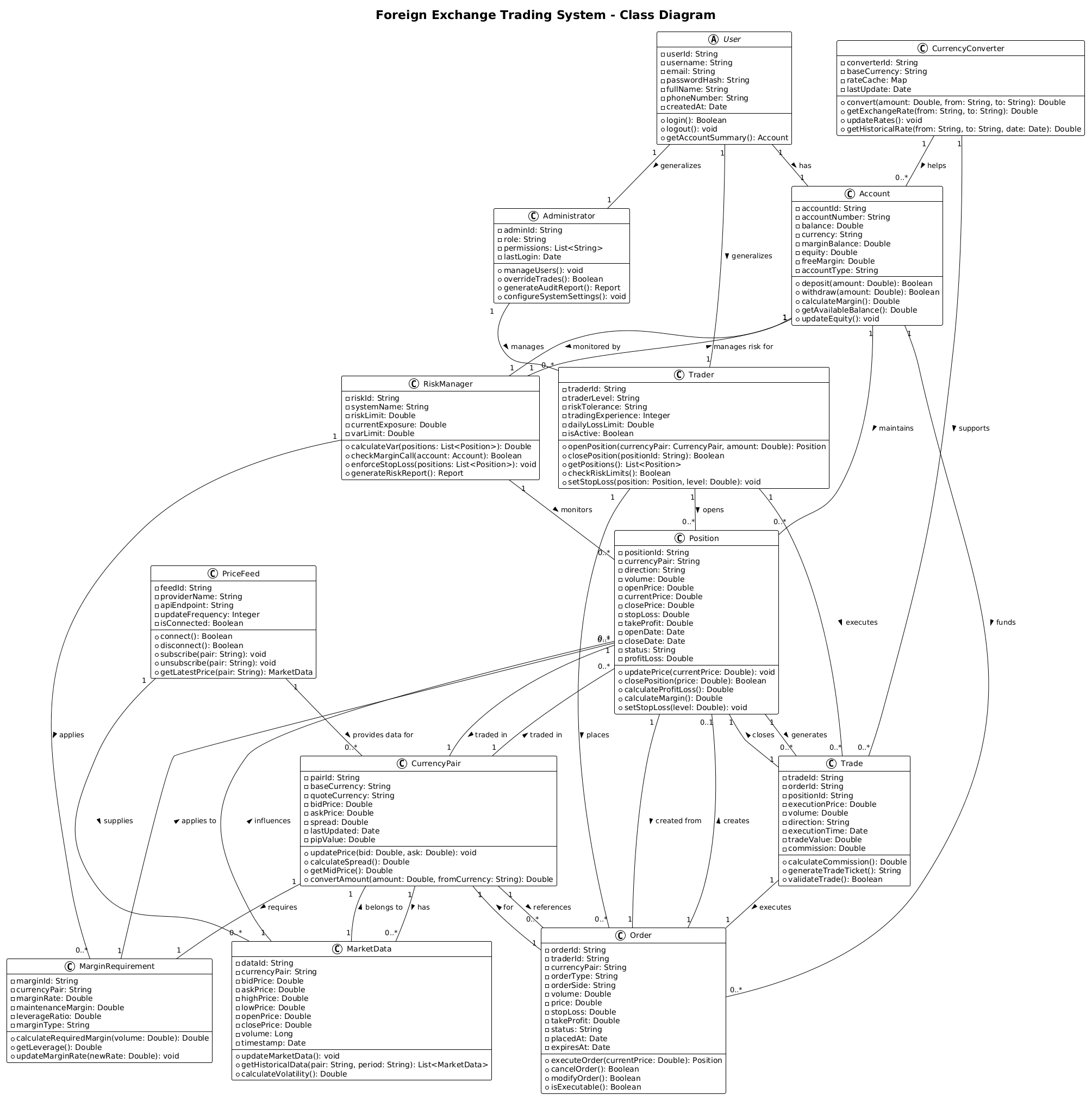
This PlantUML Class Diagram models the static structure of a Foreign Exchange Trading System. Unlike sequence diagrams that focus on runtime interactions, a class diagram defines the building blocks of the system: entities, their attributes, and their relationships. In a finance context, this means defining how a Trader interacts with an Account, how an Order transforms into a Position, and how a RiskManager enforces constraints across the portfolio.
Target Domain Scope & Scenario
The scope of this model covers the core trading lifecycle within a single institution. It includes:
- Authentication & Roles: Distinguishing between Traders, Administrators, and base User entities.
- Trading Operations: The flow from placing an Order, opening a Position, to recording a Trade.
- Financial Instruments: Management of CurrencyPairs, MarketData, and MarginRequirements.
- Risk & Compliance: The logic behind RiskManager and Account margin calculations.
Key Takeaways & Educational Insights
By studying this model, readers will gain insights into:
- How to abstract financial entities into reusable PlantUML classes.
- The importance of defining cardinality (e.g., “1 Trader places 0..* Orders”).
- How to separate concerns between trading logic, risk management, and market data feeds.
Complete Diagram & Full Source Code
Below is the complete blueprint for the Foreign Exchange Trading System. You can visualize the end result immediately and then copy the source code to edit it in VPasCode.
@startuml
!theme plain
title Foreign Exchange Trading System - Class Diagram

' Core User and Account classes
abstract class User {
  - userId: String
  - username: String
  - email: String
  - passwordHash: String
  - fullName: String
  - phoneNumber: String
  - createdAt: Date
  + login(): Boolean
  + logout(): void
  + getAccountSummary(): Account
}

class Trader {
  - traderId: String
  - traderLevel: String
  - riskTolerance: String
  - tradingExperience: Integer
  - dailyLossLimit: Double
  - isActive: Boolean
  + openPosition(currencyPair: CurrencyPair, amount: Double): Position
  + closePosition(positionId: String): Boolean
  + getPositions(): List<Position>
  + checkRiskLimits(): Boolean
  + setStopLoss(position: Position, level: Double): void
}

class Administrator {
  - adminId: String
  - role: String
  - permissions: List<String>
  - lastLogin: Date
  + manageUsers(): void
  + overrideTrades(): Boolean
  + generateAuditReport(): Report
  + configureSystemSettings(): void
}

class Account {
  - accountId: String
  - accountNumber: String
  - balance: Double
  - currency: String
  - marginBalance: Double
  - equity: Double
  - freeMargin: Double
  - accountType: String
  + deposit(amount: Double): Boolean
  + withdraw(amount: Double): Boolean
  + calculateMargin(): Double
  + getAvailableBalance(): Double
  + updateEquity(): void
}

' Trading classes
class CurrencyPair {
  - pairId: String
  - baseCurrency: String
  - quoteCurrency: String
  - bidPrice: Double
  - askPrice: Double
  - spread: Double
  - lastUpdated: Date
  - pipValue: Double
  + updatePrice(bid: Double, ask: Double): void
  + calculateSpread(): Double
  + getMidPrice(): Double
  + convertAmount(amount: Double, fromCurrency: String): Double
}

class Position {
  - positionId: String
  - currencyPair: String
  - direction: String
  - volume: Double
  - openPrice: Double
  - currentPrice: Double
  - closePrice: Double
  - stopLoss: Double
  - takeProfit: Double
  - openDate: Date
  - closeDate: Date
  - status: String
  - profitLoss: Double
  + updatePrice(currentPrice: Double): void
  + closePosition(price: Double): Boolean
  + calculateProfitLoss(): Double
  + calculateMargin(): Double
  + setStopLoss(level: Double): void
}

class Order {
  - orderId: String
  - traderId: String
  - currencyPair: String
  - orderType: String
  - orderSide: String
  - volume: Double
  - price: Double
  - stopLoss: Double
  - takeProfit: Double
  - status: String
  - placedAt: Date
  - expiresAt: Date
  + executeOrder(currentPrice: Double): Position
  + cancelOrder(): Boolean
  + modifyOrder(): Boolean
  + isExecutable(): Boolean
}

class Trade {
  - tradeId: String
  - orderId: String
  - positionId: String
  - executionPrice: Double
  - volume: Double
  - direction: String
  - executionTime: Date
  - tradeValue: Double
  - commission: Double
  + calculateCommission(): Double
  + generateTradeTicket(): String
  + validateTrade(): Boolean
}

' Risk Management classes
class RiskManager {
  - riskId: String
  - systemName: String
  - riskLimit: Double
  - currentExposure: Double
  - varLimit: Double
  + calculateVar(positions: List<Position>): Double
  + checkMarginCall(account: Account): Boolean
  + enforceStopLoss(positions: List<Position>): void
  + generateRiskReport(): Report
}

class MarginRequirement {
  - marginId: String
  - currencyPair: String
  - marginRate: Double
  - maintenanceMargin: Double
  - leverageRatio: Double
  - marginType: String
  + calculateRequiredMargin(volume: Double): Double
  + getLeverage(): Double
  + updateMarginRate(newRate: Double): void
}

' Market Data classes
class MarketData {
  - dataId: String
  - currencyPair: String
  - bidPrice: Double
  - askPrice: Double
  - highPrice: Double
  - lowPrice: Double
  - openPrice: Double
  - closePrice: Double
  - volume: Long
  - timestamp: Date
  + updateMarketData(): void
  + getHistoricalData(pair: String, period: String): List<MarketData>
  + calculateVolatility(): Double
}

class PriceFeed {
  - feedId: String
  - providerName: String
  - apiEndpoint: String
  - updateFrequency: Integer
  - isConnected: Boolean
  + connect(): Boolean
  + disconnect(): Boolean
  + subscribe(pair: String): void
  + unsubscribe(pair: String): void
  + getLatestPrice(pair: String): MarketData
}

class CurrencyConverter {
  - converterId: String
  - baseCurrency: String
  - rateCache: Map
  - lastUpdate: Date
  + convert(amount: Double, from: String, to: String): Double
  + getExchangeRate(from: String, to: String): Double
  + updateRates(): void
  + getHistoricalRate(from: String, to: String, date: Date): Double
}

' Relationships
User "1" -- "1" Account : has >
User "1" -- "1" Trader : generalizes >
User "1" -- "1" Administrator : generalizes >

Trader "1" -- "0..*" Order : places >
Trader "1" -- "0..*" Position : opens >
Trader "1" -- "0..*" Trade : executes >

Administrator "1" -- "0..*" Trader : manages >

Account "1" -- "0..*" Position : maintains >
Account "1" -- "0..*" Order : funds >
Account "1" -- "1" RiskManager : monitored by >

CurrencyPair "1" -- "0..*" Position : traded in >
CurrencyPair "1" -- "0..*" Order : references >
CurrencyPair "1" -- "0..*" MarketData : has >
CurrencyPair "1" -- "1" MarginRequirement : requires >

Position "1" -- "1" CurrencyPair : traded in >
Position "1" -- "0..*" Trade : generates >
Position "1" -- "1" Order : created from >

Order "1" -- "0..1" Position : creates >
Order "1" -- "1" CurrencyPair : for >

Trade "1" -- "1" Position : closes >
Trade "1" -- "1" Order : executes >

RiskManager "1" -- "0..*" Position : monitors >
RiskManager "1" -- "1" Account : manages risk for >
RiskManager "1" -- "0..*" MarginRequirement : applies >

MarketData "1" -- "1" CurrencyPair : belongs to >
MarketData "1" -- "0..*" Position : influences >

PriceFeed "1" -- "0..*" MarketData : supplies >
PriceFeed "1" -- "0..*" CurrencyPair : provides data for >

CurrencyConverter "1" -- "0..*" Trade : supports >
CurrencyConverter "1" -- "0..*" Account : helps >

MarginRequirement "1" -- "0..*" Position : applies to >

@endumlStep-by-Step Architectural Walkthrough
Phase 1: Canvas Configuration & Layout Directives
Before defining classes, we set the visual theme and direction. Using !theme plain ensures a clean, professional look suitable for technical documentation. The @startuml and @enduml tags define the boundaries of the diagram.
@startuml
!theme plain
title Foreign Exchange Trading System - Class Diagram
Phase 2: Declaring Core Entities, Actors, and Boundaries
We begin with the foundational users and accounts. Notice the use of abstract class User. In PlantUML, this indicates a base entity that is not instantiated directly but serves as a parent for Trader and Administrator. We define private attributes with - and public methods with +.
abstract class User {
  - userId: String
  - username: String
  + login(): Boolean
}

class Trader {
  - traderId: String
  - riskTolerance: String
  + openPosition(...): Position
}
Phase 3: Mapping Data Flows & Key Interactions
The core trading logic revolves around the lifecycle of an Order becoming a Position and finally a Trade. We define these classes with relevant financial attributes like bidPrice, askPrice, and profitLoss. The relationships are then drawn to show how these entities connect.
Order "1" -- "0..1" Position : creates >
Position "1" -- "0..*" Trade : generates >
Trade "1" -- "1" Order : executes >
Phase 4: Grouping, Annotations & Visual Polish
We complete the model by adding risk management and market data components. The RiskManager class connects to Account and Position to enforce limits. Finally, we define the relationships using the -- connector and cardinality notation (e.g., "1", "0..*") to accurately reflect the business rules.
User "1" -- "1" Account : has >
Account "1" -- "1" RiskManager : monitored by >
Syntax & Keyword Deep Dive
To effectively model this system, understanding the PlantUML syntax is essential. Here are the key features used in this diagram:
abstract class: Defines a class that cannot be instantiated directly, serving as a base for inheritance (e.g.,User).class: Declares a standard class with attributes and methods.-vs+: The-symbol denotes private members (internal data), while+denotes public members (accessible methods).--: The line connector used to define relationships between classes."1"/"0..*": Cardinality notation."1"means exactly one, while"0..*"means zero or many.: label: Adds a descriptive label to the relationship line (e.g.,: places).
Best Practices & Pitfalls to Avoid
When building complex financial diagrams in VPasCode, follow these guidelines:
- Keep Abstraction Levels Consistent: Do not mix high-level business entities with low-level implementation details in the same diagram. Keep the focus on the domain model.
- Use Meaningful Names: Avoid generic names like
Class1. Use domain-specific terms likeMarginRequirementorPriceFeed. - Validate Cardinality: Ensure that the “1” to “0..*” relationships accurately reflect the business logic (e.g., a Trader can have many Orders).
- Modularize: If the diagram becomes too large, consider breaking it into multiple files or using packages to group related classes.
Start Building Foreign Exchange Class Diagrams Faster with VPasCode
Instantly prototype and preview your financial system architecture online in VPasCode without installing any tools or configuring local environments.