


Architecting Financial Workflows: The Importance of Sequence Modeling in Forex
In the high-stakes environment of financial technology, clarity is currency. For architects and developers building Forex (Foreign Exchange) trading platforms, understanding the precise temporal order of operations is critical. A single misaligned message or incorrect validation step can lead to financial loss, compliance breaches, or system failures.

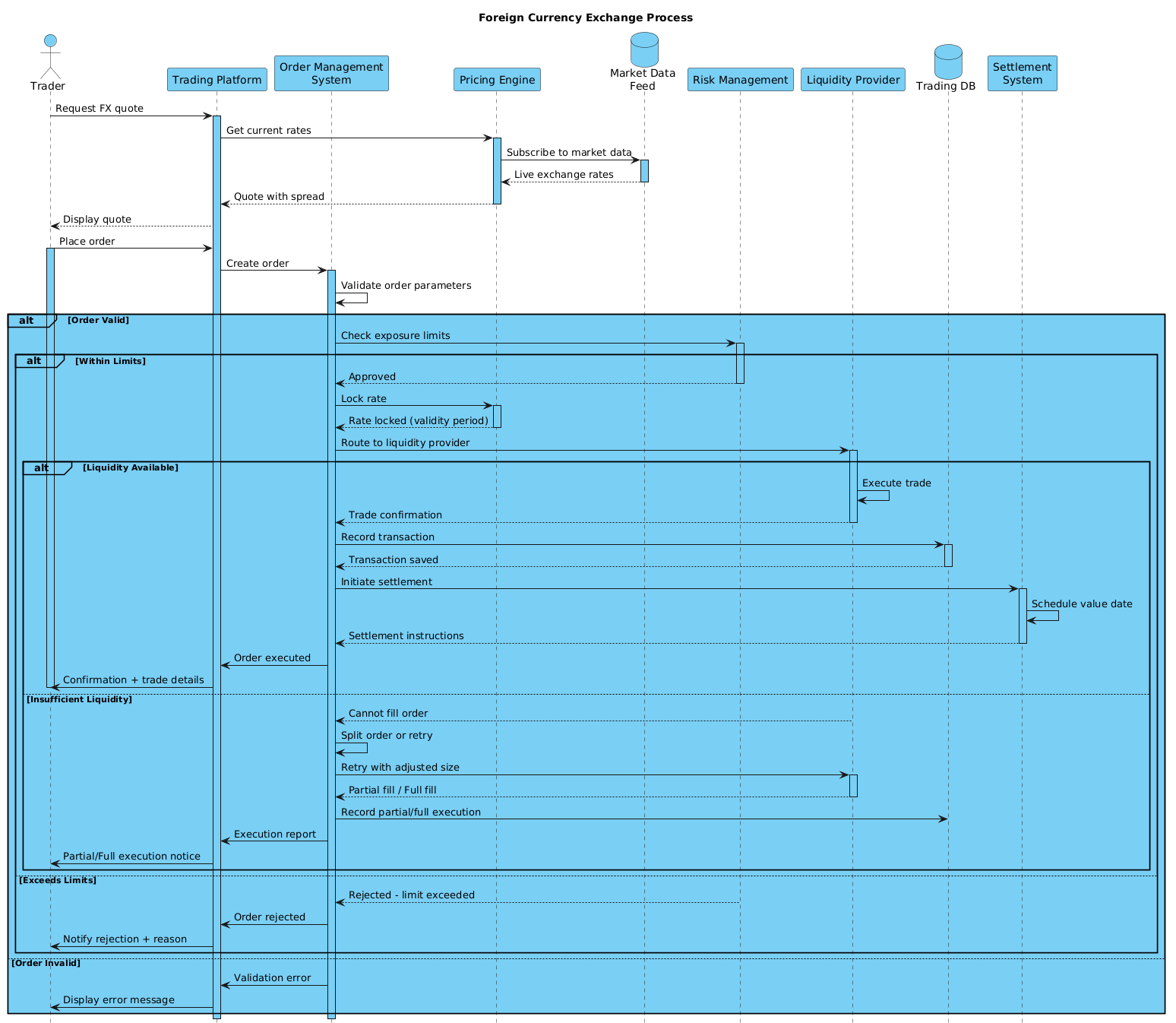
This tutorial demonstrates how to model a Foreign Currency Exchange Process using PlantUML sequence diagrams. By leveraging diagram-as-code with VPasCode, you can rapidly prototype complex financial workflows involving traders, order management systems (OMS), risk engines, and liquidity providers. This approach enhances architectural clarity, facilitates communication between business analysts and developers, and serves as living technical documentation that is easy to maintain and version.
Understanding the Model: Purpose, Scope & Problem Framing
Diagram Abstraction & Representation
A Sequence Diagram is the ideal abstraction for modeling the dynamic behavior of your system. Unlike static class diagrams, sequence diagrams capture the when and how of interactions. In this Forex scenario, we model:
- Lifelines: The persistent entities (Trader, Platform, OMS, Risk, etc.) that exist throughout the transaction.
- Messages: The synchronous and asynchronous requests (e.g., “Get current rates”, “Place order”) that drive the system state.
- Activation Bars: The periods during which an entity is actively processing a request, helping identify bottlenecks or long-running operations.
- Combined Fragments: The
altblocks that represent decision logic, such as checking if a user has exceeded risk limits or if liquidity is available.
Target Domain Scope & Scenario
This diagram focuses on the Order-to-Settlement lifecycle within a Forex trading platform. It intentionally models the critical path from a trader requesting a quote to the final settlement instruction. It excludes low-level network protocols and database indexing details, focusing instead on the business logic flow and system boundaries.
Key Takeaways & Educational Insights
By building this model, you will gain insights into:
- How to separate concerns between the Trading Platform (UI/API), Order Management System (Business Logic), and Risk Management (Compliance).
- How to model error handling and alternative flows (e.g., “Insufficient Liquidity”) using
altfragments. - How to visualize the lifecycle of a transaction, ensuring every step has a corresponding confirmation or rejection message.
Complete Diagram & Full Source Code
Below is the finished blueprint of the Foreign Currency Exchange Process. You can view the rendered diagram directly above or copy the source code below to edit it instantly.
@startuml
!include https://static.visual-paradigm.com/web/resources/plantuml-stdlib/themes/vp.puml

title Foreign Currency Exchange Process

actor "Trader" as Trader
participant "Trading Platform" as Platform
participant "Order Management\nSystem" as OMS
participant "Pricing Engine" as Pricing
database "Market Data\nFeed" as MDF
participant "Risk Management" as Risk
participant "Liquidity Provider" as LP
database "Trading DB" as TDB
participant "Settlement\nSystem" as Settlement

Trader -> Platform: Request FX quote
activate Platform
Platform -> Pricing: Get current rates
activate Pricing
Pricing -> MDF: Subscribe to market data
activate MDF
MDF --> Pricing: Live exchange rates
deactivate MDF
Pricing --> Platform: Quote with spread
deactivate Pricing
Platform --> Trader: Display quote

Trader -> Platform: Place order
activate Trader
Platform -> OMS: Create order
activate OMS
OMS -> OMS: Validate order parameters

alt Order Valid
    OMS -> Risk: Check exposure limits
    activate Risk

    alt Within Limits
        Risk --> OMS: Approved
        deactivate Risk

        OMS -> Pricing: Lock rate
        activate Pricing
        Pricing --> OMS: Rate locked (validity period)
        deactivate Pricing

        OMS -> LP: Route to liquidity provider
        activate LP

        alt Liquidity Available
            LP -> LP: Execute trade
            LP --> OMS: Trade confirmation
            deactivate LP

            OMS -> TDB: Record transaction
            activate TDB
            TDB --> OMS: Transaction saved
            deactivate TDB

            OMS -> Settlement: Initiate settlement
            activate Settlement
            Settlement -> Settlement: Schedule value date
            Settlement --> OMS: Settlement instructions
            deactivate Settlement

            OMS -> Platform: Order executed
            Platform -> Trader: Confirmation + trade details
            deactivate Trader

        else Insufficient Liquidity
            LP --> OMS: Cannot fill order
            deactivate LP
            OMS -> OMS: Split order or retry
            OMS -> LP: Retry with adjusted size
            activate LP
            LP --> OMS: Partial fill / Full fill
            deactivate LP
            OMS -> TDB: Record partial/full execution
            OMS -> Platform: Execution report
            Platform -> Trader: Partial/Full execution notice
        end

    else Exceeds Limits
        Risk --> OMS: Rejected - limit exceeded
        deactivate Risk
        OMS -> Platform: Order rejected
        Platform -> Trader: Notify rejection + reason
    end

else Order Invalid
    OMS -> Platform: Validation error
    Platform -> Trader: Display error message
end

deactivate OMS
deactivate Platform
@endumlStep-by-Step Architectural Walkthrough
Let’s break down the construction of this diagram into logical phases. This approach ensures your code remains modular and your architecture is well-defined.
Phase 1: Canvas Configuration & Layout Directives
Before drawing any boxes or arrows, we set the stage. We define the theme to ensure the diagram looks professional and consistent with Visual Paradigm standards. We also add a title to provide immediate context.
@startuml
!include https://static.visual-paradigm.com/web/resources/plantuml-stdlib/themes/vp.puml

title Foreign Currency Exchange Process
Phase 2: Declaring Core Entities, Actors, and Boundaries
Next, we define the participants. In a Forex system, you have external actors (the Trader) and internal components (OMS, Risk, Liquidity Provider). We use specific stereotypes like actor, participant, and database to visually distinguish their roles.
actor "Trader" as Trader
participant "Trading Platform" as Platform
participant "Order Management
System" as OMS
participant "Pricing Engine" as Pricing
database "Market Data
Feed" as MDF
participant "Risk Management" as Risk
participant "Liquidity Provider" as LP
database "Trading DB" as TDB
participant "Settlement
System" as Settlement
Phase 3: Mapping Data Flows & Key Interactions
Now we model the happy path. We start with the Trader requesting a quote. Note the use of activate and deactivate to show when a component is busy. This helps visualize concurrency and processing time.
Trader -> Platform: Request FX quote
activate Platform
Platform -> Pricing: Get current rates
activate Pricing
Pricing -> MDF: Subscribe to market data
activate MDF
MDF --> Pricing: Live exchange rates
deactivate MDF
Pricing --> Platform: Quote with spread
deactivate Pricing
Platform --> Trader: Display quote
Phase 4: Grouping, Annotations & Visual Polish
The most complex part of any financial diagram is handling the logic branches. We use alt (alternative) fragments to model scenarios like “Order Valid” vs “Order Invalid” and “Within Limits” vs “Exceeds Limits”. This keeps the diagram readable while capturing all edge cases.
alt Order Valid
    OMS -> Risk: Check exposure limits
    activate Risk

    alt Within Limits
        Risk --> OMS: Approved
        deactivate Risk

        OMS -> Pricing: Lock rate
        activate Pricing
        Pricing --> OMS: Rate locked (validity period)
        deactivate Pricing

        OMS -> LP: Route to liquidity provider
        activate LP

        alt Liquidity Available
            LP -> LP: Execute trade
            LP --> OMS: Trade confirmation
            deactivate LP

            OMS -> TDB: Record transaction
            activate TDB
            TDB --> OMS: Transaction saved
            deactivate TDB

            OMS -> Settlement: Initiate settlement
            activate Settlement
            Settlement -> Settlement: Schedule value date
            Settlement --> OMS: Settlement instructions
            deactivate Settlement

            OMS -> Platform: Order executed
            Platform -> Trader: Confirmation + trade details
            deactivate Trader

        else Insufficient Liquidity
            LP --> OMS: Cannot fill order
            deactivate LP
            OMS -> OMS: Split order or retry
            OMS -> LP: Retry with adjusted size
            activate LP
            LP --> OMS: Partial fill / Full fill
            deactivate LP
            OMS -> TDB: Record partial/full execution
            OMS -> Platform: Execution report
            Platform -> Trader: Partial/Full execution notice
        end

    else Exceeds Limits
        Risk --> OMS: Rejected - limit exceeded
        deactivate Risk
        OMS -> Platform: Order rejected
        Platform -> Trader: Notify rejection + reason
    end

else Order Invalid
    OMS -> Platform: Validation error
    Platform -> Trader: Display error message
end
Syntax & Keyword Deep Dive
To master PlantUML sequence diagrams, you must understand the core syntax elements used in this Forex model.
actor: Defines an external entity (like the Trader) that interacts with the system.participant: Represents a system component, service, or class (e.g., OMS, Risk Engine).database: Specializes a participant to indicate persistent storage (e.g., Market Data Feed, Trading DB).->(Solid Arrow): Represents a synchronous message where the sender waits for a response.-->(Dashed Arrow): Represents an asynchronous message or a return value.activate/deactivate: Controls the vertical activation bar on a lifeline, indicating the duration of processing.alt/else/end: Combined fragments used to model conditional logic (if/else structures) within the sequence flow.
Best Practices & Pitfalls to Avoid
- Keep Lifelines Meaningful: Do not create too many participants. Group related logic (like Pricing and Market Data) if they act as a single unit, but keep them separate if they represent distinct microservices.
- Use Clear Naming: In financial systems, ambiguity is dangerous. Use full names like “Order Management System” instead of “OMS” in the diagram text, even if you alias them in code for brevity.
- Balance Detail vs. Abstraction: Don’t model every internal database query. Focus on the business-level interactions (e.g., “Record Transaction” rather than “INSERT INTO trades_table”).
- Manage Complexity with Fragments: Use
altandoptblocks to handle error paths and optional flows. This prevents the diagram from becoming a tangled web of lines.
Try It Yourself with VPasCode
Start Building Forex Sequence Diagrams Faster with VPasCode
Test, preview, and customize this PlantUML sequence diagram online in VPasCode without installing any tools or configuring local environments.