


In the rapidly evolving landscape of educational technology, the architecture of a Learning Management System (LMS) is critical. An LMS is not merely a repository for content; it is a complex ecosystem involving users with distinct roles, hierarchical content structures, assessment workflows, and administrative oversight. Designing such a system requires a clear understanding of domain entities and their interactions before a single line of application code is written.

Visual modeling serves as the blueprint for this complexity. A Class Diagram in PlantUML provides the static structural view necessary to define how data is organized and how components relate to one another. By using diagram-as-code with VPasCode, software architects can prototype these structures instantly in the browser. This approach eliminates the friction of local environment setup, allowing teams to focus on domain logic, inheritance hierarchies, and relationship cardinalities without distraction.
This masterclass demonstrates how to model a comprehensive LMS domain using PlantUML. We will explore how to structure user roles, manage content hierarchies, and define the relationships between assessments, submissions, and grades, ensuring a robust foundation for your educational software.
Understanding the Model: Purpose, Scope & Problem Framing
Diagram Abstraction & Representation
A Class Diagram is the cornerstone of Object-Oriented Programming (OOP) documentation. In the context of an LMS, it abstracts the system into classes (blueprints) and objects (instances). It defines the attributes (data) and methods (behaviors) available to each entity. Unlike a flowchart that shows process, a class diagram shows structure. It answers the question: “What are the core building blocks of this system, and how do they fit together?”
For an LMS, this abstraction is vital. It ensures that the distinction between a Student and an Instructor is clear, that a Course is properly composed of Modules, and that Grades are strictly tied to Submissions. This structural clarity prevents logic errors in the backend implementation.
Target Domain Scope & Scenario
This model focuses on the core domain entities of a standard educational platform. It intentionally excludes peripheral systems like payment gateways or external authentication providers to maintain focus on the internal data structure. The scope includes:
- User Management: Defining the hierarchy of roles (Student, Instructor, Admin) inheriting from a base User class.
- Content Delivery: The hierarchical structure of Courses, Modules, and Lessons.
- Assessment & Grading: The flow from Assignment creation to Submission and final Grade recording.
Key Takeaways & Educational Insights
By constructing this diagram, you will gain insights into:
- Inheritance Patterns: How to reduce redundancy by sharing common attributes in a base
Userclass. - Relationship Cardinality: Understanding when one entity holds many others (Composition) versus when they simply reference each other (Association).
- Domain-Driven Design: Aligning code structure with real-world educational workflows.
Complete Diagram & Full Source Code
Below is the complete blueprint for the Learning Management System. This model utilizes the VPasCode standard theme for professional styling and includes a detailed comment block explaining the context.
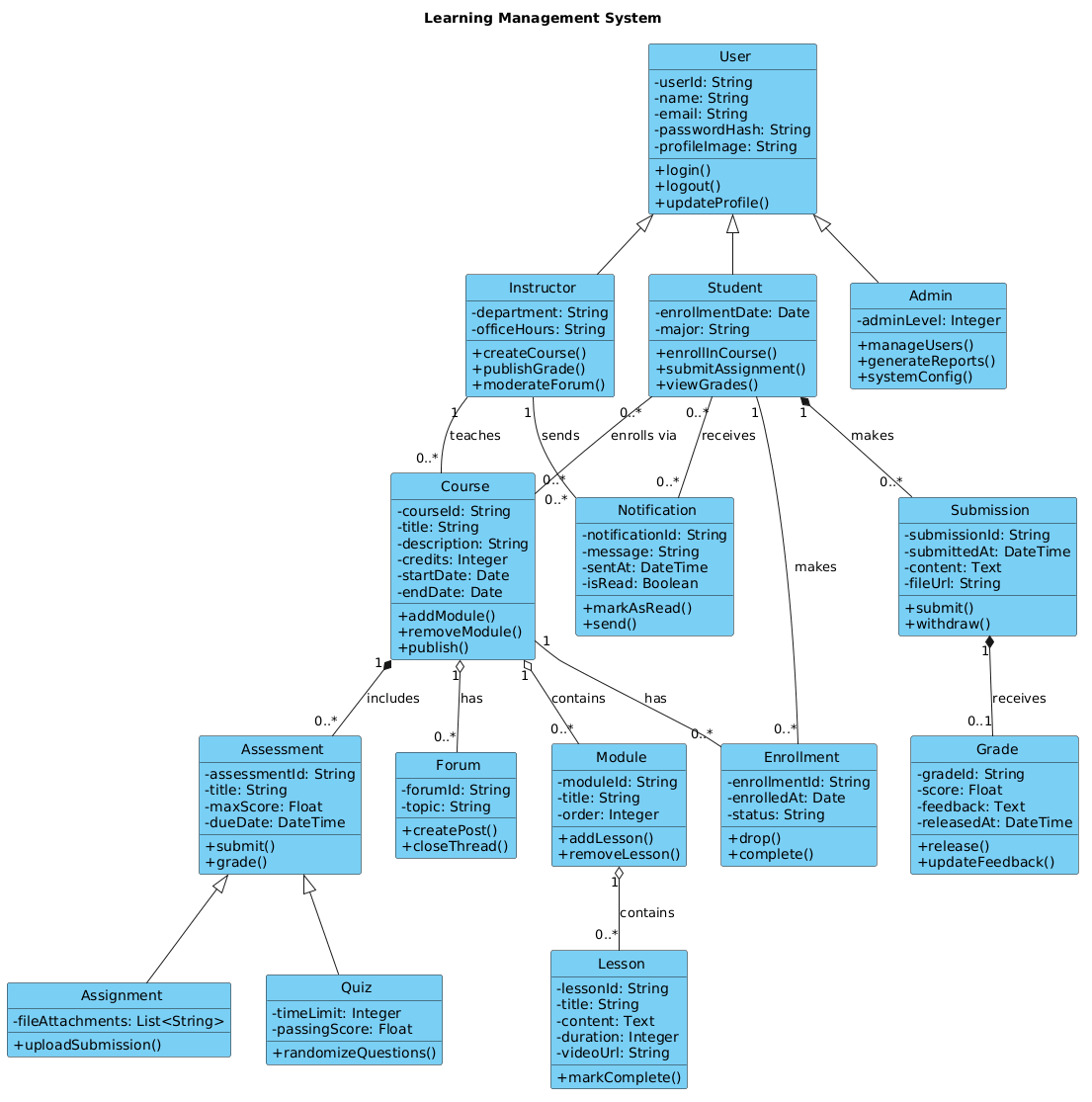
@startuml
!include https://static.visual-paradigm.com/web/resources/plantuml-stdlib/themes/vp.puml

title Learning Management System

/'
This class diagram models the core domain entities and relationships
within a typical Learning Management System (LMS).
The system supports user management, course creation, content delivery,
student enrollment, assessment, grading, and administrative reporting.
Key entities include users with different roles (instructor, student, admin),
courses composed of modules and lessons, assignments and quizzes as
assessments, submissions with grades, and notifications to keep
users informed. The diagram illustrates inheritance, associations,
aggregations, and compositions among these domain objects to
capture both structural and behavioral aspects of the LMS.
'/

class User {
  - userId: String
  - name: String
  - email: String
  - passwordHash: String
  - profileImage: String
  + login()
  + logout()
  + updateProfile()
}

class Student {
  - enrollmentDate: Date
  - major: String
  + enrollInCourse()
  + submitAssignment()
  + viewGrades()
}

class Instructor {
  - department: String
  - officeHours: String
  + createCourse()
  + publishGrade()
  + moderateForum()
}

class Admin {
  - adminLevel: Integer
  + manageUsers()
  + generateReports()
  + systemConfig()
}

class Course {
  - courseId: String
  - title: String
  - description: String
  - credits: Integer
  - startDate: Date
  - endDate: Date
  + addModule()
  + removeModule()
  + publish()
}

class Module {
  - moduleId: String
  - title: String
  - order: Integer
  + addLesson()
  + removeLesson()
}

class Lesson {
  - lessonId: String
  - title: String
  - content: Text
  - duration: Integer
  - videoUrl: String
  + markComplete()
}

class Assessment {
  - assessmentId: String
  - title: String
  - maxScore: Float
  - dueDate: DateTime
  + submit()
  + grade()
}

class Assignment {
  - fileAttachments: List<String>
  + uploadSubmission()
}

class Quiz {
  - timeLimit: Integer
  - passingScore: Float
  + randomizeQuestions()
}

class Submission {
  - submissionId: String
  - submittedAt: DateTime
  - content: Text
  - fileUrl: String
  + submit()
  + withdraw()
}

class Grade {
  - gradeId: String
  - score: Float
  - feedback: Text
  - releasedAt: DateTime
  + release()
  + updateFeedback()
}

class Enrollment {
  - enrollmentId: String
  - enrolledAt: Date
  - status: String
  + drop()
  + complete()
}

class Notification {
  - notificationId: String
  - message: String
  - sentAt: DateTime
  - isRead: Boolean
  + markAsRead()
  + send()
}

class Forum {
  - forumId: String
  - topic: String
  + createPost()
  + closeThread()
}

' Inheritance relationships
User <|-- Student
User <|-- Instructor
User <|-- Admin

' Association relationships
Instructor "1" -- "0..*" Course : teaches
Student "0..*" -- "0..*" Course : enrolls via
Course "1" -- "0..*" Enrollment : has
Student "1" -- "0..*" Enrollment : makes

' Aggregation relationships
Course "1" o-- "0..*" Module : contains
Module "1" o-- "0..*" Lesson : contains
Course "1" o-- "0..*" Forum : has

' Composition relationships
Course "1" *-- "0..*" Assessment : includes
Assessment <|-- Assignment
Assessment <|-- Quiz
Student "1" *-- "0..*" Submission : makes
Submission "1" *-- "0..1" Grade : receives

' Additional associations
Student "0..*" -- "0..*" Notification : receives
Instructor "1" -- "0..*" Notification : sends
@endumlStep-by-Step Architectural Walkthrough
Building this diagram requires a logical progression from high-level entities to specific relationships. Follow these phases to replicate the architecture in VPasCode.
Phase 1: Canvas Configuration & Layout Directives
Every PlantUML diagram begins with setup. We start by including the standard theme library to ensure professional styling without manual CSS configuration.
!include https://static.visual-paradigm.com/web/resources/plantuml-stdlib/themes/vp.pumlNext, we define the diagram title and add a comment block. Comments in PlantUML are enclosed in /' and '/. This block provides context for anyone reading the code later.
title Learning Management System

/'
This class diagram models the core domain entities...
'/
Phase 2: Declaring Core Entities, Actors, and Boundaries
The foundation of the LMS is the User entity. We define the base class with common attributes like userId and email. Then, we create specific roles that inherit from this base.
class User {
  - userId: String
  + login()
}

class Student {
  - enrollmentDate: Date
  + enrollInCourse()
}

' Define Inheritance
User <|-- Student
We repeat this pattern for Instructor and Admin. This ensures that common login logic is centralized in the User class, adhering to the DRY (Don't Repeat Yourself) principle.
Phase 3: Mapping Data Flows & Key Interactions
The core of the LMS is the content structure. A Course is not just a list; it is a container for Modules, which contain Lessons. We define these classes and then establish the hierarchy.
class Course {
  - courseId: String
  - credits: Integer
}

class Module {
  - moduleId: String