


In the finance industry, clarity is currency. When designing complex systems like an Automated Teller Machine (ATM), software architects must balance user experience, security protocols, and backend data integrity. A static structure diagram, specifically a Class Diagram, serves as the blueprint for developers, defining entities, their attributes, and the methods they expose.

Traditional diagramming tools often require heavy installations or manual drag-and-drop operations that can become tedious as models grow. By adopting a diagram-as-code approach with PlantUML in VPasCode, architects can version their documentation as code, ensuring that the visual model remains synchronized with the actual system implementation. This tutorial demonstrates how to construct a robust ATM Class Diagram using the VPasCode web editor, leveraging its instant browser-based rendering to prototype financial workflows without local dependencies.
Understanding the Model: Purpose, Scope & Problem Framing
Diagram Abstraction & Representation
A Class Diagram models the static structure of a system. In the context of an ATM, this means defining the core objects that exist in memory or the database: the physical machine, the user’s credentials, their financial accounts, and the transaction records. It captures what the system knows about itself, rather than how it behaves over time (which would be a Sequence Diagram).
Key abstractions include:
- Classes: Represent entities like
ATM,Customer, andAccount. - Attributes: Data stored within classes (e.g.,
balance: double). - Operations: Methods available to interact with the class (e.g.,
withdraw(amount)). - Relationships: How classes interact, such as inheritance (is-a), association (uses), or aggregation (has-a).
Target Domain Scope & Scenario
This model focuses on the core banking logic required for a standard ATM transaction. It intentionally excludes peripheral systems like network hardware drivers or specific banking compliance modules to keep the diagram readable. The scope covers the interaction between the ATM hardware, the customer’s card, the bank’s backend, and the various types of transactions (Withdrawal, Deposit, Balance Inquiry).
Key Takeaways & Educational Insights
By following this guide, you will learn how to:
- Apply the Template Method Pattern using PlantUML inheritance syntax.
- Distinguish between Aggregation and Composition in financial data lifecycles.
- Utilize VPasCode to visualize complex dependency graphs instantly.
Complete Diagram & Full Source Code
Below is the complete blueprint for the ATM System Class Diagram. This code includes the VPasCode theme integration, class definitions, and detailed relationship mappings.
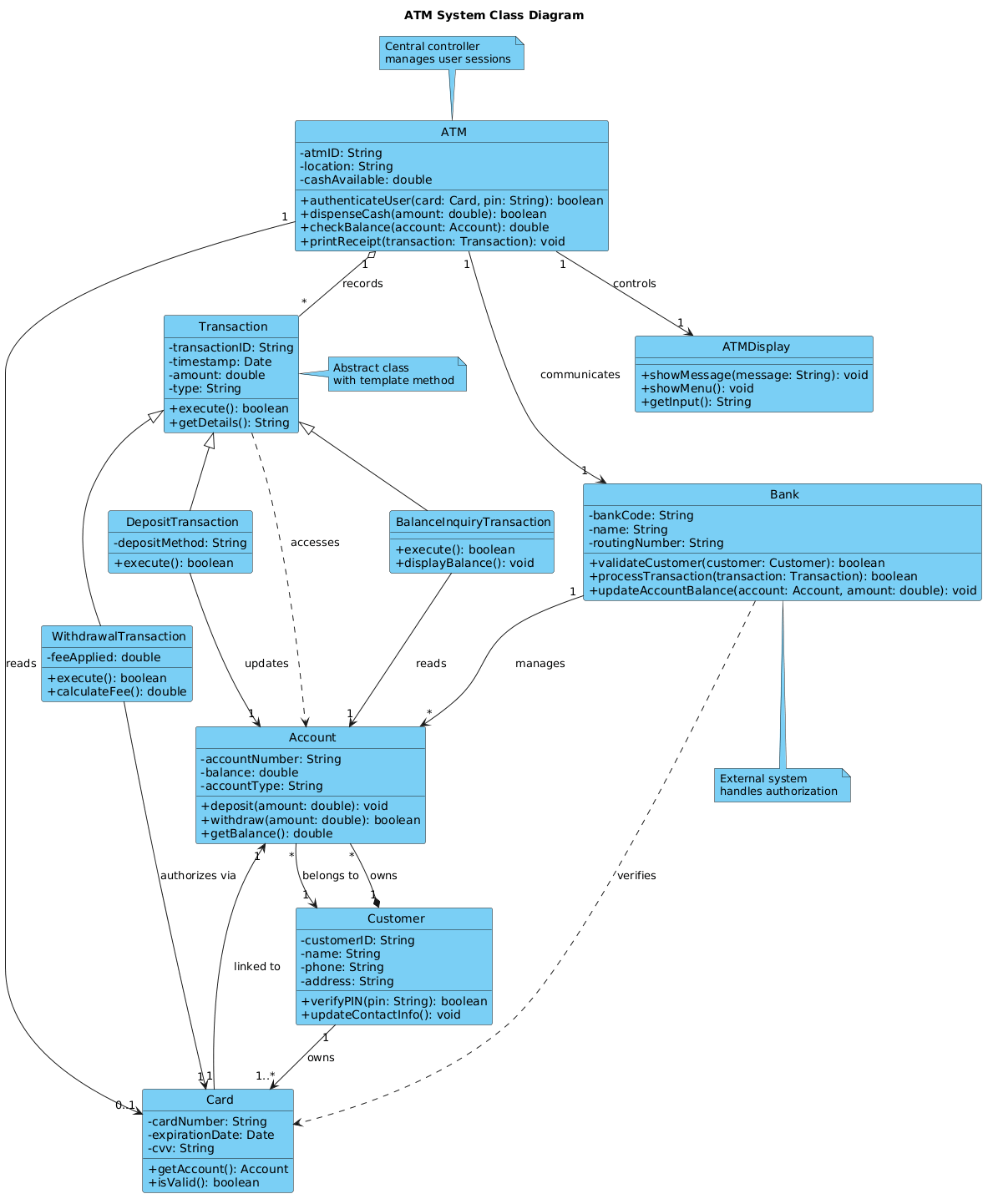
@startuml

!include https://static.visual-paradigm.com/web/resources/plantuml-stdlib/themes/vp.puml

title ATM System Class Diagram

' ========== CORE CLASSES ==========

class ATM {
  - atmID: String
  - location: String
  - cashAvailable: double
  + authenticateUser(card: Card, pin: String): boolean
  + dispenseCash(amount: double): boolean
  + checkBalance(account: Account): double
  + printReceipt(transaction: Transaction): void
}

class Card {
  - cardNumber: String
  - expirationDate: Date
  - cvv: String
  + getAccount(): Account
  + isValid(): boolean
}

class Customer {
  - customerID: String
  - name: String
  - phone: String
  - address: String
  + verifyPIN(pin: String): boolean
  + updateContactInfo(): void
}

class Account {
  - accountNumber: String
  - balance: double
  - accountType: String
  + deposit(amount: double): void
  + withdraw(amount: double): boolean
  + getBalance(): double
}

class Transaction {
  - transactionID: String
  - timestamp: Date
  - amount: double
  - type: String
  + execute(): boolean
  + getDetails(): String
}

class WithdrawalTransaction {
  - feeApplied: double
  + execute(): boolean
  + calculateFee(): double
}

class DepositTransaction {
  - depositMethod: String
  + execute(): boolean
}

class BalanceInquiryTransaction {
  + execute(): boolean
  + displayBalance(): void
}

class Bank {
  - bankCode: String
  - name: String
  - routingNumber: String
  + validateCustomer(customer: Customer): boolean
  + processTransaction(transaction: Transaction): boolean
  + updateAccountBalance(account: Account, amount: double): void
}

class ATMDisplay {
  + showMessage(message: String): void
  + showMenu(): void
  + getInput(): String
}

' ========== RELATIONSHIPS ==========

' Association: ATM "has a" Card (temporary)
ATM "1" --> "0..1" Card : reads

' Association: ATM "has" ATMDisplay
ATM "1" --> "1" ATMDisplay : controls

' Association: ATM communicates with Bank
ATM "1" --> "1" Bank : communicates

' Association: Customer owns Card(s)
Customer "1" --> "1..*" Card : owns

' Association: Card linked to Account
Card "1" --> "1" Account : linked to

' Association: Account belongs to Customer
Account "*" --> "1" Customer : belongs to

' Association: Bank manages Accounts
Bank "1" --> "*" Account : manages

' Generalization (inheritance): Transaction subclasses
Transaction <|-- WithdrawalTransaction
Transaction <|-- DepositTransaction
Transaction <|-- BalanceInquiryTransaction

' Aggregation: ATM aggregates Transaction records
ATM "1" o-- "*" Transaction : records

' Composition: Account cannot exist without Customer (stronger lifecycle)
Customer "1" *-- "*" Account : owns

' Dependency: Transaction depends on Account to execute
Transaction ..> Account : accesses

' Association: WithdrawalTransaction uses Card for authorization
WithdrawalTransaction --> "1" Card : authorizes via

' Association: DepositTransaction updates Account
DepositTransaction --> "1" Account : updates

' Association: BalanceInquiryTransaction reads Account
BalanceInquiryTransaction --> "1" Account : reads

' Association: Bank validates Customer through Card
Bank ..> Card : verifies

' ========== NOTES ==========
note top of ATM : Central controller\nmanages user sessions
note right of Transaction : Abstract class\nwith template method
note bottom of Bank : External system\nhandles authorization

@endumlStep-by-Step Architectural Walkthrough
Building a professional diagram requires a structured approach. We will construct this model in four logical phases, starting with the environment setup and moving through entity declaration, relationship mapping, and finally, visual polish.
Phase 1: Canvas Configuration & Layout Directives
Before defining any classes, we must configure the rendering environment. This ensures the diagram matches the VPasCode design standards and is readable across different screen sizes. We begin by including the standard library theme and setting a descriptive title.
!include https://static.visual-paradigm.com/web/resources/plantuml-stdlib/themes/vp.puml

title ATM System Class Diagram
The !include directive pulls in the VPasCode theme definitions, which control colors, fonts, and border styles automatically. The title directive ensures the diagram has a clear header when exported or shared.
Phase 2: Declaring Core Entities, Actors, and Boundaries
Next, we define the core classes. In PlantUML, a class is declared using the class keyword followed by the name and a block containing attributes and methods. We use - for private members and + for public members.
class ATM {
  - atmID: String
  - cashAvailable: double
  + authenticateUser(card: Card, pin: String): boolean
}
Notice how we define the Card and Account classes similarly. In a finance context, precise typing (e.g., double for currency, String for IDs) is crucial for generating accurate documentation.
Phase 3: Mapping Data Flows & Key Interactions
Once entities exist, we define how they relate. We use arrows to indicate direction and cardinality (multiplicity). For example, a Customer can own multiple cards, while an ATM interacts with exactly one Bank system.
Customer "1" --> "1..*" Card : owns
ATM "1" --> "1" Bank : communicates
These associations establish the structural integrity of the system. The 1..* notation indicates that one customer must have at least one card, while the 1 indicates a singular connection to the bank.
Phase 4: Grouping, Annotations & Visual Polish
To add context, we use inheritance and notes. Inheritance is shown with a hollow triangle arrow (<|--), indicating that WithdrawalTransaction is a specialized type of Transaction. Notes provide additional metadata about the class’s role.
Transaction <|-- WithdrawalTransaction
note top of ATM : Central controller\nmanages user sessions
The note command allows you to attach explanatory text to specific elements, which is invaluable for onboarding new developers to the architecture.
Syntax & Keyword Deep Dive
Understanding the specific PlantUML syntax used in this diagram empowers you to extend it. Here are the critical keywords and symbols:
class: Declares a new entity with its internal structure.+and-: Access modifiers.+denotes public visibility, while-denotes private visibility.-->: Represents a standard Association (dependency or relationship) between two classes.<|--: Represents Generalization (Inheritance). The arrow points to the parent class.o--: Represents Aggregation. A weak "has-a" relationship where the child can exist independently.*--: Represents Composition. A strong "part-of" relationship where the child's lifecycle depends on the parent...>: Represents a Dependency. A "uses-a" relationship that is less permanent than an association.: label: Adds a text label to the relationship line to explain the nature of the connection.
Best Practices & Pitfalls to Avoid
To maintain high-quality diagrams in VPasCode, adhere to these modeling guidelines:
- Keep Diagrams Modular: Avoid creating a single massive diagram for the entire system. Group related classes into packages or separate diagrams (e.g., one for Core Banking, one for ATM Hardware).
- Consistent Naming Conventions: Always use PascalCase for class names (e.g.,
WithdrawalTransaction) to distinguish them from attributes or methods. - Manage Visual Complexity: If a relationship line becomes too cluttered, use a note or a separate diagram to explain the logic rather than adding more arrows.
- Use Stereotypes Wisely: While not used in this basic example, consider using
<<interface>>or<<abstract>>for classes that define contracts rather than implementations.
Try It Yourself with VPasCode
Start Building PlantUML Class Diagrams Faster with VPasCode
Test, preview, and customize your ATM architecture online in VPasCode without installing any tools.