


In the dynamic world of music education and instrument retail, businesses face a unique challenge: managing three distinct but deeply interconnected operational domains. A single customer might purchase a guitar, book a weekly lesson with an instructor, and later bring that same instrument in for a professional repair. To manage this complexity effectively, a robust data architecture is required—one that seamlessly links inventory, personnel, appointments, and service history without creating data silos. Visualizing this architecture through an Entity-Relationship Diagram (ERD) is the first critical step in ensuring data integrity and business logic clarity.

Traditional spreadsheet-based tracking often fails to capture the nuances of these relationships, leading to scheduling conflicts, inventory mismatches, and disjointed customer records. By adopting a diagram-as-code approach using PlantUML, architects can define these relationships with precision, version the schema logic, and instantly render a professional-grade blueprint. This tutorial leverages VPasCode, a free web-based diagram editor, to construct a comprehensive ERD that models a music instrument platform handling sales, lessons, and repairs, demonstrating how code-driven modeling brings immediate clarity to complex business requirements.
Understanding the Model: Purpose, Scope & Problem Framing
This ERD serves as the architectural blueprint for a multi-service music platform. Unlike simple retail databases, this model must accommodate the temporal nature of lessons (scheduling, packages, instructor availability) and the diagnostic nature of repairs (booking, parts usage, cost estimation), all while maintaining a unified view of the customer and inventory.
Diagram Abstraction & Representation
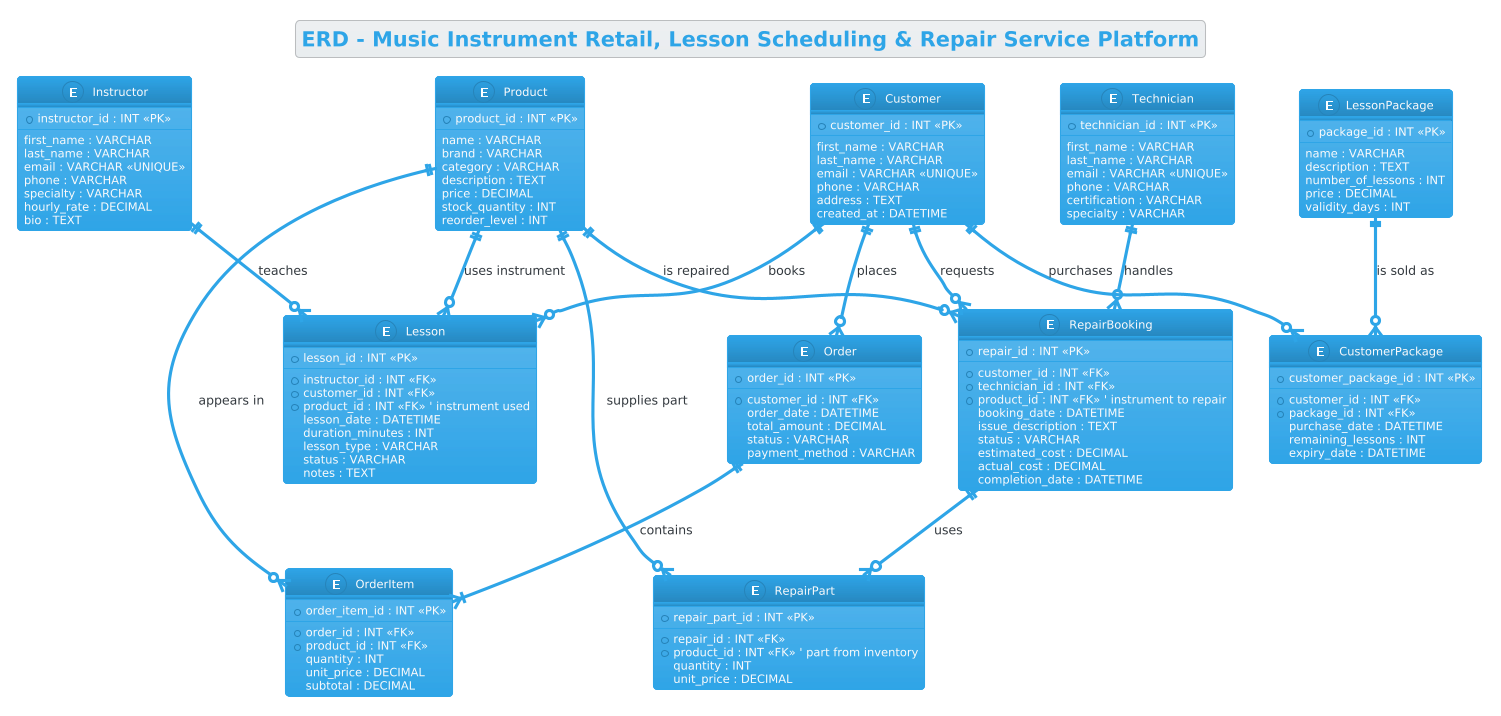
In this context, the ERD abstracts the physical database tables into logical entities. Each entity represents a core business object, such as Customer, Product, or Lesson. The attributes within these entities define the data points (e.g., price, duration, certification), while the relationships (lines connecting entities) define the cardinality and logic of how these objects interact. For instance, a single Instructor can teach many Lessons, but a specific Lesson is taught by only one Instructor. This visual representation ensures that the eventual database schema enforces these business rules automatically.
Target Domain Scope & Scenario
The scope of this diagram covers three primary business pillars:
- Retail Sales: Managing products, stock levels, and order transactions.
- Lesson Scheduling: Tracking instructor assignments, student bookings, and prepaid lesson packages.
- Repair Services: Handling service requests, technician assignments, and parts inventory usage.
The model explicitly handles the intersection of these domains, such as a Lesson that utilizes a specific Product (instrument) or a RepairBooking that references a customer’s history.
Key Takeaways & Educational Insights
By following this guide, you will learn how to model complex one-to-many and many-to-many relationships, implement associative entities (like OrderItem and RepairPart) to resolve junctions, and structure a schema that supports both transactional and service-oriented workflows. You will gain insight into how to organize a large ERD into logical sections for readability and how to use PlantUML’s syntax to clearly denote primary keys and foreign keys.
Complete Diagram & Full Source Code
Below is the complete, rendered visualization of the Music Instrument Retail & Service Platform ERD. This diagram showcases the final result of the coding process, illustrating how entities like Customer, Instructor, and Product connect to operational entities like Lesson and RepairBooking.
Here is the complete source code used to generate this diagram. You can copy this code directly into the VPasCode editor to see it live.
@startuml
/'
This diagram illustrates the entity-relationship model for a music instrument retail and service platform.
It captures the core business domains: retail sales, lesson scheduling, and repair service bookings.
The model connects customers, instruments, instructors, lessons, repair technicians, and service orders,
showing how inventory, appointments, and service history are linked across the platform.
'/
!theme cerulean

title ERD - Music Instrument Retail, Lesson Scheduling & Repair Service Platform

' ─────────────────────────────────────────
' CUSTOMERS & USERS
' ─────────────────────────────────────────
entity "Customer" as customer {
  * customer_id : INT <<PK>>
  --
  first_name : VARCHAR
  last_name : VARCHAR
  email : VARCHAR <<UNIQUE>>
  phone : VARCHAR
  address : TEXT
  created_at : DATETIME
}

entity "Instructor" as instructor {
  * instructor_id : INT <<PK>>
  --
  first_name : VARCHAR
  last_name : VARCHAR
  email : VARCHAR <<UNIQUE>>
  phone : VARCHAR
  specialty : VARCHAR
  hourly_rate : DECIMAL
  bio : TEXT
}

entity "Technician" as technician {
  * technician_id : INT <<PK>>
  --
  first_name : VARCHAR
  last_name : VARCHAR
  email : VARCHAR <<UNIQUE>>
  phone : VARCHAR
  certification : VARCHAR
  specialty : VARCHAR
}

' ─────────────────────────────────────────
' RETAIL / INVENTORY
' ─────────────────────────────────────────
entity "Product" as product {
  * product_id : INT <<PK>>
  --
  name : VARCHAR
  brand : VARCHAR
  category : VARCHAR
  description : TEXT
  price : DECIMAL
  stock_quantity : INT
  reorder_level : INT
}

entity "Order" as order {
  * order_id : INT <<PK>>
  --
  * customer_id : INT <<FK>>
  order_date : DATETIME
  total_amount : DECIMAL
  status : VARCHAR
  payment_method : VARCHAR
}

entity "OrderItem" as order_item {
  * order_item_id : INT <<PK>>
  --
  * order_id : INT <<FK>>
  * product_id : INT <<FK>>
  quantity : INT
  unit_price : DECIMAL
  subtotal : DECIMAL
}

' ─────────────────────────────────────────
' LESSON SCHEDULING
' ─────────────────────────────────────────
entity "Lesson" as lesson {
  * lesson_id : INT <<PK>>
  --
  * instructor_id : INT <<FK>>
  * customer_id : INT <<FK>>
  * product_id : INT <<FK>> ' instrument used
  lesson_date : DATETIME
  duration_minutes : INT
  lesson_type : VARCHAR
  status : VARCHAR
  notes : TEXT
}

entity "LessonPackage" as lesson_package {
  * package_id : INT <<PK>>
  --
  name : VARCHAR
  description : TEXT
  number_of_lessons : INT
  price : DECIMAL
  validity_days : INT
}

entity "CustomerPackage" as customer_package {
  * customer_package_id : INT <<PK>>
  --
  * customer_id : INT <<FK>>
  * package_id : INT <<FK>>
  purchase_date : DATETIME
  remaining_lessons : INT
  expiry_date : DATETIME
}

' ─────────────────────────────────────────
' REPAIR SERVICE BOOKING
' ─────────────────────────────────────────
entity "RepairBooking" as repair_booking {
  * repair_id : INT <<PK>>
  --
  * customer_id : INT <<FK>>
  * technician_id : INT <<FK>>
  * product_id : INT <<FK>> ' instrument to repair
  booking_date : DATETIME
  issue_description : TEXT
  status : VARCHAR
  estimated_cost : DECIMAL
  actual_cost : DECIMAL
  completion_date : DATETIME
}

entity "RepairPart" as repair_part {
  * repair_part_id : INT <<PK>>
  --
  * repair_id : INT <<FK>>
  * product_id : INT <<FK>> ' part from inventory
  quantity : INT
  unit_price : DECIMAL
}

' ─────────────────────────────────────────
' RELATIONSHIPS
' ─────────────────────────────────────────
customer ||--o{ order : "places"
order ||--|{ order_item : "contains"
product ||--o{ order_item : "appears in"

customer ||--o{ lesson : "books"
instructor ||--o{ lesson : "teaches"
product ||--o{ lesson : "uses instrument"

customer ||--o{ customer_package : "purchases"
lesson_package ||--o{ customer_package : "is sold as"

customer ||--o{ repair_booking : "requests"
technician ||--o{ repair_booking : "handles"
product ||--o{ repair_booking : "is repaired"

repair_booking ||--o{ repair_part : "uses"
product ||--o{ repair_part : "supplies part"

@endumlStep-by-Step Architectural Walkthrough
Phase 1: Canvas Configuration & Layout Directives
Before defining any data structures, we must set the stage for the diagram’s visual style. PlantUML allows us to control the overall theme and layout direction to ensure the diagram is readable regardless of its complexity. In this model, we use the !theme cerulean directive to apply a professional, blue-toned color scheme that is easy on the eyes for technical documentation. We also include a comment block at the very top to describe the diagram’s context, which helps future maintainers understand the purpose of the schema immediately.
/'
This diagram illustrates the entity-relationship model for a music instrument retail and service platform.
It captures the core business domains: retail sales, lesson scheduling, and repair service bookings.
'/
!theme cerulean

title ERD - Music Instrument Retail, Lesson Scheduling & Repair Service Platform
Phase 2: Declaring Core Entities, Actors, and Boundaries
The foundation of any ERD lies in the entities. We group these logically to maintain order. In the code, we use the entity keyword followed by the entity name and an alias. Inside the curly braces, we define the attributes. For primary keys, we use the * symbol, and for foreign keys, we use the * prefix in the attribute definition (e.g., * customer_id : INT <). We also use the < and < stereotypes to explicitly mark constraints.
entity "Customer" as customer {
  * customer_id : INT <>
  --
  first_name : VARCHAR
  last_name : VARCHAR
  email : VARCHAR <>
  created_at : DATETIME
}
Notice the separation between the primary key and other attributes using --. This is a best practice in PlantUML ERD to visually distinguish the identifier from the descriptive data.
Phase 3: Mapping Data Flows & Key Interactions
Once entities are defined, we establish the relationships that bind them. PlantUML uses specific arrow syntax to denote cardinality. For example, ||--o{ means “one or more” on the left and “zero or one” on the right. In our music platform, a Customer can place many Orders, but an Order belongs to only one Customer. This is represented as customer ||--o{ order : "places".
customer ||--o{ order : "places"
order ||--|{ order_item : "contains"
product ||--o{ order_item : "appears in"
We also handle complex scenarios like the Lesson entity, which links a Customer, an Instructor, and a Product (the instrument used). This ternary relationship is modeled by connecting the central Lesson entity to all three parent entities, ensuring data consistency across the scheduling system.
Phase 4: Grouping, Annotations & Visual Polish
To make the diagram scalable, we use comment sections (like ' ─────────────────────────────────) to visually separate the different business domains (Retail, Lessons, Repairs). This helps the reader navigate the diagram without getting lost in the web of relationships. We also use descriptive labels on the relationship lines (e.g., "handles", "uses instrument") to make the diagram self-documenting, so that the relationship logic is clear without needing external documentation.
Syntax & Keyword Deep Dive
Understanding the specific PlantUML syntax is crucial for building accurate ERDs. Here is a breakdown of the key elements used in this music retail model:
entity: The primary keyword to define a database table. It takes a display name and an internal alias (e.g.,as customer) which is used for referencing in relationships.*(Prefix): Placed before an attribute name (e.g.,* customer_id) to indicate it is a key. In the relationship syntax, it often implies a foreign key reference.<&> <: Stereotypes used to explicitly label Primary Keys and Foreign Keys, enhancing readability for database developers.> ||--o{&||--|{: Relationship arrows.||means “mandatory one”,o{means “optional many”, and|{means “mandatory many”. These define the cardinality constraints of the data model./' ... '/: The syntax for multi-line comments. This is used here to provide a high-level summary of the diagram’s purpose at the beginning of the code.
Best Practices & Pitfalls to Avoid
When modeling complex systems like a music retail platform, adhering to best practices ensures your diagram remains maintainable and useful over time.
- Modularize Your Code: As demonstrated in this tutorial, use comment blocks to separate logical domains (Retail vs. Lessons vs. Repairs). This prevents the code from becoming a single, unreadable block of text.
- Consistent Naming Conventions: Use singular nouns for entities (e.g.,
Customerinstead ofCustomers) and lowercase aliases (e.g.,as customer) for relationships. This is a standard convention in database design and makes the code easier to read. - Explicit Cardinality: Never leave relationships ambiguous. Always specify the cardinality (one-to-many, many-to-many) using the correct arrow syntax. Ambiguity here can lead to database design errors in the future.
- Use Aliases: Always assign an alias to an entity (e.g.,
as order_item). This prevents long, repetitive names in your relationship lines and makes the code significantly cleaner.
Try It Yourself with VPasCode
Start Building Complex ERDs Faster with VPasCode
Design, edit, and export your Music Retail database schema instantly in your browser with our free PlantUML editor—no installation required.