


In the rapidly evolving landscape of digital health, the integrity of data architecture is paramount for platforms that manage patient rehabilitation. A physical therapy exercise prescription and progress monitoring system is not merely a database of workouts; it is a complex ecosystem where clinical outcomes depend on the precise tracking of patient history, therapist expertise, exercise parameters, and session logs. For software architects and healthcare developers, visualizing these intricate relationships is the first step toward building a compliant, scalable, and user-friendly application.

Traditional drag-and-drop diagramming tools often struggle to maintain consistency when modeling complex healthcare schemas involving multiple entity types and strict cardinality rules. Diagram-as-code approaches, specifically using PlantUML, offer a superior alternative by allowing developers to define the schema in text, ensuring version-friendly documentation and rapid iteration. By leveraging VPasCode, a free web-based editor, architects can instantly render these complex Entity Relationship Diagrams (ERDs) without the overhead of local installations, enabling real-time collaboration and immediate visual feedback on data modeling decisions.
Understanding the Model: Purpose, Scope & Problem Framing
Diagram Abstraction & Representation
This Entity Relationship Diagram (ERD) serves as the structural blueprint for a Rehabilitation Physical Therapy platform. It models the critical data entities required to support the clinical workflow: from patient intake and diagnosis to the creation of personalized exercise plans, the logging of daily sessions, and the assessment of progress over time. The diagram uses standard ERD notation to define entities (tables), their attributes (columns), and the cardinality of relationships (foreign keys) between them.
Target Domain Scope & Scenario
The scope of this model covers the core operational domain of a physical therapy clinic or remote rehabilitation service. It explicitly models the interaction between Users (who can be either Patients or Therapists), the Exercise library, and the dynamic records of Prescriptions, Sessions, and Progress. It intentionally excludes peripheral systems like billing or insurance processing to focus on the clinical data lifecycle, ensuring the diagram remains clear and focused on patient care workflows.
Key Takeaways & Educational Insights
By studying this diagram, you will gain insights into how to structure a healthcare database to support flexible exercise prescription logic, track patient progress with granular metrics (e.g., pain levels, range of motion), and maintain a clear audit trail of clinical notes. You will learn how to use inheritance patterns (User as a parent to Patient and Therapist) and how to manage many-to-many relationships through junction entities like ExercisePrescription.
Complete Diagram & Full Source Code
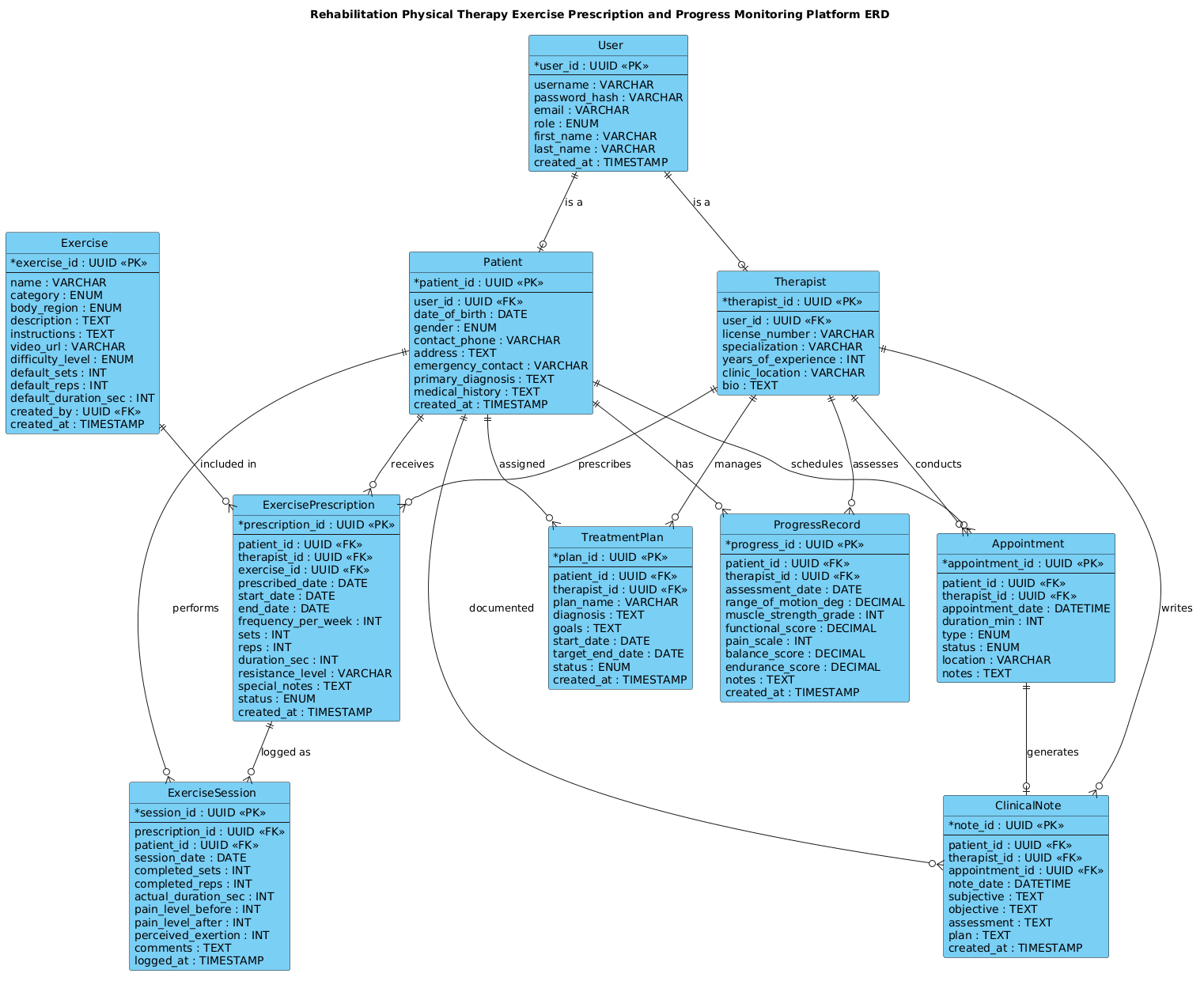
@startuml
!include https://static.visual-paradigm.com/web/resources/plantuml-stdlib/themes/vp.puml

title Rehabilitation Physical Therapy Exercise Prescription and Progress Monitoring Platform ERD

/'
This ERD models a rehabilitation physical therapy platform where clinicians prescribe
personalized exercise programs to patients and track their recovery over time. The diagram
captures the core entities needed to manage therapy plans, exercise definitions, prescribed
routines, session logging, progress assessments, and clinical notes. It supports the workflow
from initial patient intake and diagnosis through exercise prescription, daily completion
tracking, periodic outcome measurement, and ongoing plan adjustment. Key relationships
connect patients to their prescriptions, prescriptions to the exercises they contain, and
patients to the progress records generated during rehabilitation.
'/

' ==================== ENTITIES ====================

entity "User" as user {
  * user_id : UUID <<PK>>
  --
  username : VARCHAR
  password_hash : VARCHAR
  email : VARCHAR
  role : ENUM
  first_name : VARCHAR
  last_name : VARCHAR
  created_at : TIMESTAMP
}

entity "Patient" as patient {
  * patient_id : UUID <<PK>>
  --
  user_id : UUID <<FK>>
  date_of_birth : DATE
  gender : ENUM
  contact_phone : VARCHAR
  address : TEXT
  emergency_contact : VARCHAR
  primary_diagnosis : TEXT
  medical_history : TEXT
  created_at : TIMESTAMP
}

entity "Therapist" as therapist {
  * therapist_id : UUID <<PK>>
  --
  user_id : UUID <<FK>>
  license_number : VARCHAR
  specialization : VARCHAR
  years_of_experience : INT
  clinic_location : VARCHAR
  bio : TEXT
}

entity "Exercise" as exercise {
  * exercise_id : UUID <<PK>>
  --
  name : VARCHAR
  category : ENUM
  body_region : ENUM
  description : TEXT
  instructions : TEXT
  video_url : VARCHAR
  difficulty_level : ENUM
  default_sets : INT
  default_reps : INT
  default_duration_sec : INT
  created_by : UUID <<FK>>
  created_at : TIMESTAMP
}

entity "ExercisePrescription" as prescription {
  * prescription_id : UUID <<PK>>
  --
  patient_id : UUID <<FK>>
  therapist_id : UUID <<FK>>
  exercise_id : UUID <<FK>>
  prescribed_date : DATE
  start_date : DATE
  end_date : DATE
  frequency_per_week : INT
  sets : INT
  reps : INT
  duration_sec : INT
  resistance_level : VARCHAR
  special_notes : TEXT
  status : ENUM
  created_at : TIMESTAMP
}

entity "ExerciseSession" as session {
  * session_id : UUID <<PK>>
  --
  prescription_id : UUID <<FK>>
  patient_id : UUID <<FK>>
  session_date : DATE
  completed_sets : INT
  completed_reps : INT
  actual_duration_sec : INT
  pain_level_before : INT
  pain_level_after : INT
  perceived_exertion : INT
  comments : TEXT
  logged_at : TIMESTAMP
}

entity "ProgressRecord" as progress {
  * progress_id : UUID <<PK>>
  --
  patient_id : UUID <<FK>>
  therapist_id : UUID <<FK>>
  assessment_date : DATE
  range_of_motion_deg : DECIMAL
  muscle_strength_grade : INT
  functional_score : DECIMAL
  pain_scale : INT
  balance_score : DECIMAL
  endurance_score : DECIMAL
  notes : TEXT
  created_at : TIMESTAMP
}

entity "TreatmentPlan" as plan {
  * plan_id : UUID <<PK>>
  --
  patient_id : UUID <<FK>>
  therapist_id : UUID <<FK>>
  plan_name : VARCHAR
  diagnosis : TEXT
  goals : TEXT
  start_date : DATE
  target_end_date : DATE
  status : ENUM
  created_at : TIMESTAMP
}

entity "Appointment" as appointment {
  * appointment_id : UUID <<PK>>
  --
  patient_id : UUID <<FK>>
  therapist_id : UUID <<FK>>
  appointment_date : DATETIME
  duration_min : INT
  type : ENUM
  status : ENUM
  location : VARCHAR
  notes : TEXT
}

entity "ClinicalNote" as note {
  * note_id : UUID <<PK>>
  --
  patient_id : UUID <<FK>>
  therapist_id : UUID <<FK>>
  appointment_id : UUID <<FK>>
  note_date : DATETIME
  subjective : TEXT
  objective : TEXT
  assessment : TEXT
  plan : TEXT
  created_at : TIMESTAMP
}

' ==================== RELATIONSHIPS ====================

user ||--o| patient : "is a"
user ||--o| therapist : "is a"

patient ||--o{ prescription : "receives"
therapist ||--o{ prescription : "prescribes"
exercise ||--o{ prescription : "included in"

prescription ||--o{ session : "logged as"
patient ||--o{ session : "performs"

patient ||--o{ progress : "has"
therapist ||--o{ progress : "assesses"

patient ||--o{ plan : "assigned"
therapist ||--o{ plan : "manages"

patient ||--o{ appointment : "schedules"
therapist ||--o{ appointment : "conducts"

patient ||--o{ note : "documented"
therapist ||--o{ note : "writes"
appointment ||--o| note : "generates"

@endumlStep-by-Step Architectural Walkthrough
Phase 1: Canvas Configuration & Layout Directives
The foundation of any professional PlantUML diagram lies in its configuration. In this section, we set the theme and title to ensure the diagram aligns with the Visual Paradigm aesthetic and clearly states its purpose.
We begin by including the standard PlantUML library theme. This directive loads a pre-defined set of styles, colors, and fonts that give the diagram a modern, consistent look without manual CSS tweaking.
!include https://static.visual-paradigm.com/web/resources/plantuml-stdlib/themes/vp.pumlNext, we define the diagram title. This appears at the top of the rendered output, providing immediate context for stakeholders reviewing the architecture.
title Rehabilitation Physical Therapy Exercise Prescription and Progress Monitoring Platform ERDFinally, we add a comment block using the /' and '/ syntax. This allows us to embed a rich description of the diagram’s context directly within the code, serving as documentation that travels with the file.
/'
This ERD models a rehabilitation physical therapy platform...
'/
Phase 2: Declaring Core Entities, Actors, and Boundaries
The core of the ERD is the definition of entities. In PlantUML, we use the entity keyword followed by the entity name (in quotes), an alias, and a block containing attributes.
We start with the User entity. This acts as a parent entity in our inheritance model. It contains authentication and basic profile data.
entity "User" as user {
  * user_id : UUID <>
  --
  username : VARCHAR
  password_hash : VARCHAR
  email : VARCHAR
  role : ENUM
  first_name : VARCHAR
  last_name : VARCHAR
  created_at : TIMESTAMP
}
Notice the use of * to mark the Primary Key (PK) and UUID as the data type. We also use the -- separator to visually divide keys from other attributes, a best practice for readability.
Similarly, we define Patient and Therapist entities. Both reference user_id as a Foreign Key (FK) to link back to the User entity, establishing the “is a” relationship (a Patient is a User).
entity "Patient" as patient {
  * patient_id : UUID <>
  --
  user_id : UUID <>
  date_of_birth : DATE
  ...
We continue this pattern for Exercise, ExercisePrescription, ExerciseSession, ProgressRecord, TreatmentPlan, Appointment, and ClinicalNote, ensuring each entity captures the specific data points required for the healthcare domain.
Phase 3: Mapping Data Flows & Key Interactions
Once entities are defined, we map the relationships using the ||--o{ and ||--o| syntax. This notation defines cardinality: one-to-many or one-to-one.
For example, a single Patient can receive many Prescriptions, but a Prescription belongs to only one Patient.
patient ||--o{ prescription : "receives"We also model the relationship between Therapist and Prescription, indicating that a therapist prescribes multiple plans.
therapist ||--o{ prescription : "prescribes"The ExercisePrescription entity acts as a junction table (or associative entity) linking Patient, Therapist, and Exercise. This allows a patient to have multiple prescriptions, and each prescription can include specific details like sets, reps, and resistance_level that differ from the default exercise definition.
exercise ||--o{ prescription : "included in"We continue mapping relationships for sessions, progress records, and clinical notes, ensuring the flow of data from intake to assessment is logically sound.
Phase 4: Grouping, Annotations & Visual Polish
While the core logic is in the relationships, visual polish enhances readability. The VP theme handles most styling, but we can add specific annotations.
We use the role attribute in the User entity to differentiate between a patient and a therapist at the application level, though the ERD uses separate entities for clarity. We also ensure that all foreign keys are explicitly marked with < in the attribute list, which helps developers quickly identify referential integrity constraints.
The use of ENUM for fields like gender, difficulty_level, and status ensures data consistency and restricts input to valid values, a critical requirement in healthcare applications.
Syntax & Keyword Deep Dive
To build this diagram effectively, it is essential to understand the specific PlantUML syntax elements used:
entity: The primary keyword used to define a table or entity in an ERD. It is followed by the display name and an alias.entity "Name" as alias: Allows you to specify a friendly name (e.g., “Patient”) and a shorter alias (e.g.,patient) for use in relationship definitions.*(Asterisk): Placed before an attribute name to denote it as the Primary Key (PK).<and> <: Stereotypes used to explicitly label Primary Keys and Foreign Keys within the entity block.> --(Double Dash): A visual separator line within an entity block that divides keys from other attributes.||--o{: The relationship arrow syntax representing “One or more to Zero or more” (One-to-Many). The||indicates mandatory participation on the left, ando{indicates optional participation on the right.||--o|: The relationship arrow syntax representing “One or more to Zero or One” (One-to-One or Optional One)./' ... '/: The syntax for multi-line comments, allowing for detailed documentation within the code block.!include: A directive to load external resources, such as themes or libraries, to standardize the diagram’s appearance.
Best Practices & Pitfalls to Avoid
When modeling complex healthcare ERDs, adherence to best practices ensures the diagram remains maintainable and accurate.
1. Use Aliases for Readability
Always define an alias for your entities (e.g., entity "Patient" as patient). This prevents the diagram from becoming cluttered with long entity names in relationship lines and makes the code easier to read.
2. Normalize Data Types
Be consistent with data types. Use UUID for unique identifiers, TIMESTAMP for creation/modification times, and ENUM for fixed lists of values. This clarity helps developers map the diagram directly to database schema definitions.
3. Avoid Over-Normalization in Visual Models
While normalization is key for databases, ERDs should focus on business relationships. Ensure that junction entities like ExercisePrescription are used appropriately to capture attributes specific to the relationship (e.g., the specific sets prescribed) rather than just linking tables.
4. Document Relationships Clearly
Always label your relationship lines (e.g., : "receives"). Without labels, the meaning of the connection is ambiguous, especially in a diagram with many entities.
Try It Yourself with VPasCode
Start Building Healthcare ERDs Faster with VPasCode
Instantly render and customize your complex PlantUML Entity Relationship Diagrams online with zero local setup or tool installation.