


In the fast-paced world of retail and e-commerce, the integrity of data flows is the backbone of a successful online platform. Before a single line of application code is written, architects must visualize how customers interact with products, how inventory is tracked, and how complex transactions like checkout and payment are structured. A well-designed Entity-Relationship Diagram (ERD) serves as the blueprint for this digital ecosystem, ensuring that relationships between customers, orders, and inventory are logically sound and scalable.
However, traditional drag-and-drop diagramming tools often struggle with the complexity of relational database schemas. They can become cluttered, difficult to version, and hard to share with development teams. This is where diagram-as-code comes into play. By writing the schema definition in text using PlantUML, developers can maintain a clear, versionable, and easily editable model of their data architecture. Using VPasCode, the free web-based PlantUML editor, teams can instantly render these complex ERDs, validate their logic, and export them for documentation without the overhead of installing local software or configuring build environments.
Understanding the Model: Purpose, Scope & Problem Framing
The diagram we are about to construct represents a comprehensive E-Commerce Product Catalog and Shopping Cart Checkout system. This is a classic but critical domain in the retail industry, where data consistency is paramount. The model focuses on the core entities that drive the business: the Customer who initiates the interaction, the Product catalog that defines the inventory, the Shopping Cart that manages temporary state, and the Order system that records the final transaction.
Diagram Abstraction & Representation
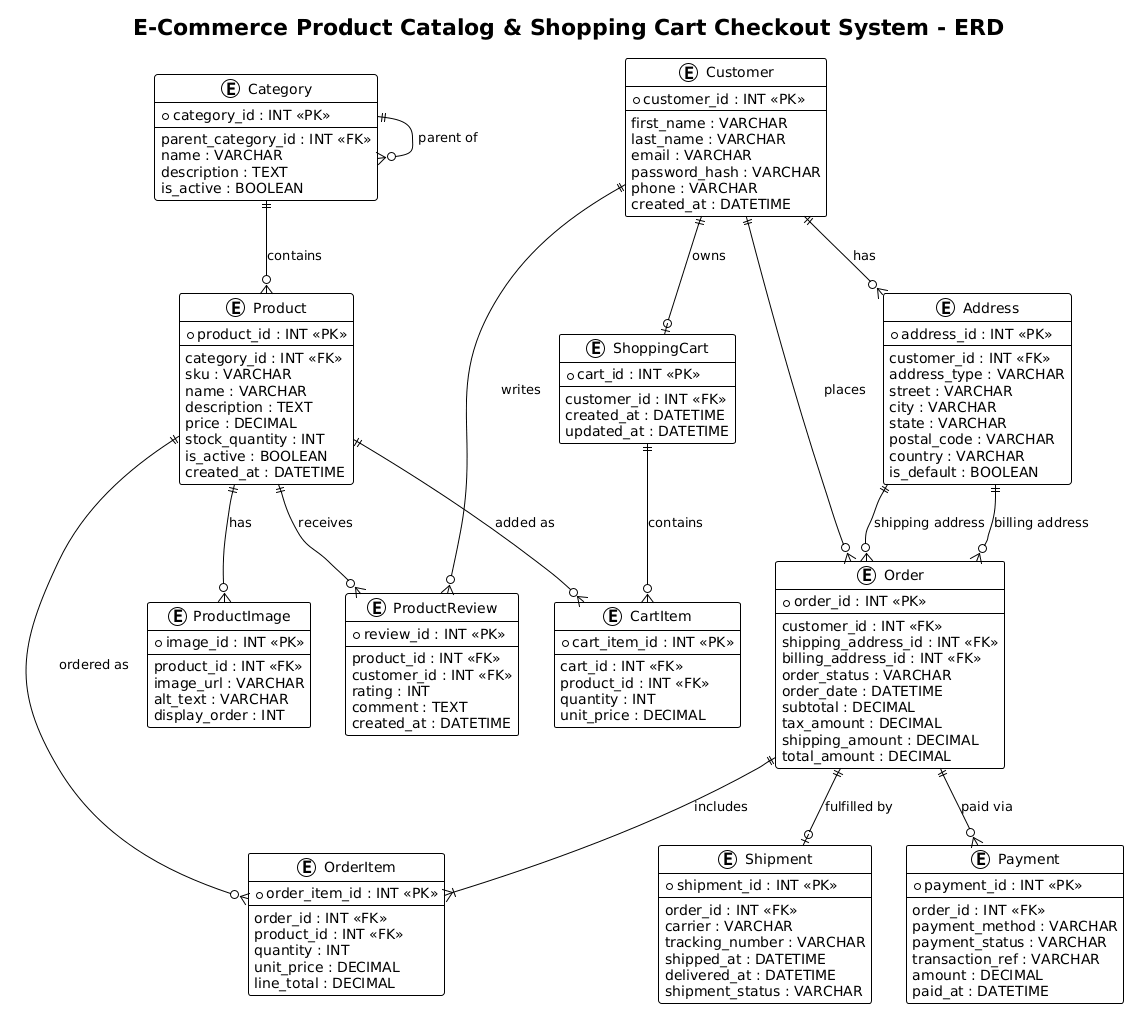
As an ERD, this diagram uses entities to represent database tables and relationships to define how data is linked. For instance, the relationship between a Customer and an Order is modeled as a one-to-many relationship, indicating that one customer can place multiple orders over time. Similarly, the Product entity is linked to ProductImage and ProductReview, showing how a single item can have multiple associated assets and feedback records. The use of foreign keys (FK) and primary keys (PK) is explicit in the code, ensuring that the relational integrity is preserved in the visual model.
Target Domain Scope & Scenario
The scope of this model covers the entire lifecycle of a purchase, from browsing a category to finalizing a payment and shipping arrangement. It intentionally excludes lower-level implementation details like API endpoints or specific code libraries, focusing instead on the data structure. This abstraction allows architects to discuss schema design with stakeholders—such as product managers and backend engineers—without getting bogged down in technical syntax.
Key Takeaways & Educational Insights
By following this guide, you will gain insights into how to model complex many-to-many relationships (like the link between Orders and Products via OrderItems), how to handle recursive relationships (like the self-referencing Category hierarchy), and how to structure attributes for real-world constraints like default addresses and inventory tracking.
Complete Diagram & Full Source Code
Below is the complete visualization of the E-Commerce ERD. This diagram showcases the relationships between Customers, Categories, Products, Shopping Carts, Orders, Payments, and Shipments, all rendered instantly.
@startuml
/'
Diagram Description:
This ERD models an e-commerce product catalog and shopping cart checkout system.
It captures how products are organized into categories, how customers browse and
add items to shopping carts, and how orders are created upon checkout. The diagram
supports tracking inventory, pricing, cart contents, and order line items, as well
as payment and shipping details associated with each completed order.
'/
!theme plain

title E-Commerce Product Catalog & Shopping Cart Checkout System - ERD

entity "Customer" as customer {
  *customer_id : INT <<PK>>
  --
  first_name : VARCHAR
  last_name : VARCHAR
  email : VARCHAR
  password_hash : VARCHAR
  phone : VARCHAR
  created_at : DATETIME
}

entity "Address" as address {
  *address_id : INT <<PK>>
  --
  customer_id : INT <<FK>>
  address_type : VARCHAR
  street : VARCHAR
  city : VARCHAR
  state : VARCHAR
  postal_code : VARCHAR
  country : VARCHAR
  is_default : BOOLEAN
}

entity "Category" as category {
  *category_id : INT <<PK>>
  --
  parent_category_id : INT <<FK>>
  name : VARCHAR
  description : TEXT
  is_active : BOOLEAN
}

entity "Product" as product {
  *product_id : INT <<PK>>
  --
  category_id : INT <<FK>>
  sku : VARCHAR
  name : VARCHAR
  description : TEXT
  price : DECIMAL
  stock_quantity : INT
  is_active : BOOLEAN
  created_at : DATETIME
}

entity "ProductImage" as product_image {
  *image_id : INT <<PK>>
  --
  product_id : INT <<FK>>
  image_url : VARCHAR
  alt_text : VARCHAR
  display_order : INT
}

entity "ProductReview" as product_review {
  *review_id : INT <<PK>>
  --
  product_id : INT <<FK>>
  customer_id : INT <<FK>>
  rating : INT
  comment : TEXT
  created_at : DATETIME
}

entity "ShoppingCart" as shopping_cart {
  *cart_id : INT <<PK>>
  --
  customer_id : INT <<FK>>
  created_at : DATETIME
  updated_at : DATETIME
}

entity "CartItem" as cart_item {
  *cart_item_id : INT <<PK>>
  --
  cart_id : INT <<FK>>
  product_id : INT <<FK>>
  quantity : INT
  unit_price : DECIMAL
}

entity "Order" as order {
  *order_id : INT <<PK>>
  --
  customer_id : INT <<FK>>
  shipping_address_id : INT <<FK>>
  billing_address_id : INT <<FK>>
  order_status : VARCHAR
  order_date : DATETIME
  subtotal : DECIMAL
  tax_amount : DECIMAL
  shipping_amount : DECIMAL
  total_amount : DECIMAL
}

entity "OrderItem" as order_item {
  *order_item_id : INT <<PK>>
  --
  order_id : INT <<FK>>
  product_id : INT <<FK>>
  quantity : INT
  unit_price : DECIMAL
  line_total : DECIMAL
}

entity "Payment" as payment {
  *payment_id : INT <<PK>>
  --
  order_id : INT <<FK>>
  payment_method : VARCHAR
  payment_status : VARCHAR
  transaction_ref : VARCHAR
  amount : DECIMAL
  paid_at : DATETIME
}

entity "Shipment" as shipment {
  *shipment_id : INT <<PK>>
  --
  order_id : INT <<FK>>
  carrier : VARCHAR
  tracking_number : VARCHAR
  shipped_at : DATETIME
  delivered_at : DATETIME
  shipment_status : VARCHAR
}

' Relationships
customer ||--o{ address : "has"
customer ||--o{ product_review : "writes"
customer ||--o| shopping_cart : "owns"
customer ||--o{ order : "places"

category ||--o{ category : "parent of"
category ||--o{ product : "contains"

product ||--o{ product_image : "has"
product ||--o{ product_review : "receives"
product ||--o{ cart_item : "added as"
product ||--o{ order_item : "ordered as"

shopping_cart ||--o{ cart_item : "contains"

order ||--|{ order_item : "includes"
order ||--o{ payment : "paid via"
order ||--o| shipment : "fulfilled by"
address ||--o{ order : "shipping address"
address ||--o{ order : "billing address"

@endumlStep-by-Step Architectural Walkthrough
Phase 1: Canvas Configuration & Layout Directives
Every PlantUML diagram begins with setup directives that define the rendering engine’s behavior. In this ERD, we start with @startuml to open the diagram context. We immediately follow this with a comment block wrapped in /' and '/. This is a best practice for documentation, allowing us to describe the diagram’s purpose and scope without it being rendered as a visual element.
We also apply the !theme plain directive. While PlantUML offers many colorful themes, the “plain” theme is ideal for ERDs because it reduces visual noise, ensuring that the focus remains on the entities and their relationships rather than decorative elements. Finally, the title directive provides a clear header for the diagram, which is essential for professional documentation.
Phase 2: Declaring Core Entities, Actors, and Boundaries
The heart of an ERD is the entity definition. We use the entity keyword to define a table structure. For example, the Customer entity is defined with a specific alias (e.g., as customer) which we will use later to reference it in relationships. Inside the curly braces, we define the attributes.
We use the * prefix to denote a Primary Key (PK) and the < stereotype to explicitly label it in the visual output. For instance, *customer_id : INT < creates a clear visual indicator of the unique identifier. The -- separator is used to visually divide the primary key from the other attributes, improving readability. We also define Foreign Keys (FK) using the < stereotype, which is crucial for understanding how data links across tables, such as the customer_id in the Address entity.
Phase 3: Mapping Data Flows & Key Interactions
Once entities are declared, we map the relationships using the double-dash syntax ||-- combined with cardinality symbols. The symbols | (zero or one), o (zero or many), and { (one or many) are used to define the cardinality of the relationship.
For example, the line customer ||--o{ order : "places" indicates that a Customer must place at least one Order (or more), and an Order is placed by exactly one Customer. The || symbol on the customer side denotes mandatory participation (a customer must exist to place an order), while the o{ on the order side denotes zero or many. We also handle recursive relationships, such as category ||--o{ category : "parent of", which allows a category to have a parent category, creating a hierarchical tree structure for the product catalog.
Phase 4: Grouping, Annotations & Visual Polish
To ensure the diagram is professional and self-explanatory, we add relationship labels using the "label" syntax. This clarifies the semantic meaning of the connection, such as "paid via" between an Order and a Payment. We also ensure that all entities like ProductImage and Shipment are logically connected to their parents. The use of DECIMAL for financial fields and DATETIME for timestamps ensures that the data types are semantically correct for a retail system. This phase is about refining the visual output to match the logical requirements of the database schema.
Syntax & Keyword Deep Dive
PlantUML provides a robust set of keywords specifically tailored for database modeling. Understanding these allows you to build precise and accurate diagrams.
entity: Defines a database table or entity. The syntax isentity "Name" as alias { ... }. The alias is the short identifier used for linking.PKandFKStereotypes: Used as<and> <to visually mark Primary and Foreign keys. This is critical for ERDs to distinguish keys from regular columns.> ||--o{Relationship Syntax: This is the standard notation for cardinality.||means mandatory one,|means optional one,omeans optional many, and{means mandatory many. Combining them creates complex constraints like||--o{(One-to-Many).!themeDirective: A global directive to apply a visual style.!theme plainremoves colors and shadows for a clean, technical look.titleDirective: Adds a prominent title to the diagram, useful for reports and documentation.
Best Practices & Pitfalls to Avoid
When building ERDs with PlantUML, adhering to best practices ensures your diagrams remain maintainable and readable as your system grows.
- Use Meaningful Aliases: Always use the
askeyword to assign short, lowercase aliases (e.g.,as customer) rather than relying on the full entity name for relationships. This prevents long, cluttered lines in the diagram. - Consistent Naming Conventions: Stick to a consistent naming convention for attributes (e.g., snake_case for columns, PascalCase for entity names) to make the code easier to scan.
- Handle Recursive Relationships Carefully: When modeling self-referencing entities like Categories, ensure the relationship line does not overlap confusingly with the entity box. PlantUML usually handles this well, but manual positioning might be needed for very complex hierarchies.
- Separate Logic from Data: Do not include business logic (like “calculate tax”) inside the entity attributes. Keep the ERD focused on data storage structure, not calculation logic.
Start Building E-Commerce ERDs Faster with VPasCode
Instantly visualize and edit your Retail system database schemas online with VPasCode’s free PlantUML editor—no installation required.