


In the fast-paced environment of modern retail, the integrity of a Point-of-Sale (POS) system hinges on a robust data architecture. Every transaction, from the moment a cashier scans an item to the final receipt generation, generates a complex web of data points that must be captured, stored, and linked with precision. A single flaw in how these entities are related can lead to inventory discrepancies, payment reconciliation errors, or lost sales history. This is where visual modeling becomes not just a documentation exercise, but a critical engineering safeguard.
Designing the database schema for a POS system requires a clear understanding of how transactions flow through the system. We need to define the specific attributes of a transaction, how line items relate to products, and how payment methods and receipt statuses are tracked. Using diagram-as-code with PlantUML allows architects to define these relationships in a text-based format that is version-friendly, easy to review, and instantly renderable. By utilizing VPasCode, developers can prototype these complex ERDs in the browser without the overhead of installing local database engines or diagramming software, ensuring that the data model aligns perfectly with business logic before a single line of SQL is written.
Understanding the Model: Purpose, Scope & Problem Framing
This tutorial focuses on constructing an Entity Relationship Diagram (ERD) specifically tailored for a retail Point-of-Sale terminal. The primary goal is to model the data structures required to record sales, manage inventory interactions, and track the lifecycle of customer receipts.
Diagram Abstraction & Representation
An ERD is the blueprint for a relational database. In this context, it abstracts the physical storage of data into logical entities. We represent Entities (like Transaction or Product) as tables that store specific information. Attributes (like total_amount or sku) define the columns within those tables. Most critically, the Relationships (lines connecting entities) define how data references one another. For a POS system, the cardinality is vital: one transaction contains many line items, but each line item belongs to exactly one transaction. This model ensures data integrity by preventing orphaned records.
Target Domain Scope & Scenario
The scope of this diagram covers the core transactional lifecycle at a retail terminal. It includes the hardware context (Terminals), the human operator (Cashiers), the items being sold (Products), the financial event (Transactions), the specific goods purchased (Line Items), the method of settlement (Payments), and the output record (Receipts). It intentionally excludes external inventory management systems or loyalty programs to focus on the immediate, atomic transaction flow.
Key Takeaways & Educational Insights
By following this guide, you will learn how to structure a normalized database schema that supports complex retail operations. You will gain insights into defining Primary Keys (PK) and Foreign Keys (FK) to maintain referential integrity, managing one-to-many relationships between transactions and line items, and using PlantUML to visualize these constraints clearly for development teams.
Complete Diagram & Full Source Code
Before diving into the step-by-step construction, here is the final, fully rendered Entity Relationship Diagram. This visual output represents the complete data model for the POS system, illustrating how every component connects.
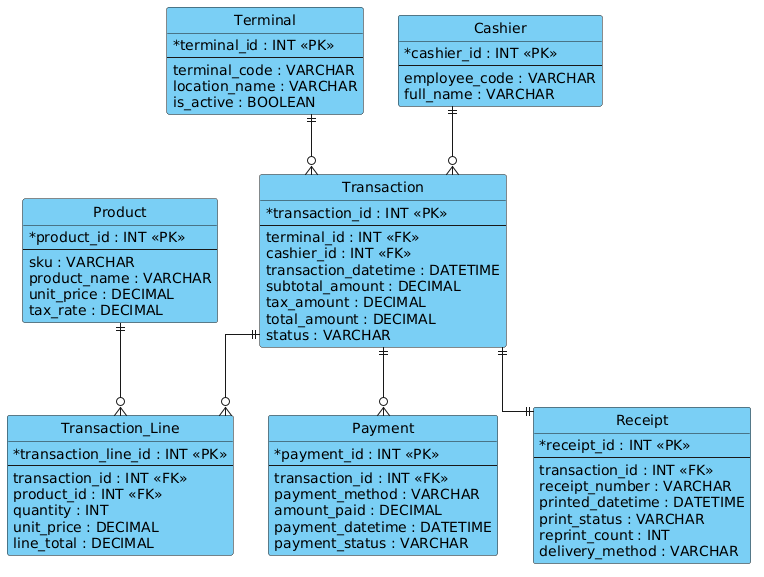
Below is the complete PlantUML source code used to generate this diagram. You can copy this entire block and paste it into the VPasCode editor to see the live rendering.
@startuml
/'
Diagram Context:
This ERD models the core data requirements for a point-of-sale (POS) terminal
transaction and receipt printing system. It supports capturing sales transactions
made at a terminal, the line items and payments associated with each transaction,
and the receipts generated for customers. The design helps track what was sold,
how it was paid for, and whether a receipt was printed, reprinted, or delivered
electronically.
'/
!include https://static.visual-paradigm.com/web/resources/plantuml-stdlib/themes/vp.puml

hide circle
skinparam linetype ortho

entity "Terminal" as terminal {
  * terminal_id : INT <<PK>>
  --
  terminal_code : VARCHAR
  location_name : VARCHAR
  is_active : BOOLEAN
}

entity "Cashier" as cashier {
  * cashier_id : INT <<PK>>
  --
  employee_code : VARCHAR
  full_name : VARCHAR
}

entity "Transaction" as transaction {
  * transaction_id : INT <<PK>>
  --
  terminal_id : INT <<FK>>
  cashier_id : INT <<FK>>
  transaction_datetime : DATETIME
  subtotal_amount : DECIMAL
  tax_amount : DECIMAL
  total_amount : DECIMAL
  status : VARCHAR
}

entity "Transaction_Line" as transaction_line {
  * transaction_line_id : INT <<PK>>
  --
  transaction_id : INT <<FK>>
  product_id : INT <<FK>>
  quantity : INT
  unit_price : DECIMAL
  line_total : DECIMAL
}

entity "Product" as product {
  * product_id : INT <<PK>>
  --
  sku : VARCHAR
  product_name : VARCHAR
  unit_price : DECIMAL
  tax_rate : DECIMAL
}

entity "Payment" as payment {
  * payment_id : INT <<PK>>
  --
  transaction_id : INT <<FK>>
  payment_method : VARCHAR
  amount_paid : DECIMAL
  payment_datetime : DATETIME
  payment_status : VARCHAR
}

entity "Receipt" as receipt {
  * receipt_id : INT <<PK>>
  --
  transaction_id : INT <<FK>>
  receipt_number : VARCHAR
  printed_datetime : DATETIME
  print_status : VARCHAR
  reprint_count : INT
  delivery_method : VARCHAR
}

terminal ||--o{ transaction
cashier ||--o{ transaction
transaction ||--o{ transaction_line
product ||--o{ transaction_line
transaction ||--o{ payment
transaction ||--|| receipt

@endumlStep-by-Step Architectural Walkthrough
Phase 1: Canvas Configuration & Layout Directives
Every professional PlantUML diagram begins with configuration directives that set the stage for the visual output. We start by including the standard library theme to ensure a consistent, modern look. The !include directive pulls in the Visual Paradigm theme definitions.
Next, we define the visual style. The hide circle directive removes the circular notation often used in ERDs, opting for a cleaner, more standard box-and-line look. The skinparam linetype ortho command forces all relationship lines to be orthogonal (right-angled), which significantly improves readability in complex schemas by avoiding tangled diagonal lines.
!include https://static.visual-paradigm.com/web/resources/plantuml-stdlib/themes/vp.puml
hide circle
skinparam linetype ortho
Phase 2: Declaring Core Entities, Actors, and Boundaries
With the canvas set, we define the core entities. In PlantUML, we use the entity keyword. Each entity block contains a name, an alias (for relationship referencing), and a list of attributes.
For the Terminal entity, we define the primary key using the asterisk * symbol. We also define attributes like terminal_code and location_name. The double hyphen -- is used to visually separate keys from other attributes. We repeat this pattern for Cashier, Transaction, Product, Payment, and Receipt, ensuring that every table has a unique identifier (PK) and relevant data fields.
entity "Terminal" as terminal {
  * terminal_id : INT <>
  --
  terminal_code : VARCHAR
  location_name : VARCHAR
  is_active : BOOLEAN
}
Phase 3: Mapping Data Flows & Key Interactions
The most critical part of an ERD is defining how entities relate to one another. We use the ||--o{ syntax to represent relationships. The || symbol indicates a mandatory one (one and only one), while o{ indicates an optional many (zero or more).
For example, a Transaction must belong to exactly one Terminal and one Cashier, but a single Transaction can contain many Transaction_Line items. We model this by connecting the entities with their respective aliases defined in the entity blocks.
terminal ||--o{ transaction
cashier ||--o{ transaction
transaction ||--o{ transaction_line
product ||--o{ transaction_line
We also model the relationship between a transaction and its payment, and the transaction and its receipt. Note that in the final line, we used transaction |||| receipt to indicate a strict one-to-one relationship, implying that for every transaction, there is exactly one receipt record generated in this specific model context.
Phase 4: Grouping, Annotations & Visual Polish
To enhance the diagram’s educational value, we add a comment block at the top using /' and '/. This block provides a high-level context description for anyone reading the code, explaining the purpose of the schema without cluttering the visual diagram itself. This is a best practice for maintaining living documentation.
/'
Diagram Context:
This ERD models the core data requirements for a point-of-sale (POS) terminal
transaction and receipt printing system...
'/
Syntax & Keyword Deep Dive
Understanding the specific PlantUML syntax is essential for building accurate ERDs. Here is a breakdown of the key keywords used in this diagram:
entity: Defines a new table or entity in the diagram. It takes a display name (e.g., “Transaction”) and an internal alias (e.g.,transaction) for use in relationships.*: Placed before an attribute name to denote a Primary Key (PK). This visually highlights the unique identifier for the entity.<and> <: These are stereotypes.> <explicitly labels a field as a Primary Key, while> <labels it as a Foreign Key, aiding in database generation and understanding.> ||--o{: This is a relationship arrow.||means "one and only one" (mandatory), ando{means "zero or more" (optional). This creates a one-to-many relationship.||--||: This denotes a mandatory one-to-one relationship. Both sides must exist./'and'/: These delimiters create a multi-line comment block that is visible in the code but can be configured to be hidden or shown in the diagram rendering.
Best Practices & Pitfalls to Avoid
When modeling complex retail systems, adhering to best practices ensures your diagrams remain maintainable and useful over time.
1. Consistent Naming Conventions: Always use a consistent naming strategy for your aliases. In this guide, we used lowercase singular names (e.g., transaction) as aliases, even though the entity display name is capitalized. This prevents confusion when writing relationship lines.
2. Explicit Cardinality: Don't guess the relationship type. If a transaction can exist without a payment (e.g., pending authorization), use o{. If it must have a payment, use |. Incorrect cardinality leads to flawed database constraints.
3. Modularize Complex Schemas: If your diagram becomes too crowded, consider breaking it into multiple diagrams (e.g., one for "Sales," one for "Inventory," one for "Payments") and linking them, rather than cramming everything into a single massive file.
Try It Yourself with VPasCode
Start Building POS ERDs Faster with VPasCode
Design and visualize your retail database schemas instantly in your browser with our free PlantUML editor, requiring zero local installation or setup.