


In the realm of government services, transparency and process integrity are paramount. Whether it is a passport issuance system, tax filing portal, or public benefit application, the workflow must be auditable, clear, and compliant with regulatory standards. Traditional static documentation often fails to capture the dynamic nature of these interactions, leading to confusion between departments and bottlenecks in service delivery.

This tutorial demonstrates how to model a critical Passport Application Submission Process using PlantUML activity diagrams. By leveraging VPasCode, the free web-based diagram-as-code editor, architects can define complex workflows with precision. This approach ensures that the system logic—encompassing applicant actions, system validations, and officer verifications—is documented as living code rather than static images.
Using diagram-as-code enhances architectural clarity by allowing teams to prototype, test, and visualize the flow of data and decisions instantly. With VPasCode, there is no need for local Java installations or complex environment configurations; the browser renders the diagram in real-time, making it the ideal tool for rapid visual prototyping of government-grade workflows.
Understanding the Model: Purpose, Scope & Problem Framing
Diagram Abstraction & Representation
An Activity Diagram in PlantUML is the ideal notation for modeling the flow of control between activities. In this context, it serves as a blueprint for the lifecycle of a passport application. The diagram abstracts the system into distinct roles (actors) and system processes, connected by logical flows.
Key modeling elements include:
- Swimlanes: These partition the diagram into vertical columns representing different actors (e.g., Applicant, System, Verification Officer). This clarifies responsibility boundaries.
- Decision Points: Diamond shapes (implemented via
ifstatements) represent critical validation gates where the process branches based on data integrity. - Parallel Flows: The
forkandend forkconstructs allow modeling concurrent tasks, such as checking a photo and verifying an address simultaneously.
Target Domain Scope & Scenario
This model focuses specifically on the Submission and Initial Verification phase of the Passport Issuance System. It intentionally excludes downstream steps like printing or mailing to maintain focus on the intake workflow. The scope covers the interaction between the citizen (Applicant), the digital portal (System), and the human reviewer (Verification Officer).
The problem being solved is the visualization of a multi-stage approval process that requires both automated checks (completeness) and manual checks (document validity). By mapping this in VPasCode, stakeholders can identify potential failure points, such as where an application might be rejected prematurely or where verification bottlenecks occur.
Key Takeaways & Educational Insights
By completing this tutorial, you will gain:
- Process Clarity: A visual understanding of how data moves between human and automated actors.
- Logic Validation: The ability to simulate decision paths (e.g., what happens if documents are missing?) before writing backend code.
- Compliance Mapping: A structured way to document regulatory requirements, such as mandatory field validation and dual-factor verification.
Complete Diagram & Full Source Code
Below is the complete blueprint for the Passport Application Submission Process. This diagram utilizes the VPasCode theme for professional styling and swimlanes to separate responsibilities.
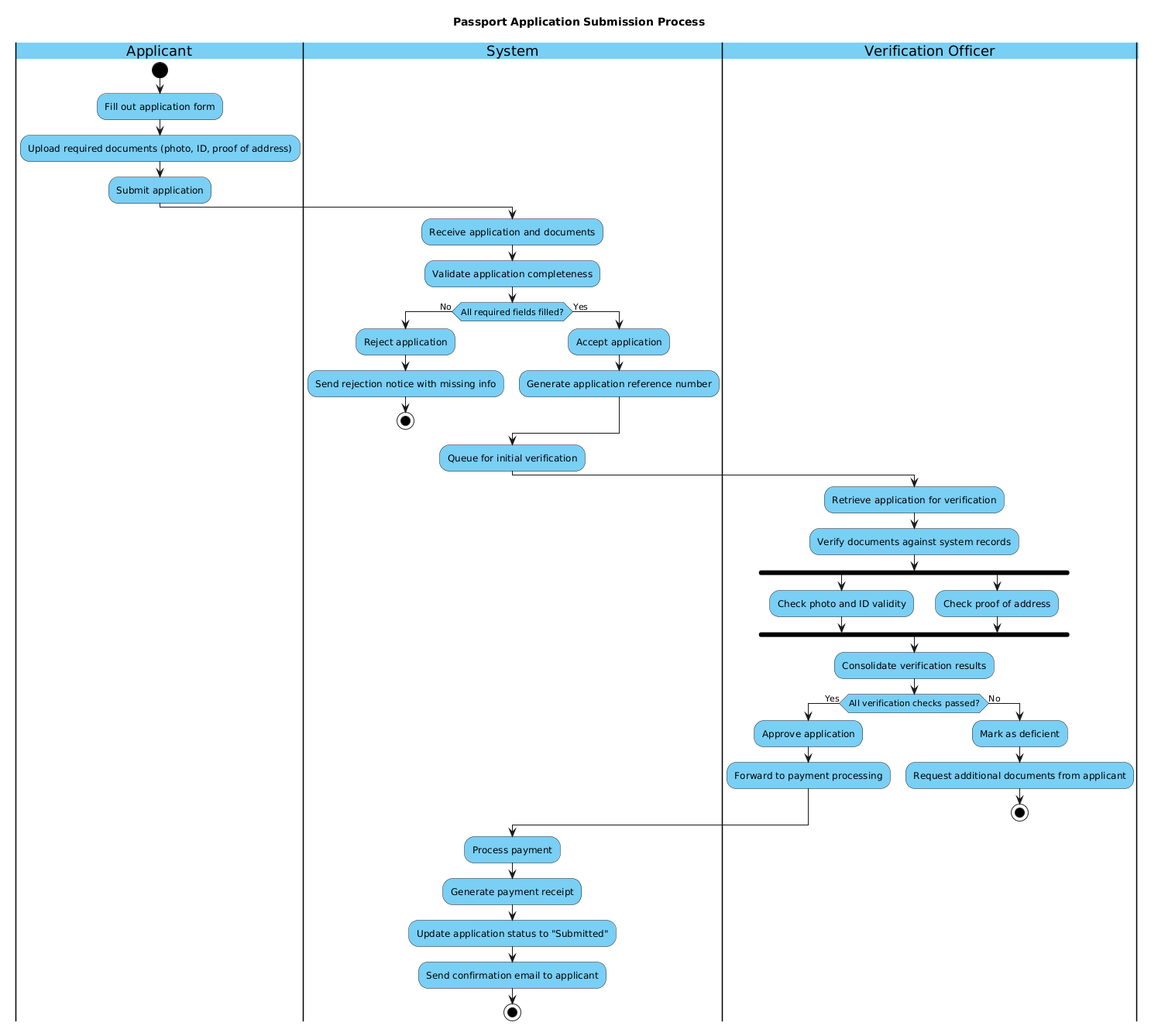
The following source code defines the entire workflow. You can copy this directly into the VPasCode editor to render and customize it.
@startuml
!include https://static.visual-paradigm.com/web/resources/plantuml-stdlib/themes/vp.puml

title Passport Application Submission Process

|Applicant|
start
:Fill out application form;
:Upload required documents (photo, ID, proof of address);
:Submit application;

|System|
:Receive application and documents;
:Validate application completeness;

if (All required fields filled?) then (No)
  :Reject application;
  :Send rejection notice with missing info;
  stop
else (Yes)
  :Accept application;
  :Generate application reference number;
endif

:Queue for initial verification;

|Verification Officer|
:Retrieve application for verification;
:Verify documents against system records;

fork
  :Check photo and ID validity;
fork again
  :Check proof of address;
end fork

:Consolidate verification results;

if (All verification checks passed?) then (Yes)
  :Approve application;
  :Forward to payment processing;
else (No)
  :Mark as deficient;
  :Request additional documents from applicant;
  stop
endif

|System|
:Process payment;
:Generate payment receipt;
:Update application status to "Submitted";
:Send confirmation email to applicant;

stop
@endumlStep-by-Step Architectural Walkthrough
Building this diagram in VPasCode involves four distinct phases. We will break down the code to understand how each section contributes to the overall architecture.
Phase 1: Canvas Configuration & Layout Directives
Before defining the logic, we must set up the canvas. This ensures the diagram renders with the correct theme and title. The !include directive pulls in the standard VPasCode theme library, which applies consistent styling (colors, borders, fonts) across the diagram.
!include https://static.visual-paradigm.com/web/resources/plantuml-stdlib/themes/vp.puml

title Passport Application Submission Process
Using title ensures the diagram is self-documenting. In a government context, having a clear header is essential for audit trails and official documentation.
Phase 2: Declaring Core Entities, Actors, and Boundaries
The core structure of an activity diagram relies on swimlanes. Swimlanes define who performs which action. In PlantUML, we use the pipe syntax |Lane Name| to start a new column.
|Applicant|
start
:Fill out application form;
:Upload required documents (photo, ID, proof of address);
:Submit application;
Here, we initialize the flow with the start node. The actions are defined using the colon syntax :Action;. This clearly delineates the Applicant’s responsibilities from the System’s.
Phase 3: Mapping Data Flows & Key Interactions
This phase handles the critical logic: validation and verification. We use if statements for decision points and fork for parallel processing.
if (All required fields filled?) then (No)
  :Reject application;
  :Send rejection notice with missing info;
  stop
else (Yes)
  :Accept application;
  :Generate application reference number;
endif
The if block creates a branch. If the condition is met, the flow continues; otherwise, it takes the else path. The stop node terminates that specific branch of the process.
For the verification phase, we introduce parallelism:
fork
  :Check photo and ID validity;
fork again
  :Check proof of address;
end fork
The fork keyword splits the flow into parallel threads. This models real-world efficiency where different officers or automated scripts can check different documents simultaneously, saving time in the government workflow.
Phase 4: Grouping, Annotations & Visual Polish
The final phase ensures the process concludes correctly. After verification, the system must handle payment and confirmation.
|System|
:Process payment;
:Generate payment receipt;
:Update application status to "Submitted";
:Send confirmation email to applicant;

stop
We return to the System swimlane to handle backend tasks. The final stop node indicates the successful completion of the entire workflow.
Syntax & Keyword Deep Dive
To master PlantUML activity diagrams in VPasCode, you must understand the specific keywords used in this model.
!include: Imports external style libraries. This ensures your diagram matches the VPasCode visual standards without manual CSS tweaking.|Lane|: Defines a swimlane. Each new|Name|creates a vertical partition, clarifying ownership of tasks.start/stop: Mark the entry and exit points of the process. A valid activity diagram must have one start and one or more stops.if ... then ... else ... endif: The standard conditional logic block. It allows the diagram to represent branching paths based on data validation.fork/fork again/end fork: These keywords enable parallel execution. This is crucial for modeling systems that perform concurrent checks (e.g., security vs. address verification).:Action;: The syntax for defining an activity node. The colon at the start and semicolon at the end are mandatory for proper parsing.
Best Practices & Pitfalls to Avoid
When building government-grade workflows in VPasCode, adhere to these architectural guidelines:
- Keep Swimlanes Logical: Do not create too many swimlanes. Stick to distinct roles (e.g., Applicant, System, Officer) to avoid visual clutter. If you find yourself splitting a lane too often, consider if that role should be split into sub-processes.
- Limit Nesting Depth: Avoid deeply nested
ifstatements. If a decision point has more than three outcomes, consider using a separate sub-diagram or a sequence diagram to clarify the logic. - Use Descriptive Labels: In government contexts, precision is key. Instead of
:Check ID;, use:Verify ID against government database;. This reduces ambiguity during audits. - Consistent Termination: Ensure every branch has a clear end. Use
stopexplicitly for rejection paths and the finalstopfor successful completion to prevent “orphaned” flows.
Try It Yourself with VPasCode
Start Building Activity Diagrams Faster with VPasCode
Visualize complex government workflows instantly in your browser. Test your PlantUML syntax, adjust swimlanes, and export professional diagrams without installing any tools.