


In the modern era of digital government transformation, the architecture of public service portals is critical to citizen satisfaction and operational efficiency. A robust Public Service Portal must seamlessly integrate diverse functions—user authentication, service discovery, application processing, document verification, and financial transactions—while maintaining strict data integrity and security standards.

Visual modeling serves as the backbone of this architectural planning. A well-structured class diagram provides stakeholders, developers, and government auditors with a clear blueprint of the system’s static structure. By using PlantUML within VPasCode, architects can rapidly prototype these complex domains without the overhead of manual drawing tools. This approach ensures that documentation remains living, versioned alongside code, and instantly accessible to all project participants.
This masterclass demonstrates how to construct a comprehensive class diagram for a Public Service Portal, focusing on the relationships between citizens, government agencies, and the services they utilize.
Understanding the Model: Purpose, Scope & Problem Framing
Before diving into the syntax, it is essential to understand the domain abstraction being modeled. A class diagram in this context represents the structural skeleton of the application, defining the entities that store data and the methods they expose.
Diagram Abstraction & Representation
In a government service context, the class diagram maps the Domain-Driven Design (DDD) boundaries. It distinguishes between the Subject (the Citizen), the Provider (the Agency), and the Transaction (the Service Application). The diagram visualizes how these entities interact structurally, rather than just temporally. For instance, it clarifies that a ServiceApplication is composed of specific Documents and a Payment, whereas a Citizen merely associates with multiple applications.
Target Domain Scope & Scenario
This model focuses on the core transactional loop of a digital government portal. It intentionally excludes lower-level infrastructure concerns (like database schemas or network topology) to focus on business logic entities. The scope includes:
- Identity Management: Handling Citizen profiles and secure User Accounts.
- Service Catalog: Organizing services by categories and agencies.
- Application Lifecycle: Tracking the submission, approval, and payment flow.
- Compliance & Audit: Recording actions via Audit Logs and Notifications.
Key Takeaways & Educational Insights
By the end of this tutorial, you will understand how to:
- Define clear entity boundaries for government-grade applications.
- Implement complex relationships like Composition and Aggregation to model ownership.
- Utilize PlantUML’s theming capabilities to create professional, publication-ready diagrams instantly.
Complete Diagram & Full Source Code
Below is the complete blueprint for the Public Service Portal. This diagram encapsulates the entire structural logic required for the system, ready to be rendered in the browser.
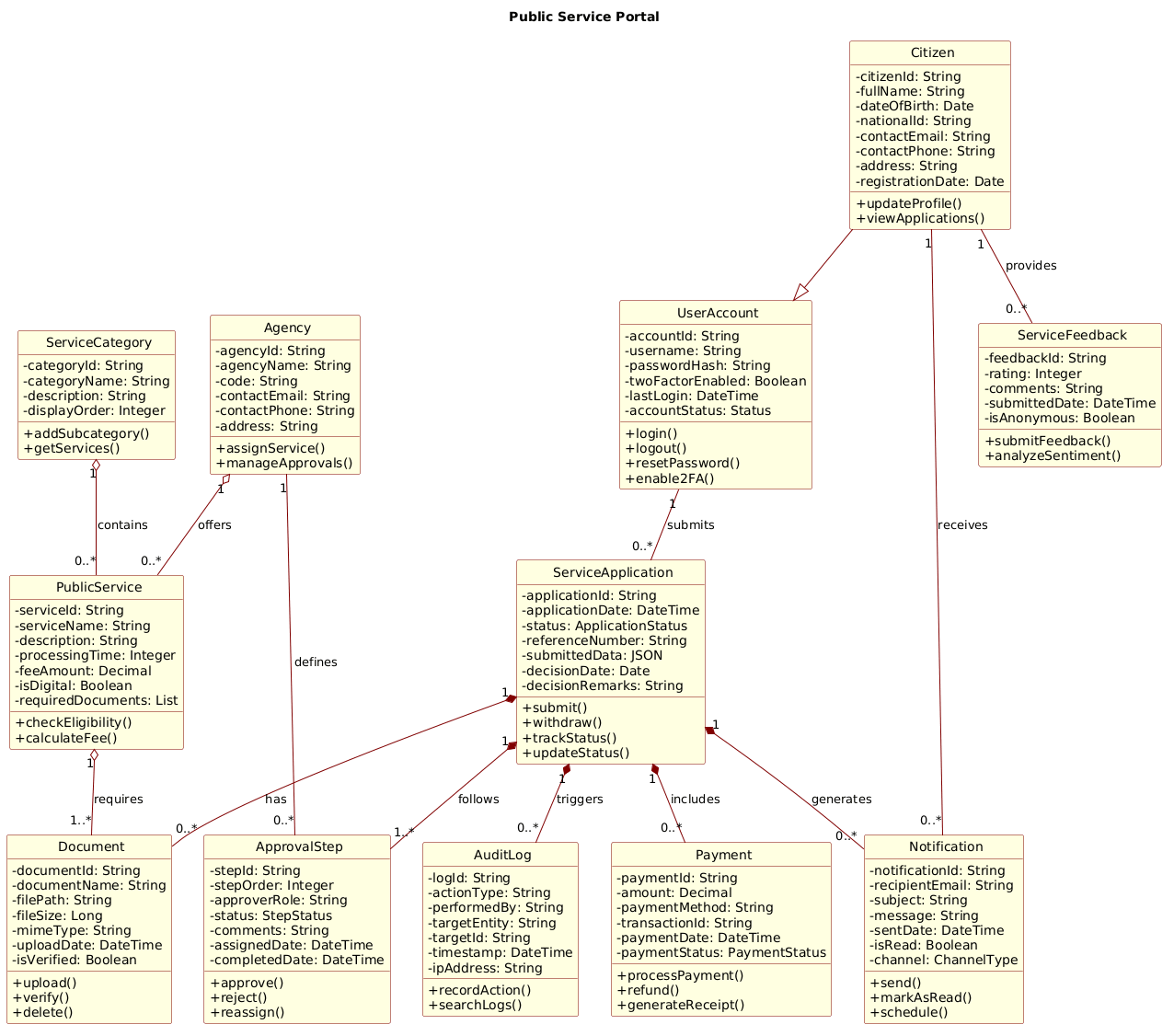
@startuml
!include https://static.visual-paradigm.com/web/resources/plantuml-stdlib/themes/rose.puml

title Public Service Portal

/'
This class diagram models the core domain of a Public Service Portal system.
The portal enables citizens to discover, apply for, and track various public services provided by different government agencies.
It manages user profiles, service catalogs, application submissions, document attachments, approval workflows, and payment processing.
The diagram illustrates the structural relationships among key entities such as users, services, applications, agencies, payments, and supporting components like documents, notifications, and audit logs.
'/

class Citizen {
  - citizenId: String
  - fullName: String
  - dateOfBirth: Date
  - nationalId: String
  - contactEmail: String
  - contactPhone: String
  - address: String
  - registrationDate: Date
  + updateProfile()
  + viewApplications()
}

class UserAccount {
  - accountId: String
  - username: String
  - passwordHash: String
  - twoFactorEnabled: Boolean
  - lastLogin: DateTime
  - accountStatus: Status
  + login()
  + logout()
  + resetPassword()
  + enable2FA()
}

class ServiceCategory {
  - categoryId: String
  - categoryName: String
  - description: String
  - displayOrder: Integer
  + addSubcategory()
  + getServices()
}

class PublicService {
  - serviceId: String
  - serviceName: String
  - description: String
  - processingTime: Integer
  - feeAmount: Decimal
  - isDigital: Boolean
  - requiredDocuments: List
  + checkEligibility()
  + calculateFee()
}

class Agency {
  - agencyId: String
  - agencyName: String
  - code: String
  - contactEmail: String
  - contactPhone: String
  - address: String
  + assignService()
  + manageApprovals()
}

class ServiceApplication {
  - applicationId: String
  - applicationDate: DateTime
  - status: ApplicationStatus
  - referenceNumber: String
  - submittedData: JSON
  - decisionDate: Date
  - decisionRemarks: String
  + submit()
  + withdraw()
  + trackStatus()
  + updateStatus()
}

class Document {
  - documentId: String
  - documentName: String
  - filePath: String
  - fileSize: Long
  - mimeType: String
  - uploadDate: DateTime
  - isVerified: Boolean
  + upload()
  + verify()
  + delete()
}

class Payment {
  - paymentId: String
  - amount: Decimal
  - paymentMethod: String
  - transactionId: String
  - paymentDate: DateTime
  - paymentStatus: PaymentStatus
  + processPayment()
  + refund()
  + generateReceipt()
}

class ApprovalStep {
  - stepId: String
  - stepOrder: Integer
  - approverRole: String
  - status: StepStatus
  - comments: String
  - assignedDate: DateTime
  - completedDate: DateTime
  + approve()
  + reject()
  + reassign()
}

class Notification {
  - notificationId: String
  - recipientEmail: String
  - subject: String
  - message: String
  - sentDate: DateTime
  - isRead: Boolean
  - channel: ChannelType
  + send()
  + markAsRead()
  + schedule()
}

class AuditLog {
  - logId: String
  - actionType: String
  - performedBy: String
  - targetEntity: String
  - targetId: String
  - timestamp: DateTime
  - ipAddress: String
  + recordAction()
  + searchLogs()
}

class ServiceFeedback {
  - feedbackId: String
  - rating: Integer
  - comments: String
  - submittedDate: DateTime
  - isAnonymous: Boolean
  + submitFeedback()
  + analyzeSentiment()
}

' Generalization
Citizen --|> UserAccount

' Association
UserAccount "1" -- "0..*" ServiceApplication : submits
Citizen "1" -- "0..*" ServiceFeedback : provides

' Aggregation
PublicService "1" o-- "1..*" Document : requires
ServiceCategory "1" o-- "0..*" PublicService : contains
Agency "1" o-- "0..*" PublicService : offers

' Composition
ServiceApplication "1" *-- "0..*" Document : has
ServiceApplication "1" *-- "0..*" Payment : includes
ServiceApplication "1" *-- "1..*" ApprovalStep : follows
ServiceApplication "1" *-- "0..*" Notification : generates
ServiceApplication "1" *-- "0..*" AuditLog : triggers

' Additional associations
Agency "1" -- "0..*" ApprovalStep : defines
Citizen "1" -- "0..*" Notification : receives
@endumlStep-by-Step Architectural Walkthrough
Building a professional class diagram requires a structured approach. We will deconstruct this diagram into four logical phases: Canvas Setup, Entity Declaration, Relationship Mapping, and Visual Polish.
Phase 1: Canvas Configuration & Layout Directives
The first step in any PlantUML project is setting the stage. This involves defining the visual theme and providing context through titles and comments. In this government portal scenario, clarity and professionalism are paramount.
We begin by including the rose.puml theme, which provides a clean, corporate aesthetic suitable for official documentation.
!include https://static.visual-paradigm.com/web/resources/plantuml-stdlib/themes/rose.pumlNext, we define the title and a descriptive comment block. The comment block, wrapped in /' and '/, acts as documentation that renders in the diagram metadata but does not clutter the visual structure.
title Public Service Portal

/'
This class diagram models the core domain of a Public Service Portal system...
'/
Phase 2: Declaring Core Entities, Actors, and Boundaries
With the canvas ready, we define the classes. In PlantUML, a class is defined using the class keyword followed by the class name. We organize the code by grouping related entities (e.g., Identity, Services, Transactions).
For the Citizen and UserAccount classes, we define attributes (private members prefixed with -) and methods (public members prefixed with +). This separation is critical for defining the API surface of each entity.
class Citizen {
  - citizenId: String
  - fullName: String
  + updateProfile()
  + viewApplications()
}
We repeat this pattern for critical government entities like Agency and ServiceApplication, ensuring that attributes reflect real-world data types (e.g., Decimal for payments, DateTime for timestamps).
Phase 3: Mapping Data Flows & Key Interactions
Once entities are declared, we define how they relate. In class diagrams, relationships indicate structural dependencies. We distinguish between Association, Aggregation, and Composition.
For the Citizen and UserAccount, we use a Generalization relationship (inheritance), denoted by the solid line with a hollow triangle arrow (--|>). This signifies that a Citizen is-a type of UserAccount.
Citizen --|> UserAccountFor the ServiceApplication, we use Composition (*--). This indicates a strong ownership: if the Application is deleted, its Documents and Payments should logically cease to exist as independent entities. This is distinct from Aggregation (o--), where a PublicService requires a Document but the Document could exist independently.
Phase 4: Grouping, Annotations & Visual Polish
The final phase involves refining the diagram for readability. We add cardinality constraints (e.g., "1" to "0..*") to specify multiplicity. We also ensure that the diagram flows logically, typically from the user (Citizen) on the left to the backend processes (Agency, Approval) on the right.
By utilizing the VPasCode editor, you can instantly toggle between the code view and the rendered diagram to verify that the layout is balanced and that all relationship lines are clear and unambiguous.
Syntax & Keyword Deep Dive
Understanding the specific syntax of PlantUML empowers you to build more complex diagrams. Here is a breakdown of the key keywords used in this Public Service Portal diagram:
class: Declares a new class entity with a name and optional members.title: Sets the main heading displayed at the top of the diagram.!include: Imports external resources, such as themes or shared libraries, to standardize styling.--|>: Represents Generalization (Inheritance). The arrow points to the parent class.--: Represents a standard Association. A simple line connecting two classes.o--: Represents Aggregation. A hollow diamond indicates a “part-of” relationship where parts can exist independently.*--: Represents Composition. A filled diamond indicates a stronger “part-of” relationship where parts cannot exist without the whole."1"/"0..*": Cardinality constraints defining the minimum and maximum number of instances (e.g., one Citizen to zero or many Applications)./:/'/: Comment syntax for adding descriptive text that does not render as a class.
Best Practices & Pitfalls to Avoid
When modeling complex government systems, adhering to best practices ensures your diagrams remain maintainable and useful over time.
- Maintain Consistent Naming Conventions: Use PascalCase for class names (e.g.,
ServiceApplication) and camelCase for methods (e.g.,trackStatus). Consistency reduces cognitive load for developers reading the diagram. - Limit Class Complexity: Avoid cramming too many attributes into a single class. If a class has more than 10 attributes, consider splitting it into sub-entities or using an interface.
- Clarify Relationship Types: Be precise between Aggregation and Composition. Misusing these can lead to architectural confusion regarding data ownership and lifecycle management.
- Use Themes for Professionalism: Always include a theme (like
rose.puml) to ensure your diagrams look polished and professional when shared with stakeholders.
Start Building PlantUML Diagrams Faster with VPasCode
Instantly render, customize, and export your government architecture diagrams online in VPasCode without installing any tools.