


In the fast-paced world of retail, the efficiency of the supply chain hinges on the integrity of data management. A single retail organization often deals with thousands of vendors, millions of SKUs, and a continuous stream of purchase requisitions, orders, receipts, and invoices. Without a robust, well-structured database schema, these operations become fragmented, leading to inventory discrepancies, payment errors, and inefficient vendor performance tracking. The ability to visualize these complex data relationships before implementation is not just a best practice; it is a critical strategic necessity for maintaining operational clarity.
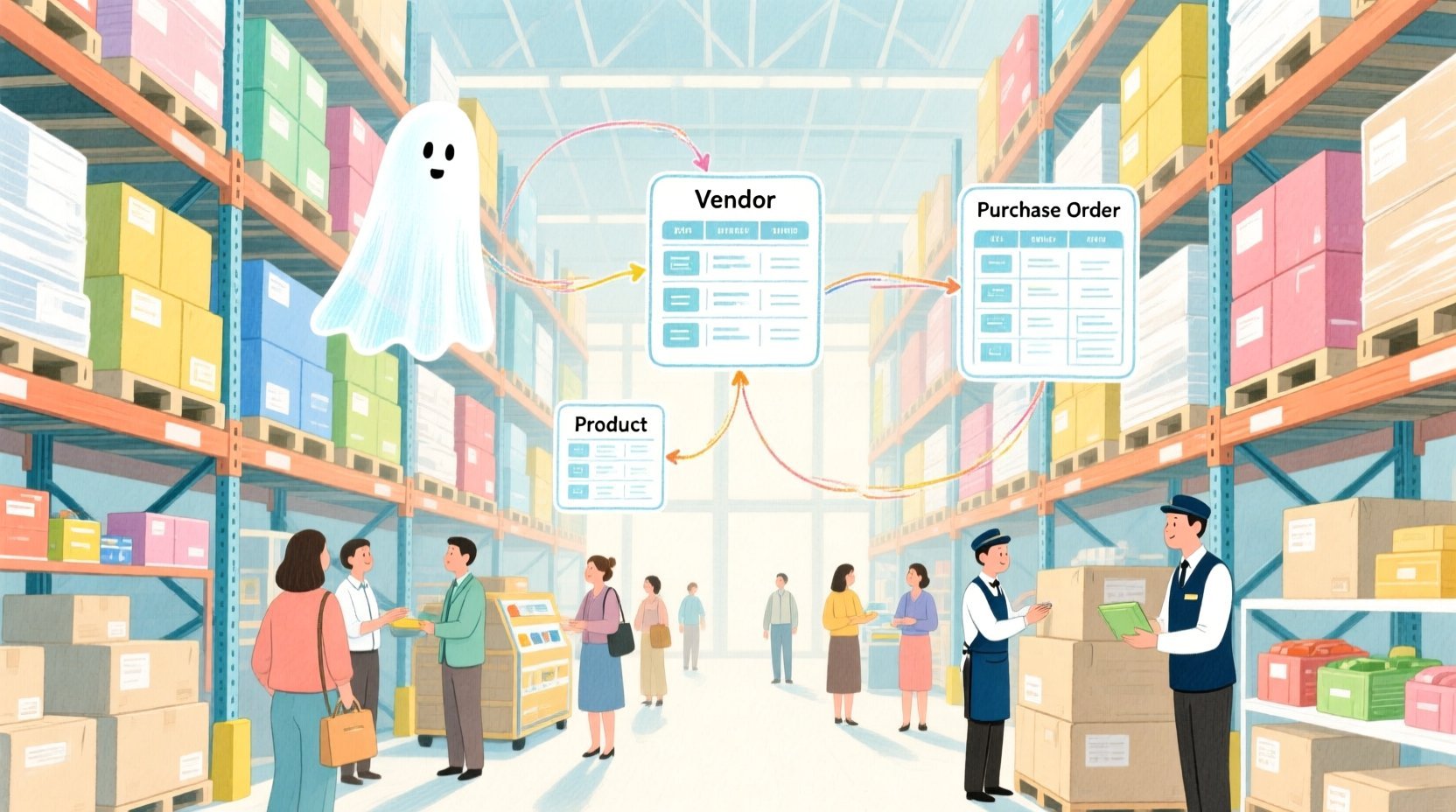
Diagramming-as-code with PlantUML offers a modern solution to this architectural challenge. By defining database structures through code rather than dragging and dropping boxes, architects ensure consistency, versionability, and rapid iteration. In this tutorial, we will leverage VPasCode, the free web-based diagram editor, to construct a detailed Entity-Relationship Diagram (ERD) specifically tailored for retail supplier vendor management and purchase order processing. This approach allows us to model the entire lifecycle from vendor onboarding and product cataloging to the critical three-way matching process of PO, receipt, and invoice, all within a single, living document.
Understanding the Model: Purpose, Scope & Problem Framing
Before diving into the syntax, it is essential to understand the architectural abstraction we are building. This ERD represents the backbone of a Procurement and Supply Chain Management system. Unlike a simple list of tables, this model captures the dynamic flow of goods and financial obligations.
Diagram Abstraction & Representation
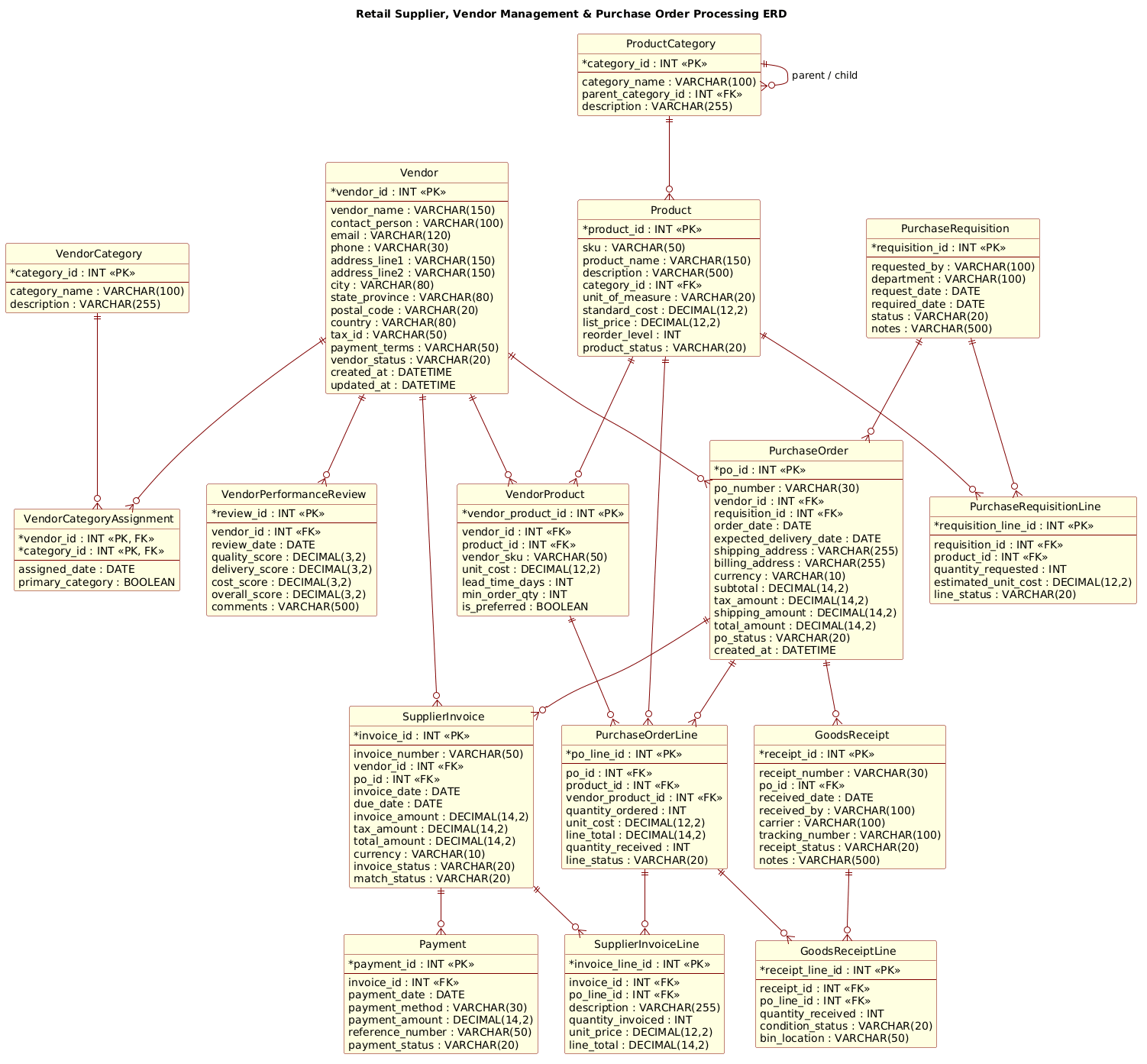
The Entity-Relationship Diagram (ERD) is the standard visual language for database design. In this specific context, it models the static structure of data required to support dynamic business processes. Each Entity (e.g., Vendor, Product, PurchaseOrder) represents a core business object with defined attributes (columns). The Relationships (lines connecting entities) define the cardinality and foreign key constraints that enforce data integrity, ensuring that a Purchase Order is always linked to a valid Vendor and that a Goods Receipt cannot exist without a corresponding Order.
Target Domain Scope & Scenario
This model focuses specifically on the Procurement domain within a retail environment. It intentionally covers the full spectrum of the “Source-to-Pay” cycle:
- Vendor Management: Capturing vendor details, categories, and performance metrics.
- Product Cataloging: Managing SKUs, pricing, and supplier-specific product mappings.
- Order Processing: Handling the transition from internal requisitions to external purchase orders.
- Receiving & Invoicing: Tracking physical goods arrival (Goods Receipt) and financial reconciliation (Supplier Invoice).
Key Takeaways & Educational Insights
By building this diagram, you will gain insights into how to model many-to-many relationships (e.g., one Vendor supplying many Products and one Product supplied by many Vendors) using associative entities like VendorProduct. You will also learn how to structure transactional data (Purchase Orders) and their line items to support audit trails and financial reporting.
Complete Diagram & Full Source Code
Below is the final blueprint of the Retail Supplier and Purchase Order ERD. This diagram visualizes the intricate web of connections required to manage a retail supply chain effectively. You can view the rendered result immediately below, and the complete source code follows.
@startuml
!include https://static.visual-paradigm.com/web/resources/plantuml-stdlib/themes/rose.puml

title Retail Supplier, Vendor Management & Purchase Order Processing ERD

/'
Diagram Context:
This ERD models the core data structures needed by a retail organization to manage its
supply base and procure inventory. It covers vendor registration and performance tracking,
product cataloging, purchase requisitions, purchase order issuance, goods receipt, and
supplier invoice matching. The model supports key retail workflows such as vendor
onboarding and evaluation, item sourcing, replenishment, three-way matching
(PO / receipt / invoice), and supplier payment processing. It is intended as a
blueprint for database design, application development, and reporting on procurement
and vendor management operations.
'/

' ==============================
' ENTITIES
' ==============================

entity "Vendor" as vendor {
  * vendor_id : INT <<PK>>
  --
  vendor_name : VARCHAR(150)
  contact_person : VARCHAR(100)
  email : VARCHAR(120)
  phone : VARCHAR(30)
  address_line1 : VARCHAR(150)
  address_line2 : VARCHAR(150)
  city : VARCHAR(80)
  state_province : VARCHAR(80)
  postal_code : VARCHAR(20)
  country : VARCHAR(80)
  tax_id : VARCHAR(50)
  payment_terms : VARCHAR(50)
  vendor_status : VARCHAR(20)
  created_at : DATETIME
  updated_at : DATETIME
}

entity "VendorCategory" as vendor_category {
  * category_id : INT <<PK>>
  --
  category_name : VARCHAR(100)
  description : VARCHAR(255)
}

entity "VendorCategoryAssignment" as vendor_category_assignment {
  * vendor_id : INT <<PK, FK>>
  * category_id : INT <<PK, FK>>
  --
  assigned_date : DATE
  primary_category : BOOLEAN
}

entity "VendorPerformanceReview" as vendor_performance_review {
  * review_id : INT <<PK>>
  --
  vendor_id : INT <<FK>>
  review_date : DATE
  quality_score : DECIMAL(3,2)
  delivery_score : DECIMAL(3,2)
  cost_score : DECIMAL(3,2)
  overall_score : DECIMAL(3,2)
  comments : VARCHAR(500)
}

entity "Product" as product {
  * product_id : INT <<PK>>
  --
  sku : VARCHAR(50)
  product_name : VARCHAR(150)
  description : VARCHAR(500)
  category_id : INT <<FK>>
  unit_of_measure : VARCHAR(20)
  standard_cost : DECIMAL(12,2)
  list_price : DECIMAL(12,2)
  reorder_level : INT
  product_status : VARCHAR(20)
}

entity "ProductCategory" as product_category {
  * category_id : INT <<PK>>
  --
  category_name : VARCHAR(100)
  parent_category_id : INT <<FK>>
  description : VARCHAR(255)
}

entity "VendorProduct" as vendor_product {
  * vendor_product_id : INT <<PK>>
  --
  vendor_id : INT <<FK>>
  product_id : INT <<FK>>
  vendor_sku : VARCHAR(50)
  unit_cost : DECIMAL(12,2)
  lead_time_days : INT
  min_order_qty : INT
  is_preferred : BOOLEAN
}

entity "PurchaseRequisition" as purchase_requisition {
  * requisition_id : INT <<PK>>
  --
  requested_by : VARCHAR(100)
  department : VARCHAR(100)
  request_date : DATE
  required_date : DATE
  status : VARCHAR(20)
  notes : VARCHAR(500)
}

entity "PurchaseRequisitionLine" as purchase_requisition_line {
  * requisition_line_id : INT <<PK>>
  --
  requisition_id : INT <<FK>>
  product_id : INT <<FK>>
  quantity_requested : INT
  estimated_unit_cost : DECIMAL(12,2)
  line_status : VARCHAR(20)
}

entity "PurchaseOrder" as purchase_order {
  * po_id : INT <<PK>>
  --
  po_number : VARCHAR(30)
  vendor_id : INT <<FK>>
  requisition_id : INT <<FK>>
  order_date : DATE
  expected_delivery_date : DATE
  shipping_address : VARCHAR(255)
  billing_address : VARCHAR(255)
  currency : VARCHAR(10)
  subtotal : DECIMAL(14,2)
  tax_amount : DECIMAL(14,2)
  shipping_amount : DECIMAL(14,2)
  total_amount : DECIMAL(14,2)
  po_status : VARCHAR(20)
  created_at : DATETIME
}

entity "PurchaseOrderLine" as purchase_order_line {
  * po_line_id : INT <<PK>>
  --
  po_id : INT <<FK>>
  product_id : INT <<FK>>
  vendor_product_id : INT <<FK>>
  quantity_ordered : INT
  unit_cost : DECIMAL(12,2)
  line_total : DECIMAL(14,2)
  quantity_received : INT
  line_status : VARCHAR(20)
}

entity "GoodsReceipt" as goods_receipt {
  * receipt_id : INT <<PK>>
  --
  receipt_number : VARCHAR(30)
  po_id : INT <<FK>>
  received_date : DATE
  received_by : VARCHAR(100)
  carrier : VARCHAR(100)
  tracking_number : VARCHAR(100)
  receipt_status : VARCHAR(20)
  notes : VARCHAR(500)
}

entity "GoodsReceiptLine" as goods_receipt_line {
  * receipt_line_id : INT <<PK>>
  --
  receipt_id : INT <<FK>>
  po_line_id : INT <<FK>>
  quantity_received : INT
  condition_status : VARCHAR(20)
  bin_location : VARCHAR(50)
}

entity "SupplierInvoice" as supplier_invoice {
  * invoice_id : INT <<PK>>
  --
  invoice_number : VARCHAR(50)
  vendor_id : INT <<FK>>
  po_id : INT <<FK>>
  invoice_date : DATE
  due_date : DATE
  invoice_amount : DECIMAL(14,2)
  tax_amount : DECIMAL(14,2)
  total_amount : DECIMAL(14,2)
  currency : VARCHAR(10)
  invoice_status : VARCHAR(20)
  match_status : VARCHAR(20)
}

entity "SupplierInvoiceLine" as supplier_invoice_line {
  * invoice_line_id : INT <<PK>>
  --
  invoice_id : INT <<FK>>
  po_line_id : INT <<FK>>
  description : VARCHAR(255)
  quantity_invoiced : INT
  unit_price : DECIMAL(12,2)
  line_total : DECIMAL(14,2)
}

entity "Payment" as payment {
  * payment_id : INT <<PK>>
  --
  invoice_id : INT <<FK>>
  payment_date : DATE
  payment_method : VARCHAR(30)
  payment_amount : DECIMAL(14,2)
  reference_number : VARCHAR(50)
  payment_status : VARCHAR(20)
}

' ==============================
' RELATIONSHIPS
' ==============================

vendor ||--o{ vendor_category_assignment
vendor_category ||--o{ vendor_category_assignment

vendor ||--o{ vendor_performance_review

product_category ||--o{ product
product_category ||--o{ product_category : "parent / child"

vendor ||--o{ vendor_product
product ||--o{ vendor_product

purchase_requisition ||--o{ purchase_requisition_line
product ||--o{ purchase_requisition_line

purchase_requisition ||--o{ purchase_order
vendor ||--o{ purchase_order

purchase_order ||--o{ purchase_order_line
product ||--o{ purchase_order_line
vendor_product ||--o{ purchase_order_line

purchase_order ||--o{ goods_receipt
goods_receipt ||--o{ goods_receipt_line
purchase_order_line ||--o{ goods_receipt_line

vendor ||--o{ supplier_invoice
purchase_order ||--o{ supplier_invoice
supplier_invoice ||--o{ supplier_invoice_line
purchase_order_line ||--o{ supplier_invoice_line

supplier_invoice ||--o{ payment

@endumlStep-by-Step Architectural Walkthrough
Building this ERD in VPasCode is a modular process. We will break down the construction into four logical phases: setup, entity declaration, relationship mapping, and visual refinement.
Phase 1: Canvas Configuration & Layout Directives
Every PlantUML diagram begins with configuration directives that set the stage. In this retail ERD, we want a professional look that stands out in documentation. We start by including the rose theme, which provides a polished, modern aesthetic with rounded corners and distinct colors for entities.
@startuml
!include https://static.visual-paradigm.com/web/resources/plantuml-stdlib/themes/rose.puml

title Retail Supplier, Vendor Management & Purchase Order Processing ERD
The @startuml tag initializes the diagram engine. The !include directive fetches the external theme file, ensuring consistent styling without manual CSS overrides. Finally, the title directive adds a clear header to the diagram, which is crucial for context when sharing the output.
Phase 2: Declaring Core Entities, Actors, and Boundaries
The core of an ERD is the definition of entities. In PlantUML, we use the entity keyword followed by the name and an alias for brevity. Inside the curly braces {}, we define the attributes (columns) and their data types.
entity "Vendor" as vendor {
  * vendor_id : INT <>
  --
  vendor_name : VARCHAR(150)
  ...
}
Here, vendor is the alias used for referencing in relationships. The * prefix indicates a Primary Key (PK), and the «PK» stereotype visually reinforces this in the diagram. The -- separator separates keys from other attributes, improving readability. We repeat this pattern for all 15 entities, ensuring that critical fields like created_at, status, and amount are included to support the retail workflow.
Phase 3: Mapping Data Flows & Key Interactions
Once entities are defined, we connect them to represent the business logic. PlantUML uses specific arrow syntax to denote cardinality. For example, ||--o{ means “one and only one” to “zero or many”.
purchase_order ||--o{ purchase_order_line
purchase_order_line ||--o{ goods_receipt_line
This syntax establishes that one Purchase Order can have many Purchase Order Lines, and one Order Line can be associated with many Goods Receipt Lines (e.g., receiving goods in multiple shipments). We also handle complex relationships like the Many-to-Many between Vendor and Product by introducing the associative entity VendorProduct, which holds specific pricing and lead-time data for that specific pairing.
Phase 4: Grouping, Annotations & Visual Polish
To make the diagram self-explanatory, we use comments to document the context. In PlantUML, comments start with '. We wrapped a detailed description block at the top of the code using /' ... '/ to provide a narrative summary of the diagram’s purpose without cluttering the visual output.
/'
Diagram Context:
This ERD models the core data structures needed by a retail organization...
'/
This approach keeps the documentation living alongside the code, ensuring that anyone viewing the diagram understands the scope immediately.
Syntax & Keyword Deep Dive
Understanding the specific PlantUML syntax is key to mastering ERD creation. Here are the critical keywords and conventions used in this tutorial:
entity: Defines a database table or entity. It takes a display name and an internal alias.«PK»and«FK»: Stereotypes used to mark Primary Keys and Foreign Keys. These are rendered visually to highlight the database constraints.||--o{: A relationship arrow indicating a mandatory one-to-many relationship (e.g., a Vendor must have at least one review, but can have many).«-»and«|modifiers: Used to indicate optionality (zero or more) or mandatory participation (one or more) in relationships.!include: A directive to load external libraries or themes, allowing for reusable styling across multiple diagrams.
Best Practices & Pitfalls to Avoid
When constructing complex ERDs like this retail model, adhering to best practices ensures the diagram remains maintainable and readable.
- Use Descriptive Aliases: While
Vendoris the display name, using a short alias likevendorfor relationships keeps the code clean and reduces the chance of syntax errors. - Separate Keys from Attributes: Always use the
--separator in entity definitions. This visually groups the Primary Key and Foreign Keys at the top of the box, making the data model easier to scan. - Handle Many-to-Many Correctly: Never try to draw a direct many-to-many line between two tables. Always introduce an associative entity (like
VendorProduct) to resolve the relationship and store additional attributes specific to that link. - Modularize Comments: Keep detailed documentation in the comment block at the top or within the entity definitions, rather than trying to add notes to every single attribute, which can clutter the visual output.
Start Building Retail ERDs Faster with VPasCode
Design complex database schemas instantly in your browser with VPasCode’s free PlantUML editor—no installation required.