


In the high-stakes environment of financial technology, clarity in process modeling is not just a best practice—it is a compliance necessity. When building an investment platform, the trade execution lifecycle involves multiple actors (investors, internal systems, and external exchanges) and complex decision points (balance checks, order matching). Misunderstandings in these flows can lead to financial discrepancies or regulatory issues.

This tutorial demonstrates how to model a Stock Trade Execution Process using PlantUML activity diagrams within VPasCode. By leveraging diagram-as-code, architects can maintain a single source of truth for their workflows. VPasCode offers an instant browser-based rendering environment, allowing you to prototype these complex financial flows without installing Java dependencies or configuring local build tools. This approach ensures your documentation remains up-to-date alongside your evolving codebase.
Understanding the Model: Purpose, Scope & Problem Framing
Diagram Abstraction & Representation
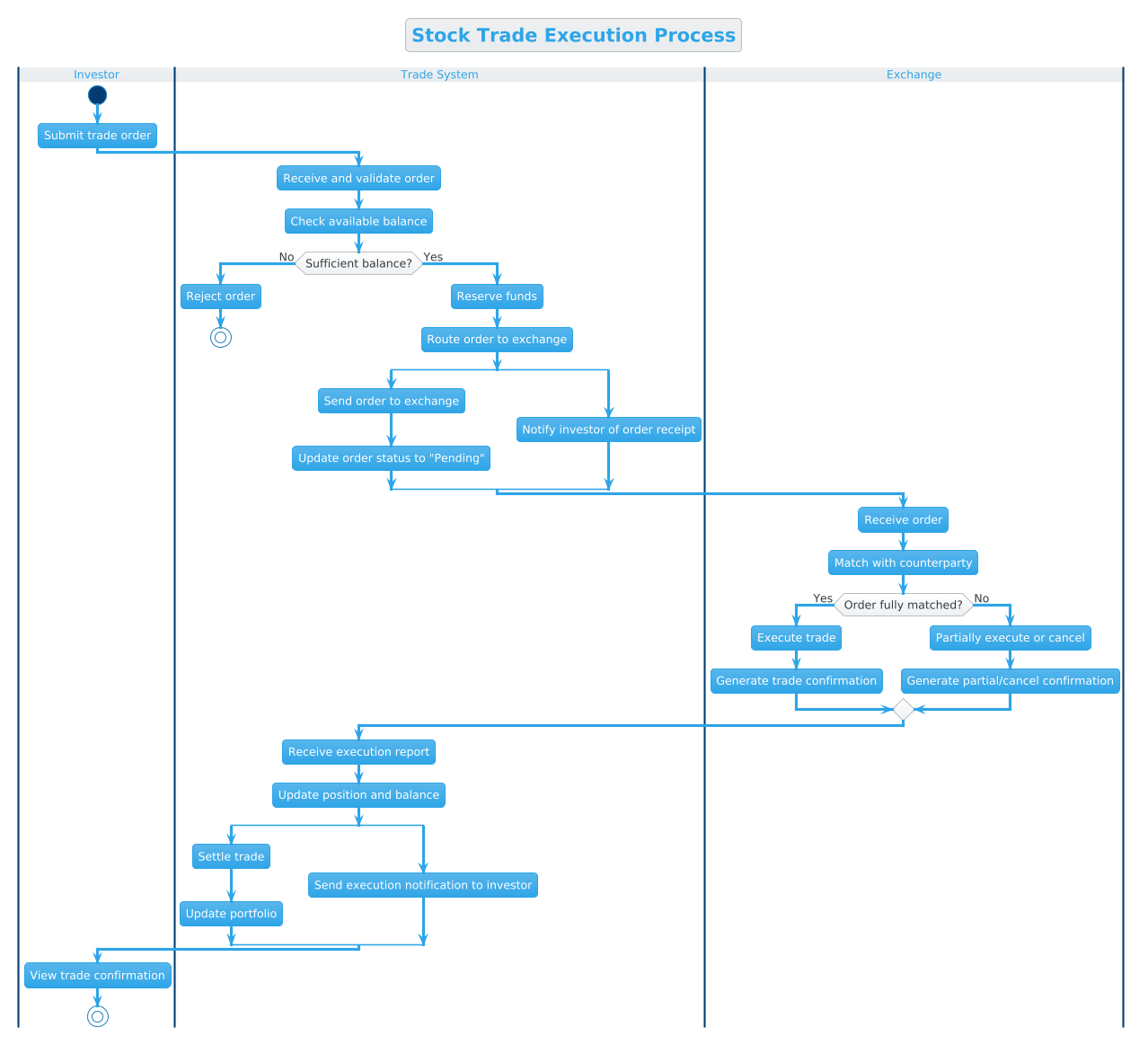
An activity diagram is the ideal abstraction for modeling the dynamic behavior of a system over time. In this context, we are visualizing the control flow of a trade from initiation to settlement. Key modeling elements include:
- Swimlanes: These partition the diagram by responsibility (Investor, Trade System, Exchange), clarifying who performs which action.
- Conditional Logic: Represented by diamonds (if/else), these model risk controls like balance verification.
- Parallel Flows: Represented by split bars, these show concurrent system actions, such as updating status while notifying the user.
Target Domain Scope & Scenario
This model focuses strictly on the execution phase of a stock trade. It intentionally excludes pre-trade compliance checks (like KYC) or post-trade accounting ledgers to maintain focus on the core transactional flow. The boundaries are defined by the Investor initiating the request and the Trade System finalizing the settlement.
Key Takeaways & Educational Insights
By building this diagram, you will gain insights into how to:
- Separate concerns using swimlanes to avoid tangled logic.
- Handle failure states gracefully (e.g., insufficient balance rejection).
- Model asynchronous notifications alongside synchronous execution steps.
Complete Diagram & Full Source Code
Below is the finished blueprint for the Stock Trade Execution Process. This diagram utilizes the cerulean theme for a clean, professional appearance and incorporates advanced PlantUML syntax for swimlanes and parallel processing.
@startuml
!theme cerulean
title Stock Trade Execution Process

|Investor|
start
:Submit trade order;

|Trade System|
:Receive and validate order;
:Check available balance;

if (Sufficient balance?) then (No)
  :Reject order;
  stop
else (Yes)
  :Reserve funds;
  :Route order to exchange;
  split
    :Send order to exchange;
    :Update order status to "Pending";
  split again
    :Notify investor of order receipt;
  end split
endif

|Exchange|
:Receive order;
:Match with counterparty;

if (Order fully matched?) then (Yes)
  :Execute trade;
  :Generate trade confirmation;
else (No)
  :Partially execute or cancel;
  :Generate partial/cancel confirmation;
endif

|Trade System|
:Receive execution report;
:Update position and balance;
split
  :Settle trade;
  :Update portfolio;
split again
  :Send execution notification to investor;
end split

|Investor|
:View trade confirmation;
stop
@endumlStep-by-Step Architectural Walkthrough
Follow this guide to reconstruct the diagram from scratch in the VPasCode editor. We will build this in four logical phases.
Phase 1: Canvas Configuration & Layout Directives
Every PlantUML diagram begins with configuration. We start by defining the theme to ensure visual consistency. The !theme cerulean directive applies a modern blue gradient style suitable for enterprise applications.
Next, we define the diagram title using the title keyword. This ensures the rendered output is self-documenting.
@startuml
!theme cerulean
title Stock Trade Execution Process
Phase 2: Declaring Core Entities, Actors, and Boundaries
Activity diagrams rely on swimlanes to assign responsibility. In PlantUML, swimlanes are defined using the pipe character |. We establish three distinct lanes: Investor, Trade System, and Exchange.
|Investor|
start
:Submit trade order;

|Trade System|
:Receive and validate order;
Notice how the flow naturally transitions between lanes. The start node initiates the process within the Investor lane, and subsequent actions flow down into the Trade System lane.
Phase 3: Mapping Data Flows & Key Interactions
Here we implement the core business logic using conditionals and parallel splits. The if statement checks for sufficient balance. If the condition fails, the process stops immediately.
if (Sufficient balance?) then (No)
  :Reject order;
  stop
else (Yes)
  :Reserve funds;
endif
For the successful path, we use split blocks to represent parallel activities. For example, the system sends the order to the exchange while simultaneously updating the internal status. This reflects real-world asynchronous processing.
split
  :Send order to exchange;
  :Update order status to "Pending";
split again
  :Notify investor of order receipt;
end split
Phase 4: Grouping, Annotations & Visual Polish
The final phase ensures the diagram terminates cleanly. After the Exchange processes the trade, the Trade System updates positions and settles the trade. The flow concludes when the Investor views the confirmation.
:Update position and balance;
...
:View trade confirmation;
stop
Using the stop node explicitly marks the end of the workflow, providing a clear visual anchor for readers.
Syntax & Keyword Deep Dive
To master this notation, understand the specific PlantUML syntax elements used in this financial workflow:
|Lane Name|: Defines a swimlane. Actions following this header belong to that specific actor until a new lane is declared.if (Condition): Creates a decision node. Thethenandelsebranches handle true/false outcomes.split/end split: Defines a fork in the flow where multiple activities happen simultaneously (parallelism).:Action;: Represents an activity state. The colon prefix is required for activity nodes.start/stop: Marks the entry and exit points of the process flow.!theme cerulean: Applies a specific visual skin to the entire diagram.
Best Practices & Pitfalls to Avoid
When modeling complex financial processes, keep these architectural principles in mind:
- Keep Swimlanes Balanced: Avoid having one swimlane dominate the diagram. If one lane has 90% of the logic, consider if the boundary needs adjustment.
- Limit Parallel Complexity: While
splitis powerful, too many concurrent branches can make the diagram unreadable. Use them only for critical parallel operations. - Consistent Naming: Use imperative verbs for activities (e.g., “Submit order” vs. “Order submission”) to maintain action-oriented clarity.
- Handle Failure Paths: Never assume success. Always model the
elsebranch for critical checks like balance validation or order matching.
Start Building Activity Diagrams Faster with VPasCode
Instantly preview your finance workflows online in VPasCode without installing any tools or configuring local environments.