


In the rapidly evolving landscape of digital healthcare, software architecture plays a pivotal role in ensuring data integrity, security, and seamless user experiences. A Telemedicine Portal is not merely a scheduling tool; it is a complex ecosystem connecting patients, medical professionals, administrators, and financial systems. For software architects and developers, visualizing this structure before writing a single line of application code is critical to avoid costly refactoring later.

Class diagrams serve as the blueprint for these systems, defining the static structure, attributes, and methods of the domain objects. However, traditional drag-and-drop modeling tools can often become cumbersome when managing intricate inheritance hierarchies or complex relationship cardinalities. This is where diagramming-as-code shines. By using PlantUML within the VPasCode editor, architects can rapidly prototype, validate, and document the core domain model of a healthcare platform with precision and clarity.
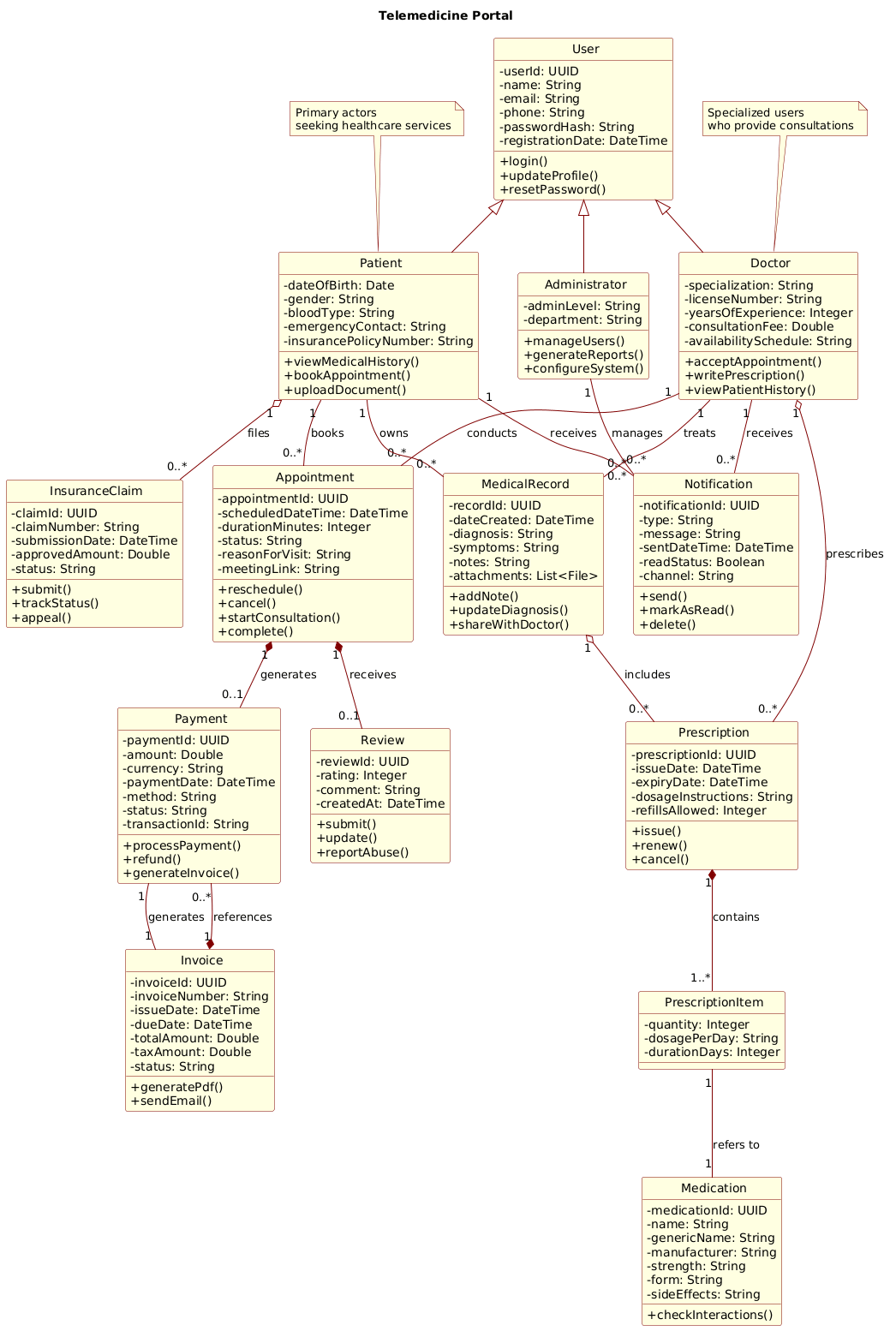
This masterclass demonstrates how to construct a comprehensive Telemedicine Portal class diagram. We will leverage VPasCode’s instant browser-based rendering to iterate on the design, ensuring that relationships like composition, aggregation, and generalization accurately reflect real-world business rules in the healthcare sector.
Understanding the Model: Purpose, Scope & Problem Framing
Diagram Abstraction & Representation
A class diagram in this context acts as the structural backbone of the application. It moves beyond simple entity-relationship modeling to include behavioral definitions (methods) and strict lifecycle management (composition vs. aggregation). In a Telemedicine Portal, the distinction between a Prescription (which cannot exist without a PrescriptionItem) and a MedicalRecord (which may exist independently of a specific Prescription) is vital for database schema design and object-oriented programming.
Target Domain Scope & Scenario
The scope of this model covers the core operational domain of a virtual care platform. It includes user management (Patients, Doctors, Administrators), clinical workflows (Appointments, Medical Records, Prescriptions), and administrative support (Billing, Invoices, Notifications). It explicitly excludes external third-party integrations like Payment Gateways or EHR Systems, focusing instead on the internal logical boundaries of the portal itself.
Key Takeaways & Educational Insights
By the end of this tutorial, you will understand how to model the inheritance hierarchy of users, how to define the lifecycle dependencies between appointments and payments, and how to use PlantUML syntax to enforce cardinality rules that prevent data inconsistencies in the final software implementation.
Complete Diagram & Full Source Code
Below is the complete, finalized source code for the Telemedicine Portal class diagram. This code includes the theme configuration, class definitions, and relationship mappings. You can copy this entire block directly into the VPasCode editor to see the rendered visualization instantly.
@startuml
!include https://static.visual-paradigm.com/web/resources/plantuml-stdlib/themes/rose.puml

title Telemedicine Portal

/'
This class diagram models the core domain entities and their relationships within a telemedicine platform.
The system enables patients to schedule virtual consultations with doctors, manage electronic health records,
process prescriptions, handle billing, and coordinate care across multiple specialties.
Key functional areas include user management, appointment scheduling, clinical documentation, pharmacy integration,
payment processing, and administrative oversight.
The diagram captures structural dependencies such as patient-doctor associations, composition of medical records,
aggregation of prescription items, and generalization of user roles.
'/

class User {
  - userId: UUID
  - name: String
  - email: String
  - phone: String
  - passwordHash: String
  - registrationDate: DateTime
  + login()
  + updateProfile()
  + resetPassword()
}

class Patient {
  - dateOfBirth: Date
  - gender: String
  - bloodType: String
  - emergencyContact: String
  - insurancePolicyNumber: String
  + viewMedicalHistory()
  + bookAppointment()
  + uploadDocument()
}

class Doctor {
  - specialization: String
  - licenseNumber: String
  - yearsOfExperience: Integer
  - consultationFee: Double
  - availabilitySchedule: String
  + acceptAppointment()
  + writePrescription()
  + viewPatientHistory()
}

class Administrator {
  - adminLevel: String
  - department: String
  + manageUsers()
  + generateReports()
  + configureSystem()
}

class Appointment {
  - appointmentId: UUID
  - scheduledDateTime: DateTime
  - durationMinutes: Integer
  - status: String
  - reasonForVisit: String
  - meetingLink: String
  + reschedule()
  + cancel()
  + startConsultation()
  + complete()
}

class MedicalRecord {
  - recordId: UUID
  - dateCreated: DateTime
  - diagnosis: String
  - symptoms: String
  - notes: String
  - attachments: List<File>
  + addNote()
  + updateDiagnosis()
  + shareWithDoctor()
}

class Prescription {
  - prescriptionId: UUID
  - issueDate: DateTime
  - expiryDate: DateTime
  - dosageInstructions: String
  - refillsAllowed: Integer
  + issue()
  + renew()
  + cancel()
}

class Medication {
  - medicationId: UUID
  - name: String
  - genericName: String
  - manufacturer: String
  - strength: String
  - form: String
  - sideEffects: String
  + checkInteractions()
}

class PrescriptionItem {
  - quantity: Integer
  - dosagePerDay: String
  - durationDays: Integer
}

class Payment {
  - paymentId: UUID
  - amount: Double
  - currency: String
  - paymentDate: DateTime
  - method: String
  - status: String
  - transactionId: String
  + processPayment()
  + refund()
  + generateInvoice()
}

class Invoice {
  - invoiceId: UUID
  - invoiceNumber: String
  - issueDate: DateTime
  - dueDate: DateTime
  - totalAmount: Double
  - taxAmount: Double
  - status: String
  + generatePdf()
  + sendEmail()
}

class InsuranceClaim {
  - claimId: UUID
  - claimNumber: String
  - submissionDate: DateTime
  - approvedAmount: Double
  - status: String
  + submit()
  + trackStatus()
  + appeal()
}

class Notification {
  - notificationId: UUID
  - type: String
  - message: String
  - sentDateTime: DateTime
  - readStatus: Boolean
  - channel: String
  + send()
  + markAsRead()
  + delete()
}

class Review {
  - reviewId: UUID
  - rating: Integer
  - comment: String
  - createdAt: DateTime
  + submit()
  + update()
  + reportAbuse()
}

' Inheritance
User <|-- Patient
User <|-- Doctor
User <|-- Administrator

' Associations
Patient "1" -- "0..*" Appointment : books
Doctor "1" -- "0..*" Appointment : conducts
Patient "1" -- "0..*" MedicalRecord : owns
Doctor "1" -- "0..*" MedicalRecord : treats

' Composition (strong lifecycle)
Appointment "1" *-- "0..1" Payment : generates
Appointment "1" *-- "0..1" Review : receives
Prescription "1" *-- "1..*" PrescriptionItem : contains
Invoice "1" *-- "0..*" Payment : references

' Aggregation (weak lifecycle)
MedicalRecord "1" o-- "0..*" Prescription : includes
Patient "1" o-- "0..*" InsuranceClaim : files
Doctor "1" o-- "0..*" Prescription : prescribes

' Other associations
PrescriptionItem "1" -- "1" Medication : refers to
Payment "1" -- "1" Invoice : generates
Patient "1" -- "0..*" Notification : receives
Doctor "1" -- "0..*" Notification : receives
Administrator "1" -- "0..*" Notification : manages

note top of Doctor : Specialized users\nwho provide consultations
note top of Patient : Primary actors\nseeking healthcare services
@endumlStep-by-Step Architectural Walkthrough
Building this diagram in VPasCode involves a logical progression from setting the canvas to defining complex relationships. Follow these phases to replicate the architecture.
Phase 1: Canvas Configuration & Layout Directives
Before defining entities, we establish the visual theme and context. The !include directive loads the rose.puml theme, ensuring the diagram matches the professional aesthetic of the Visual Paradigm brand. The title directive sets the diagram caption, while the comment block (enclosed in /' and '/) provides essential documentation for stakeholders without cluttering the rendering engine.
!include https://static.visual-paradigm.com/web/resources/plantuml-stdlib/themes/rose.puml

title Telemedicine Portal

/'
This class diagram models the core domain entities...
'/
Phase 2: Declaring Core Entities, Actors, and Boundaries
We begin with the User class, which acts as the base for all system actors. Using generalization (inheritance), we derive Patient, Doctor, and Administrator. This structure enforces DRY (Don’t Repeat Yourself) principles by sharing common attributes like email and passwordHash in the parent class.
class User {
  - userId: UUID
  - name: String
  ...
}

User <|-- Patient
User <|-- Doctor
User <|-- Administrator
Phase 3: Mapping Data Flows & Key Interactions
The core business logic revolves around the Appointment. This class links the Patient and Doctor. We define associations using cardinality notation (e.g., "1" -- "0..*") to indicate that one patient can book zero or many appointments. We also introduce the MedicalRecord to track clinical history, linking it to both patients and doctors.
Patient "1" -- "0..*" Appointment : books
Doctor "1" -- "0..*" Appointment : conducts
Patient "1" -- "0..*" MedicalRecord : owns
Phase 4: Grouping, Annotations & Visual Polish
Finally, we refine the diagram with financial and administrative classes like Payment, Invoice, and InsuranceClaim. We use notes to provide additional context for specific roles, such as clarifying the role of the Doctor at the top of the diagram. This ensures the diagram remains self-documenting for future developers.
note top of Doctor : Specialized users
who provide consultations
Syntax & Keyword Deep Dive
Understanding the specific PlantUML syntax used in this diagram is crucial for maintaining the model as the system evolves. Below are the key constructs utilized:
class: Defines a structural entity with attributes (private-) and methods (public+). Attributes include their type (e.g.,String,DateTime).<|--: Represents Generalization (Inheritance). The arrow points from the subclass to the superclass (e.g.,Patientinherits fromUser).--: Represents a standard Association. It indicates a structural link between two classes without implying strong ownership.*--: Represents Composition. This is a strong form of aggregation where the child object cannot exist without the parent (e.g.,PrescriptionItemcannot exist without aPrescription).o--: Represents Aggregation. A weak form of association where the child can exist independently of the parent (e.g.,Prescriptioncan exist even if theMedicalRecordis archived)."0..*"&"1": Cardinality notations."0..*"means zero or more, while"1"means exactly one.
Best Practices & Pitfalls to Avoid
To maintain a clean and scalable class diagram in VPasCode, adhere to the following best practices:
- Consistent Naming Conventions: Always use PascalCase for class names (e.g.,
TelemedicinePortal) and camelCase for attributes (e.g.,appointmentId). This reduces cognitive load when mapping code to diagrams. - Define Lifecycle Boundaries: Be precise with Composition vs. Aggregation. Misusing these can lead to memory leaks in implementation or incorrect database cascade delete rules.
- Limit Scope per Diagram: While this diagram is comprehensive, large systems often benefit from splitting diagrams by module (e.g., one for Clinical, one for Billing) to avoid visual clutter.
- Use Comments for Context: Use the
/'comment syntax to explain the why behind the model, not just the what. This preserves institutional knowledge.
Start Building PlantUML Class Diagrams Faster with VPasCode
Immediately test, preview, and customize this Telemedicine Portal architecture online in VPasCode without installing any tools or configuring environments.