


In the high-stakes world of financial services, clarity is currency. When architects design a Loan Management System, they are not merely defining database tables; they are modeling the lifecycle of trust, risk, and capital flow. A robust class diagram serves as the blueprint for this ecosystem, capturing the static structure of entities like Customer, Loan, and Payment, while defining the strict rules of engagement between them.

Traditional drag-and-drop diagramming tools often lead to disconnected documentation that becomes obsolete the moment the code is written. By contrast, using a diagram-as-code approach with PlantUML within VPasCode allows financial engineers to maintain a living, versionable, and instantly renderable documentation layer. This tutorial walks you through the architectural design of a comprehensive Loan Management System, demonstrating how to leverage PlantUML syntax to model complex financial relationships, data attributes, and behavioral methods.
Understanding the Model: Purpose, Scope & Problem Framing
Diagram Abstraction & Representation
This diagram is a Class Diagram, a structural model in the Unified Modeling Language (UML). Unlike sequence diagrams that focus on temporal interactions, class diagrams define the static skeleton of the application. In the context of finance, this is critical because it establishes:
- Data Integrity: Defining attributes (e.g.,
principalAmount,creditScore) ensures that the database schema aligns with business logic. - Behavioral Contracts: Methods (e.g.,
calculateMonthlyPayment) define the API surface available to other services. - Relationship Cardinality: Defining how many loans a customer can have (1-to-many) enforces business rules at the design level.
Target Domain Scope & Scenario
The scope of this model covers the core operational lifecycle of a lending institution. It intentionally includes the Customer lifecycle, the Loan Application process, the Credit Verification workflow, and the Repayment mechanics. It abstracts away the underlying database implementation details (SQL vs. NoSQL) to focus on the domain entities and their logical connections.
Key Takeaways & Educational Insights
By the end of this guide, you will understand how to model:
- Encapsulation: Using private attributes (
-) and public methods (+) to protect sensitive financial data. - External Dependencies: Integrating third-party systems like CreditBureau and InterestRateEngine.
- Complex Associations: Handling one-to-many and one-to-one relationships that govern financial transactions.
Complete Diagram & Full Source Code
Before diving into the step-by-step construction, here is the complete architectural blueprint for the Loan Management System. You can copy this code directly into VPasCode to render the diagram instantly.
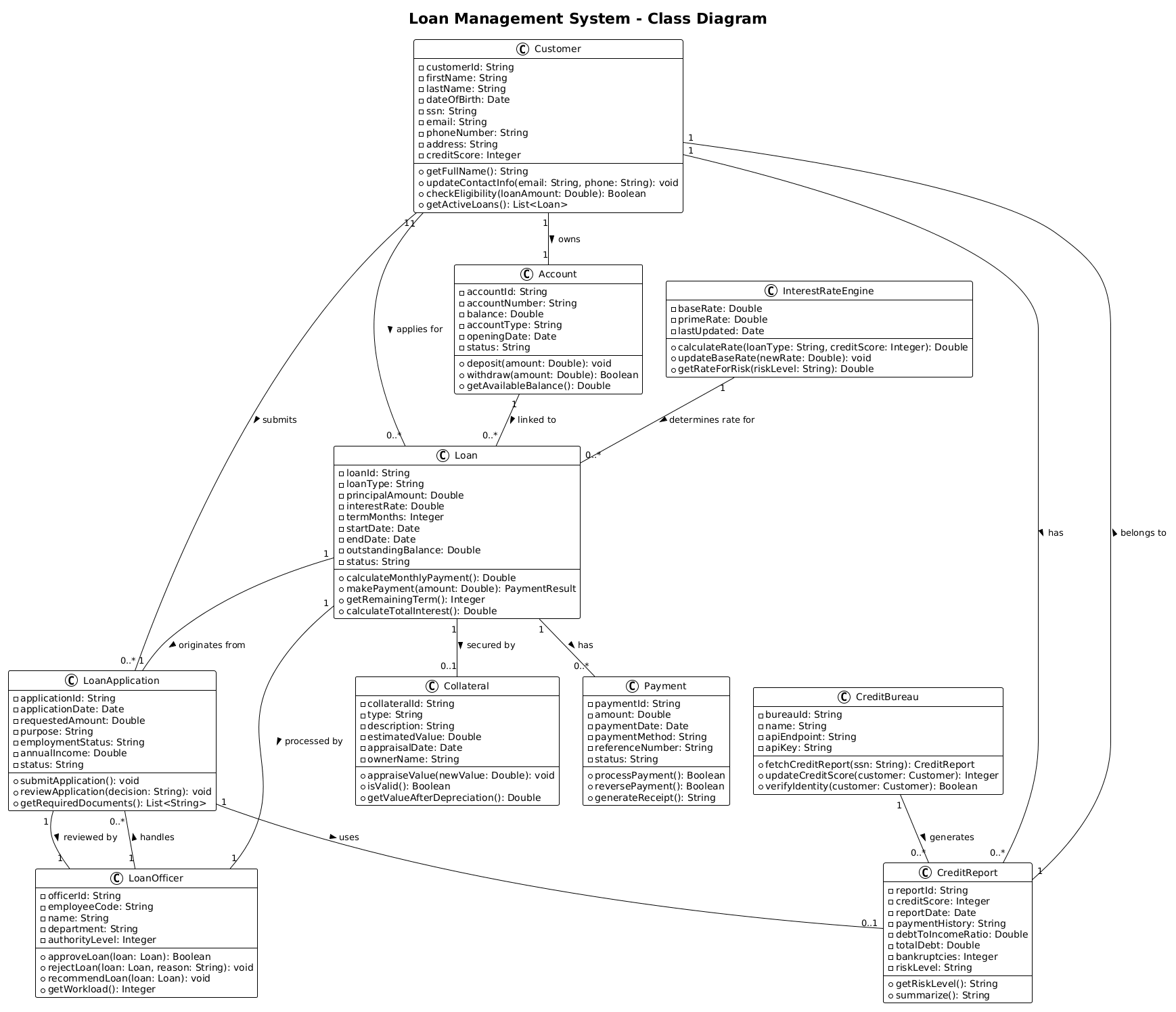
@startuml
!theme plain
title Loan Management System - Class Diagram

' Core Customer and Account classes
class Customer {
  - customerId: String
  - firstName: String
  - lastName: String
  - dateOfBirth: Date
  - ssn: String
  - email: String
  - phoneNumber: String
  - address: String
  - creditScore: Integer
  + getFullName(): String
  + updateContactInfo(email: String, phone: String): void
  + checkEligibility(loanAmount: Double): Boolean
  + getActiveLoans(): List<Loan>
}

class Account {
  - accountId: String
  - accountNumber: String
  - balance: Double
  - accountType: String
  - openingDate: Date
  - status: String
  + deposit(amount: Double): void
  + withdraw(amount: Double): Boolean
  + getAvailableBalance(): Double
}

' Loan related classes
class Loan {
  - loanId: String
  - loanType: String
  - principalAmount: Double
  - interestRate: Double
  - termMonths: Integer
  - startDate: Date
  - endDate: Date
  - outstandingBalance: Double
  - status: String
  + calculateMonthlyPayment(): Double
  + makePayment(amount: Double): PaymentResult
  + getRemainingTerm(): Integer
  + calculateTotalInterest(): Double
}

class LoanApplication {
  - applicationId: String
  - applicationDate: Date
  - requestedAmount: Double
  - purpose: String
  - employmentStatus: String
  - annualIncome: Double
  - status: String
  + submitApplication(): void
  + reviewApplication(decision: String): void
  + getRequiredDocuments(): List<String>
}

class Payment {
  - paymentId: String
  - amount: Double
  - paymentDate: Date
  - paymentMethod: String
  - referenceNumber: String
  - status: String
  + processPayment(): Boolean
  + reversePayment(): Boolean
  + generateReceipt(): String
}

class Collateral {
  - collateralId: String
  - type: String
  - description: String
  - estimatedValue: Double
  - appraisalDate: Date
  - ownerName: String
  + appraiseValue(newValue: Double): void
  + isValid(): Boolean
  + getValueAfterDepreciation(): Double
}

' Employee and Credit classes
class LoanOfficer {
  - officerId: String
  - employeeCode: String
  - name: String
  - department: String
  - authorityLevel: Integer
  + approveLoan(loan: Loan): Boolean
  + rejectLoan(loan: Loan, reason: String): void
  + recommendLoan(loan: Loan): void
  + getWorkload(): Integer
}

class CreditBureau {
  - bureauId: String
  - name: String
  - apiEndpoint: String
  - apiKey: String
  + fetchCreditReport(ssn: String): CreditReport
  + updateCreditScore(customer: Customer): Integer
  + verifyIdentity(customer: Customer): Boolean
}

class CreditReport {
  - reportId: String
  - creditScore: Integer
  - reportDate: Date
  - paymentHistory: String
  - debtToIncomeRatio: Double
  - totalDebt: Double
  - bankruptcies: Integer
  - riskLevel: String
  + getRiskLevel(): String
  + summarize(): String
}

class InterestRateEngine {
  - baseRate: Double
  - primeRate: Double
  - lastUpdated: Date
  + calculateRate(loanType: String, creditScore: Integer): Double
  + updateBaseRate(newRate: Double): void
  + getRateForRisk(riskLevel: String): Double
}

' Relationships
Customer "1" -- "0..*" Loan : applies for >
Customer "1" -- "1" Account : owns >
Customer "1" -- "0..*" LoanApplication : submits >

Loan "1" -- "1" LoanApplication : originates from >
Loan "1" -- "0..*" Payment : has >
Loan "1" -- "0..1" Collateral : secured by >
Loan "1" -- "1" LoanOfficer : processed by >

LoanApplication "1" -- "1" LoanOfficer : reviewed by >
LoanApplication "1" -- "0..1" CreditReport : uses >

CreditBureau "1" -- "0..*" CreditReport : generates >
CreditReport "1" -- "1" Customer : belongs to >

LoanOfficer "1" -- "0..*" LoanApplication : handles >

InterestRateEngine "1" -- "0..*" Loan : determines rate for >

Customer "1" -- "0..*" CreditReport : has >
Account "1" -- "0..*" Loan : linked to >

@endumlStep-by-Step Architectural Walkthrough
Phase 1: Canvas Configuration & Layout Directives
Every PlantUML diagram begins with configuration directives that set the visual tone and layout engine. For a financial system, we want clarity and structure.
We start by declaring the diagram type and applying a clean theme:
@startuml
!theme plain
title Loan Management System - Class Diagram
The @startuml directive tells the engine we are starting a UML diagram. The !theme plain directive ensures a minimalistic, high-contrast look that is ideal for technical documentation, removing unnecessary decorative elements to focus on the data.
Phase 2: Declaring Core Entities, Actors, and Boundaries
The heart of the system lies in the class definitions. In PlantUML, a class is defined using the class keyword, followed by the class name. Inside the curly braces {}, we define attributes (private data) and methods (public behavior).
For the Customer class, we define sensitive financial data as private attributes (prefixed with -) and public API methods (prefixed with +):
class Customer {
  - customerId: String
  - creditScore: Integer
  + checkEligibility(loanAmount: Double): Boolean
}
Key Insight: Notice the type annotations (e.g., : String, : Double). In financial modeling, strict typing is essential to prevent calculation errors. The method signature checkEligibility(loanAmount: Double): Boolean clearly indicates that the method takes a double value and returns a true/false decision.
Phase 3: Mapping Data Flows & Key Interactions
Once the classes are defined, we must establish how they relate. Relationships in PlantUML are drawn using association lines. The syntax follows the pattern: ClassA "Cardinality" -- "Cardinality" ClassB : Label.
Consider the relationship between a Customer and a Loan:
Customer "1" -- "0..*" Loan : applies for >This line states that one Customer (“1”) can apply for zero or many Loans (“0..*”). The label applies for describes the directionality of the relationship, and the arrow > reinforces the flow from Customer to Loan.
We also model the CreditBureau dependency, which is crucial for risk assessment:
CreditBureau "1" -- "0..*" CreditReport : generates >
CreditReport "1" -- "1" Customer : belongs to >
This establishes that a bureau generates multiple reports, and each report belongs to exactly one customer.
Phase 4: Grouping, Annotations & Visual Polish
While this diagram uses a flat structure for clarity, complex systems often benefit from grouping. PlantUML supports package blocks to visually separate concerns.
For example, you could group all internal banking classes:
package "Banking Core" {
  class Account
  class Loan
  class Payment
}
In this specific tutorial, we opted for a unified view to show the end-to-end flow from application to repayment, ensuring that stakeholders can see the entire lifecycle in a single view.
Syntax & Keyword Deep Dive
To master PlantUML, you must understand the specific keywords that drive the rendering engine. Here are the critical syntax elements used in the Loan Management System diagram:
class: The fundamental building block. Defines a blueprint for objects with attributes and methods.-(Dash): Denotes a private attribute. In finance, this represents data that should not be directly modified by external classes (e.g.,- creditScore).+(Plus): Denotes a public method. These are the operations exposed to the rest of the system (e.g.,+ makePayment).--(Double Dash): Represents a standard association line connecting two classes."1" -- "0..*"(Cardinality): Defines the multiplicity."1"means exactly one,"0..*"means zero to many. This is vital for enforcing business rules like “One customer can have many loans.”: Label(Relationship Name): Text placed after the relationship line to describe the nature of the connection (e.g.,secured by,processed by).!theme: A directive to apply a specific visual theme to the entire diagram canvas.
Best Practices & Pitfalls to Avoid
When modeling financial systems with VPasCode, follow these architectural guidelines to ensure your diagrams remain maintainable and clear:
- Enforce Encapsulation: Never expose sensitive fields like
ssnorapiKeyas public methods. Use private attributes and provide controlled accessors only when necessary for the specific business logic. - Use Meaningful Cardinalities: Ambiguity in relationships leads to database errors. Always explicitly define cardinalities (e.g.,
0..1vs1) to reflect real-world constraints. - Separate Concerns: If the diagram becomes too crowded, consider splitting it into sub-diagrams (e.g., one for “Customer Management” and another for “Loan Processing”).
- Consistent Naming Conventions: Use PascalCase for class names (e.g.,
CreditBureau) and camelCase for methods (e.g.,fetchCreditReport) to align with standard Java/C# conventions common in banking.
Try It Yourself with VPasCode
Start Building PlantUML Class Diagrams Faster with VPasCode
Instantly render, edit, and customize your financial architecture diagrams online without installing any local tools or Java dependencies.