


In the modern digital landscape, educational institutions are increasingly relying on automated portals to manage the complex lifecycle of student admissions. A University Admissions Portal is not merely a form-filling interface; it is a robust system orchestrating applicant data, academic program constraints, document verification workflows, and financial transactions. To ensure this system is built on a solid foundation, software architects must first define the core domain model with precision.

Class diagrams are the cornerstone of Object-Oriented Design (OOD). They provide a static view of the system, detailing the classes, attributes, operations, and the relationships between them. For a domain as intricate as university admissions, where data integrity and workflow clarity are paramount, a well-structured class diagram is essential.
VPasCode offers a streamlined, browser-based environment to create these diagrams using PlantUML. By leveraging diagram-as-code principles, architects can version their models as text, iterate rapidly, and maintain documentation that stays in sync with the codebase. This tutorial guides you through designing a professional Class Diagram for a University Admissions Portal, demonstrating how to model generalization hierarchies, complex associations, and lifecycle dependencies using PlantUML syntax within VPasCode.
Understanding the Model: Purpose, Scope & Problem Framing
Diagram Abstraction & Representation
A Class Diagram in this context serves as the blueprint for the system’s data structure and business logic. It abstracts real-world entities—such as Students, Reviewers, and Programs—into software classes. Each class encapsulates data (attributes) and behavior (methods), while relationships define how these entities interact.
For the University Admissions Portal, the diagram models the “Contract” of the system. It answers critical questions: Who submits applications? How are applications linked to specific programs? What documents are required? How does a decision lead to an offer and subsequent enrollment? By visualizing these connections, stakeholders can validate business rules before writing a single line of backend code.
Target Domain Scope & Scenario
This diagram focuses on the core administrative domain of the admissions process. It covers the full lifecycle from application submission to enrollment confirmation. The scope includes:
- Applicant Management: Handling personal data and eligibility checks.
- Application Processing: Managing the state of applications and associated documents.
- Academic Administration: Defining programs, capacity, and fee structures.
- Workflow & Decisions: Modeling the review process, decision outcomes, and financial obligations.
Dependencies such as external payment gateways or legacy student information systems are abstracted away to keep the model focused on the portal’s internal logic.
Key Takeaways & Educational Insights
By the end of this guide, you will understand how to:
- Model inheritance hierarchies using generalization to reduce redundancy (e.g.,
Personparent class). - Define cardinality and multiplicity to enforce data constraints (e.g., one-to-many relationships).
- Distinguish between different relationship types: Association (usage), Aggregation (weak ownership), and Composition (strong ownership).
- Apply visual themes and annotations to enhance diagram readability.
Complete Diagram & Full Source Code
Below is the complete, finalized PlantUML source code for the University Admissions Portal class diagram. This code includes the theme configuration, class definitions, and all relationship mappings.
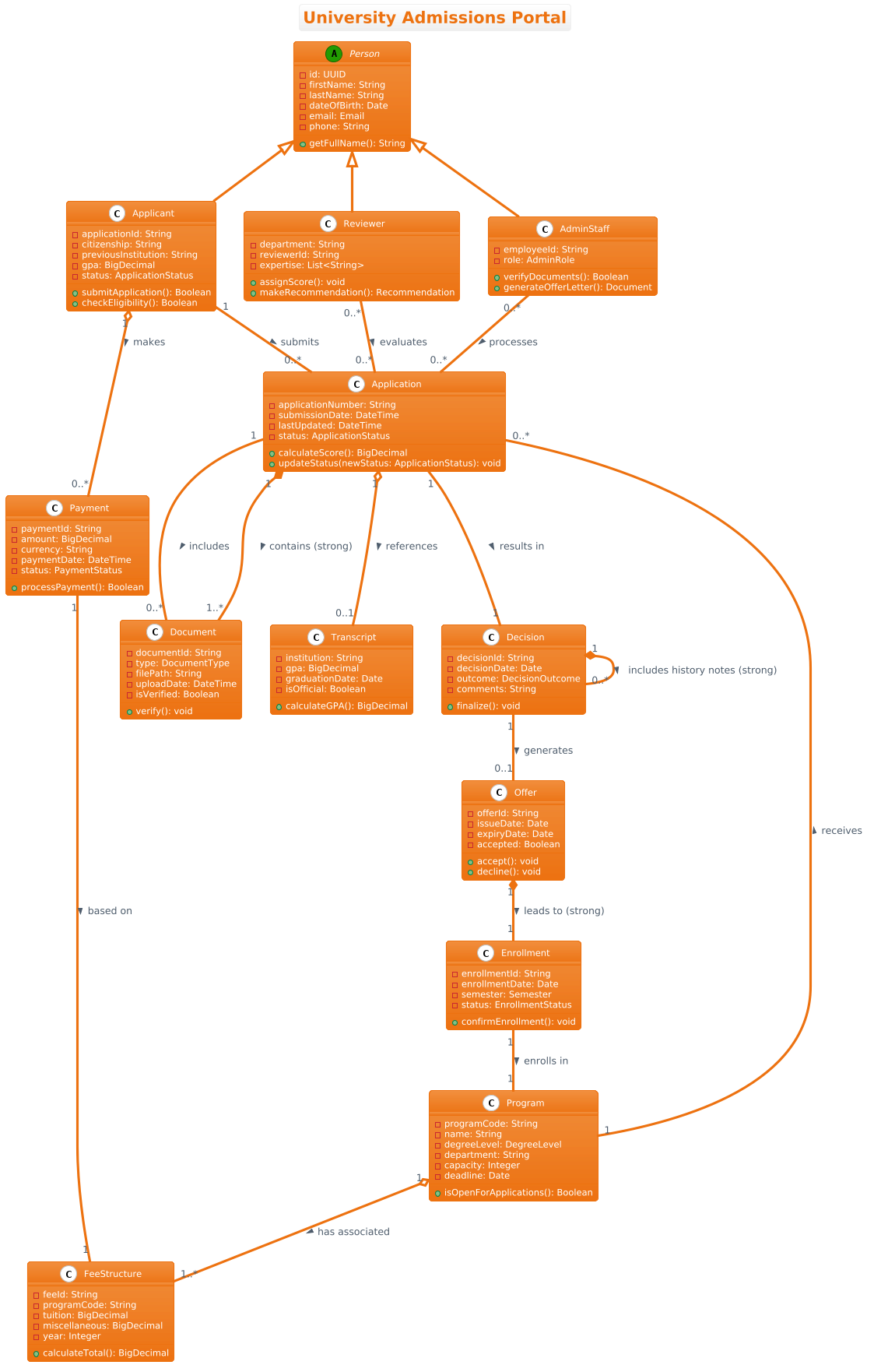
@startuml
!theme aws-orange
title University Admissions Portal

/'
This class diagram models the core domain entities and relationships within a University Admissions Portal system.
The system supports the full lifecycle of a student application, from initial submission through to final enrollment.
Key functional areas include applicant management, application processing, academic program administration,
document verification, decision workflows, and fee payment tracking.
The diagram illustrates how applicants interact with programs, how applications are evaluated by reviewers,
and how administrative entities like transcripts, offers, and enrollments are interconnected.
It captures both the structural data and the decision-making pathways essential for automating and streamlining
the admissions process across multiple departments and academic levels.
'/

abstract class Person {
  - id: UUID
  - firstName: String
  - lastName: String
  - dateOfBirth: Date
  - email: Email
  - phone: String
  + getFullName(): String
}

class Applicant {
  - applicationId: String
  - citizenship: String
  - previousInstitution: String
  - gpa: BigDecimal
  - status: ApplicationStatus
  + submitApplication(): Boolean
  + checkEligibility(): Boolean
}

class Reviewer {
  - department: String
  - reviewerId: String
  - expertise: List<String>
  + assignScore(): void
  + makeRecommendation(): Recommendation
}

class AdminStaff {
  - employeeId: String
  - role: AdminRole
  + verifyDocuments(): Boolean
  + generateOfferLetter(): Document
}

class Program {
  - programCode: String
  - name: String
  - degreeLevel: DegreeLevel
  - department: String
  - capacity: Integer
  - deadline: Date
  + isOpenForApplications(): Boolean
}

class Application {
  - applicationNumber: String
  - submissionDate: DateTime
  - lastUpdated: DateTime
  - status: ApplicationStatus
  + calculateScore(): BigDecimal
  + updateStatus(newStatus: ApplicationStatus): void
}

class Document {
  - documentId: String
  - type: DocumentType
  - filePath: String
  - uploadDate: DateTime
  - isVerified: Boolean
  + verify(): void
}

class Transcript {
  - institution: String
  - gpa: BigDecimal
  - graduationDate: Date
  - isOfficial: Boolean
  + calculateGPA(): BigDecimal
}

class Decision {
  - decisionId: String
  - decisionDate: Date
  - outcome: DecisionOutcome
  - comments: String
  + finalize(): void
}

class Offer {
  - offerId: String
  - issueDate: Date
  - expiryDate: Date
  - accepted: Boolean
  + accept(): void
  + decline(): void
}

class Enrollment {
  - enrollmentId: String
  - enrollmentDate: Date
  - semester: Semester
  - status: EnrollmentStatus
  + confirmEnrollment(): void
}

class Payment {
  - paymentId: String
  - amount: BigDecimal
  - currency: String
  - paymentDate: DateTime
  - status: PaymentStatus
  + processPayment(): Boolean
}

class FeeStructure {
  - feeId: String
  - programCode: String
  - tuition: BigDecimal
  - miscellaneous: BigDecimal
  - year: Integer
  + calculateTotal(): BigDecimal
}

' Generalization
Person <|-- Applicant
Person <|-- Reviewer
Person <|-- AdminStaff

' Association
Applicant "1" -- "0..*" Application : submits >
Program "1" -- "0..*" Application : receives >
Application "1" -- "0..*" Document : includes >
Application "1" -- "1" Decision : results in >
Decision "1" -- "0..1" Offer : generates >

' Aggregation
Application "1" o-- "0..1" Transcript : references >
Program "1" o-- "1..*" FeeStructure : has associated >
Applicant "1" o-- "0..*" Payment : makes >

' Composition
Application "1" *-- "1..*" Document : contains (strong) >
Offer "1" *-- "1" Enrollment : leads to (strong) >
Decision "1" *-- "0..*" Decision : includes history notes (strong) >

' Additional associations
Reviewer "0..*" -- "0..*" Application : evaluates >
AdminStaff "0..*" -- "0..*" Application : processes >
Enrollment "1" -- "1" Program : enrolls in >
Payment "1" -- "1" FeeStructure : based on >
@endumlStep-by-Step Architectural Walkthrough
Building a robust class diagram requires a methodical approach. We will construct this diagram in four logical phases, starting with configuration and moving toward complex relationship mapping.
Phase 1: Canvas Configuration & Layout Directives
Before defining any classes, we set the visual context. VPasCode supports PlantUML directives to customize the look and feel of the diagram. We begin by setting the theme to aws-orange to give the diagram a professional, modern aesthetic.
!theme aws-orange
title University Admissions Portal

'/
This class diagram models the core domain entities...
'/
The title directive ensures the diagram has a clear header. Following this, we use a comment block /' ... '/ to document the scope and purpose of the diagram. This is crucial for maintainability, ensuring that future developers understand the context of the model without needing to reverse-engineer the code.
Phase 2: Declaring Core Entities, Actors, and Boundaries
The foundation of any object-oriented system is the class definition. We start with the root entity Person, which is declared as abstract. This is a best practice in modeling; Person is a concept, not a concrete entity that exists in the database on its own.
abstract class Person {
  - id: UUID
  - firstName: String
  - lastName: String
  - dateOfBirth: Date
  - email: Email
  - phone: String
  + getFullName(): String
}
We then define specific roles that inherit from Person, such as Applicant, Reviewer, and AdminStaff. Each class includes private attributes (prefixed with -) for data and public methods (prefixed with +) for behavior. This encapsulation mirrors real-world software design patterns.
Phase 3: Mapping Data Flows & Key Interactions
Once classes are defined, we establish how they connect. We use association lines to show relationships. For example, an Applicant submits an Application.
Applicant "1" -- "0..*" Application : submits >The syntax "1" and "0..*" defines cardinality: one applicant can submit zero or many applications. This prevents logical errors in the system design, such as allowing an application without an owner.
Phase 4: Grouping, Annotations & Visual Polish
Finally, we refine the relationships to reflect ownership semantics. We use Aggregation (hollow diamond o--) for relationships where the child can exist independently of the parent, and Composition (filled diamond *--) for strong ownership where the child’s lifecycle is bound to the parent.
Application "1" *-- "1..*" Document : contains (strong) >Here, Document is composed within Application; if the application is deleted, the documents are logically deleted too. This distinction adds semantic depth to the diagram.
Syntax & Keyword Deep Dive
Understanding the specific PlantUML keywords is essential for creating accurate diagrams. Below is a breakdown of the critical syntax used in this University Admissions Portal model.
abstract class: Declares a class that cannot be instantiated directly. Used for thePersonbase class to enforce the hierarchy.<|--: Represents Generalization (Inheritance).Person <|-- Applicantmeans Applicant is a specialized type of Person.--: Represents a standard Association. It implies a navigable link between two classes without implying ownership.o--: Represents Aggregation. The hollow diamond indicates a “has-a” relationship where parts can exist independently (e.g.,ApplicantmakesPayment).*--: Represents Composition. The filled diamond indicates a “part-of” relationship where the part cannot exist without the whole (e.g.,ApplicationcontainsDocument)."0..*"/"1"/"0..1": These are multiplicity notations defining cardinality constraints (Zero or Many, Exactly One, Zero or One)./:…/: Comment blocks that are rendered as text within the diagram but do not affect the rendering logic.
Best Practices & Pitfalls to Avoid
When designing class diagrams in VPasCode, adhering to modeling best practices ensures clarity and scalability.
- Separate Concerns: Do not clutter the diagram with every possible attribute. Focus on the core domain entities that drive the business logic. In this model, we focused on the admission lifecycle rather than the underlying database schema details.
- Use Consistent Naming: Use PascalCase for class names and camelCase for methods. This aligns with standard programming conventions and makes the diagram easier to read.
- Define Relationships Clearly: Be precise about the difference between Aggregation and Composition. Misusing these can lead to confusion about data ownership and lifecycle management.
- Keep it Modular: If the diagram becomes too large, consider splitting it into sub-diagrams (e.g., one for User Management, one for Application Processing). However, for a portal of this scale, a unified view is often preferred for high-level architecture.
Try It Yourself with VPasCode
Start Building PlantUML Class Diagrams Faster with VPasCode
Instantly preview and customize your University Admissions Portal diagram online in VPasCode without installing any tools.