


In the world of financial systems, the payroll process is a critical, high-stakes workflow that requires absolute precision. A single error in salary calculation, tax remittance, or bank transfer can have significant legal and reputational consequences. For software architects and business analysts, visualizing this complex orchestration between Human Resources, Finance, and Banking institutions is essential for system validation and stakeholder alignment.

Traditional drag-and-drop diagramming tools often lack the precision and reproducibility needed for technical documentation. Diagram-as-code with PlantUML offers a superior alternative. By defining the logic in code, you ensure that your diagrams remain synchronized with your system specifications and can be versioned alongside your application code. Using VPasCode, the free web-based PlantUML editor, teams can rapidly prototype these workflows with instant browser rendering, zero local setup, and professional styling.
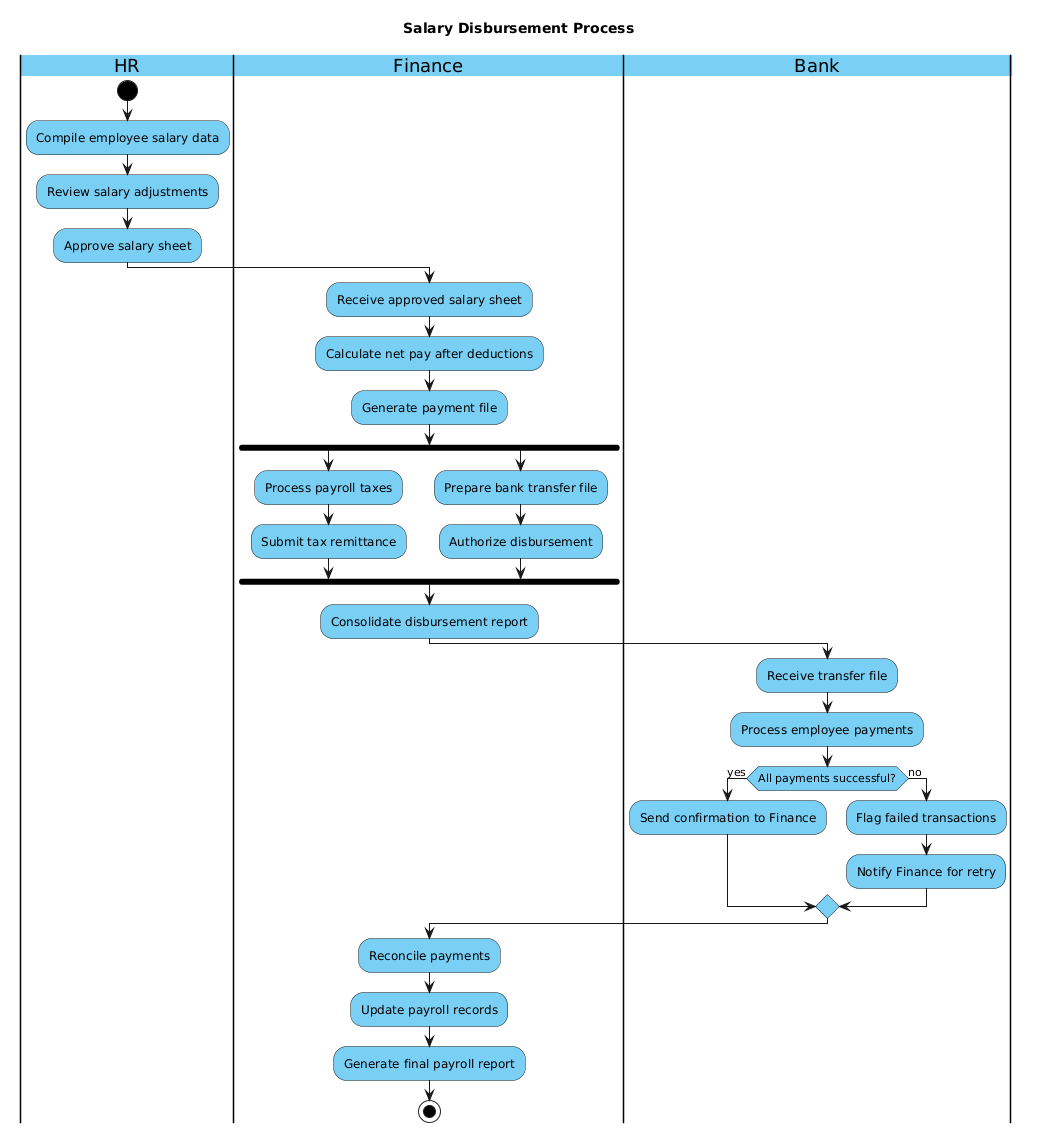
This tutorial walks you through constructing a comprehensive Activity Diagram for a Salary Disbursement Process. We will leverage PlantUML’s swimlane capabilities to separate concerns, use fork/join blocks for parallel processing, and implement conditional logic to handle transaction failures.
Understanding the Model: Purpose, Scope & Problem Framing
Diagram Abstraction & Representation
An Activity Diagram in PlantUML is the ideal notation for modeling workflows where actions occur in a specific sequence. In the context of payroll, this diagram abstracts the process rather than the structure of the data. It answers the question: “What happens next?” rather than “What does this look like?”.
For this specific model, we utilize Swimlanes (vertical partitions) to represent organizational boundaries. This is crucial for clarity: it visually separates the responsibilities of HR (data compilation), Finance (funds management), and the Bank (execution). This separation helps identify bottlenecks and ensures that handoffs between departments are clearly defined.
Target Domain Scope & Scenario
This diagram focuses strictly on the Post-Approval Disbursement Phase. It does not model the initial hiring or tax rate configuration, but rather the lifecycle of the approved salary sheet from the moment it leaves HR until the final reconciliation.
Key Boundaries:
- HR: Responsible for data integrity and approval.
- Finance: Responsible for net pay calculation, tax handling, and bank file generation.
- Bank: Responsible for actual fund transfer and error handling.
Key Takeaways & Educational Insights
By building this model, you will gain insights into:
- Parallel Processing: How to model simultaneous tasks (taxes vs. transfers) using
forkblocks. - Error Handling: How to explicitly design for failure scenarios using
if/elselogic. - State Transitions: How to map the flow from an initial state (
start) to a final state (stop).
Complete Diagram & Full Source Code
Below is the complete blueprint for the Salary Disbursement Activity Diagram. This code utilizes the Visual Paradigm theme for a professional look and includes all necessary logic for a production-grade workflow.
@startuml
!include https://static.visual-paradigm.com/web/resources/plantuml-stdlib/themes/vp.puml

title Salary Disbursement Process

|HR|
|Finance|
|Bank|

|HR|
start
:Compile employee salary data;
:Review salary adjustments;
:Approve salary sheet;

|Finance|
:Receive approved salary sheet;
:Calculate net pay after deductions;
:Generate payment file;
fork
  :Process payroll taxes;
  :Submit tax remittance;
fork again
  :Prepare bank transfer file;
  :Authorize disbursement;
end fork
:Consolidate disbursement report;

|Bank|
:Receive transfer file;
:Process employee payments;
if (All payments successful?) then (yes)
  :Send confirmation to Finance;
else (no)
  :Flag failed transactions;
  :Notify Finance for retry;
endif

|Finance|
:Reconcile payments;
:Update payroll records;
:Generate final payroll report;
stop

@endumlStep-by-Step Architectural Walkthrough
Now, let’s deconstruct the code to understand how each architectural component contributes to the final workflow visualization.
Phase 1: Canvas Configuration & Layout Directives
Every PlantUML diagram begins with configuration directives that set the stage. We start by including the Visual Paradigm theme to ensure the diagram renders with a modern, professional aesthetic consistent with enterprise documentation.
!include https://static.visual-paradigm.com/web/resources/plantuml-stdlib/themes/vp.pumlNext, we define the title of the diagram. This acts as the caption and provides immediate context for anyone viewing the rendered output.
title Salary Disbursement ProcessPhase 2: Declaring Core Entities, Actors, and Boundaries
Activity diagrams rely on swimlanes to organize logic by responsibility. In PlantUML, swimlanes are declared using the pipe syntax |Name|. We define three distinct lanes to represent the organizational silos involved in payroll.
|HR|
|Finance|
|Bank|
Notice how we redeclare |HR| later in the code. This allows the flow to jump back to the HR lane if necessary, though in this specific flow, we primarily move through Finance and Bank before returning to Finance for reconciliation.
Phase 3: Mapping Data Flows & Key Interactions
This is the core logic of the diagram. We begin with the start node, which acts as the entry point of the workflow. Actions are defined using colons followed by text.
start
:Compile employee salary data;
:Review salary adjustments;
:Approve salary sheet;
Parallel Processing with Fork: One of the most powerful features in activity diagrams is the ability to model parallel tasks. In payroll, tax remittance and bank transfers often happen simultaneously to save time. We use the fork and end fork blocks to encapsulate these concurrent activities.
fork
  :Process payroll taxes;
  :Submit tax remittance;
fork again
  :Prepare bank transfer file;
  :Authorize disbursement;
end fork
The fork again directive allows us to group multiple parallel branches logically. The diagram will render these actions side-by-side, indicating they occur concurrently.
Phase 4: Grouping, Annotations & Visual Polish
Finally, we handle decision logic. Real-world systems rarely have a perfect path; exceptions must be modeled. We use the if / else / endif structure to handle transaction failures.
if (All payments successful?) then (yes)
  :Send confirmation to Finance;
else (no)
  :Flag failed transactions;
  :Notify Finance for retry;
endif
This structure ensures that the diagram explicitly documents the “Happy Path” (success) and the “Exception Path” (failure), which is critical for audit trails in finance.
Syntax & Keyword Deep Dive
To master PlantUML activity diagrams, it is essential to understand the specific keywords used in this tutorial:
start/stop: These define the entry and exit points of the entire workflow. Every valid activity diagram must have exactly one start and one stop node.|Lane|: This syntax creates a vertical swimlane. It restricts the scope of the actions following it to that specific actor until a new lane is declared.fork/fork again/end fork: These keywords create parallel threads of execution.forksplits the flow,fork againadds more parallel branches, andend forkjoins them back into a single flow.if/else/endif: These create conditional branching. The text inside parentheses(Condition)represents the decision point, and the text afterthenorelserepresents the labels for the outgoing arrows.:Action;: The colon and semicolon syntax is the standard way to define a process step in PlantUML.
Best Practices & Pitfalls to Avoid
When modeling finance workflows with VPasCode, keep these best practices in mind to ensure your diagrams remain maintainable and clear:
- Keep Swimlanes Logical: Do not create too many swimlanes (e.g., more than 5-6). If you have too many actors, consider splitting the diagram into sub-processes.
- Consistent Naming: Use action-oriented verbs for your steps (e.g., “Calculate Net Pay” vs. “Net Pay Calculation”). This implies movement and process rather than static nouns.
- Balance Complexity: If a diagram becomes too dense, use
partitionblocks to group related logic visually. This helps readers digest the information in chunks. - Handle Edge Cases: Never model only the success path. As shown in this tutorial, explicitly modeling the
elsebranch for failed transactions is vital for financial compliance.
Try It Yourself with VPasCode
Start Building Activity Diagrams Faster with VPasCode
Instantly render and customize this salary disbursement workflow in your browser—no installation required, just write code and see the result.