


In the fast-paced world of fintech and digital banking, the integrity of a payment system relies heavily on a robust software architecture. A Credit Card Processing System is not merely a transaction log; it is a complex ecosystem involving customer data, merchant validation, financial gateways, security services, and regulatory compliance. For software architects and developers, visualizing these interactions is critical before writing a single line of production code.

Class diagrams serve as the blueprint for object-oriented systems, defining the static structure of the application. By modeling the Credit Card Processing System using PlantUML within the VPasCode web editor, you can rapidly prototype the domain model, validate relationship cardinalities, and ensure all critical components (like AuthorizationService and FraudDetectionService) are correctly integrated. This approach enhances architectural clarity, reduces miscommunication between stakeholders, and enables living technical documentation that evolves with your codebase.
Understanding the Model: Purpose, Scope & Problem Framing
Before diving into the syntax, it is essential to understand what this specific class diagram represents and why it is the right tool for this financial domain problem.
Diagram Abstraction & Representation
A class diagram in this context abstracts the static structure of the payment system. It does not show runtime behavior (like sequence diagrams) but rather the entities and their relationships. In finance, this is crucial for:
- Entity Definition: Clearly defining what constitutes a
Customeror aTransaction(attributes likeamount,timestamp,status). - Relationship Cardinality: Ensuring business rules are enforced visually (e.g., a Customer owns one or more CreditCards, but a Transaction is processed by exactly one Merchant).
- Service Boundaries: Separating concerns between core banking logic (BankAccount) and security logic (FraudDetectionService).
Target Domain Scope & Scenario
This model covers the core lifecycle of a credit card transaction from initiation to settlement. It intentionally excludes external legacy systems or mobile app UI layers to focus on the backend service architecture. The scope includes:
- Customer & Merchant Domains: The primary actors initiating and receiving payments.
- Transaction Engine: The core object managing the flow of funds.
- Security & Compliance: The services validating the transaction (Auth & Fraud).
- Settlement & Post-Processing: How funds move to the bank and how the customer is notified (Receipt & Loyalty).
Key Takeaways & Educational Insights
By constructing this model in VPasCode, you will gain:
- Clear visibility into the One-to-Many relationships between Customers and Transactions.
- An understanding of how to model Dependency vs. Association (e.g., Transaction depends on AuthorizationService).
- Best practices for organizing financial data classes with appropriate access modifiers (+ for public methods).
Complete Diagram & Full Source Code
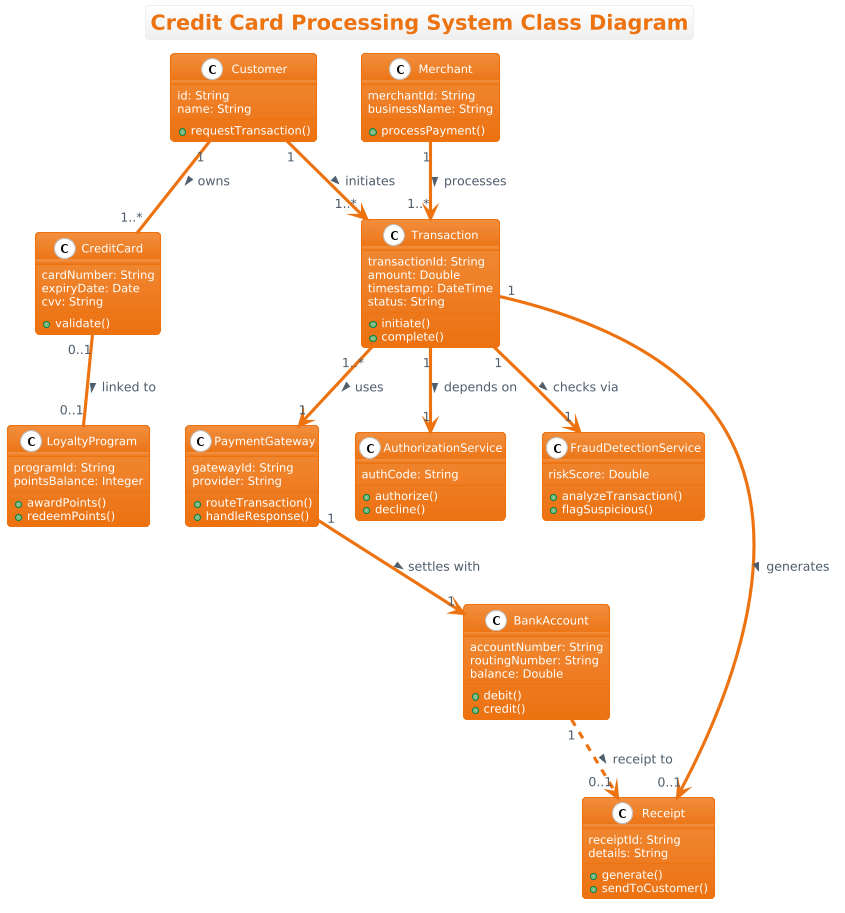
Below is the complete Credit Card Processing System class diagram. This blueprint encapsulates 10 distinct classes, including core entities like Customer and Merchant, along with specialized services like FraudDetectionService and AuthorizationService. The diagram uses the aws-orange theme for a professional, modern aesthetic.
@startuml
!theme aws-orange

title Credit Card Processing System Class Diagram

class Customer {
    id: String
    name: String
    +requestTransaction()
}

class CreditCard {
    cardNumber: String
    expiryDate: Date
    cvv: String
    +validate()
}

class Merchant {
    merchantId: String
    businessName: String
    +processPayment()
}

class Transaction {
    transactionId: String
    amount: Double
    timestamp: DateTime
    status: String
    +initiate()
    +complete()
}

class PaymentGateway {
    gatewayId: String
    provider: String
    +routeTransaction()
    +handleResponse()
}

class BankAccount {
    accountNumber: String
    routingNumber: String
    balance: Double
    +debit()
    +credit()
}

class AuthorizationService {
    authCode: String
    +authorize()
    +decline()
}

class FraudDetectionService {
    riskScore: Double
    +analyzeTransaction()
    +flagSuspicious()
}

class Receipt {
    receiptId: String
    details: String
    +generate()
    +sendToCustomer()
}

class LoyaltyProgram {
    programId: String
    pointsBalance: Integer
    +awardPoints()
    +redeemPoints()
}

' Relationships
Customer "1" -- "1..*" CreditCard : owns >
CreditCard "0..1" -- "0..1" LoyaltyProgram : linked to >
Customer "1" --> "1..*" Transaction : initiates >
Merchant "1" --> "1..*" Transaction : processes >
Transaction "1..*" --> "1" PaymentGateway : uses >
PaymentGateway "1" --> "1" BankAccount : settles with >
Transaction "1" --> "1" AuthorizationService : depends on >
Transaction "1" --> "1" FraudDetectionService : checks via >
Transaction "1" --> "0..1" Receipt : generates >
BankAccount "1" ..> "0..1" Receipt : receipt to >

@endumlStep-by-Step Architectural Walkthrough
Building a robust class diagram requires a logical progression. In VPasCode, you can write code and see the result instantly. Here is how we constructed the Credit Card Processing System model.
Phase 1: Canvas Configuration & Layout Directives
Every PlantUML diagram begins with configuration. We set the theme to match a professional fintech aesthetic and define the diagram type.
First, we specify the diagram type using @startuml. Next, we apply the visual theme:
!theme aws-orangeThis directive ensures the diagram uses a clean, modern color palette suitable for enterprise architecture documentation. We also add a title to provide immediate context:
title Credit Card Processing System Class DiagramPhase 2: Declaring Core Entities, Actors, and Boundaries
The foundation of any class diagram is the entity definition. We start with the primary actors: the Customer and the Merchant, followed by the financial instrument CreditCard.
Each class is defined using the class keyword, followed by the name, attributes, and methods. In PlantUML, attributes are listed first, followed by methods. Public methods are prefixed with a plus sign (+).
class Customer {
    id: String
    name: String
    +requestTransaction()
}
We repeat this pattern for CreditCard and Merchant, ensuring attributes like cardNumber and merchantId are typed correctly. This phase establishes the static data structures that will hold the transactional state.
Phase 3: Mapping Data Flows & Key Interactions
The core of the system is the Transaction object. This class acts as the central hub, linking the Customer, Merchant, and Payment Gateway. We also introduce specialized services for security and banking logic.
We define the Transaction class with its lifecycle methods:
class Transaction {
    transactionId: String
    amount: Double
    timestamp: DateTime
    status: String
    +initiate()
    +complete()
}
Next, we define the supporting services. The AuthorizationService and FraudDetectionService are critical for compliance. Notice how we use the ..> syntax for dependencies later, as these services are called upon but are not necessarily part of the Transaction’s direct composition.
Phase 4: Grouping, Annotations & Visual Polish
The final phase involves defining the relationships that connect these classes. This is where the business logic becomes visual.
We use association lines (--) for ownership (Customer owns CreditCard) and dependency arrows (-->) for usage (Transaction uses PaymentGateway). We also add cardinality labels to enforce business rules, such as "1" -- "1..*" (One Customer can have Many Cards).
Customer "1" -- "1..*" CreditCard : owns >
Transaction "1" --> "1" AuthorizationService : depends on >
This phase ensures the diagram is not just a list of classes, but a representation of how data flows through the financial system.
Syntax & Keyword Deep Dive
To effectively model your own diagrams in VPasCode, you must understand the specific PlantUML syntax used in this example. Here is a breakdown of the key keywords and conventions:
class: The fundamental keyword to define a class. It is followed by the class name and a block containing attributes and methods.+(Public Modifier):** Indicates that a method or attribute is public and accessible from outside the class. (e.g.,+requestTransaction()).--(Association):** A solid line connecting two classes, indicating a structural relationship (e.g.,CustomerownsCreditCard).-->(Dependency):** A dashed or solid line with an arrowhead, indicating that one class depends on another to function (e.g.,Transactiondepends onAuthorizationService)."1"&"1..*"(Cardinality):** Text labels placed on relationship lines to define the number of instances."1"means exactly one, and"1..*"means one or more.: label(Relationship Label):** The text following the relationship line (e.g.,: owns >) describes the nature of the connection.
Best Practices & Pitfalls to Avoid
When building class diagrams for complex financial systems, follow these guidelines to ensure clarity and maintainability:
- Maintain Separation of Concerns: Keep security logic (FraudDetection) separate from core banking logic (BankAccount). This makes your code easier to test and scale.
- Use Meaningful Cardinalities: Don’t just connect classes; define the rules. A
Customercan have many cards, but a specificTransactionis usually tied to one specificBankAccountfor settlement. - Avoid Over-Engineering: Only include classes that are necessary for the current scope. If you don’t need to model the mobile app, don’t add a
MobileAppclass to a backend architecture diagram. - Consistent Naming: Use PascalCase for class names (
CreditCard) and camelCase for methods (requestTransaction) to maintain consistency with common programming standards.
Start Building Credit Card Processing Diagrams Faster with VPasCode
Instantly visualize your fintech architecture in the browser with zero setup. Test your PlantUML class diagrams, customize themes, and export professional diagrams for your documentation today.