


In the high-velocity world of retail logistics, the efficiency of a warehouse fulfillment center is often dictated by the clarity of its data architecture. Modern operations rely on a seamless flow of information from the moment a customer places an order to the final handoff to a carrier. A robust database schema is the backbone of this operation, ensuring that inventory is accurately allocated, pick tasks are efficiently generated for warehouse operators, and shipments are tracked with precision. Without a well-structured data model, bottlenecks occur, inventory discrepancies arise, and the customer experience suffers.

Modeling this complex ecosystem requires more than just listing tables; it demands a visual representation of how entities like Orders, Inventory, and PickTasks interact to drive the physical movement of goods. This tutorial guides you through the creation of a professional Entity Relationship Diagram (ERD) using PlantUML within VPasCode. By leveraging the diagram-as-code approach, you can define the intricate relationships between customers, products, locations, and shipping carriers in a version-friendly, easily editable format that serves as living documentation for your engineering and operations teams.
Understanding the Model: Purpose, Scope & Problem Framing
This ERD is designed to model the end-to-end lifecycle of a warehouse fulfillment automation system. It addresses the critical challenge of synchronizing digital order data with physical warehouse operations. The diagram captures the journey of a product from the moment it is stocked in an InventoryLocation to the point it is shipped to a customer via a Carrier.
Diagram Abstraction & Representation
As an Entity Relationship Diagram, this model uses standardized notation to represent the static structure of the database. Entities (like Order and Product) represent the core nouns of the business domain, while Relationships (lines connecting entities) define how these nouns interact. For instance, the relationship between Order and OrderLine illustrates a one-to-many cardinality, showing that a single order can contain multiple line items. The inclusion of specific entities like PickTask and PackingTask elevates this from a simple sales schema to an operational workflow model, capturing the state of work in progress.
Target Domain Scope & Scenario
The scope of this diagram covers the core fulfillment loop: Order Receipt (Customer & Order), Inventory Allocation (Product & Location), Order Fulfillment (Pick & Pack tasks), and Shipping (Shipment & Carrier). It intentionally excludes upstream supply chain management (like procurement from suppliers) and downstream returns processing to maintain focus on the outbound fulfillment logic. The model assumes a distributed inventory system where products are tracked by specific locations (Zone, Aisle, Rack, Bin) and work is assigned to human operators or automated systems.
Key Takeaways & Educational Insights
By constructing this diagram, you will gain insights into:
- Operational State Management: How to model transient states like
PickTaskstatus (e.g., Assigned, In Progress, Completed) alongside permanent data. - Resource Allocation: The relationship between physical resources (Pack Stations, Packaging Materials) and the tasks they perform.
- Auditability: The inclusion of an
AuditLogentity to track who performed which action, a critical requirement for compliance in retail logistics.
Complete Diagram & Full Source Code
Below is the finished blueprint of the Warehouse Fulfillment ERD. It utilizes the aws-orange theme to provide a clean, professional aesthetic suitable for technical documentation.
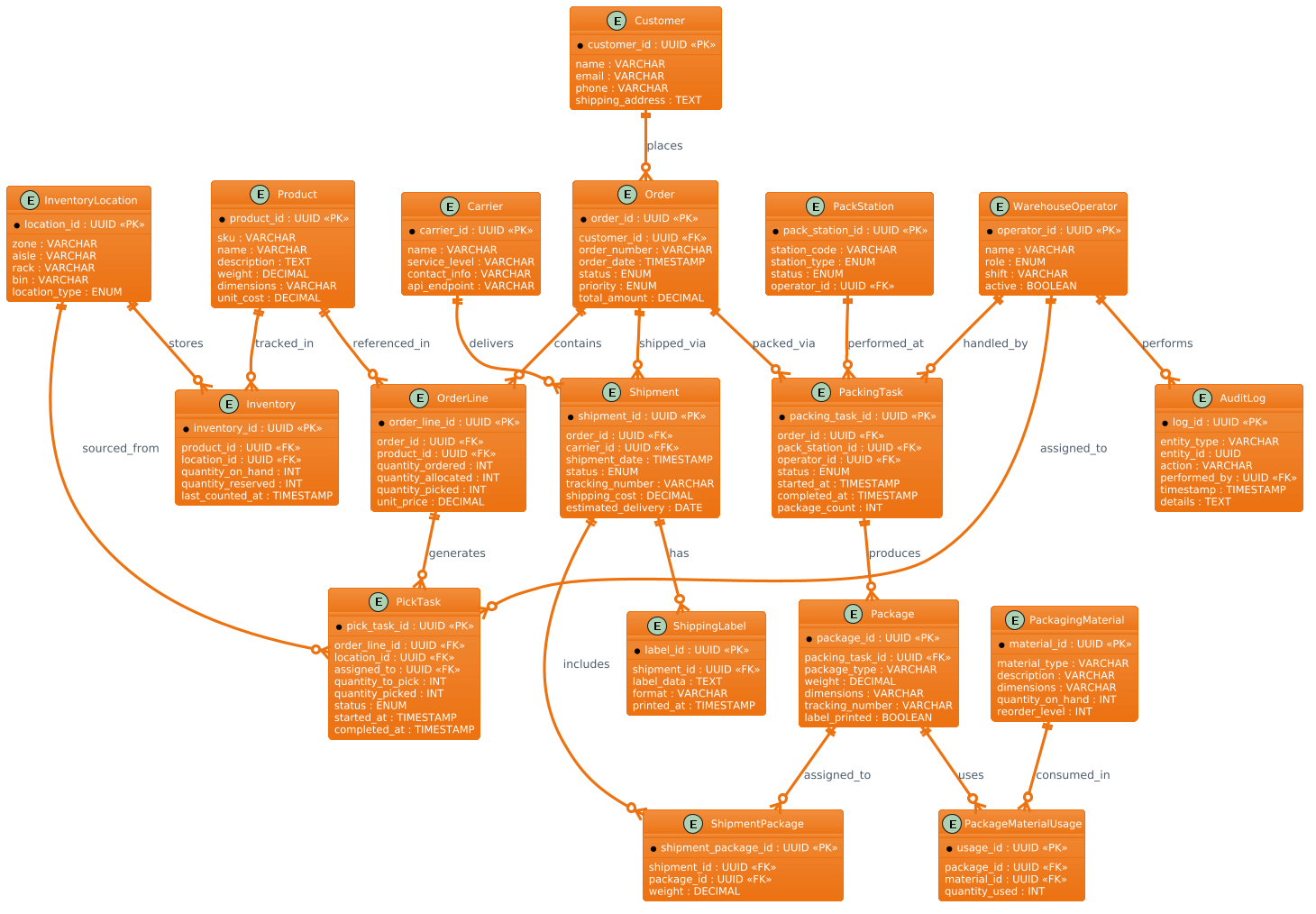
@startuml
/'
Diagram Context:
This ERD models a warehouse fulfillment automation system that manages the
end-to-end process of picking, packing, and shipping customer orders. The
system tracks orders from receipt through allocation to warehouse locations,
orchestrates pick tasks for warehouse operators or automated equipment,
manages packing stations and packaging materials, and coordinates shipment
handoff to carriers. Key entities capture inventory positions, work tasks,
packing operations, shipment records, and carrier details to support
real-time visibility and automation across the fulfillment lifecycle.
'/
!theme aws-orange

entity "Customer" as customer {
  * customer_id : UUID <<PK>>
  --
  name : VARCHAR
  email : VARCHAR
  phone : VARCHAR
  shipping_address : TEXT
}

entity "Order" as order {
  * order_id : UUID <<PK>>
  --
  customer_id : UUID <<FK>>
  order_number : VARCHAR
  order_date : TIMESTAMP
  status : ENUM
  priority : ENUM
  total_amount : DECIMAL
}

entity "OrderLine" as orderline {
  * order_line_id : UUID <<PK>>
  --
  order_id : UUID <<FK>>
  product_id : UUID <<FK>>
  quantity_ordered : INT
  quantity_allocated : INT
  quantity_picked : INT
  unit_price : DECIMAL
}

entity "Product" as product {
  * product_id : UUID <<PK>>
  --
  sku : VARCHAR
  name : VARCHAR
  description : TEXT
  weight : DECIMAL
  dimensions : VARCHAR
  unit_cost : DECIMAL
}

entity "InventoryLocation" as location {
  * location_id : UUID <<PK>>
  --
  zone : VARCHAR
  aisle : VARCHAR
  rack : VARCHAR
  bin : VARCHAR
  location_type : ENUM
}

entity "Inventory" as inventory {
  * inventory_id : UUID <<PK>>
  --
  product_id : UUID <<FK>>
  location_id : UUID <<FK>>
  quantity_on_hand : INT
  quantity_reserved : INT
  last_counted_at : TIMESTAMP
}

entity "PickTask" as picktask {
  * pick_task_id : UUID <<PK>>
  --
  order_line_id : UUID <<FK>>
  location_id : UUID <<FK>>
  assigned_to : UUID <<FK>>
  quantity_to_pick : INT
  quantity_picked : INT
  status : ENUM
  started_at : TIMESTAMP
  completed_at : TIMESTAMP
}

entity "WarehouseOperator" as operator {
  * operator_id : UUID <<PK>>
  --
  name : VARCHAR
  role : ENUM
  shift : VARCHAR
  active : BOOLEAN
}

entity "PackStation" as packstation {
  * pack_station_id : UUID <<PK>>
  --
  station_code : VARCHAR
  station_type : ENUM
  status : ENUM
  operator_id : UUID <<FK>>
}

entity "PackingTask" as packingtask {
  * packing_task_id : UUID <<PK>>
  --
  order_id : UUID <<FK>>
  pack_station_id : UUID <<FK>>
  operator_id : UUID <<FK>>
  status : ENUM
  started_at : TIMESTAMP
  completed_at : TIMESTAMP
  package_count : INT
}

entity "Package" as package {
  * package_id : UUID <<PK>>
  --
  packing_task_id : UUID <<FK>>
  package_type : VARCHAR
  weight : DECIMAL
  dimensions : VARCHAR
  tracking_number : VARCHAR
  label_printed : BOOLEAN
}

entity "PackagingMaterial" as material {
  * material_id : UUID <<PK>>
  --
  material_type : VARCHAR
  description : VARCHAR
  dimensions : VARCHAR
  quantity_on_hand : INT
  reorder_level : INT
}

entity "PackageMaterialUsage" as packmaterial {
  * usage_id : UUID <<PK>>
  --
  package_id : UUID <<FK>>
  material_id : UUID <<FK>>
  quantity_used : INT
}

entity "Shipment" as shipment {
  * shipment_id : UUID <<PK>>
  --
  order_id : UUID <<FK>>
  carrier_id : UUID <<FK>>
  shipment_date : TIMESTAMP
  status : ENUM
  tracking_number : VARCHAR
  shipping_cost : DECIMAL
  estimated_delivery : DATE
}

entity "Carrier" as carrier {
  * carrier_id : UUID <<PK>>
  --
  name : VARCHAR
  service_level : VARCHAR
  contact_info : VARCHAR
  api_endpoint : VARCHAR
}

entity "ShipmentPackage" as shipmentpackage {
  * shipment_package_id : UUID <<PK>>
  --
  shipment_id : UUID <<FK>>
  package_id : UUID <<FK>>
  weight : DECIMAL
}

entity "ShippingLabel" as label {
  * label_id : UUID <<PK>>
  --
  shipment_id : UUID <<FK>>
  label_data : TEXT
  format : VARCHAR
  printed_at : TIMESTAMP
}

entity "AuditLog" as auditlog {
  * log_id : UUID <<PK>>
  --
  entity_type : VARCHAR
  entity_id : UUID
  action : VARCHAR
  performed_by : UUID <<FK>>
  timestamp : TIMESTAMP
  details : TEXT
}

' Relationships
customer ||--o{ order : places
order ||--o{ orderline : contains
product ||--o{ orderline : referenced_in
location ||--o{ inventory : stores
product ||--o{ inventory : tracked_in
orderline ||--o{ picktask : generates
location ||--o{ picktask : sourced_from
operator ||--o{ picktask : assigned_to
order ||--o{ packingtask : packed_via
packstation ||--o{ packingtask : performed_at
operator ||--o{ packingtask : handled_by
packingtask ||--o{ package : produces
package ||--o{ packmaterial : uses
material ||--o{ packmaterial : consumed_in
order ||--o{ shipment : shipped_via
carrier ||--o{ shipment : delivers
shipment ||--o{ shipmentpackage : includes
package ||--o{ shipmentpackage : assigned_to
shipment ||--o{ label : has
operator ||--o{ auditlog : performs

@endumlStep-by-Step Architectural Walkthrough
Phase 1: Canvas Configuration & Layout Directives
The foundation of any PlantUML diagram lies in its initial configuration. In this model, we begin by setting the diagram type and applying a specific visual theme to match the branding or aesthetic requirements of the project. We use the @startuml directive to initialize the diagram. Immediately following this, we define a comment block to provide context for the diagram’s purpose, which is essential for collaborative documentation.
We then apply the !theme aws-orange directive. This single line instructs the VPasCode renderer to use a specific color palette (shades of orange, white, and gray) for all entities and relationships, giving the diagram a cohesive, professional look without needing to manually style every element.
Phase 2: Declaring Core Entities, Actors, and Boundaries
With the canvas ready, we define the core building blocks: the Entities. In PlantUML ERD notation, we use the entity keyword followed by a display name and an alias (used for referencing). For example:
entity "Customer" as customer {
  * customer_id : UUID <>
  --
  name : VARCHAR
  email : VARCHAR
}
Inside the curly braces, we define the attributes. The * prefix indicates a Primary Key (PK). We use the <<PK>> stereotype to explicitly mark the key. The -- separator is used to visually divide primary keys from other attributes, improving readability. We define similar structures for Order, Product, Inventory, and the operational entities like PickTask and PackStation.
Notice the inclusion of WarehouseOperator. This entity represents the human (or robotic) actor in the system, linking the digital task to the physical worker.
Phase 3: Mapping Data Flows & Key Interactions
Once entities are defined, we establish the relationships that drive the business logic. We use the ||--o{ syntax to represent a “one-to-many” relationship, where the entity on the left (the “one”) can be associated with zero or many entities on the right (the “many”).
For instance, the relationship between Customer and Order is defined as:
customer ||--o{ order : placesThis reads: “One Customer places zero or many Orders.” We follow this pattern to map the entire workflow: Order contains OrderLine, OrderLine generates PickTask, and PickTask is assigned to an Operator. We also model complex many-to-many relationships using junction tables (associative entities) like PackageMaterialUsage to track which materials were used for which package.
Phase 4: Grouping, Annotations & Visual Polish
The final phase involves ensuring the diagram is self-explanatory and visually balanced. We utilized the comment block at the top to describe the system context. In PlantUML, comments are wrapped in /' and '/.
We also ensured that the naming conventions are consistent. For example, using singular nouns for entities (e.g., Product instead of Products) and snake_case for internal aliases (e.g., product) helps in maintaining clean code. The use of ENUM for fields like status and priority indicates that these fields are restricted to a predefined set of values, which is crucial for data integrity in a fulfillment system.
Syntax & Keyword Deep Dive
To master PlantUML ERD modeling, understanding the specific syntax components is essential. Here is a breakdown of the key features used in this diagram:
entity: The fundamental keyword used to define a table or class. It takes a display name (in quotes) and an alias (for code references)./* ... */or/' ... '/: Comment blocks. The/'style is specifically used here to allow multi-line descriptions that are rendered in the diagram’s context or legend.||--o{: This is the cardinality notation.||means “one and only one” (mandatory one) on the source side, ando{means “zero or many” (optional many) on the target side.<<PK>>&<<FK>>: Stereotypes used to visually mark Primary Keys and Foreign Keys.PKis mandatory for the entity’s own identifier, whileFKdenotes a reference to another entity.!!or!!(Prefixes): While not used in this specific snippet, PlantUML supports prefixes like*for PKs and#for composite keys to visually distinguish them.!theme: A directive to apply a pre-defined color scheme to the entire diagram, ensuring consistency.
Best Practices & Pitfalls to Avoid
When building complex ERDs like this warehouse fulfillment model, adhering to best practices ensures the diagram remains maintainable and readable.
- Modularize Your Code: Define entities in a logical order. Start with master data (Customers, Products), move to transactional data (Orders), and finish with operational data (Tasks, Shipments). This helps readers understand the data flow naturally.
- Consistent Naming Conventions: Use clear, singular names for entities (e.g.,
OrdernotOrders) and consistent casing for attributes. This reduces cognitive load when reading the schema. - Avoid Circular Dependencies: Ensure your relationships form a logical tree or graph. Circular references (e.g., A references B, B references A) can make the diagram hard to read and may indicate a modeling error unless explicitly handled as a many-to-many relationship.
- Use Stereotypes Wisely: Don’t overuse
<<PK>>or<<FK>>if the context is obvious, but in complex schemas, they are vital for clarity. Ensure you distinguish between logical keys and physical implementation details.
Start Building Warehouse ERDs Faster with VPasCode
Instantly prototype and visualize your retail logistics data models with zero setup using our free, browser-based PlantUML editor.