


In the high-stakes environment of meat processing and slaughterhouse operations, data integrity is not just a technical requirement; it is a matter of regulatory compliance, food safety traceability, and operational efficiency. Every animal that enters a facility represents a complex chain of custody, from the farm of origin to the final primal cut on the processing line. Manufacturing managers and database architects face the challenge of modeling intricate relationships: linking individual animal tags to specific lots, tracking hot and cold carcass weights, recording detailed USDA grading metrics, and calculating precise yield percentages for every primal cut. Without a clear, visual data model, these operations risk losing critical traceability data or misinterpreting yield analytics.
Visual modeling bridges the gap between complex domain logic and technical implementation. By adopting a diagram-as-code approach, teams can maintain a single source of truth for their database schema that evolves alongside their business processes. PlantUML offers a powerful, text-based syntax to define these relationships, while VPasCode provides the instant, browser-based rendering engine needed to visualize these structures without any local setup. This tutorial walks you through building a comprehensive Entity-Relationship Diagram (ERD) specifically tailored for a meat packing slaughterhouse, focusing on the critical flow of data from animal reception through grading and final cut yield analysis.
Understanding the Model: Purpose, Scope & Problem Framing
The diagram we are constructing serves as the architectural blueprint for a relational database designed to support traceability and yield optimization in a meat packing facility. Unlike generic inventory systems, this model must handle the unique lifecycle of biological assets. The scope is strictly defined to cover the “kill-to-pack” workflow, excluding downstream distribution or retail sales to keep the model focused on the core processing logic.
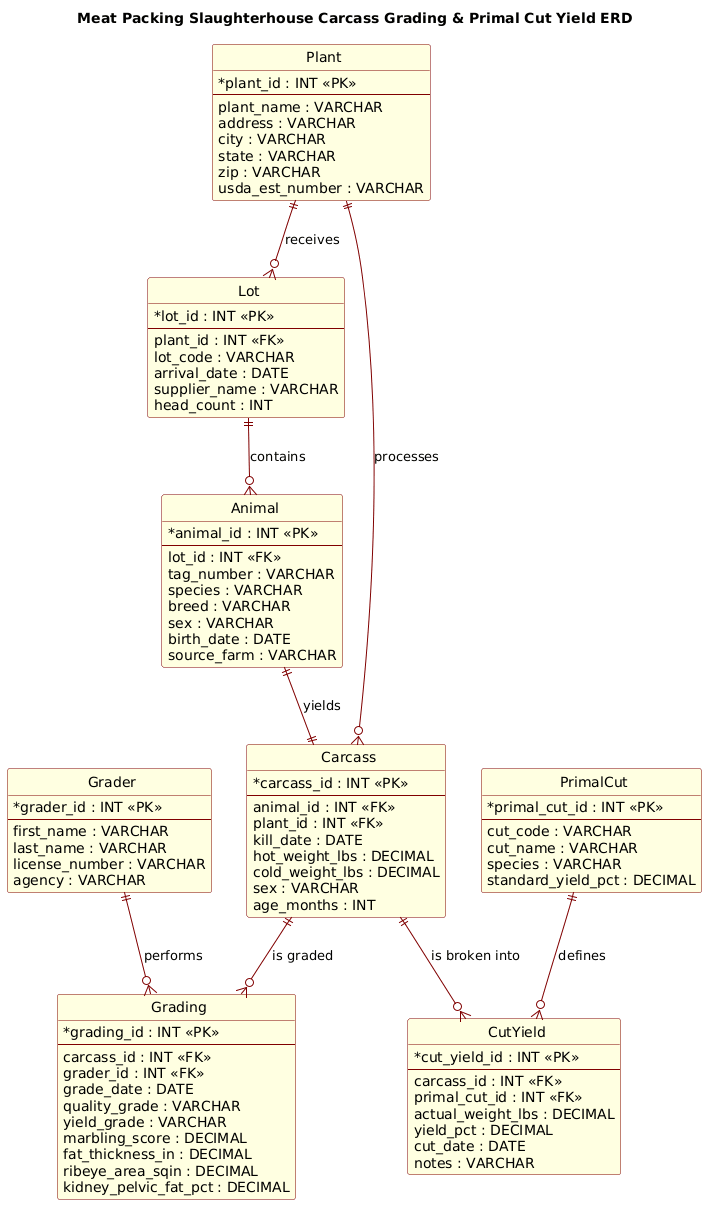
Diagram Abstraction & Representation: In this ERD, Entities represent the core nouns of the business domain: the facility, the animal, the lot, the carcass, the grader, and the resulting cuts. Relationships define the cardinality and direction of data flow, such as how a single Lot contains many Animals, or how one Carcass is broken down into multiple CutYields. The model specifically addresses the need to link physical attributes (like weight and fat thickness) to the specific animal and carcass records to ensure full traceability.
Target Domain Scope & Scenario: The diagram models the specific scenario of a USDA-inspected slaughterhouse. It captures the transition from live animal intake (tagged, sourced) to processed carcass (weighed, graded) and finally to breakdown (primal cuts, yield calculation). It explicitly includes the personnel (Graders) and the facility context (Plant) to ensure that every data point is auditable by location and responsible party.
Key Takeaways & Educational Insights: By the end of this guide, you will understand how to model one-to-many relationships for traceability, how to handle composite entities like grading scores, and how to structure a database schema that supports complex yield analysis. You will also learn how to use PlantUML’s entity-relationship syntax to create a clean, professional diagram that can be versioned and shared across your engineering and operations teams.
Complete Diagram & Full Source Code
Below is the final rendered ERD. This diagram visualizes the complete data structure for the meat packing operation, showing how entities connect from the plant level down to the specific cut yield details.
Copy the complete source code below to see the diagram in action or to use as a starting point for your own modifications.
@startuml
!include https://static.visual-paradigm.com/web/resources/plantuml-stdlib/themes/rose.puml

title Meat Packing Slaughterhouse Carcass Grading & Primal Cut Yield ERD

/'
Diagram Context:
This ERD models the core data structures for a slaughterhouse meat packing operation.
It tracks individual animal carcasses from receiving through grading, and records how each
carcass is broken down into primal cuts with associated yields. Key entities include:
- Animal/Lot: source and traceability information for each animal or group.
- Carcass: individual carcass records with hot/cold weights, grade, and sex.
- Grading: quality and yield grade assessments (e.g., USDA), marbling, fat thickness.
- PrimalCut: standardized primal cut definitions (e.g., chuck, rib, loin, round).
- CutYield: the actual weight and percentage yield of each primal cut per carcass.
- Inspector/Grader: personnel who perform official grading.
- Plant/Facility: the slaughterhouse location where processing occurs.
This structure supports traceability, yield analysis, and compliance reporting.
'/

' ========================
' ENTITIES
' ========================

entity "Plant" as plant {
  * plant_id : INT <<PK>>
  --
  plant_name : VARCHAR
  address : VARCHAR
  city : VARCHAR
  state : VARCHAR
  zip : VARCHAR
  usda_est_number : VARCHAR
}

entity "Animal" as animal {
  * animal_id : INT <<PK>>
  --
  lot_id : INT <<FK>>
  tag_number : VARCHAR
  species : VARCHAR
  breed : VARCHAR
  sex : VARCHAR
  birth_date : DATE
  source_farm : VARCHAR
}

entity "Lot" as lot {
  * lot_id : INT <<PK>>
  --
  plant_id : INT <<FK>>
  lot_code : VARCHAR
  arrival_date : DATE
  supplier_name : VARCHAR
  head_count : INT
}

entity "Carcass" as carcass {
  * carcass_id : INT <<PK>>
  --
  animal_id : INT <<FK>>
  plant_id : INT <<FK>>
  kill_date : DATE
  hot_weight_lbs : DECIMAL
  cold_weight_lbs : DECIMAL
  sex : VARCHAR
  age_months : INT
}

entity "Grading" as grading {
  * grading_id : INT <<PK>>
  --
  carcass_id : INT <<FK>>
  grader_id : INT <<FK>>
  grade_date : DATE
  quality_grade : VARCHAR
  yield_grade : VARCHAR
  marbling_score : DECIMAL
  fat_thickness_in : DECIMAL
  ribeye_area_sqin : DECIMAL
  kidney_pelvic_fat_pct : DECIMAL
}

entity "Grader" as grader {
  * grader_id : INT <<PK>>
  --
  first_name : VARCHAR
  last_name : VARCHAR
  license_number : VARCHAR
  agency : VARCHAR
}

entity "PrimalCut" as primal_cut {
  * primal_cut_id : INT <<PK>>
  --
  cut_code : VARCHAR
  cut_name : VARCHAR
  species : VARCHAR
  standard_yield_pct : DECIMAL
}

entity "CutYield" as cut_yield {
  * cut_yield_id : INT <<PK>>
  --
  carcass_id : INT <<FK>>
  primal_cut_id : INT <<FK>>
  actual_weight_lbs : DECIMAL
  yield_pct : DECIMAL
  cut_date : DATE
  notes : VARCHAR
}

' ========================
' RELATIONSHIPS
' ========================

plant ||--o{ lot : "receives"
plant ||--o{ carcass : "processes"
lot ||--o{ animal : "contains"
animal ||--|| carcass : "yields"
carcass ||--o{ grading : "is graded"
grader ||--o{ grading : "performs"
carcass ||--o{ cut_yield : "is broken into"
primal_cut ||--o{ cut_yield : "defines"

@endumlStep-by-Step Architectural Walkthrough
Building a complex ERD requires a systematic approach. We will break down the construction of this diagram into four logical phases: setting the visual theme, defining the core entities, establishing the relationships, and adding the necessary metadata.
Phase 1: Canvas Configuration & Layout Directives
Before defining any data structures, we must establish the visual style and context. In PlantUML, the !include directive allows us to import pre-built themes to ensure professional styling without writing custom CSS. We also start with a title directive to give the diagram a clear header.
The code below sets the stage. We include the rose.puml theme, which provides a clean, modern aesthetic suitable for technical documentation. We also add a comment block immediately after the title to provide context for anyone reading the code.
@startuml
!include https://static.visual-paradigm.com/web/resources/plantuml-stdlib/themes/rose.puml

title Meat Packing Slaughterhouse Carcass Grading & Primal Cut Yield ERD

/'
Diagram Context:
This ERD models the core data structures for a slaughterhouse meat packing operation.
... (context description)
'/
Phase 2: Declaring Core Entities, Actors, and Boundaries
The backbone of an ERD is the entity block. Each entity represents a table in the database. We define the entity name, an alias (short name) for use in relationships, and its attributes. In PlantUML, attributes are listed inside curly braces {}.
We use specific syntax to denote Primary Keys (*) and Foreign Keys (FK). For example, the Plant entity is the starting point for our data, containing the facility details and the critical USDA establishment number.
entity "Plant" as plant {
  * plant_id : INT <>
  --
  plant_name : VARCHAR
  address : VARCHAR
  city : VARCHAR
  state : VARCHAR
  zip : VARCHAR
  usda_est_number : VARCHAR
}
Similarly, the Animal entity tracks individual livestock, linking back to a Lot via a foreign key. The Grader entity captures the human element, storing license numbers and agency affiliations to ensure audit compliance.
entity "Animal" as animal {
  * animal_id : INT <>
  --
  lot_id : INT <>
  tag_number : VARCHAR
  species : VARCHAR
  ...
Phase 3: Mapping Data Flows & Key Interactions
Once the entities are defined, we connect them using relationship lines. PlantUML uses specific arrow notation to define cardinality. The ||--o{ syntax reads as “one or more” (the o{) on the right side, and “exactly one” (the ||) on the left side.
We map the flow of the meat packing process:
plant ||--o{ lot : "receives": A single plant receives many lots.lot ||--o{ animal : "contains": A lot contains many animals.animal ||--|| carcass : "yields": An animal yields exactly one carcass (a strict 1:1 relationship).carcass ||--o{ cut_yield : "is broken into": One carcass can be broken into many primal cuts.
This phase is critical for ensuring the logical integrity of the data model. If a relationship is defined incorrectly, the resulting database schema will be flawed.
Phase 4: Grouping, Annotations & Visual Polish
The final phase involves ensuring the diagram is readable and self-documenting. We use the title directive to label the diagram. We also utilize the comment block syntax /' ... '/ to embed a detailed description of the diagram’s purpose directly within the code. This ensures that the documentation travels with the model, making it easy for new team members to understand the context without needing external documentation.
'/'
Diagram Context:
This ERD models the core data structures...
'/
Syntax & Keyword Deep Dive
To master PlantUML for ERD modeling, you must understand the specific keywords and syntax conventions used in this diagram. Here is a breakdown of the essential elements:
entity: The primary keyword used to define a database table. The syntax isentity "Display Name" as alias { ... }. Thealiasis crucial for referencing the entity in relationship lines.entity attributes: Attributes are listed inside the entity block. The format is* attribute_name : TYPEfor Primary Keys andattribute_name : TYPEfor regular fields. The<and> <stereotypes visually highlight key constraints.> cardinality notation: The relationship lines use symbols to define constraints.||means “exactly one,”|omeans “zero or one,” ando{means “zero or many.” For example,animal ||--|| carcassindicates a mandatory one-to-one relationship.relationship labels: You can add text to the relationship line using the: syntax (e.g.,plant ||--o{ lot : "receives"). This describes the verb or action connecting the two entities.!include: This directive imports external resources, such as themes or libraries, allowing you to reuse styling across multiple diagrams.
Best Practices & Pitfalls to Avoid
When modeling complex manufacturing data like meat packing operations, following best practices ensures your diagram remains maintainable and accurate.
- Use Meaningful Aliases: Always define a short alias (e.g.,
as animal) for your entities. This makes relationship lines much cleaner and easier to read than using the full display name. - Be Consistent with Data Types: Stick to standard SQL data types (e.g.,
INT,VARCHAR,DECIMAL) for all attributes. This helps developers immediately understand the expected data format when converting the diagram to a physical schema. - Document Relationships Clearly: Don't just connect boxes; label the lines with verbs (e.g., "processes," "yields," "contains"). This turns a static diagram into a narrative of how data flows through the system.
- Keep Comments Contextual: Use the comment block
/' ... '/to explain the why of the model, not the how of the syntax. This keeps the code clean while providing essential business context for stakeholders.
Start Building Professional Meat Packing ERDs Faster with VPasCode
Visualize your slaughterhouse data structures instantly in your browser with VPasCode, the free PlantUML editor that requires zero installation.