


In the high-precision world of solar panel manufacturing, ensuring product reliability is not just a quality check—it is a fundamental requirement for grid stability and customer trust. The production journey from raw silicon wafers to finished photovoltaic modules involves intricate stages like cell stringing, tabbing, and lamination. Each of these steps introduces potential failure points, such as micro-cracks, misaligned tabs, or delamination, which must be captured, tracked, and analyzed with surgical precision. Without a robust data model linking production batches to specific inspection results, manufacturers are left flying blind, unable to trace the root cause of defects or optimize their yield rates.
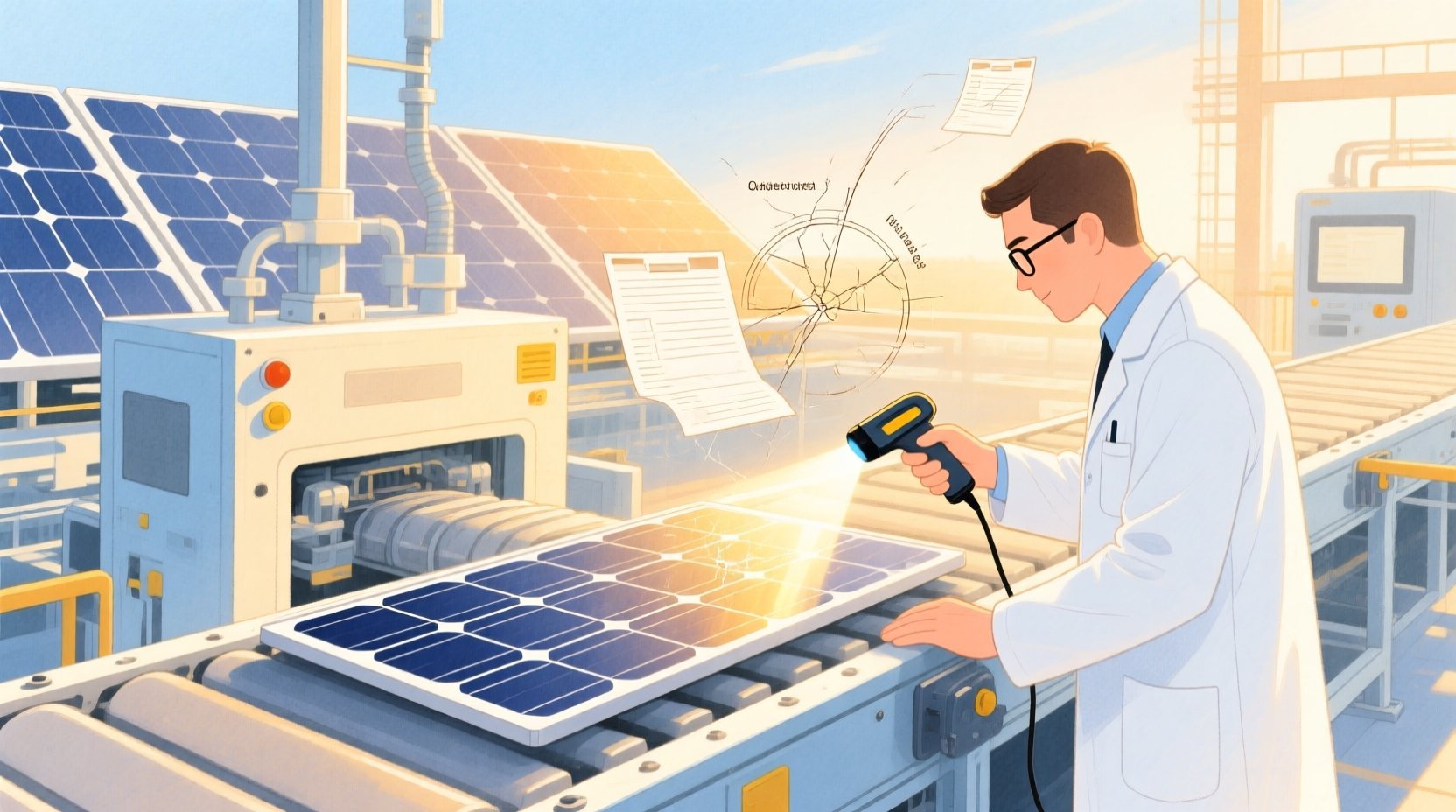
Building a comprehensive Entity-Relationship Diagram (ERD) for this ecosystem requires more than just listing tables; it demands a clear representation of how a single solar cell moves through the production line, how it is mapped to a string, and how every inspection event is recorded against that specific component. By modeling the relationships between ProductionBatches, SolarCells, Inspections, and Defects, engineers can create a digital twin of the quality process. This tutorial demonstrates how to construct this complex schema using PlantUML within the VPasCode editor, providing a live, editable blueprint that serves as the foundation for your manufacturing database architecture.
Understanding the Model: Purpose, Scope & Problem Framing
Diagram Abstraction & Representation
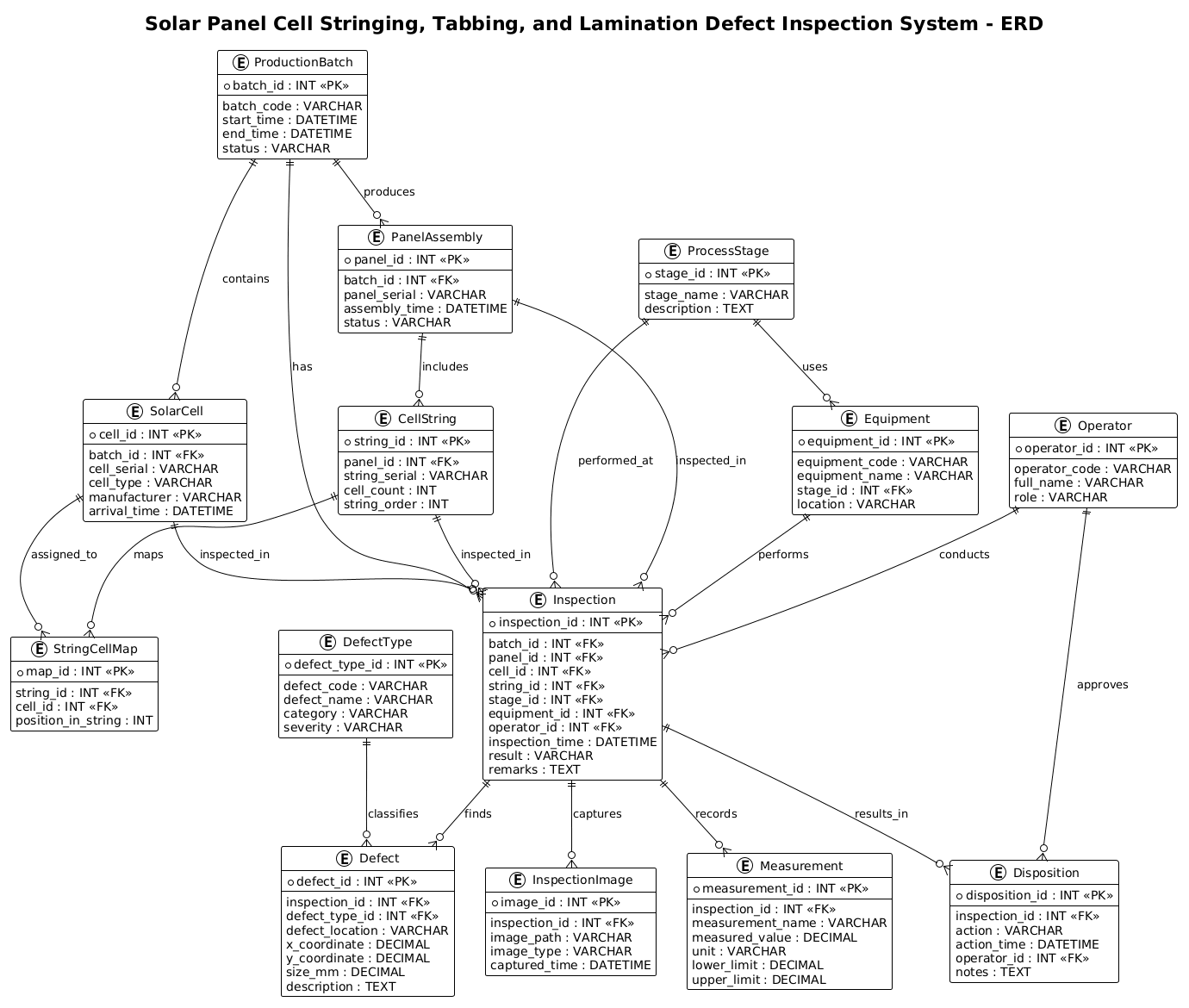
This ERD serves as the structural backbone for a Quality Management System (QMS) in a solar manufacturing facility. Unlike a simple inventory list, this model is designed to handle temporal traceability. It captures the lifecycle of a defect: from its physical location (coordinates) and severity, to the specific equipment and operator involved at the moment of discovery. The diagram abstracts the physical manufacturing floor into logical entities, where a CellString represents a physical assembly of cells, and an Inspection entity acts as a transactional record linking the physical object to the digital quality report.
Target Domain Scope & Scenario
The scope of this diagram is strictly limited to the defect inspection workflow within the solar panel production line. It covers three critical process stages: Cell Stringing (connecting cells), Tabbing (joining strings), and Lamination (encapsulating the panel). The model explicitly excludes upstream raw material sourcing or downstream logistics distribution to maintain focus on the internal quality control loop. It defines the boundaries for tracking defects across these specific stages, ensuring that every defect is linked back to a specific batch, panel, and even a specific cell position.
Key Takeaways & Educational Insights
By studying this model, you will learn how to handle many-to-many relationships (e.g., mapping multiple cells to a single string) and how to implement associative entities (like StringCellMap and Inspection) to store rich metadata about interactions. You will also see how to structure a schema that supports complex queries for root-cause analysis, such as “Find all defects of type ‘Micro-crack’ on cells from Batch #123 inspected by Operator #456.”
Complete Diagram & Full Source Code
Below is the final rendered Entity-Relationship Diagram. It visualizes the entire data flow from the initial production batch to the final disposition of a defective panel.
@startuml
!theme plain
title Solar Panel Cell Stringing, Tabbing, and Lamination Defect Inspection System - ERD

/'
This ERD models a solar panel manufacturing defect inspection system covering three key process stages:
cell stringing, tabbing, and lamination. The diagram context focuses on how production batches,
individual solar cells, and inspection results are tracked across these stages to detect and
classify defects. It connects manufacturing equipment, operators, inspections, defect types,
and final panel assemblies so that traceability and quality analysis can be performed.
'/

entity "ProductionBatch" as batch {
  * batch_id : INT <<PK>>
  --
  batch_code : VARCHAR
  start_time : DATETIME
  end_time : DATETIME
  status : VARCHAR
}

entity "SolarCell" as cell {
  * cell_id : INT <<PK>>
  --
  batch_id : INT <<FK>>
  cell_serial : VARCHAR
  cell_type : VARCHAR
  manufacturer : VARCHAR
  arrival_time : DATETIME
}

entity "ProcessStage" as stage {
  * stage_id : INT <<PK>>
  --
  stage_name : VARCHAR
  description : TEXT
}

entity "Equipment" as equipment {
  * equipment_id : INT <<PK>>
  --
  equipment_code : VARCHAR
  equipment_name : VARCHAR
  stage_id : INT <<FK>>
  location : VARCHAR
}

entity "Operator" as operator {
  * operator_id : INT <<PK>>
  --
  operator_code : VARCHAR
  full_name : VARCHAR
  role : VARCHAR
}

entity "PanelAssembly" as panel {
  * panel_id : INT <<PK>>
  --
  batch_id : INT <<FK>>
  panel_serial : VARCHAR
  assembly_time : DATETIME
  status : VARCHAR
}

entity "CellString" as cellstring {
  * string_id : INT <<PK>>
  --
  panel_id : INT <<FK>>
  string_serial : VARCHAR
  cell_count : INT
  string_order : INT
}

entity "StringCellMap" as stringcellmap {
  * map_id : INT <<PK>>
  --
  string_id : INT <<FK>>
  cell_id : INT <<FK>>
  position_in_string : INT
}

entity "Inspection" as inspection {
  * inspection_id : INT <<PK>>
  --
  batch_id : INT <<FK>>
  panel_id : INT <<FK>>
  cell_id : INT <<FK>>
  string_id : INT <<FK>>
  stage_id : INT <<FK>>
  equipment_id : INT <<FK>>
  operator_id : INT <<FK>>
  inspection_time : DATETIME
  result : VARCHAR
  remarks : TEXT
}

entity "DefectType" as defecttype {
  * defect_type_id : INT <<PK>>
  --
  defect_code : VARCHAR
  defect_name : VARCHAR
  category : VARCHAR
  severity : VARCHAR
}

entity "Defect" as defect {
  * defect_id : INT <<PK>>
  --
  inspection_id : INT <<FK>>
  defect_type_id : INT <<FK>>
  defect_location : VARCHAR
  x_coordinate : DECIMAL
  y_coordinate : DECIMAL
  size_mm : DECIMAL
  description : TEXT
}

entity "InspectionImage" as image {
  * image_id : INT <<PK>>
  --
  inspection_id : INT <<FK>>
  image_path : VARCHAR
  image_type : VARCHAR
  captured_time : DATETIME
}

entity "Measurement" as measurement {
  * measurement_id : INT <<PK>>
  --
  inspection_id : INT <<FK>>
  measurement_name : VARCHAR
  measured_value : DECIMAL
  unit : VARCHAR
  lower_limit : DECIMAL
  upper_limit : DECIMAL
}

entity "Disposition" as disposition {
  * disposition_id : INT <<PK>>
  --
  inspection_id : INT <<FK>>
  action : VARCHAR
  action_time : DATETIME
  operator_id : INT <<FK>>
  notes : TEXT
}

batch ||--o{ cell : contains
batch ||--o{ panel : produces
batch ||--o{ inspection : has
stage ||--o{ equipment : uses
stage ||--o{ inspection : performed_at
equipment ||--o{ inspection : performs
operator ||--o{ inspection : conducts
operator ||--o{ disposition : approves
panel ||--o{ cellstring : includes
cellstring ||--o{ stringcellmap : maps
cell ||--o{ stringcellmap : assigned_to
panel ||--o{ inspection : inspected_in
cell ||--o{ inspection : inspected_in
cellstring ||--o{ inspection : inspected_in
inspection ||--o{ defect : finds
defecttype ||--o{ defect : classifies
inspection ||--o{ image : captures
inspection ||--o{ measurement : records
inspection ||--o{ disposition : results_in

@endumlStep-by-Step Architectural Walkthrough
Phase 1: Canvas Configuration & Layout Directives
Every PlantUML diagram begins with configuration directives that set the visual tone and layout engine. In this manufacturing schema, clarity is paramount. We start by applying the !theme plain directive to strip away decorative elements, ensuring the focus remains on the data relationships. This is crucial for technical documentation where stakeholders need to read the schema quickly without visual distractions.
@startuml
!theme plain
title Solar Panel Cell Stringing, Tabbing, and Lamination Defect Inspection System - ERD
Following the theme, we define the title. While not strictly necessary for the logic, a descriptive title is a best practice for versioning and understanding the diagram’s scope at a glance. We also include a comment block using /' ... '/ to document the business context directly within the code, ensuring that the “why” of the diagram is preserved alongside the “how”.
Phase 2: Declaring Core Entities, Actors, and Boundaries
The foundation of any ERD is the entity definition. In PlantUML, we use the entity keyword followed by the entity name, an alias (for easier referencing in relationships), and a block containing attributes. We use the * symbol to denote Primary Keys (PK) and FK for Foreign Keys.
For example, the SolarCell entity represents the fundamental unit of production. It links back to the ProductionBatch via a foreign key, establishing the hierarchy:
entity "SolarCell" as cell {
  * cell_id : INT <>
  --
  batch_id : INT <>
  cell_serial : VARCHAR
  cell_type : VARCHAR
  manufacturer : VARCHAR
  arrival_time : DATETIME
}
Notice the use of the -- separator line within the entity block. This is a PlantUML convention to visually separate the identifier (PK) and foreign keys from the rest of the attributes, improving readability. We also define supporting entities like Operator and Equipment, which are critical for auditing who performed the inspection and on which machine.
Phase 3: Mapping Data Flows & Key Interactions
The most complex part of this manufacturing model is the relationship between the physical assembly and the inspection records. We introduce the StringCellMap entity to handle the many-to-many relationship between CellString and SolarCell. A single string contains multiple cells, and a single cell belongs to only one string at a specific position.
entity "StringCellMap" as stringcellmap {
* map_id : INT <>
--
string_id : INT <>
cell_id : INT < >
position_in_string : INT
}
Similarly, the Inspection entity acts as a central hub. It connects to the Batch, Panel, Cell, String, Stage, Equipment, and Operator. This “star schema” approach ensures that every inspection record is fully contextualized, allowing for granular analysis of defect patterns.
Phase 4: Grouping, Annotations & Visual Polish
Finally, we define the relationships using the ||--o{ syntax. This notation indicates a one-to-many relationship where the entity on the left (the parent) can contain zero or many of the entity on the right (the child). For instance, a ProductionBatch contains many SolarCells:
batch ||--o{ cell : contains
We also link the Inspection to Defect, Image, and Measurement. This structure ensures that a single inspection event can have multiple defects, multiple images, and multiple measurements recorded against it, reflecting the reality of a comprehensive quality check.
Syntax & Keyword Deep Dive
PlantUML offers a rich set of keywords for ERD modeling. Understanding these is essential for building robust schemas.
entity: Defines a database table or entity. The syntaxentity "Name" as alias { ... }allows you to give a long name a short alias for use in relationship lines.PKandFKstereotypes: Inside an entity block,<marks the Primary Key, and> <marks a Foreign Key. These are rendered with specific icons in the diagram.> ||--o{relationship: This is the standard cardinality notation for “One-to-Many”. The||represents “One” (mandatory), ando{represents “Zero or Many”. For example,batch ||--o{ cellmeans one batch contains zero or more cells.--separator: Used inside an entity block to visually separate the key attributes from the regular attributes, improving diagram readability./' ... '/comment block: Allows for multi-line comments that are ignored by the renderer but visible in the source code, perfect for documentation.
Best Practices & Pitfalls to Avoid
When modeling complex manufacturing systems like this, adherence to best practices ensures the diagram remains maintainable and accurate.
- Normalize Your Entities: Avoid putting all attributes in a single giant table. As seen in this model, separating Defect from Inspection allows you to track multiple defects per inspection without duplicating inspection metadata.
- Use Consistent Naming Conventions: Stick to camelCase for aliases (e.g.,
cellstring) and PascalCase for entity names. This consistency makes the code easier to scan and modify later. - Document Cardinality Clearly: Always use the
||--o{syntax to explicitly define relationships. Ambiguous relationships lead to database design errors where data integrity cannot be enforced. - Keep the Scope Focused: Don’t try to model the entire factory in one diagram. Focus on the specific process (e.g., Defect Inspection) and link to broader entities (like Batch) rather than duplicating all batch details.
Start Building Manufacturing ERDs Faster with VPasCode
Design complex solar panel inspection schemas instantly in your browser with VPasCode, the free PlantUML editor that renders your diagrams live without any installation.