


In the high-precision world of wire drawing manufacturing, maintaining product quality requires a seamless integration of physical machinery data and digital record-keeping. The process involves pulling metal through dies to reduce diameter, where die wear directly impacts the final wire dimensions, and winding the finished product onto spools, where tension control is critical to prevent breakage or deformation. Without a structured data model, tracking the correlation between a specific die’s wear history, the tension setpoints applied during a run, and the actual readings logged in real-time becomes a chaotic manual task prone to error.
A robust Entity-Relationship Diagram (ERD) serves as the blueprint for the database that powers these modern manufacturing execution systems (MES). By modeling the relationships between production runs, individual dies, wear measurements, spools, and operator actions, engineers can ensure data integrity and enable advanced analytics for predictive maintenance. Using diagram-as-code with PlantUML allows architects to version this logic alongside their codebase, ensuring the documentation evolves in lockstep with the database schema. This tutorial demonstrates how to construct a comprehensive ERD for wire drawing operations using the VPasCode editor.
Understanding the Model: Purpose, Scope & Problem Framing
Diagram Abstraction & Representation
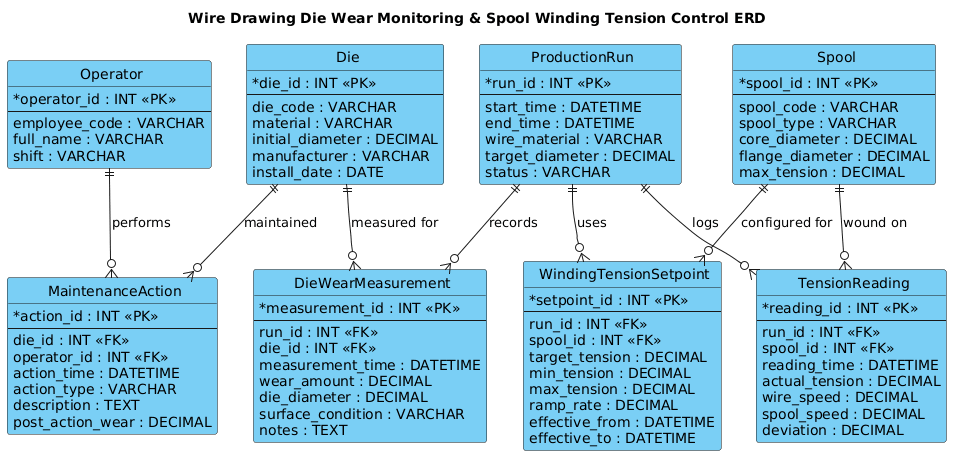
The Entity-Relationship Diagram (ERD) is the fundamental tool for visualizing the logical structure of a relational database. In this specific context, the diagram abstracts the physical manufacturing workflow into discrete data entities. It defines Entities (like Die or Spool) as the core objects of interest, Attributes (like wear_amount or target_tension) as the specific properties of those objects, and Relationships (like records or maintained) as the logical links that connect them. This abstraction allows developers to see how a single production run aggregates data from multiple sources without needing to write SQL queries first.
Target Domain Scope & Scenario
This model is scoped specifically for the wire drawing and spool winding process. It intentionally excludes upstream raw material procurement or downstream logistics to focus on the core production loop. The scope covers the lifecycle of a ProductionRun, which initiates with a specific Die and Spool, and concludes with the logging of WearMeasurements and TensionReadings. It also captures the human element via the Operator entity and the reactive maintenance workflow through MaintenanceAction.
Key Takeaways & Educational Insights
By studying this model, you will learn how to handle one-to-many relationships (e.g., one production run has many tension readings) and how to structure time-series data (wear measurements and tension logs) effectively. You will also gain insight into how to model configuration data (setpoints) that changes over time within a single run, ensuring that the database can answer questions like “What tension was applied at the 50% mark of this specific run?”
Complete Diagram & Full Source Code
Below is the complete, rendered ERD that we will be building. This diagram visualizes the complex interplay between the physical assets and the operational data in a manufacturing environment.
Here is the complete PlantUML source code for the diagram. You can copy this directly into the VPasCode editor to see the live rendering.
@startuml
!include https://static.visual-paradigm.com/web/resources/plantuml-stdlib/themes/vp.puml

/'
Diagram Context:
This ERD models the data required for monitoring wear on wire drawing dies
and controlling tension during spool winding. The core entities capture
production runs, individual dies and their wear measurements, spools and
their tension setpoints, and the tension readings logged during winding.
The relationships link a production run to the specific die and spool used,
while wear measurements and tension readings provide the time-series data
needed for condition monitoring and closed-loop tension control.
'/

title Wire Drawing Die Wear Monitoring & Spool Winding Tension Control ERD

entity "ProductionRun" as run {
  * run_id : INT <<PK>>
  --
  start_time : DATETIME
  end_time : DATETIME
  wire_material : VARCHAR
  target_diameter : DECIMAL
  status : VARCHAR
}

entity "Die" as die {
  * die_id : INT <<PK>>
  --
  die_code : VARCHAR
  material : VARCHAR
  initial_diameter : DECIMAL
  manufacturer : VARCHAR
  install_date : DATE
}

entity "DieWearMeasurement" as wear {
  * measurement_id : INT <<PK>>
  --
  run_id : INT <<FK>>
  die_id : INT <<FK>>
  measurement_time : DATETIME
  wear_amount : DECIMAL
  die_diameter : DECIMAL
  surface_condition : VARCHAR
  notes : TEXT
}

entity "Spool" as spool {
  * spool_id : INT <<PK>>
  --
  spool_code : VARCHAR
  spool_type : VARCHAR
  core_diameter : DECIMAL
  flange_diameter : DECIMAL
  max_tension : DECIMAL
}

entity "WindingTensionSetpoint" as setpoint {
  * setpoint_id : INT <<PK>>
  --
  run_id : INT <<FK>>
  spool_id : INT <<FK>>
  target_tension : DECIMAL
  min_tension : DECIMAL
  max_tension : DECIMAL
  ramp_rate : DECIMAL
  effective_from : DATETIME
  effective_to : DATETIME
}

entity "TensionReading" as reading {
  * reading_id : INT <<PK>>
  --
  run_id : INT <<FK>>
  spool_id : INT <<FK>>
  reading_time : DATETIME
  actual_tension : DECIMAL
  wire_speed : DECIMAL
  spool_speed : DECIMAL
  deviation : DECIMAL
}

entity "Operator" as operator {
  * operator_id : INT <<PK>>
  --
  employee_code : VARCHAR
  full_name : VARCHAR
  shift : VARCHAR
}

entity "MaintenanceAction" as maint {
  * action_id : INT <<PK>>
  --
  die_id : INT <<FK>>
  operator_id : INT <<FK>>
  action_time : DATETIME
  action_type : VARCHAR
  description : TEXT
  post_action_wear : DECIMAL
}

run ||--o{ wear : "records"
die ||--o{ wear : "measured for"
run ||--o{ setpoint : "uses"
spool ||--o{ setpoint : "configured for"
run ||--o{ reading : "logs"
spool ||--o{ reading : "wound on"
operator ||--o{ maint : "performs"
die ||--o{ maint : "maintained"

@endumlStep-by-Step Architectural Walkthrough
Phase 1: Canvas Configuration & Layout Directives
The foundation of any professional PlantUML diagram lies in its configuration. We begin by including the vp.puml theme, which provides a consistent, modern visual style optimized for technical documentation. We also define a comment block using / delimiters to provide immediate context for anyone reading the code later. This context is crucial for maintenance teams who may not be familiar with the specific manufacturing nuances.
!include https://static.visual-paradigm.com/web/resources/plantuml-stdlib/themes/vp.puml

/'
Diagram Context:
This ERD models the data required for monitoring wear on wire drawing dies...
'/
We then set the global title to clearly identify the diagram’s purpose, ensuring that when the diagram is exported or shared, its intent is immediately understood.
title Wire Drawing Die Wear Monitoring & Spool Winding Tension Control ERDPhase 2: Declaring Core Entities, Actors, and Boundaries
Next, we define the core entities. In PlantUML ERD syntax, we use the entity keyword. Each entity is given a unique identifier (e.g., run, die) which acts as a shorthand reference in the relationship section, making the diagram easier to read and maintain. Inside the curly braces {}, we define the attributes. The * symbol before a field indicates it is a Primary Key (PK), and the < stereotype is explicitly used for clarity in the rendering. The -- separator visually divides keys from other attributes.
entity "ProductionRun" as run {
  * run_id : INT <>
  --
  start_time : DATETIME
  end_time : DATETIME
  wire_material : VARCHAR
  target_diameter : DECIMAL
  status : VARCHAR
}
We repeat this pattern for Die, Spool, and Operator, ensuring that data types like INT, DECIMAL, and DATETIME are used correctly to reflect manufacturing data requirements.
Phase 3: Mapping Data Flows & Key Interactions
The most critical part of an ERD is the relationship mapping. In manufacturing, data flows from the physical process into the database. We use the ||--o{ syntax to denote a one-to-many relationship. For example, one ProductionRun can have many DieWearMeasurement records (as the die is measured repeatedly during the run). The o{ at the end of the relationship line indicates that the “many” side is optional (a run might not have wear measurements recorded if the system is paused, though in practice it is mandatory).
run ||--o{ wear : "records"
die ||--o{ wear : "measured for"
run ||--o{ setpoint : "uses"
spool ||--o{ setpoint : "configured for"
run ||--o{ reading : "logs"
spool ||--o{ reading : "wound on"
We also model the interaction between humans and assets. An Operator performs multiple MaintenanceAction records, and a Die can be maintained multiple times over its lifecycle.
operator ||--o{ maint : "performs"
die ||--o{ maint : "maintained"
Phase 4: Grouping, Annotations & Visual Polish
To ensure the diagram is readable, we use descriptive labels for the relationships (e.g., "records", "measured for"). This turns abstract foreign keys into business logic. The WindingTensionSetpoint entity is particularly interesting as it links both a run and a spool, creating a junction that captures the specific configuration parameters for that specific combination of assets during that run. This structure allows for historical analysis of how different setpoints affected tension stability.
Syntax & Keyword Deep Dive
To build professional ERDs in PlantUML, understanding the specific syntax keywords is essential. Here is a breakdown of the key elements used in this manufacturing model:
- entity: The keyword used to define a table or object. It is followed by the display name and an alias (e.g.,
entity "Die" as die). - attributes: Defined inside the entity block. The format is
field_name : TYPE. PlantUML automatically parses the type to apply appropriate formatting. - Primary Key (PK): Indicated by
*before the field name and the stereotype<. This ensures the diagram renders the key visually distinct from regular attributes.> - Relationships: The
||--o{syntax represents a mandatory one-to-many relationship.||means “one” (mandatory), ando{means “zero or many” (optional). You can also useo{for optional-one or||for mandatory-one depending on business rules. - Labels: Text inside quotes (e.g.,
"records") placed after the relationship line defines the role of the relationship, making the diagram self-documenting. - Comment Blocks: The
/delimiter allows for multi-line comments that are ignored by the renderer but visible in the source code, perfect for architectural context.
Best Practices & Pitfalls to Avoid
When designing ERDs for complex manufacturing systems, adhering to best practices ensures the model remains maintainable and scalable.
- Use Meaningful Aliases: Always assign a short alias to your entities (e.g.,
as run). This prevents the relationship lines from becoming cluttered with long entity names and makes the code easier to read. - Consistent Naming Conventions: Stick to a consistent naming convention for attributes (e.g., always using
_idfor foreign keys). This helps database developers translate the diagram directly into SQL schemas. - Avoid Over-Complexity: If a diagram becomes too crowded, consider splitting it into multiple views (e.g., a “High-Level Production” view and a “Detailed Measurement” view). However, for this specific use case, the current scope is manageable in a single view.
- Validate Cardinality: Double-check your relationship arrows. For instance, a
Diecan definitely be measured multiple times, but a singleMeasurementrecord cannot belong to multiple runs. Ensure the direction of the arrow matches the real-world data dependency.
Start Building Manufacturing ERDs Faster with VPasCode
Instantly design, preview, and export your wire drawing database schemas online with VPasCode, the free PlantUML editor for engineers.