


In the rapidly evolving fintech landscape, a Robo-Advisor Platform serves as the backbone for automated investment management. Unlike traditional advisory services, these platforms rely on sophisticated algorithms to manage portfolios, assess risk, and execute trades with minimal human intervention. For software architects and engineers, documenting this architecture is critical to ensure data integrity, scalability, and compliance with financial regulations.

Visual modeling plays a pivotal role in this process. A well-structured Class Diagram provides a static blueprint of the system’s data structures, relationships, and business logic. By using PlantUML within VPasCode, you can create living documentation that evolves alongside your codebase. This approach enhances architectural clarity, allowing teams to prototype visual models instantly without the overhead of local environment setup or complex configuration.
This tutorial guides you through designing a comprehensive Class Diagram for a Robo-Advisor Platform. We will explore how to model core entities like Users and Portfolios, define complex inheritance hierarchies for Assets (Stocks, Bonds, ETFs), and integrate essential services for risk assessment and market data.
Understanding the Model: Purpose, Scope & Problem Framing
Diagram Abstraction & Representation
A Class Diagram is the most appropriate tool for modeling the static structure of the Robo-Advisor system. It abstracts the runtime behavior of the application into tangible building blocks. In this context, classes represent persistent data entities (e.g., Portfolio, Transaction), while methods encapsulate business logic (e.g., rebalance(), calculateReturns()).
The diagram focuses on the domain model rather than infrastructure details. It defines the “what” of the system: what data is stored, how it relates, and what operations are available. This is essential for backend development, database schema design, and API contract definition.
Target Domain Scope & Scenario
The scope of this diagram encompasses the core financial domain of a robo-advisory service. It intentionally excludes low-level infrastructure components (like database connection pools or cloud storage buckets) to maintain focus on business logic. The model covers:
- Customer Management: How
UserandInvestorProfileinteract. - Investment Logic: The hierarchy of
Assettypes and portfolio composition. - Operational Services: How
RebalancingEngineandRiskAssessmentServiceinteract with the core data.
Key Takeaways & Educational Insights
By constructing this model, you will gain insights into:
- Domain-Driven Design (DDD): Separating core domain logic from supporting services.
- Inheritance Patterns: Using Polymorphism to handle diverse asset types efficiently.
- Relationship Cardinality: Defining strict 1-to-1 or 1-to-many constraints to enforce business rules.
Complete Diagram & Full Source Code
Below is the complete blueprint for the Robo-Advisor Platform. You can copy this code directly into the VPasCode editor to visualize the diagram instantly.
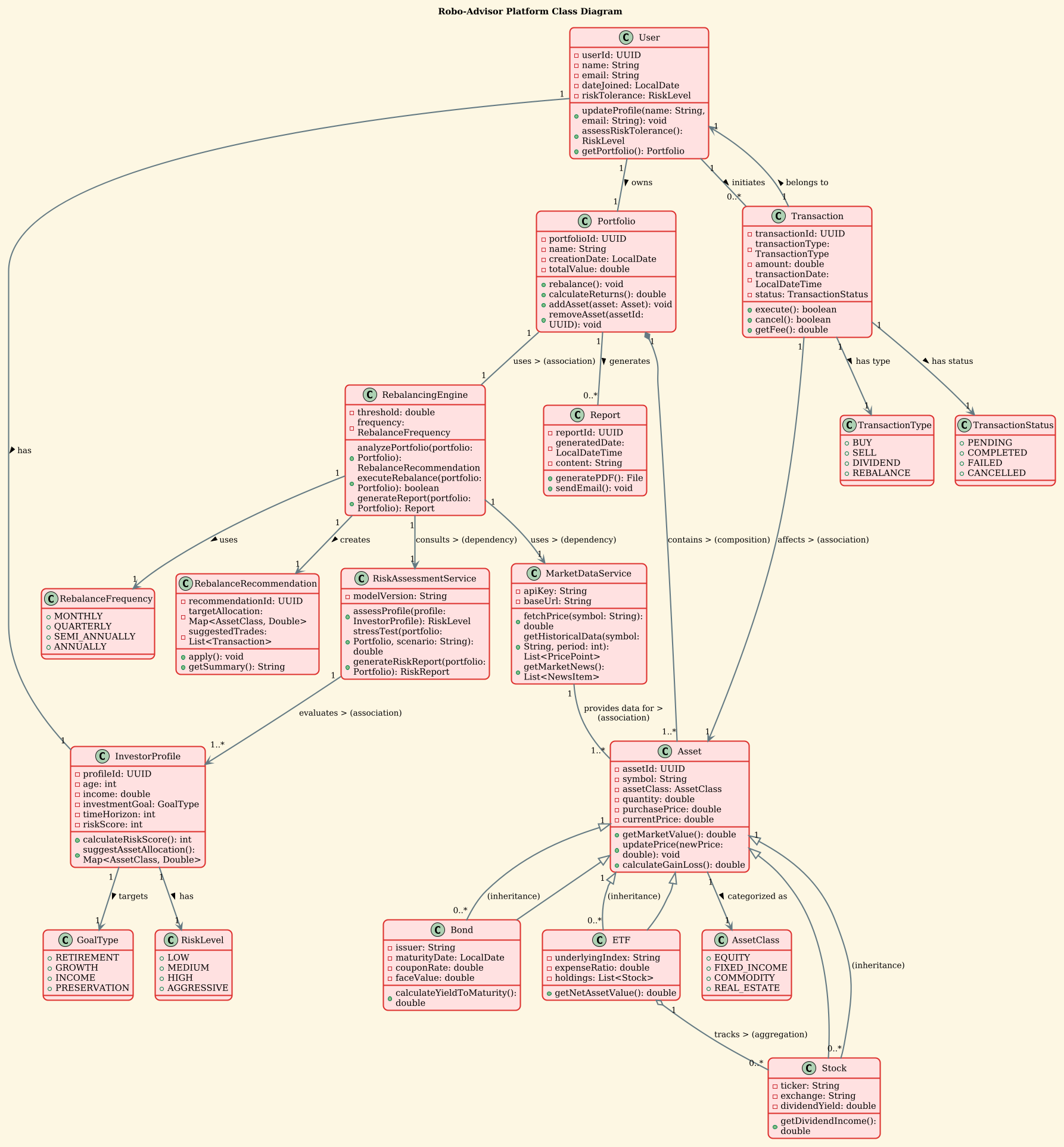
@startuml
!theme sunlust
title Robo-Advisor Platform Class Diagram

' Core domain classes
class User {
  - userId: UUID
  - name: String
  - email: String
  - dateJoined: LocalDate
  - riskTolerance: RiskLevel
  + updateProfile(name: String, email: String): void
  + assessRiskTolerance(): RiskLevel
  + getPortfolio(): Portfolio
}

class InvestorProfile {
  - profileId: UUID
  - age: int
  - income: double
  - investmentGoal: GoalType
  - timeHorizon: int
  - riskScore: int
  + calculateRiskScore(): int
  + suggestAssetAllocation(): Map<AssetClass, Double>
}

class Portfolio {
  - portfolioId: UUID
  - name: String
  - creationDate: LocalDate
  - totalValue: double
  + rebalance(): void
  + calculateReturns(): double
  + addAsset(asset: Asset): void
  + removeAsset(assetId: UUID): void
}

class Asset {
  - assetId: UUID
  - symbol: String
  - assetClass: AssetClass
  - quantity: double
  - purchasePrice: double
  - currentPrice: double
  + getMarketValue(): double
  + updatePrice(newPrice: double): void
  + calculateGainLoss(): double
}

class Stock extends Asset {
  - ticker: String
  - exchange: String
  - dividendYield: double
  + getDividendIncome(): double
}

class Bond extends Asset {
  - issuer: String
  - maturityDate: LocalDate
  - couponRate: double
  - faceValue: double
  + calculateYieldToMaturity(): double
}

class ETF extends Asset {
  - underlyingIndex: String
  - expenseRatio: double
  - holdings: List<Stock>
  + getNetAssetValue(): double
}

class Transaction {
  - transactionId: UUID
  - transactionType: TransactionType
  - amount: double
  - transactionDate: LocalDateTime
  - status: TransactionStatus
  + execute(): boolean
  + cancel(): boolean
  + getFee(): double
}

class MarketDataService {
  - apiKey: String
  - baseUrl: String
  + fetchPrice(symbol: String): double
  + getHistoricalData(symbol: String, period: int): List<PricePoint>
  + getMarketNews(): List<NewsItem>
}

class RebalancingEngine {
  - threshold: double
  - frequency: RebalanceFrequency
  + analyzePortfolio(portfolio: Portfolio): RebalanceRecommendation
  + executeRebalance(portfolio: Portfolio): boolean
  + generateReport(portfolio: Portfolio): Report
}

class RiskAssessmentService {
  - modelVersion: String
  + assessProfile(profile: InvestorProfile): RiskLevel
  + stressTest(portfolio: Portfolio, scenario: String): double
  + generateRiskReport(portfolio: Portfolio): RiskReport
}

' Relationships

User "1" -- "1" InvestorProfile : has >
User "1" -- "1" Portfolio : owns >
User "1" -- "0..*" Transaction : initiates >

Portfolio "1" *-- "1..*" Asset : contains > (composition)
Portfolio "1" -- "1" RebalancingEngine : uses > (association)

Asset "1" <|-- "0..*" Stock : (inheritance)
Asset "1" <|-- "0..*" Bond : (inheritance)
Asset "1" <|-- "0..*" ETF : (inheritance)

ETF "1" o-- "0..*" Stock : tracks > (aggregation)

Transaction "1" --> "1" Asset : affects > (association)
Transaction "1" --> "1" User : belongs to >

MarketDataService "1" -- "1..*" Asset : provides data for > (association)

RebalancingEngine "1" --> "1" MarketDataService : uses > (dependency)
RebalancingEngine "1" --> "1" RiskAssessmentService : consults > (dependency)

RiskAssessmentService "1" --> "1..*" InvestorProfile : evaluates > (association)

' Enum-like types as classes (since enums are not allowed)
class RiskLevel {
  + LOW
  + MEDIUM
  + HIGH
  + AGGRESSIVE
}

class GoalType {
  + RETIREMENT
  + GROWTH
  + INCOME
  + PRESERVATION
}

class AssetClass {
  + EQUITY
  + FIXED_INCOME
  + COMMODITY
  + REAL_ESTATE
}

class TransactionType {
  + BUY
  + SELL
  + DIVIDEND
  + REBALANCE
}

class TransactionStatus {
  + PENDING
  + COMPLETED
  + FAILED
  + CANCELLED
}

class RebalanceFrequency {
  + MONTHLY
  + QUARTERLY
  + SEMI_ANNUALLY
  + ANNUALLY
}

' Relationships for type classes
InvestorProfile "1" --> "1" RiskLevel : has >
InvestorProfile "1" --> "1" GoalType : targets >
Asset "1" --> "1" AssetClass : categorized as >
Transaction "1" --> "1" TransactionType : has type >
Transaction "1" --> "1" TransactionStatus : has status >
RebalancingEngine "1" --> "1" RebalanceFrequency : uses >

' Additional utility classes
class Report {
  - reportId: UUID
  - generatedDate: LocalDateTime
  - content: String
  + generatePDF(): File
  + sendEmail(): void
}

class RebalanceRecommendation {
  - recommendationId: UUID
  - targetAllocation: Map<AssetClass, Double>
  - suggestedTrades: List<Transaction>
  + apply(): void
  + getSummary(): String
}

Portfolio "1" -- "0..*" Report : generates >
RebalancingEngine "1" --> "1" RebalanceRecommendation : creates >

@endumlStep-by-Step Architectural Walkthrough
Now, let’s break down how to build this diagram from scratch using VPasCode. We will follow a phased approach to ensure logical grouping and maintainability.
Phase 1: Canvas Configuration & Layout Directives
Before defining classes, we set the visual theme and title. This ensures consistency across your documentation. In PlantUML, the !theme directive is used to apply a specific visual style.
Start your code with:
@startuml
!theme sunlust
title Robo-Advisor Platform Class Diagram
The !theme sunlust directive applies a modern, high-contrast color scheme suitable for technical presentations. The title directive adds a clear header to the rendered diagram.
Phase 2: Declaring Core Entities, Actors, and Boundaries
The foundation of any financial system is the User and their investment profile. We define these classes using the standard class keyword, followed by the class name and a block for attributes and methods.
For the User class, we define private attributes (prefixed with -) and public methods (prefixed with +):
class User {
  - userId: UUID
  - name: String
  - email: String
  + updateProfile(name: String, email: String): void
  + getPortfolio(): Portfolio
}
Notice the data types (e.g., UUID, String, LocalDate). In a real implementation, these map directly to your backend language types. This phase establishes the entry point for the system.
Phase 3: Mapping Data Flows & Key Interactions
Once entities are declared, we define their relationships using association lines. This is where the business logic becomes visible.
For example, a User owns a Portfolio. This is a 1-to-1 relationship:
User "1" -- "1" Portfolio : owns >We also model the composition of a Portfolio. A Portfolio is composed of Assets. This is a strong relationship (composition), indicated by the filled diamond:
Portfolio "1" *-- "1..*" Asset : contains >The 1..* cardinality indicates that a Portfolio must contain at least one Asset, while a single Asset can belong to multiple Portfolios (if shared, though typically ownership is exclusive). This phase clarifies the data flow and ownership rules.
Phase 4: Grouping, Annotations & Visual Polish
Finally, we handle inheritance and complex types. In PlantUML, inheritance is represented by a hollow triangle arrow pointing to the parent class.
Asset "1" <|-- "0..*" Stock : (inheritance)This syntax tells the renderer that Stock is a subtype of Asset. We also define enum-like classes for types like RiskLevel and TransactionType to ensure type safety in the model. Adding comments (lines starting with ') helps document specific design decisions within the code.
Syntax & Keyword Deep Dive
Understanding the specific PlantUML syntax used in this diagram is crucial for extending it later. Here is a breakdown of the key keywords and conventions:
class: Defines a new class. Followed by the class name and a block for members.-(Hyphen): Indicates a private attribute or method.+(Plus): Indicates a public attribute or method.--(Association): A standard relationship line between two classes.*--(Composition): Indicates a strong "part-of" relationship where the child cannot exist without the parent.o--(Aggregation): Indicates a weak "part-of" relationship where the child can exist independently.<|--(Inheritance): A hollow triangle arrow indicating that the source class inherits from the target class."1"/"0..*"(Cardinality): Defines the multiplicity of the relationship (e.g., exactly 1, zero or more).!theme: A directive to load a specific visual theme for the diagram.
Best Practices & Pitfalls to Avoid
To maintain a clean and professional Class Diagram, follow these architectural best practices:
- Keep Diagrams Modular: If the diagram becomes too large, consider splitting it into multiple files (e.g., one for Core Domain, one for Services) and include them using
@include. This prevents clutter and improves readability. - Use Consistent Naming Conventions: Always use PascalCase for class names (e.g.,
RebalancingEngine) and camelCase for methods (e.g.,calculateReturns). This aligns with standard Java and C# conventions. - Limit Inheritance Depth: Avoid deep inheritance trees. In this diagram,
Assetis the parent, but we keep direct children (Stock, Bond, ETF) at the same level to prevent complexity. - Define Cardinality Explicitly: Never leave relationships undefined. Always specify whether a relationship is 1-to-1, 1-to-many, etc., as this impacts database schema design.
Try It Yourself with VPasCode
Start Building PlantUML Class Diagrams Faster with VPasCode
Instantly visualize and customize your Robo-Advisor architecture online in VPasCode without installing any tools.