


In the rapidly evolving landscape of financial technology, robust data modeling is the backbone of any expense management platform. Whether for corporate reimbursement, personal finance tracking, or enterprise budgeting, the integrity of financial data relies heavily on a well-defined class structure. A Class Diagram in PlantUML serves as the blueprint for these systems, visualizing the static structure, attributes, methods, and relationships between key entities like Users, Expenses, Budgets, and Approvals.

Traditional diagramming tools often require manual drag-and-drop operations that can become tedious and disconnected from the actual codebase. By adopting a diagram-as-code approach with VPasCode, architects can maintain a single source of truth. This method ensures that visual documentation evolves in lockstep with the application logic, enhancing clarity for stakeholders and reducing the cognitive load during code reviews. In this masterclass, we will construct a professional-grade Expense Tracking System class diagram, demonstrating how to leverage PlantUML to model complex inheritance, composition, and association relationships critical for financial compliance and audit trails.
Understanding the Model: Purpose, Scope & Problem Framing
Before diving into the syntax, it is crucial to understand the architectural abstraction we are building. This diagram is not merely a visual aid; it is a specification of the system’s data integrity rules.
Diagram Abstraction & Representation
A Class Diagram in PlantUML represents the static view of a system. In this context, it maps out the domain entities of an expense management workflow. Each class corresponds to a specific data object in the database or a persistent entity in the software architecture. The attributes define the data stored (e.g., amount, currency), while the methods define the behaviors (e.g., approveExpense, calculateTax). The relationships between classes define the cardinality and ownership, such as a User owning multiple Expenses or a Budget tracking specific Categories.
Target Domain Scope & Scenario
This model is scoped for a mid-to-large enterprise finance environment. It covers the end-to-end lifecycle of an expense claim, from creation and categorization to approval workflows and budget tracking. Key boundaries include:
- Core Financial Entities: Expenses, Budgets, and Payment Methods.
- Identity Management: Users, Roles, and Departments.
- Compliance & Audit: Approval Workflows, Audit Logs, and Receipts.
- Reporting: Report Generators and Notification Services.
Dependencies are clearly defined to ensure data consistency. For instance, an Expense cannot exist without a User, and a Budget cannot be tracked without a Category. This strict modeling prevents orphaned records and ensures referential integrity.
Key Takeaways & Educational Insights
By building this model, you will gain insights into:
- Inheritance Patterns: How to handle generic Expense types vs. specific types like Travel or Business expenses.
- Ownership Semantics: Distinguishing between Composition (strong ownership) and Aggregation (weak ownership) in financial data.
- Cardinality Constraints: Defining how many Approvals are needed per Expense or how many Receipts attach to a single claim.
Complete Diagram & Full Source Code
Below is the complete, finalized diagram for the Expense Tracking System. This blueprint utilizes the sunlust theme for a professional aesthetic and includes all necessary relationships to support a production-ready architecture.
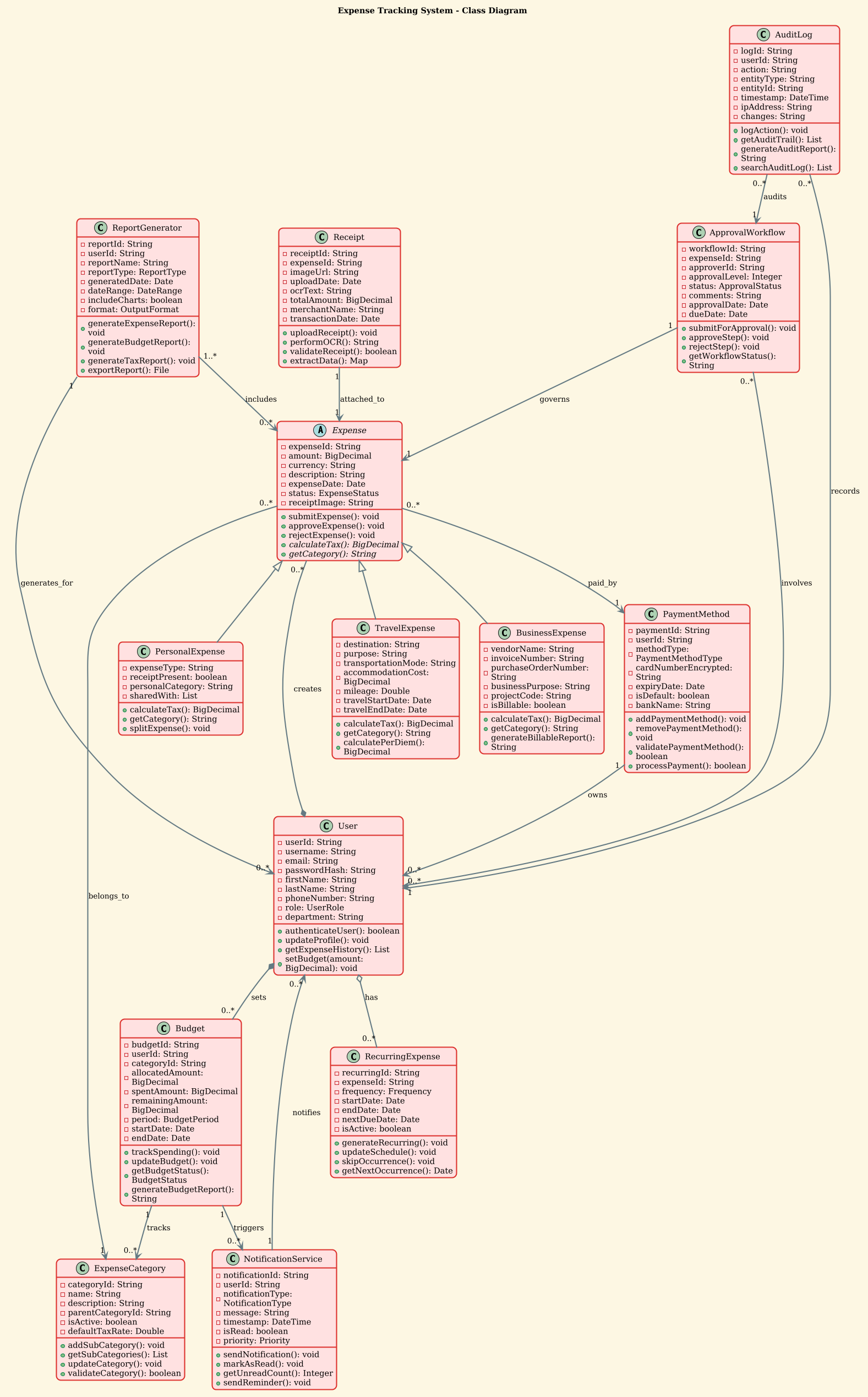
Copy the following code block directly into the VPasCode editor to render the diagram interactively.
@startuml

!theme sunlust
title Expense Tracking System - Class Diagram

' Abstract base class
abstract class Expense {
  - expenseId: String
  - amount: BigDecimal
  - currency: String
  - description: String
  - expenseDate: Date
  - status: ExpenseStatus
  - receiptImage: String
  + submitExpense(): void
  + approveExpense(): void
  + rejectExpense(): void
  + {abstract} calculateTax(): BigDecimal
  + {abstract} getCategory(): String
}

' Derived classes from Expense
class TravelExpense {
  - destination: String
  - purpose: String
  - transportationMode: String
  - accommodationCost: BigDecimal
  - mileage: Double
  - travelStartDate: Date
  - travelEndDate: Date
  + calculateTax(): BigDecimal
  + getCategory(): String
  + calculatePerDiem(): BigDecimal
}

class BusinessExpense {
  - vendorName: String
  - invoiceNumber: String
  - purchaseOrderNumber: String
  - businessPurpose: String
  - projectCode: String
  - isBillable: boolean
  + calculateTax(): BigDecimal
  + getCategory(): String
  + generateBillableReport(): String
}

class PersonalExpense {
  - expenseType: String
  - receiptPresent: boolean
  - personalCategory: String
  - sharedWith: List
  + calculateTax(): BigDecimal
  + getCategory(): String
  + splitExpense(): void
}

' User class
class User {
  - userId: String
  - username: String
  - email: String
  - passwordHash: String
  - firstName: String
  - lastName: String
  - phoneNumber: String
  - role: UserRole
  - department: String
  + authenticateUser(): boolean
  + updateProfile(): void
  + getExpenseHistory(): List
  + setBudget(amount: BigDecimal): void
}

' ExpenseCategory class
class ExpenseCategory {
  - categoryId: String
  - name: String
  - description: String
  - parentCategoryId: String
  - isActive: boolean
  - defaultTaxRate: Double
  + addSubCategory(): void
  + getSubCategories(): List
  + updateCategory(): void
  + validateCategory(): boolean
}

' Budget class
class Budget {
  - budgetId: String
  - userId: String
  - categoryId: String
  - allocatedAmount: BigDecimal
  - spentAmount: BigDecimal
  - remainingAmount: BigDecimal
  - period: BudgetPeriod
  - startDate: Date
  - endDate: Date
  + trackSpending(): void
  + updateBudget(): void
  + getBudgetStatus(): BudgetStatus
  + generateBudgetReport(): String
}

' Receipt class
class Receipt {
  - receiptId: String
  - expenseId: String
  - imageUrl: String
  - uploadDate: Date
  - ocrText: String
  - totalAmount: BigDecimal
  - merchantName: String
  - transactionDate: Date
  + uploadReceipt(): void
  + performOCR(): String
  + validateReceipt(): boolean
  + extractData(): Map
}

' ApprovalWorkflow class
class ApprovalWorkflow {
  - workflowId: String
  - expenseId: String
  - approverId: String
  - approvalLevel: Integer
  - status: ApprovalStatus
  - comments: String
  - approvalDate: Date
  - dueDate: Date
  + submitForApproval(): void
  + approveStep(): void
  + rejectStep(): void
  + getWorkflowStatus(): String
}

' NotificationService class
class NotificationService {
  - notificationId: String
  - userId: String
  - notificationType: NotificationType
  - message: String
  - timestamp: DateTime
  - isRead: boolean
  - priority: Priority
  + sendNotification(): void
  + markAsRead(): void
  + getUnreadCount(): Integer
  + sendReminder(): void
}

' ReportGenerator class
class ReportGenerator {
  - reportId: String
  - userId: String
  - reportName: String
  - reportType: ReportType
  - generatedDate: Date
  - dateRange: DateRange
  - includeCharts: boolean
  - format: OutputFormat
  + generateExpenseReport(): void
  + generateBudgetReport(): void
  + generateTaxReport(): void
  + exportReport(): File
}

' AuditLog class
class AuditLog {
  - logId: String
  - userId: String
  - action: String
  - entityType: String
  - entityId: String
  - timestamp: DateTime
  - ipAddress: String
  - changes: String
  + logAction(): void
  + getAuditTrail(): List
  + generateAuditReport(): String
  + searchAuditLog(): List
}

' PaymentMethod class
class PaymentMethod {
  - paymentId: String
  - userId: String
  - methodType: PaymentMethodType
  - cardNumberEncrypted: String
  - expiryDate: Date
  - isDefault: boolean
  - bankName: String
  + addPaymentMethod(): void
  + removePaymentMethod(): void
  + validatePaymentMethod(): boolean
  + processPayment(): boolean
}

' RecurringExpense class
class RecurringExpense {
  - recurringId: String
  - expenseId: String
  - frequency: Frequency
  - startDate: Date
  - endDate: Date
  - nextDueDate: Date
  - isActive: boolean
  + generateRecurring(): void
  + updateSchedule(): void
  + skipOccurrence(): void
  + getNextOccurrence(): Date
}

' ============ Relationships ============

' Generalization (Inheritance)
Expense <|-- TravelExpense
Expense <|-- BusinessExpense
Expense <|-- PersonalExpense

' Composition (User - Expense) - Strong ownership
User *-- "0..*" Expense : creates

' Composition (User - Budget) - Strong ownership
User *-- "0..*" Budget : sets

' Association (Expense - ExpenseCategory) - Many-to-One
Expense "0..*" --> "1" ExpenseCategory : belongs_to

' Association (Budget - ExpenseCategory) - One-to-Many
Budget "1" --> "0..*" ExpenseCategory : tracks

' Association (Receipt - Expense) - One-to-One
Receipt "1" --> "1" Expense : attached_to

' Association (ApprovalWorkflow - Expense) - One-to-One
ApprovalWorkflow "1" --> "1" Expense : governs

' Association (NotificationService - User) - One-to-Many
NotificationService "1" --> "0..*" User : notifies

' Association (ReportGenerator - User) - One-to-Many
ReportGenerator "1" --> "0..*" User : generates_for

' Aggregation (User - RecurringExpense) - Weak ownership
User o-- "0..*" RecurringExpense : has

' Association (AuditLog - User) - Many-to-One
AuditLog "0..*" --> "1" User : records

' Association (PaymentMethod - User) - One-to-Many
PaymentMethod "1" --> "0..*" User : owns

' Association (Expense - PaymentMethod) - Many-to-One
Expense "0..*" --> "1" PaymentMethod : paid_by

' Association (ApprovalWorkflow - User) - Many-to-Many
ApprovalWorkflow "0..*" --> "0..*" User : involves

' Association (Budget - NotificationService) - One-to-Many
Budget "1" --> "0..*" NotificationService : triggers

' Association (ReportGenerator - Expense) - Many-to-Many
ReportGenerator "1..*" --> "0..*" Expense : includes

' Association (AuditLog - ApprovalWorkflow) - Many-to-One
AuditLog "0..*" --> "1" ApprovalWorkflow : audits

@endumlStep-by-Step Architectural Walkthrough
Constructing a complex class diagram requires a phased approach to maintain clarity and ensure all relationships are correctly modeled. Here is how we built this Expense Tracking System diagram using VPasCode.
Phase 1: Canvas Configuration & Layout Directives
Every PlantUML diagram begins with configuration directives that define the visual style and scope. We started by initializing the diagram with @startuml and immediately applied the !theme sunlust directive. This theme provides a modern, high-contrast look suitable for technical documentation.
We also added a title directive to label the diagram clearly for stakeholders.
@startuml
!theme sunlust
title Expense Tracking System - Class Diagram
Phase 2: Declaring Core Entities, Actors, and Boundaries
The foundation of the system is the Expense class. We defined it as an abstract class because it represents a generic concept that cannot exist without specific context (like Travel or Business). This enforces polymorphism in the codebase.
We then defined the specific subclasses: TravelExpense, BusinessExpense, and PersonalExpense. Each subclass inherits the core attributes from Expense but adds domain-specific fields like destination or vendorName.
abstract class Expense {
  - expenseId: String
  - amount: BigDecimal
  + {abstract} calculateTax(): BigDecimal
}

class TravelExpense {
  - destination: String
  - mileage: Double
  + calculateTax(): BigDecimal
}
Phase 3: Mapping Data Flows & Key Interactions
Next, we modeled the supporting entities that manage the lifecycle of an expense. The User class represents the employee or administrator. The Budget class tracks financial limits, and the Receipt class handles document storage.
We also included the ApprovalWorkflow class to manage the hierarchical approval process, ensuring that expenses are validated before payment. This is critical for financial compliance.
class User {
  - userId: String
  - role: UserRole
  + authenticateUser(): boolean
}

class ApprovalWorkflow {
  - workflowId: String
  - status: ApprovalStatus
  + approveStep(): void
}
Phase 4: Grouping, Annotations & Visual Polish
The final phase involves defining the relationships that bind these classes together. We used specific arrow styles to denote the nature of the relationship. For example, a solid diamond (*--) indicates Composition (strong ownership), while a hollow diamond (o--) indicates Aggregation (weak ownership).
We also added cardinality labels like "0..*" to specify that a User can create zero or many Expenses. This ensures the diagram accurately reflects the database schema constraints.
User *-- "0..*" Expense : creates
Expense "0..*" --> "1" ExpenseCategory : belongs_to
Syntax & Keyword Deep Dive
Understanding the specific PlantUML syntax is essential for mastering class diagrams. Here is a breakdown of the key keywords used in this model:
abstract class: Defines a class that cannot be instantiated directly. It serves as a template for subclasses. In finance, this is used for generic Expense types.class: The standard keyword to define a concrete entity with attributes and methods.Attribute Syntax: Attributes are defined with a visibility modifier (-for private,+for public) followed by the name and type (e.g.,- amount: BigDecimal).Method Syntax: Methods follow the same visibility rules and include a return type (e.g.,+ submitExpense(): void).<|--(Inheritance): Generalization arrow pointing from subclass to superclass. Used forTravelExpenseextendingExpense.*--(Composition): A filled diamond indicating strong ownership. If the User is deleted, their Expenses are deleted.o--(Aggregation): A hollow diamond indicating weak ownership. The RecurringExpense can exist independently of the User.-->(Association): A simple arrow indicating a relationship without ownership, such as an Expense belonging to a Category."0..*"(Cardinality): Specifies the number of instances allowed.0..*means zero or more, while1means exactly one.
Best Practices & Pitfalls to Avoid
To ensure your PlantUML diagrams remain maintainable and clear, follow these architectural best practices:
- Maintain Abstraction Levels: Avoid mixing high-level business entities with low-level implementation details. Keep the diagram focused on domain logic rather than database keys.
- Consistent Naming Conventions: Use PascalCase for class names and camelCase for attributes. This improves readability across the team.
- Limit Relationship Complexity: While PlantUML supports many relationship types, avoid creating “spaghetti diagrams.” Use interfaces or abstract classes to simplify complex dependencies.
- Validate Cardinality: Always define cardinality (
0..1,1..*) to prevent data integrity issues during development.
Try It Yourself with VPasCode
Ready to visualize your own financial architecture? VPasCode offers a free, browser-based environment where you can write PlantUML code and see your diagram render instantly. No installation or configuration is required.
Start Building PlantUML Class Diagrams Faster with VPasCode
Instantly preview and customize your Expense Tracking System architecture in the browser without installing any tools.