


In the complex ecosystem of modern healthcare, the accuracy of billing and claims processing is paramount. A single error in a claim submission can lead to significant financial losses for providers and delays in patient care. To manage this complexity, software architects must design robust data models that clearly define how patients, providers, insurance policies, and medical services interact within a claims lifecycle. Visual modeling provides the necessary clarity to ensure all stakeholders understand the data flow before a single line of application code is written.

Using a diagram-as-code approach with PlantUML in VPasCode allows teams to iterate on these architectural blueprints rapidly. Unlike traditional drag-and-drop tools, this method treats the diagram as living documentation that can be reviewed and deployed alongside the actual software. In this masterclass, we will construct a comprehensive class diagram for a Medical Billing and Claims Processing System, demonstrating how to model complex relationships like composition and aggregation within the healthcare domain.
Understanding the Model: Purpose, Scope & Problem Framing
A Class Diagram is the most appropriate tool for this scenario because it captures the static structure of the system. In a healthcare billing context, the primary challenge is managing the intricate web of dependencies between entities like patients, insurance policies, and claims. This diagram type allows us to visualize the attributes and methods of each entity, ensuring that data integrity rules are maintained across the system.
Diagram Abstraction & Representation: This model represents the core entities involved in the billing lifecycle. Classes such as Patient and HealthcareProvider represent the actors, while Claim and Payment represent the business transactions. Relationships like composition (e.g., a Claim containing Line Items) indicate strong ownership, whereas association indicates a looser connection.
Target Domain Scope: The scope covers the end-to-end process from a patient visiting a provider to the final payment reconciliation. It intentionally excludes the internal implementation details of the payment gateway or the specific UI components, focusing purely on the backend data architecture.
Key Takeaways: By the end of this guide, you will understand how to map real-world healthcare workflows to code structures, manage cardinalities (one-to-many, one-to-one), and use PlantUML syntax to enforce architectural boundaries.
Complete Diagram & Full Source Code
Below is the finished blueprint for the Medical Billing and Claims Processing System. You can view the rendered diagram and interact with the code directly in the editor.
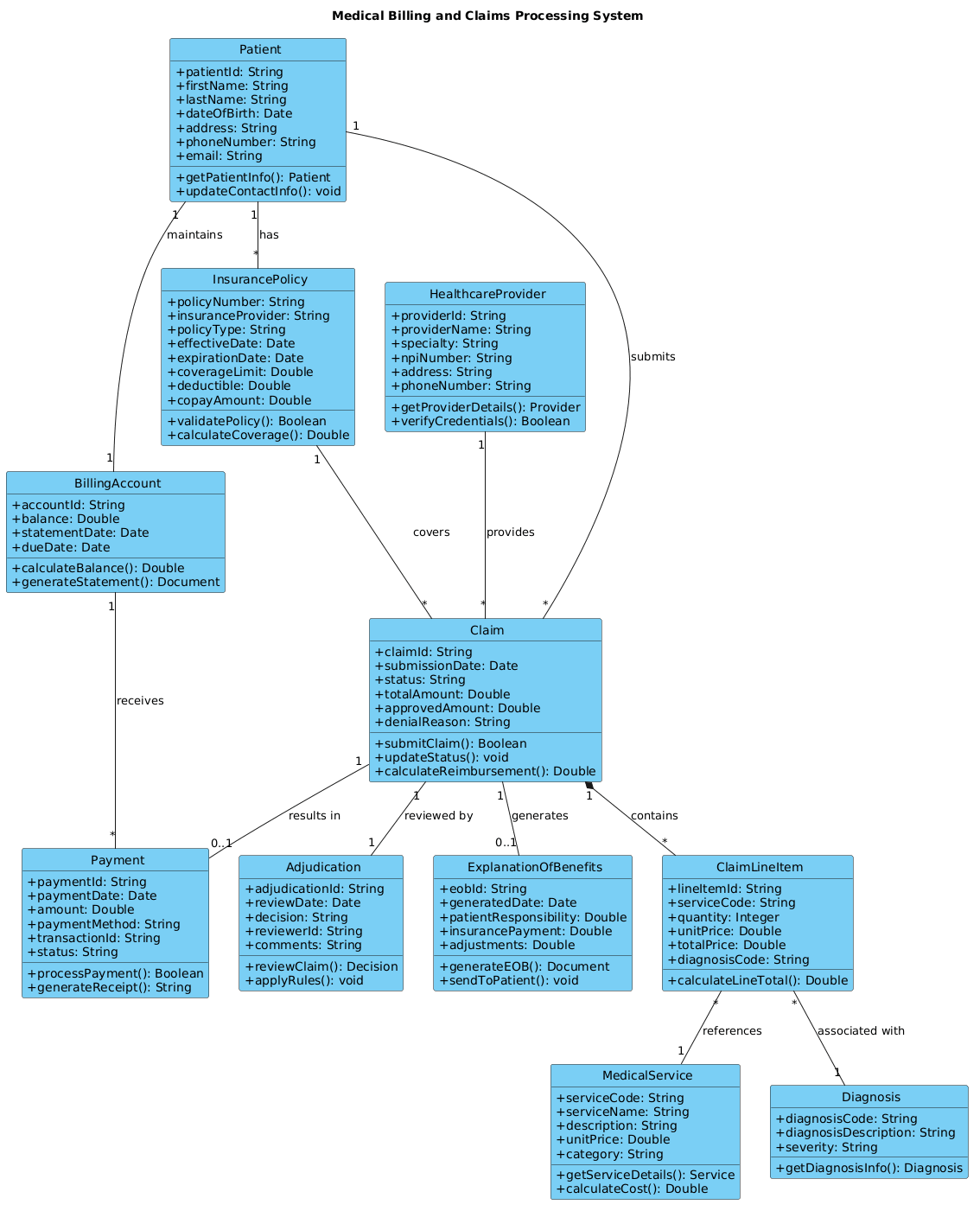
@startuml

!include https://static.visual-paradigm.com/web/resources/plantuml-stdlib/themes/vp.puml

title Medical Billing and Claims Processing System

/'
This diagram models a Medical Billing and Claims Processing System that manages the lifecycle of medical claims from submission to payment.
The system handles patient information, insurance coverage, healthcare services provided, claim submissions, adjudication processes,
and payment processing. It captures relationships between patients, providers, insurance companies, medical services, claims, and payments.
'/


class Patient {
    +patientId: String
    +firstName: String
    +lastName: String
    +dateOfBirth: Date
    +address: String
    +phoneNumber: String
    +email: String
    +getPatientInfo(): Patient
    +updateContactInfo(): void
}

class InsurancePolicy {
    +policyNumber: String
    +insuranceProvider: String
    +policyType: String
    +effectiveDate: Date
    +expirationDate: Date
    +coverageLimit: Double
    +deductible: Double
    +copayAmount: Double
    +validatePolicy(): Boolean
    +calculateCoverage(): Double
}

class HealthcareProvider {
    +providerId: String
    +providerName: String
    +specialty: String
    +npiNumber: String
    +address: String
    +phoneNumber: String
    +getProviderDetails(): Provider
    +verifyCredentials(): Boolean
}

class MedicalService {
    +serviceCode: String
    +serviceName: String
    +description: String
    +unitPrice: Double
    +category: String
    +getServiceDetails(): Service
    +calculateCost(): Double
}

class Claim {
    +claimId: String
    +submissionDate: Date
    +status: String
    +totalAmount: Double
    +approvedAmount: Double
    +denialReason: String
    +submitClaim(): Boolean
    +updateStatus(): void
    +calculateReimbursement(): Double
}

class ClaimLineItem {
    +lineItemId: String
    +serviceCode: String
    +quantity: Integer
    +unitPrice: Double
    +totalPrice: Double
    +diagnosisCode: String
    +calculateLineTotal(): Double
}

class Diagnosis {
    +diagnosisCode: String
    +diagnosisDescription: String
    +severity: String
    +getDiagnosisInfo(): Diagnosis
}

class Payment {
    +paymentId: String
    +paymentDate: Date
    +amount: Double
    +paymentMethod: String
    +transactionId: String
    +status: String
    +processPayment(): Boolean
    +generateReceipt(): String
}

class Adjudication {
    +adjudicationId: String
    +reviewDate: Date
    +decision: String
    +reviewerId: String
    +comments: String
    +reviewClaim(): Decision
    +applyRules(): void
}

class ExplanationOfBenefits {
    +eobId: String
    +generatedDate: Date
    +patientResponsibility: Double
    +insurancePayment: Double
    +adjustments: Double
    +generateEOB(): Document
    +sendToPatient(): void
}

class BillingAccount {
    +accountId: String
    +balance: Double
    +statementDate: Date
    +dueDate: Date
    +calculateBalance(): Double
    +generateStatement(): Document
}

Patient "1" -- "*" InsurancePolicy : has
Patient "1" -- "*" Claim : submits
InsurancePolicy "1" -- "*" Claim : covers
HealthcareProvider "1" -- "*" Claim : provides
Claim "1" *-- "*" ClaimLineItem : contains
ClaimLineItem "*" -- "1" MedicalService : references
ClaimLineItem "*" -- "1" Diagnosis : associated with
Claim "1" -- "1" Adjudication : reviewed by
Claim "1" -- "0..1" Payment : results in
Claim "1" -- "0..1" ExplanationOfBenefits : generates
Patient "1" -- "1" BillingAccount : maintains
BillingAccount "1" -- "*" Payment : receives

@endumlStep-by-Step Architectural Walkthrough
Constructing this diagram involves four distinct phases, from setting the visual theme to defining the complex relationships that drive the billing logic.
Phase 1: Canvas Configuration & Layout Directives
Before defining classes, we set the stage. We include the VPasCode standard theme to ensure the diagram looks professional and consistent with the platform’s branding. We also add a title and a comment block to document the diagram’s purpose for future maintainers.
!include https://static.visual-paradigm.com/web/resources/plantuml-stdlib/themes/vp.puml

title Medical Billing and Claims Processing System

/'
This diagram models a Medical Billing and Claims Processing System...
'/
The !include directive pulls in the theme definitions, while the title directive sets the header text. The /' ... '/ block serves as a multi-line comment for context.
Phase 2: Declaring Core Entities, Actors, and Boundaries
Next, we define the fundamental actors in the system. The Patient, HealthcareProvider, and InsurancePolicy classes represent the external entities interacting with the system. We define their attributes (data) and methods (behavior) clearly.
class Patient {
    +patientId: String
    +firstName: String
    +lastName: String
    +dateOfBirth: Date
    +address: String
    +phoneNumber: String
    +email: String
    +getPatientInfo(): Patient
    +updateContactInfo(): void
}
Notice the use of + to indicate public visibility for attributes and methods. This ensures the diagram reflects the public API of these classes.
Phase 3: Mapping Data Flows & Key Interactions
The core of the billing system is the Claim. We model how a claim is composed of line items and how it relates to services and diagnoses. We use composition (*--) to show that a Claim cannot exist without its Line Items.
Claim "1" *-- "*" ClaimLineItem : contains
ClaimLineItem "*" -- "1" MedicalService : references
ClaimLineItem "*" -- "1" Diagnosis : associated with
This structure ensures that every service provided and diagnosis made is tied directly to a specific line item within a claim.
Phase 4: Grouping, Annotations & Visual Polish
Finally, we connect the financial outcomes. The Payment and BillingAccount classes track the money flow. We use aggregation (--) for relationships where the lifecycle of the object is independent, such as a Patient having multiple Insurance Policies.
Patient "1" -- "*" InsurancePolicy : has
BillingAccount "1" -- "*" Payment : receives
Cardinality markers like 1, *, and 0..1 are crucial here to define the business rules (e.g., a Patient must maintain exactly one Billing Account).
Syntax & Keyword Deep Dive
Understanding the specific PlantUML syntax used in this diagram is essential for extending it in the future. Below are the key keywords and conventions employed:
class: Declares a new class with a specific name. It is followed by a block definition for attributes and methods.+: Indicates a public member (attribute or method) within a class.--: Represents a standard association or relationship between two classes.*--: Represents composition, indicating a strong ownership relationship where the child cannot exist without the parent."1","*","0..1": Cardinality markers defining how many instances of one class relate to another (e.g., one-to-many).!include: A directive to import external files, such as themes or libraries, into the current diagram./' ... '/: Multi-line comment syntax used for documentation within the code block.
Best Practices & Pitfalls to Avoid
When modeling complex healthcare systems, keep these guidelines in mind to maintain clarity and accuracy:
- Keep Diagrams Modular: If a system becomes too large, split it into subsystem diagrams (e.g., one for Billing, one for Patient Management) rather than creating a single massive file.
- Use Clear Naming Conventions: Class names should be nouns (e.g.,
InsurancePolicy), and method names should be verbs (e.g.,calculateCoverage). This improves readability for developers. - Define Cardinalities Accurately: Incorrect cardinalities (like one-to-one when it should be one-to-many) can lead to critical database schema errors during implementation.
- Document Relationships: Always label your relationship lines (e.g.,
: submits,: covers). This explains the semantic meaning of the connection without requiring code inspection.
Start Building Healthcare Class Diagrams Faster with VPasCode
Design complex medical billing schemas and claims workflows instantly in your browser with VPasCode, the free PlantUML editor that requires zero installation.