


In the high-stakes environment of occupational health, accurate data modeling is the backbone of effective case management and regulatory compliance. When an employee sustains a workplace injury, the subsequent workflow involves a complex chain of events: immediate incident reporting, medical assessment, the creation of restricted duty plans, and the eventual return-to-work (RTW) coordination. For software architects and database designers, capturing these intricate relationships between employees, incidents, medical providers, and case managers requires a visual language that is both precise and flexible. Traditional drag-and-drop tools often struggle with the depth of relationships and the sheer volume of attributes required for such a system, leading to fragmented documentation.

Diagramming-as-code with PlantUML offers a superior alternative for this domain. By defining the schema in text, architects can instantly visualize the entire lifecycle of an injury case, from the initial report to the final closure, ensuring that no critical data link is overlooked. This approach allows for rapid iteration and versioning of the data model, making it ideal for healthcare systems that must adhere to strict data integrity standards. In this masterclass, we will leverage VPasCode, the free web-based diagram-as-code editor, to construct a comprehensive Entity Relationship Diagram (ERD) that models the core data structure for an occupational health system.
Understanding the Model: Purpose, Scope & Problem Framing
This tutorial focuses on constructing a specialized ERD that addresses the specific operational challenges of workplace injury management. The model is not merely a collection of tables; it is a representation of a business process that spans legal, medical, and HR domains.
Diagram Abstraction & Representation
An Entity Relationship Diagram (ERD) in this context serves as the blueprint for the underlying database schema. It abstracts complex real-world interactions into structured entities (like Employee, Injury, and RTWCase) and defines the cardinality of their relationships (e.g., one employee reports many incidents). The diagram explicitly models the flow of data through the system: how a Supervisor initiates a report, how a MedicalProvider documents an assessment, and how a CaseManager orchestrates the return-to-work plan. This visual abstraction is critical for ensuring that the final software application can handle the nuances of injury tracking, such as tracking lost time days, managing temporary work restrictions, and maintaining confidential medical notes.
Target Domain Scope & Scenario
The scope of this diagram covers the end-to-end lifecycle of a workplace injury case. It intentionally excludes peripheral systems like payroll or general HR administration, focusing strictly on the injury management workflow. The model encompasses the initial incident reporting phase, the medical evaluation phase (including diagnosis and treatment plans), the restriction definition phase (defining what the worker can and cannot do), and the active case management phase (coordinating the return to work). By isolating this scope, we ensure the data model remains focused on the critical path of employee safety and recovery.
Key Takeaways & Educational Insights
By following this guide, you will gain the ability to model complex one-to-many and one-to-one relationships typical in healthcare systems. You will learn how to structure entities to handle temporal data (dates of injury, assessment, and case closure) and how to use PlantUML’s entity syntax to define attributes with specific data types and keys. Furthermore, you will see how to group related entities logically using comments and how to use PlantUML’s relationship syntax to clearly depict the flow of information between actors and systems.
Complete Diagram & Full Source Code
Before diving into the construction steps, here is the complete visual result of our modeling effort. This diagram represents the final state of the Occupational Health ERD, showcasing all entities, attributes, and relationships in a cohesive structure.
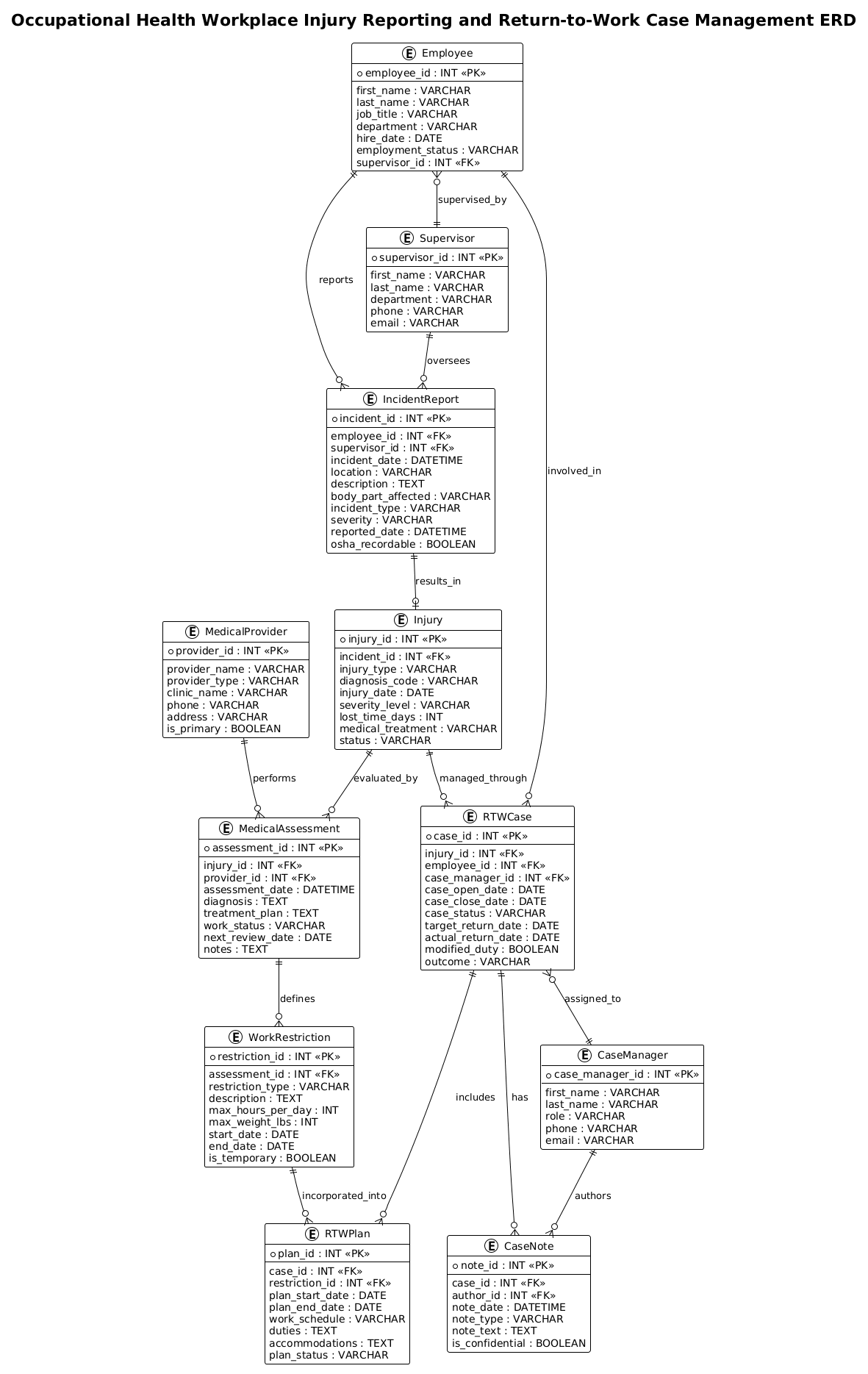
Below is the complete PlantUML source code. You can copy this entire block and paste it directly into the VPasCode editor to see the diagram rendered instantly.
@startuml
!theme plain

title Occupational Health Workplace Injury Reporting and Return-to-Work Case Management ERD

/'
Diagram Context:
This ERD models the core data structure for an occupational health system that manages workplace injury reporting and return-to-work (RTW) case management.
It supports the full lifecycle from initial incident reporting through medical assessment, case coordination, restricted duty planning, and eventual case closure.
Key entities include Employee, Incident Report, Injury, Medical Provider, Medical Assessment, RTW Case, Work Restriction, and Case Note.
The diagram is intended to clarify relationships between injured workers, incidents, clinical records, and RTW workflows for system design and database planning.
'/

' =====================
' Core People / Roles
' =====================

entity "Employee" as employee {
  * employee_id : INT <<PK>>
  --
  first_name : VARCHAR
  last_name : VARCHAR
  job_title : VARCHAR
  department : VARCHAR
  hire_date : DATE
  employment_status : VARCHAR
  supervisor_id : INT <<FK>>
}

entity "Supervisor" as supervisor {
  * supervisor_id : INT <<PK>>
  --
  first_name : VARCHAR
  last_name : VARCHAR
  department : VARCHAR
  phone : VARCHAR
  email : VARCHAR
}

entity "MedicalProvider" as provider {
  * provider_id : INT <<PK>>
  --
  provider_name : VARCHAR
  provider_type : VARCHAR
  clinic_name : VARCHAR
  phone : VARCHAR
  address : VARCHAR
  is_primary : BOOLEAN
}

' =====================
' Injury Reporting
' =====================

entity "IncidentReport" as incident {
  * incident_id : INT <<PK>>
  --
  employee_id : INT <<FK>>
  supervisor_id : INT <<FK>>
  incident_date : DATETIME
  location : VARCHAR
  description : TEXT
  body_part_affected : VARCHAR
  incident_type : VARCHAR
  severity : VARCHAR
  reported_date : DATETIME
  osha_recordable : BOOLEAN
}

entity "Injury" as injury {
  * injury_id : INT <<PK>>
  --
  incident_id : INT <<FK>>
  injury_type : VARCHAR
  diagnosis_code : VARCHAR
  injury_date : DATE
  severity_level : VARCHAR
  lost_time_days : INT
  medical_treatment : VARCHAR
  status : VARCHAR
}

' =====================
' Medical Assessment
' =====================

entity "MedicalAssessment" as assessment {
  * assessment_id : INT <<PK>>
  --
  injury_id : INT <<FK>>
  provider_id : INT <<FK>>
  assessment_date : DATETIME
  diagnosis : TEXT
  treatment_plan : TEXT
  work_status : VARCHAR
  next_review_date : DATE
  notes : TEXT
}

entity "WorkRestriction" as restriction {
  * restriction_id : INT <<PK>>
  --
  assessment_id : INT <<FK>>
  restriction_type : VARCHAR
  description : TEXT
  max_hours_per_day : INT
  max_weight_lbs : INT
  start_date : DATE
  end_date : DATE
  is_temporary : BOOLEAN
}

' =====================
' Return-to-Work Case Management
' =====================

entity "RTWCase" as rtwcase {
  * case_id : INT <<PK>>
  --
  injury_id : INT <<FK>>
  employee_id : INT <<FK>>
  case_manager_id : INT <<FK>>
  case_open_date : DATE
  case_close_date : DATE
  case_status : VARCHAR
  target_return_date : DATE
  actual_return_date : DATE
  modified_duty : BOOLEAN
  outcome : VARCHAR
}

entity "CaseManager" as casemanager {
  * case_manager_id : INT <<PK>>
  --
  first_name : VARCHAR
  last_name : VARCHAR
  role : VARCHAR
  phone : VARCHAR
  email : VARCHAR
}

entity "CaseNote" as casenote {
  * note_id : INT <<PK>>
  --
  case_id : INT <<FK>>
  author_id : INT <<FK>>
  note_date : DATETIME
  note_type : VARCHAR
  note_text : TEXT
  is_confidential : BOOLEAN
}

entity "RTWPlan" as rtwplan {
  * plan_id : INT <<PK>>
  --
  case_id : INT <<FK>>
  restriction_id : INT <<FK>>
  plan_start_date : DATE
  plan_end_date : DATE
  work_schedule : VARCHAR
  duties : TEXT
  accommodations : TEXT
  plan_status : VARCHAR
}

' =====================
' Relationships
' =====================

employee ||--o{ incident : reports
employee ||--o{ rtwcase : involved_in
employee }o--|| supervisor : supervised_by

supervisor ||--o{ incident : oversees

incident ||--o| injury : results_in

injury ||--o{ assessment : evaluated_by
injury ||--o{ rtwcase : managed_through

provider ||--o{ assessment : performs

assessment ||--o{ restriction : defines

rtwcase ||--o{ casenote : has
rtwcase ||--o{ rtwplan : includes
rtwcase }o--|| casemanager : assigned_to

restriction ||--o{ rtwplan : incorporated_into

casemanager ||--o{ casenote : authors

@endumlStep-by-Step Architectural Walkthrough
Constructing a complex ERD like this requires a structured approach. We will break down the code into four logical phases: configuration, entity declaration, relationship mapping, and visual refinement.
Phase 1: Canvas Configuration & Layout Directives
Every PlantUML diagram begins with setup directives that define the canvas behavior and visual style. For this healthcare ERD, we prioritize clarity and a clean, professional look suitable for technical documentation.
We start by declaring the diagram type with @startuml. Immediately after, we apply the !theme plain directive. This removes default background colors and heavy borders, providing a neutral canvas that allows the data relationships to stand out. We then define the title to provide immediate context. Crucially, we insert a comment block using /' ... '/ to document the diagram’s purpose, scope, and key entities. This practice ensures that anyone reading the source code understands the business context without needing to interpret the diagram first.
@startuml
!theme plain

title Occupational Health Workplace Injury Reporting and Return-to-Work Case Management ERD

/'
Diagram Context:
This ERD models the core data structure...
'/
Phase 2: Declaring Core Entities, Actors, and Boundaries
The foundation of the ERD lies in the entity definitions. In PlantUML, an entity represents a table in the database. We group these logically by domain: Core People, Injury Reporting, Medical Assessment, and Case Management.
Each entity block starts with the entity keyword, followed by the display name (e.g., "Employee") and an alias (e.g., as employee). The alias is vital for writing concise relationship lines later. Inside the curly braces {}, we define attributes. The * symbol denotes a Primary Key (PK), and INT or VARCHAR specifies the data type. We use < and < stereotypes to explicitly mark primary and foreign keys, which helps the renderer display them correctly and aids human readers in understanding the schema.
entity "Employee" as employee {
  * employee_id : INT <>
  --
  first_name : VARCHAR
  last_name : VARCHAR
  ...
Phase 3: Mapping Data Flows & Key Interactions
Once the entities are defined, we establish the relationships that bind them together. PlantUML uses specific syntax to denote cardinality and direction. The double vertical bar || indicates “one and only one” (mandatory), while the crow’s foot o{ indicates “zero or many” (optional one-to-many).
For example, the relationship employee ||--o{ incident : reports signifies that one employee must report at least one incident (or potentially zero if the syntax is interpreted as optional, but in this specific schema, the cardinality is often adjusted based on business rules; here we use o{ to indicate an employee can exist without an incident, but if an incident exists, it belongs to one employee). The label : reports describes the nature of the relationship. We map the flow from the Supervisor overseeing the IncidentReport, to the Injury resulting from the incident, and finally to the MedicalAssessment performed by a MedicalProvider.
employee ||--o{ incident : reports
supervisor ||--o{ incident : oversees
incident ||--o| injury : results_in
injury ||--o{ assessment : evaluated_by
Phase 4: Grouping, Annotations & Visual Polish
To maintain readability in a diagram with 10+ entities, we use comments and section headers. The lines starting with ' act as visual separators in the code, helping developers navigate the file. We also ensure that all foreign keys (e.g., supervisor_id in IncidentReport) are explicitly defined as attributes matching the primary key type of the referenced entity. This consistency is key for generating valid SQL scripts later. The final polish involves ensuring all relationships are bidirectional where necessary (e.g., the CaseManager authors CaseNote and is assigned to RTWCase) to provide a complete picture of the system’s data flow.
Syntax & Keyword Deep Dive
Understanding the specific PlantUML syntax used in this ERD is essential for adapting this model to other healthcare scenarios.
entityKeyword: The fundamental building block for defining tables. It accepts a display name and an alias. The alias is used for brevity in relationship definitions.*Primary Key Indicator: Placing an asterisk before an attribute (e.g.,* employee_id) automatically marks it as the Primary Key in the visual diagram, helping to identify the unique identifier for the table.<&> <Stereotypes: These are optional but highly recommended for clarity. They explicitly label attributes as Primary Keys or Foreign Keys, ensuring the diagram renders with the correct notation even if the asterisk is omitted or if the tool configuration varies.> ||--o{Cardinality: This syntax defines the relationship strength.||means “exactly one” (mandatory),o{means “zero or more” (optional one-to-many). The combination||--o{means a parent entity must exist and can have zero or many children.:/labelRelationship Label: The text after the colon (e.g.,: reports) defines the verb or noun phrase describing the relationship, making the diagram self-documenting./' ... '/Multi-line Comments: This allows for rich text documentation directly within the code, which is rendered as a note or context block in the diagram, perfect for explaining scope.
Best Practices & Pitfalls to Avoid
When designing ERDs for complex systems like occupational health, following best practices ensures the diagram remains maintainable and useful.
- Consistent Naming Conventions: Always use the same naming style for aliases (e.g., always lowercase singular nouns like
employee,incident). This prevents errors when writing relationship lines and makes the code easier to read. - Logical Grouping: Use comment sections (e.g.,
' =====================) to group related entities. In a diagram with many tables, visual grouping in the code translates to a more organized layout in the rendered output. - Avoid Redundant Foreign Keys: Ensure that foreign keys are defined as attributes in the child table (e.g.,
employee_idinIncidentReport) and that they match the data type of the parent’s primary key. Mismatched types can lead to database errors. - Balance Detail and Abstraction: While it is tempting to list every possible attribute, focus on the attributes that drive the workflow. For a high-level ERD,
TEXTfields for notes andDATEfields for critical events are sufficient; do not over-specify field lengths unless required by a specific database standard.
Start Building Occupational Health ERDs Faster with VPasCode
Design complex healthcare data models instantly in your browser with VPasCode’s free PlantUML editor—no installation required, just write, preview, and refine.