


In the rapidly evolving landscape of retail and non-profit operations, data integrity is the backbone of efficient inventory management. For thrift stores, the journey of an item from a donor’s doorstep to a price-tagged shelf is a complex logistical chain involving multiple data touchpoints. Whether tracking a donor’s history, categorizing a diverse array of donated goods, assessing their condition, or assigning a final resale price, a robust data model is essential. Without a clear architectural blueprint, these operations can quickly become fragmented, leading to lost inventory, pricing errors, and an inability to analyze donation trends.
Visualizing this workflow through an Entity Relationship Diagram (ERD) allows architects and store managers to map out the strict dependencies between donors, items, and pricing logic. By leveraging diagram-as-code tools, specifically PlantUML within the VPasCode editor, teams can create living documentation that evolves alongside their business rules. This approach eliminates the friction of manual drawing, ensuring that relationships like “one donor makes many donations” or “one item receives one price tag” are mathematically precise and instantly renderable. In this guide, we will construct a comprehensive ERD that models the entire lifecycle of a donation, from intake to the final tagging decision.
Understanding the Model: Purpose, Scope & Problem Framing
The primary objective of this diagram is to define the data structure required to manage a thrift store’s donation intake and resale preparation process. Unlike a simple inventory list, this ERD captures the provenance of items (who donated them), the classification of items (what they are), and the valuation of items (what they are worth).
Diagram Abstraction & Representation
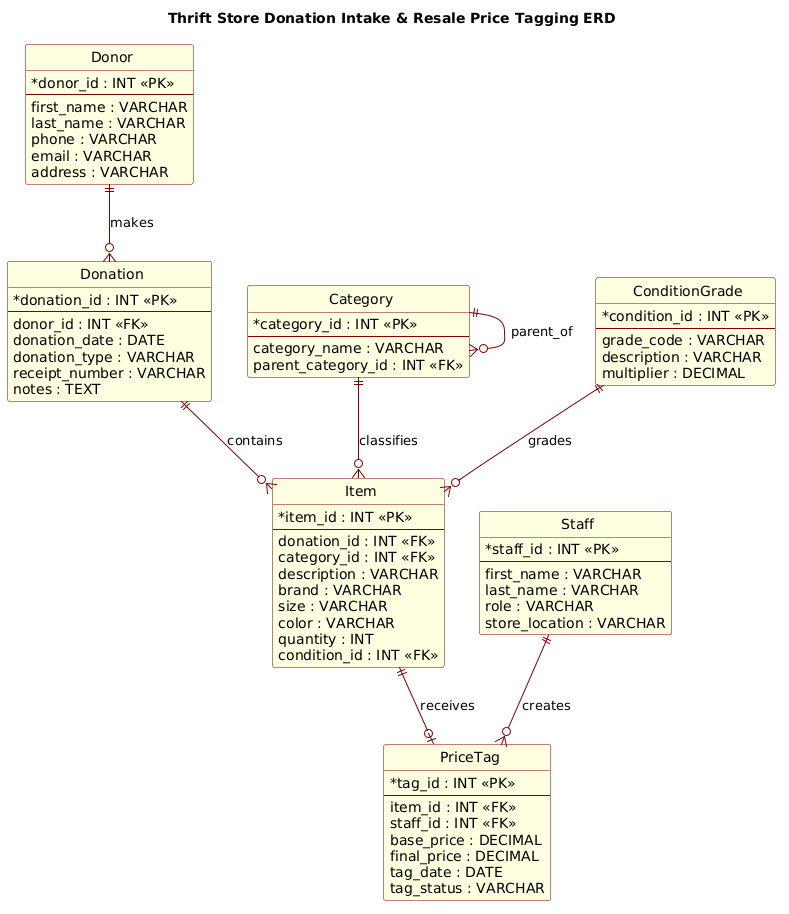
This ERD uses standard Entity-Relationship notation to model the database schema. In this context, Entities represent real-world objects such as a Donor or a specific Item. Attributes (like phone or condition_id) define the specific properties of these objects. The Relationships (lines connecting entities) define the cardinality and business logic, such as how a single donation event can contain multiple distinct items, or how a staff member creates a price tag for a specific item.
Target Domain Scope & Scenario
The scope of this model covers the intake phase (recording the donor and the donation event), the processing phase (categorizing items and assessing their physical condition), and the pricing phase (staff assigning a price and generating a tag). It intentionally excludes the final point-of-sale transaction to focus on the pre-sale preparation workflow, ensuring the model remains focused on inventory acquisition and valuation.
Key Takeaways & Educational Insights
By studying this model, readers will learn how to handle one-to-many relationships (e.g., one category containing many items), self-referencing relationships (e.g., parent categories), and the critical role of foreign keys in linking operational data like condition grades to specific inventory items.
Complete Diagram & Full Source Code
Below is the complete, rendered visualization of the Thrift Store Donation Intake and Resale Price Tagging ERD. This diagram illustrates the flow of data from the donor through to the final price tag creation.
@startuml
!include https://static.visual-paradigm.com/web/resources/plantuml-stdlib/themes/rose.puml

title Thrift Store Donation Intake & Resale Price Tagging ERD

/'
Diagram Context:
This ERD models the flow of donated items through a thrift store's intake and pricing process.
It covers donor drop-offs, item categorization, condition assessment, pricing decisions, and tag generation.
Key entities include Donor, Donation, Item, Category, ConditionGrade, PriceTag, and Staff.
The goal is to show how donations are received, sorted, priced, and prepared for resale.
'/

entity "Donor" as donor {
  * donor_id : INT <<PK>>
  --
  first_name : VARCHAR
  last_name : VARCHAR
  phone : VARCHAR
  email : VARCHAR
  address : VARCHAR
}

entity "Donation" as donation {
  * donation_id : INT <<PK>>
  --
  donor_id : INT <<FK>>
  donation_date : DATE
  donation_type : VARCHAR
  receipt_number : VARCHAR
  notes : TEXT
}

entity "Item" as item {
  * item_id : INT <<PK>>
  --
  donation_id : INT <<FK>>
  category_id : INT <<FK>>
  description : VARCHAR
  brand : VARCHAR
  size : VARCHAR
  color : VARCHAR
  quantity : INT
  condition_id : INT <<FK>>
}

entity "Category" as category {
  * category_id : INT <<PK>>
  --
  category_name : VARCHAR
  parent_category_id : INT <<FK>>
}

entity "ConditionGrade" as condition {
  * condition_id : INT <<PK>>
  --
  grade_code : VARCHAR
  description : VARCHAR
  multiplier : DECIMAL
}

entity "PriceTag" as pricetag {
  * tag_id : INT <<PK>>
  --
  item_id : INT <<FK>>
  staff_id : INT <<FK>>
  base_price : DECIMAL
  final_price : DECIMAL
  tag_date : DATE
  tag_status : VARCHAR
}

entity "Staff" as staff {
  * staff_id : INT <<PK>>
  --
  first_name : VARCHAR
  last_name : VARCHAR
  role : VARCHAR
  store_location : VARCHAR
}

donor ||--o{ donation : makes
donation ||--o{ item : contains
category ||--o{ item : classifies
category ||--o{ category : parent_of
condition ||--o{ item : grades
item ||--o| pricetag : receives
staff ||--o{ pricetag : creates

@endumlStep-by-Step Architectural Walkthrough
Building a robust ERD requires a logical progression from high-level actors to granular data attributes. We will construct this diagram in four distinct phases using PlantUML syntax.
Phase 1: Canvas Configuration & Layout Directives
Before defining any entities, we must set the stage. The first step in PlantUML is to declare the start of the diagram and include any necessary libraries or themes. In this case, we utilize the rose theme to give the diagram a professional, consistent visual style that matches the branding of the platform.
We also define the title to provide immediate context for the viewer. This is done using the title directive. Following the title, we insert a comment block using /' ... '/ to describe the diagram’s context for future maintainers, ensuring the documentation remains self-explanatory.
@startuml
!include https://static.visual-paradigm.com/web/resources/plantuml-stdlib/themes/rose.puml

title Thrift Store Donation Intake & Resale Price Tagging ERD

/'
Diagram Context:
This ERD models the flow of donated items...
'/
Phase 2: Declaring Core Entities, Actors, and Boundaries
The foundation of any ERD is the entity definition. In PlantUML, we use the entity keyword to define a table. Each entity is given a display name (e.g., “Donor”) and an internal alias (e.g., donor) to simplify relationship referencing later.
Inside the entity block, we list attributes. We distinguish between Primary Keys (PK) using the * symbol and Foreign Keys (FK) using the < stereotype. For example, the Donor entity requires a unique donor_id, while the Donation entity references that donor via a donor_id foreign key.
entity "Donor" as donor {
* donor_id : INT <>
--
first_name : VARCHAR
last_name : VARCHAR
phone : VARCHAR
email : VARCHAR
address : VARCHAR
}
entity "Donation" as donation {
* donation_id : INT < >
--
donor_id : INT <>
donation_date : DATE
donation_type : VARCHAR
receipt_number : VARCHAR
notes : TEXT
} Phase 3: Mapping Data Flows & Key Interactions
Once entities are defined, we map the relationships that dictate how data flows through the system. PlantUML uses specific arrow syntax to denote cardinality. The ||--o{ syntax represents a one-to-many relationship where the “one” side is mandatory (the double bar) and the “many” side is optional (the circle).
We define the core flow: A donor makes a donation, and a donation contains multiple items. We also model the Category hierarchy, where a category can have a parent category (self-referencing), and the ConditionGrade which grades items.
donor ||--o{ donation : makes
donation ||--o{ item : contains
category ||--o{ item : classifies
category ||--o{ category : parent_of
condition ||--o{ item : grades
Phase 4: Grouping, Annotations & Visual Polish
The final phase involves completing the relationships for the pricing workflow. We link the Item to the PriceTag (one item receives at most one tag, denoted by ||--o|) and the Staff member who creates that tag. We also ensure all attributes are typed correctly (INT, VARCHAR, DECIMAL, DATE) to reflect database standards.
We conclude the diagram with the @enduml directive, signaling the end of the code block.
item ||--o| pricetag : receives
staff ||--o{ pricetag : creates

@enduml
Syntax & Keyword Deep Dive
To fully customize and understand the PlantUML ERD syntax, it is crucial to master the specific keywords and symbols used in this diagram.
entity: The fundamental keyword used to define a database table. It takes a display name and an alias.as [alias]: Assigns a short internal name to an entity, which is required for creating relationships later in the code.* [attribute]: Denotes a Primary Key (PK). This is the unique identifier for a record in the table.<<FK>>: The stereotype used to mark a Foreign Key attribute, explicitly showing which table it references.||--o{: Represents a mandatory one-to-many relationship (e.g., One Donor makes Many Donations).||--o|: Represents an optional one-to-one or one-to-many relationship with a max cardinality of one (e.g., An Item receives at most one PriceTag)./' ... '/: The syntax for multi-line comments, allowing for detailed documentation within the code without affecting rendering.
Best Practices & Pitfalls to Avoid
When building ERDs with PlantUML, adherence to best practices ensures your diagrams remain maintainable and scalable.
- Consistent Naming Conventions: Always use singular names for entities (e.g.,
Iteminstead ofItems) to align with standard database modeling practices. Use snake_case for internal aliases (e.g.,item). - Explicit Data Types: Always define the data type for attributes (e.g.,
INT,VARCHAR,DECIMAL). This prevents ambiguity and helps developers generate accurate SQL scripts later. - Manage Cardinality Carefully: Be precise with relationship arrows. Using
o{(optional) vs|(mandatory) changes the business logic significantly. For instance, a donation must have a donor, but an item might not have a price tag yet. - Use Themes for Professionalism: Don’t rely on default styling. Including a theme like
rose.pumlimmediately elevates the diagram’s visual quality for stakeholder presentations.
Start Building PlantUML ERDs Faster with VPasCode
Visualize your retail data models instantly in your browser with VPasCode, the free PlantUML editor for creating professional ERDs without any local setup.