


In the highly regulated retail sector, particularly for the sale of alcohol, maintaining accurate records of customer age and transaction history is not just a business best practice—it is a legal necessity. Retailers must implement systems capable of capturing customer identity, verifying age at the point of sale, and logging every regulated transaction for potential audit trails. A failure in this data integrity can lead to severe fines, license revocation, and reputational damage. Visualizing these complex data relationships is the first step toward building a compliant, robust database architecture.

Diagramming this system using Entity Relationship Diagrams (ERD) allows architects and developers to map out the strict dependencies between customers, their identification documents, product categories, and sales transactions. By using PlantUML, a powerful diagram-as-code language, teams can define these schemas in a text-based format that is version-ready, easily reviewable, and instantly renderable. This approach ensures that the logical structure of the compliance system is documented clearly, allowing stakeholders to spot missing relationships—such as the critical link between an employee’s certification and the age verification they perform—before a single line of SQL is written.
Understanding the Model: Purpose, Scope & Problem Framing
This tutorial focuses on constructing a specialized Entity Relationship Diagram (ERD) designed for a Liquor Store Age Verification & Regulated Beverage Sales Compliance System. Unlike generic retail models, this schema must enforce strict constraints and relationships to satisfy regulatory requirements regarding age gating and auditability.
Diagram Abstraction & Representation
An ERD is the blueprint for relational databases, defining entities (tables), their attributes (columns), and the relationships that bind them. In this specific context, the diagram abstracts the physical world of a liquor store into logical data structures. For instance, the Customer entity represents a real-world person, while the Identification entity represents the legal proof of their age. The relationships (lines connecting entities) define the cardinality: for example, a single customer can have multiple identification records (e.g., a driver’s license and a passport), but each identification record must belong to exactly one customer. This abstraction helps developers understand how data flows from the point of sale (transaction) back to the compliance audit (audit trail).
Target Domain Scope & Scenario
The scope of this diagram covers the entire lifecycle of a regulated sale. It begins with Customer onboarding, where identity is captured. It moves to the Product catalog, where items are tagged by Category (e.g., Beer, Wine, Spirits) and flagged as regulated. The core event is the SalesTransaction, which links the customer, the products purchased, the Employee who processed it, and the specific AgeVerification event that authorized the sale. Finally, the ComplianceAudit entity provides a mechanism to review these transactions for violations. This model intentionally excludes inventory management details like warehouse logistics, focusing strictly on the compliance and transactional data required for legal adherence.
Key Takeaways & Educational Insights
By building this diagram, you will gain insights into:
- Compliance-First Data Modeling: How to structure data to support mandatory audit trails and verification logs.
- Cardinality Management: Understanding one-to-many relationships (e.g., one store has many employees) versus optional relationships (e.g., a transaction might not always have an age verification log if the customer is a registered VIP).
- Attribute Typing: Selecting appropriate data types like
DECIMALfor prices andBOOLEANfor compliance flags.
Complete Diagram & Full Source Code
Before diving into the construction phases, here is the complete, rendered ERD. This visual representation shows how the Customer, Product, Transaction, and Compliance entities interconnect to form a cohesive compliance system.
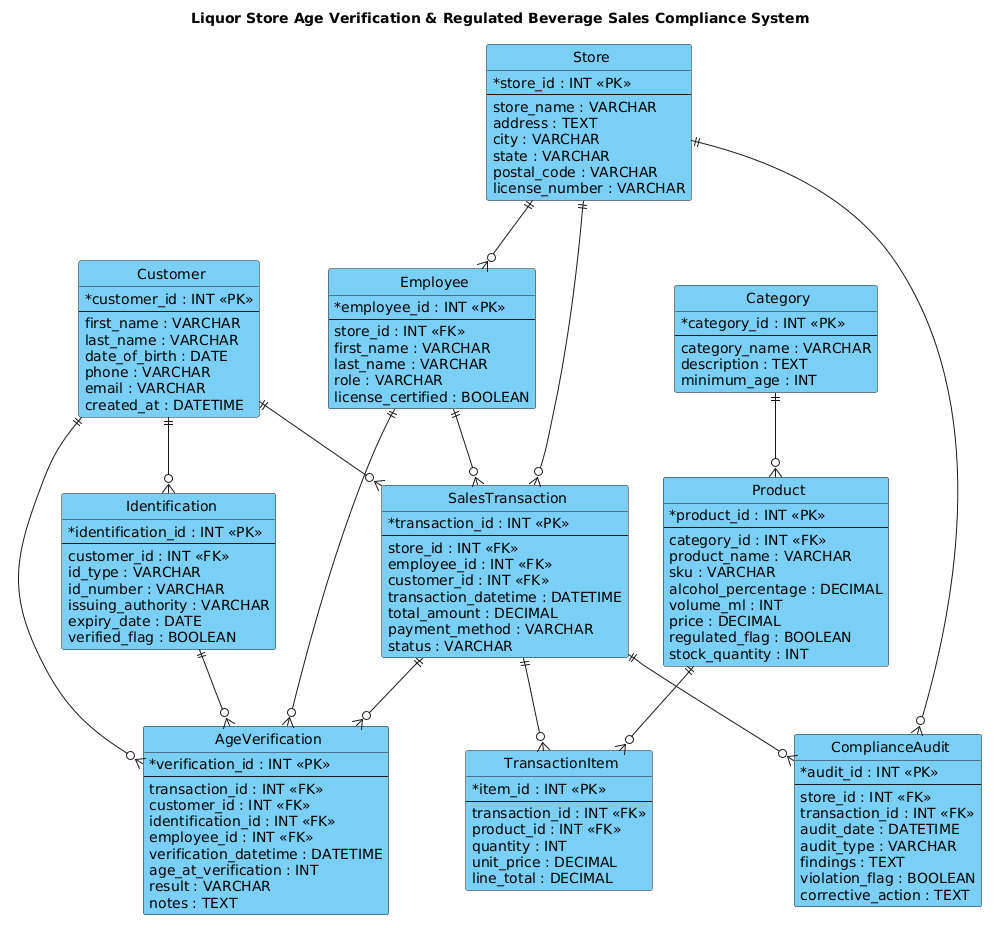
Below is the complete PlantUML source code. You can copy this entire block and paste it directly into the VPasCode web editor to see the live rendering.
@startuml
!include https://static.visual-paradigm.com/web/resources/plantuml-stdlib/themes/vp.puml

title Liquor Store Age Verification & Regulated Beverage Sales Compliance System

/'
Diagram Context:
This ERD models the core data needed for a liquor store to verify customer age,
control the sale of regulated beverages, and maintain compliance records.

The system supports:
- Customer identity and date-of-birth capture
- Age verification checks at the point of sale
- Product classification by alcohol type and regulated status
- Sales transaction logging with cashier and store details
- Compliance audit events and violation tracking

Key entities include Customer, Identification, Product, Category,
SalesTransaction, TransactionItem, Employee, Store, AgeVerification,
and ComplianceAudit. Relationships show how a sale is linked to a customer,
verified identification, purchased products, and the employee who processed it.
'/

entity "Customer" as customer {
  * customer_id : INT <<PK>>
  --
  first_name : VARCHAR
  last_name : VARCHAR
  date_of_birth : DATE
  phone : VARCHAR
  email : VARCHAR
  created_at : DATETIME
}

entity "Identification" as identification {
  * identification_id : INT <<PK>>
  --
  customer_id : INT <<FK>>
  id_type : VARCHAR
  id_number : VARCHAR
  issuing_authority : VARCHAR
  expiry_date : DATE
  verified_flag : BOOLEAN
}

entity "Product" as product {
  * product_id : INT <<PK>>
  --
  category_id : INT <<FK>>
  product_name : VARCHAR
  sku : VARCHAR
  alcohol_percentage : DECIMAL
  volume_ml : INT
  price : DECIMAL
  regulated_flag : BOOLEAN
  stock_quantity : INT
}

entity "Category" as category {
  * category_id : INT <<PK>>
  --
  category_name : VARCHAR
  description : TEXT
  minimum_age : INT
}

entity "Store" as store {
  * store_id : INT <<PK>>
  --
  store_name : VARCHAR
  address : TEXT
  city : VARCHAR
  state : VARCHAR
  postal_code : VARCHAR
  license_number : VARCHAR
}

entity "Employee" as employee {
  * employee_id : INT <<PK>>
  --
  store_id : INT <<FK>>
  first_name : VARCHAR
  last_name : VARCHAR
  role : VARCHAR
  license_certified : BOOLEAN
}

entity "SalesTransaction" as transaction {
  * transaction_id : INT <<PK>>
  --
  store_id : INT <<FK>>
  employee_id : INT <<FK>>
  customer_id : INT <<FK>>
  transaction_datetime : DATETIME
  total_amount : DECIMAL
  payment_method : VARCHAR
  status : VARCHAR
}

entity "TransactionItem" as item {
  * item_id : INT <<PK>>
  --
  transaction_id : INT <<FK>>
  product_id : INT <<FK>>
  quantity : INT
  unit_price : DECIMAL
  line_total : DECIMAL
}

entity "AgeVerification" as age_verification {
  * verification_id : INT <<PK>>
  --
  transaction_id : INT <<FK>>
  customer_id : INT <<FK>>
  identification_id : INT <<FK>>
  employee_id : INT <<FK>>
  verification_datetime : DATETIME
  age_at_verification : INT
  result : VARCHAR
  notes : TEXT
}

entity "ComplianceAudit" as audit {
  * audit_id : INT <<PK>>
  --
  store_id : INT <<FK>>
  transaction_id : INT <<FK>>
  audit_date : DATETIME
  audit_type : VARCHAR
  findings : TEXT
  violation_flag : BOOLEAN
  corrective_action : TEXT
}

customer ||--o{ identification
customer ||--o{ transaction
customer ||--o{ age_verification

category ||--o{ product

store ||--o{ employee
store ||--o{ transaction
store ||--o{ audit

employee ||--o{ transaction
employee ||--o{ age_verification

transaction ||--o{ item
transaction ||--o{ age_verification
transaction ||--o{ audit

product ||--o{ item

identification ||--o{ age_verification

@endumlStep-by-Step Architectural Walkthrough
Phase 1: Canvas Configuration & Layout Directives
Every professional PlantUML diagram begins with configuration directives that set the stage for rendering. In this compliance model, we start by including the Visual Paradigm standard library theme. This ensures the diagram uses a modern, consistent color palette and styling that matches enterprise documentation standards.
We then define the title directive to provide a clear header for the diagram, which is essential for compliance documentation where context is key. Finally, we wrap the diagram context in a comment block using /' and '/. This allows us to document the business logic and scope of the model without cluttering the rendering engine with text.
@startuml
!include https://static.visual-paradigm.com/web/resources/plantuml-stdlib/themes/vp.puml

title Liquor Store Age Verification & Regulated Beverage Sales Compliance System

/'
Diagram Context:
... (context description) ...
'/
Phase 2: Declaring Core Entities, Actors, and Boundaries
The foundation of an ERD lies in the entities. In PlantUML, we use the entity keyword followed by a display name and an alias (the internal variable name). We then define the attributes inside curly braces.
For the Customer entity, we define the primary key (* customer_id : INT <). The PK stereotype marks this column as the Primary Key. The -- separator visually divides the key attributes from the regular attributes in the rendered diagram. We define critical compliance fields like date_of_birth and email.
Similarly, the Identification entity is linked to the customer. It includes a foreign key (customer_id : INT <) which establishes the relationship. Note the verified_flag : BOOLEAN, which is crucial for tracking whether the ID presented at the counter was actually scanned and validated.
entity "Customer" as customer {
* customer_id : INT <>
--
date_of_birth : DATE
email : VARCHAR
}
entity "Identification" as identification {
* identification_id : INT < >
--
customer_id : INT <>
verified_flag : BOOLEAN
} Phase 3: Mapping Data Flows & Key Interactions
Once entities are defined, we must map the relationships. In PlantUML, relationships are drawn between the entity aliases using specific arrow notations. For this compliance system, we rely heavily on one-to-many relationships.
The notation ||--o{ is used frequently. The double bar (||) indicates mandatory participation on the left side (e.g., a transaction must have a store), while the circle and arrow (o{) indicate optional participation on the right (e.g., a store can have zero employees, though in reality, it will have many). This specific syntax visually communicates the cardinality constraints required for database integrity.
For instance, the Transaction entity is central to the flow. It connects to Store, Employee, and Customer, ensuring that every sale is traceable to a location, a person, and a buyer.
store ||--o{ transaction
employee ||--o{ transaction
customer ||--o{ transaction
Phase 4: Grouping, Annotations & Visual Polish
To make the diagram readable, we ensure that the relationship lines are logical and do not cross unnecessarily. The PlantUML layout engine automatically arranges the entities, but we can guide it by defining the order of entity declarations or using the skinparam directives if needed. In this diagram, we rely on the standard layout but ensure that the ComplianceAudit and AgeVerification entities are clearly linked to the Transaction entity, as these are the audit-critical paths. The use of TEXT for fields like notes and findings indicates that these columns can hold variable-length strings, which is a common requirement for logging audit findings.
Syntax & Keyword Deep Dive
To master PlantUML ERD modeling, it is essential to understand the specific syntax elements used in this compliance diagram.
entity: The keyword used to define a table or entity. Syntax:entity "Display Name" as alias { ... }.*(Primary Key Marker): Placed before an attribute name (e.g.,* customer_id) to indicate it is the Primary Key. This is rendered with a star icon in the diagram.<&> <Stereotypes: These are XML-like tags used to explicitly label an attribute as a Primary Key or Foreign Key.> INT <makes the role of the column explicit in the visual model.> --Separator: A horizontal line used inside an entity block to visually separate key attributes from regular attributes, improving readability.||--o{Relationship Notation: A specific cardinality notation.||means “one and only one” (mandatory), ando{means “zero or many” (optional). This is critical for defining the strictness of relationships in a compliance database./' ... '/Comment Block: A multi-line comment syntax that allows for rich text descriptions within the code without rendering as diagram elements.
Best Practices & Pitfalls to Avoid
When modeling complex compliance systems like this, adherence to best practices ensures the diagram remains maintainable and accurate.
- Consistent Naming Conventions: Always use singular names for entities (e.g.,
CustomernotCustomers) and snake_case for internal aliases (e.g.,customer). This prevents confusion when generating SQL scripts later. - Explicit Data Types: Never leave data types as generic. Use
DECIMALfor currency,DATEfor dates, andBOOLEANfor flags. Ambiguous types lead to implementation errors in the database. - Avoid Circular Dependencies: Ensure your relationships form a logical hierarchy. While some systems have circular references, in an ERD, it is best to model the “parent” (e.g., Store) as the source of truth for the “child” (e.g., Transaction) to maintain referential integrity.
- Document the “Why”: Use the
/'comment block to explain the business rules. A diagram shows the structure, but the comments explain the logic (e.g., whyverified_flagis necessary).
Start Building Compliance ERDs Faster with VPasCode
Instantly visualize and test your PlantUML database schemas in the browser with zero installation—perfect for documenting complex retail compliance systems.