


In the fast-paced world of retail hardware supply, managing contractor accounts is far more complex than simple point-of-sale transactions. Unlike individual consumers, contractors operate as businesses requiring intricate account structures: they need authorized purchasers, credit limits, tiered pricing models based on annual spend, and specific bulk order thresholds. For software architects and database designers, translating these business rules into a robust database schema is a critical challenge. A poorly designed schema can lead to data redundancy, pricing errors, or an inability to track credit history accurately.
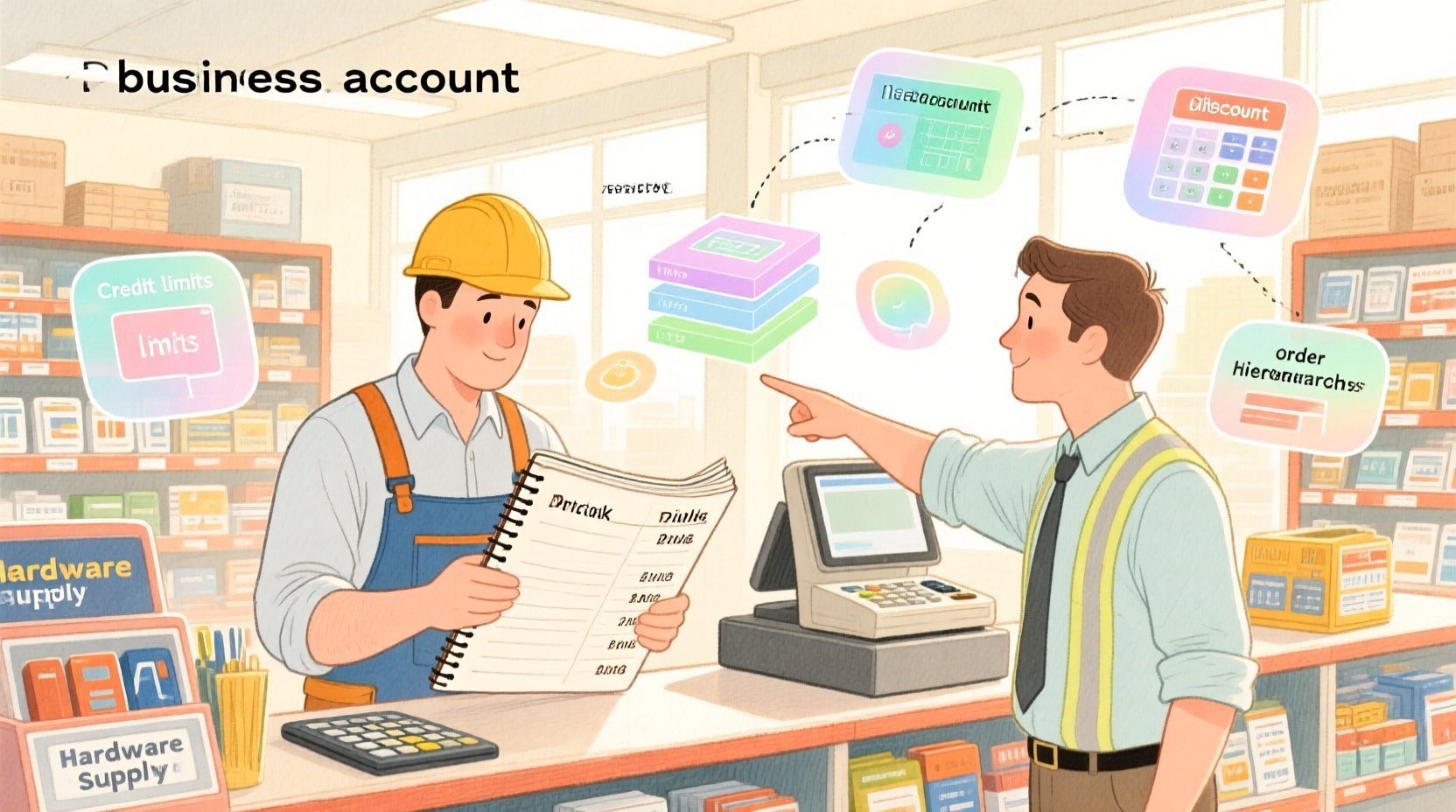
This is where diagram-as-code shines. By using PlantUML to model an Entity Relationship Diagram (ERD) for a hardware store’s contractor system, you can visualize the strict relationships between contractors, pricing tiers, and order lines before writing a single line of SQL. This approach ensures that the logical data model aligns perfectly with business requirements like “automatic tier discount application” or “multi-level authorization.” Using VPasCode, a free web-based editor, you can prototype these complex schemas instantly, test relationship cardinalities, and refine your data architecture without the overhead of local environment setup.
Understanding the Model: Purpose, Scope & Problem Framing
Before diving into the syntax, it is essential to understand the architectural abstraction we are building. This ERD is not merely a list of tables; it is a representation of a dynamic business ecosystem. The core problem being solved is the management of contractor hierarchy and pricing logic.
Diagram Abstraction & Representation
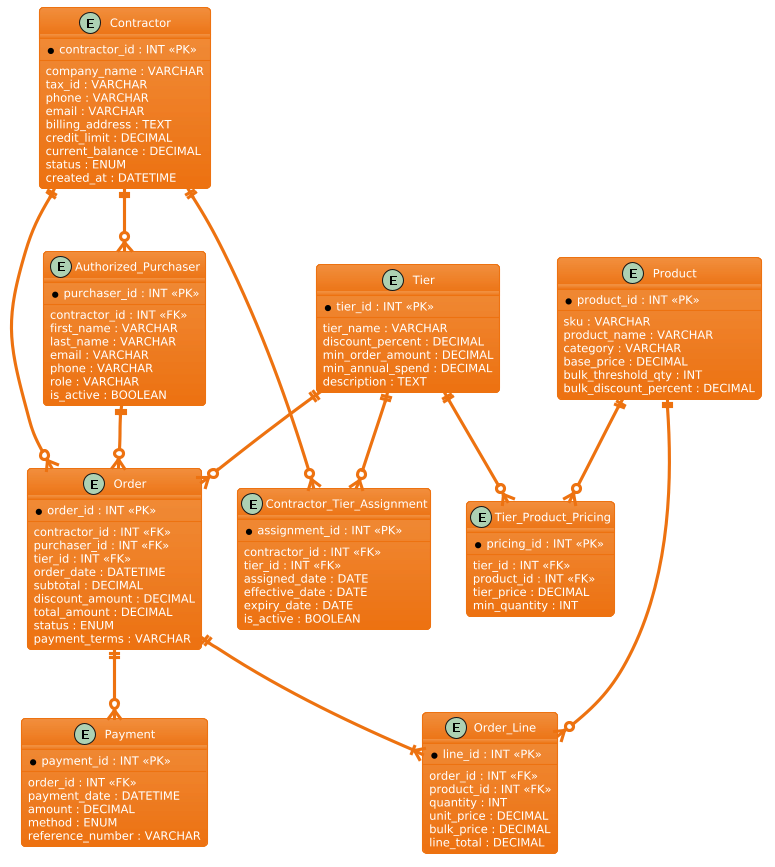
In this model, the Contractor entity acts as the root business unit. Unlike a standard customer table, a contractor entity must support a hierarchy of Authorized Purchasers (employees who can place orders) and Tier Assignments (which determine their discount level). The diagram explicitly models the many-to-many relationships between contractors and pricing tiers, resolved through an associative entity Contractor_Tier_Assignment. This allows a contractor to move between tiers over time while maintaining a historical record of when and why those changes occurred.
Target Domain Scope & Scenario
The scope of this diagram covers the entire order lifecycle for a business account. It includes:
- Account Setup: Defining the contractor company and their credit limits.
- Pricing Logic: The intersection of
Contractor,Tier, andProductto determine the final bulk price. - Order Processing: Capturing which specific purchaser placed the order, the specific products (and quantities), and the resulting payment terms.
Key Takeaways & Educational Insights
By studying this model, you will learn how to handle temporal data (using effective/expiry dates for tier assignments), conditional pricing (separating base product pricing from tier-specific pricing), and role-based access (linking orders to specific purchasers rather than just the company). This structure ensures data integrity for credit reporting and accurate financial reconciliation.
Complete Diagram & Full Source Code
Below is the finalized Entity Relationship Diagram for the Hardware Store Contractor system. This blueprint illustrates the precise cardinality and foreign key relationships required to support bulk pricing and contractor management.
@startuml
/'
Diagram Context:
This ERD models a hardware store's contractor account management and bulk pricing tier system.
It captures how contractor businesses register, have authorized purchasers, place bulk orders,
and receive tier-based discounts. The system supports multiple pricing tiers, each with
its own discount percentage and minimum order quantity thresholds. Contractors are assigned
to a tier, and their orders automatically apply the appropriate tier pricing. Purchase
history is tracked to support credit terms, spending limits, and tier progression.
'/
!theme aws-orange

entity "Contractor" as contractor {
  * contractor_id : INT <<PK>>
  --
  company_name : VARCHAR
  tax_id : VARCHAR
  phone : VARCHAR
  email : VARCHAR
  billing_address : TEXT
  credit_limit : DECIMAL
  current_balance : DECIMAL
  status : ENUM
  created_at : DATETIME
}

entity "Tier" as tier {
  * tier_id : INT <<PK>>
  --
  tier_name : VARCHAR
  discount_percent : DECIMAL
  min_order_amount : DECIMAL
  min_annual_spend : DECIMAL
  description : TEXT
}

entity "Contractor_Tier_Assignment" as assignment {
  * assignment_id : INT <<PK>>
  --
  contractor_id : INT <<FK>>
  tier_id : INT <<FK>>
  assigned_date : DATE
  effective_date : DATE
  expiry_date : DATE
  is_active : BOOLEAN
}

entity "Authorized_Purchaser" as purchaser {
  * purchaser_id : INT <<PK>>
  --
  contractor_id : INT <<FK>>
  first_name : VARCHAR
  last_name : VARCHAR
  email : VARCHAR
  phone : VARCHAR
  role : VARCHAR
  is_active : BOOLEAN
}

entity "Order" as order {
  * order_id : INT <<PK>>
  --
  contractor_id : INT <<FK>>
  purchaser_id : INT <<FK>>
  tier_id : INT <<FK>>
  order_date : DATETIME
  subtotal : DECIMAL
  discount_amount : DECIMAL
  total_amount : DECIMAL
  status : ENUM
  payment_terms : VARCHAR
}

entity "Order_Line" as line {
  * line_id : INT <<PK>>
  --
  order_id : INT <<FK>>
  product_id : INT <<FK>>
  quantity : INT
  unit_price : DECIMAL
  bulk_price : DECIMAL
  line_total : DECIMAL
}

entity "Product" as product {
  * product_id : INT <<PK>>
  --
  sku : VARCHAR
  product_name : VARCHAR
  category : VARCHAR
  base_price : DECIMAL
  bulk_threshold_qty : INT
  bulk_discount_percent : DECIMAL
}

entity "Tier_Product_Pricing" as tier_pricing {
  * pricing_id : INT <<PK>>
  --
  tier_id : INT <<FK>>
  product_id : INT <<FK>>
  tier_price : DECIMAL
  min_quantity : INT
}

entity "Payment" as payment {
  * payment_id : INT <<PK>>
  --
  order_id : INT <<FK>>
  payment_date : DATETIME
  amount : DECIMAL
  method : ENUM
  reference_number : VARCHAR
}

contractor ||--o{ assignment
tier ||--o{ assignment
contractor ||--o{ purchaser
contractor ||--o{ order
purchaser ||--o{ order
tier ||--o{ order
order ||--|{ line
product ||--o{ line
tier ||--o{ tier_pricing
product ||--o{ tier_pricing
order ||--o{ payment

@endumlStep-by-Step Architectural Walkthrough
Phase 1: Canvas Configuration & Layout Directives
The first step in building a professional diagram is setting the visual theme and the context. In PlantUML, we start with the @startuml directive. We immediately define the diagram’s purpose using a comment block. This is crucial for documentation, as it provides context to anyone viewing the diagram later without needing to read the code.
We also apply a specific theme to match the branding or visual preference. Here, we use the !theme aws-orange directive to give the diagram a warm, professional orange hue often associated with construction or hardware themes.
/'
Diagram Context:
This ERD models a hardware store's contractor account management and bulk pricing tier system.
... (context description)
'/
!theme aws-orange
Phase 2: Declaring Core Entities, Actors, and Boundaries
Next, we define the fundamental entities. In PlantUML, we use the entity keyword. We define the Contractor entity first, as it is the central business unit. We use the as alias to create a shorter reference name (e.g., as contractor) for use in relationship lines later.
Inside the entity block, we define attributes. Primary Keys (PK) are marked with * and Foreign Keys (FK) with FK in the stereotype. We also specify data types like INT, VARCHAR, and DECIMAL to ensure the schema is ready for implementation.
entity "Contractor" as contractor {
  * contractor_id : INT <>
  --
  company_name : VARCHAR
  credit_limit : DECIMAL
}
Phase 3: Mapping Data Flows & Key Interactions
Once entities are defined, we map the relationships. The most critical relationship in this model is the Contractor-Tier-Product interaction. We cannot simply link a contractor to a tier directly if we need to track history (e.g., “When did they move from Bronze to Silver?”).
To solve this, we introduce the Contractor_Tier_Assignment entity. This associative entity links the contractor and the tier with a one-to-many relationship from both sides, allowing for historical tracking via effective_date and expiry_date.
We then link the Order entity. An order belongs to one contractor but can be placed by one specific Authorized_Purchaser. This creates a path: Contractor --o Purchaser --o Order.
contractor ||--o{ assignment
tier ||--o{ assignment
contractor ||--o{ purchaser
purchaser ||--o{ order
Phase 4: Grouping, Annotations & Visual Polish
The final phase involves refining the pricing logic. We introduce the Tier_Product_Pricing entity. This is a many-to-many relationship between Tier and Product, allowing us to define specific prices for specific products at specific tiers (e.g., “Hammer costs $10 normally, but $8 for Gold Tier members who buy 10+ units”).
We also ensure the Order_Line entity captures both the unit_price (original price) and bulk_price (discounted price) to preserve the financial state of the order at the time of purchase, even if the contractor’s tier changes later.
Syntax & Keyword Deep Dive
To master this ERD, you need to understand the specific PlantUML syntax used to define structure and relationships.
entity "Name" as alias: Defines a database table. The string inside quotes is the display name, and theaskeyword creates a short alias used in relationship lines.* attribute : Type: The asterisk*indicates a Primary Key. PlantUML will render this visually as a bold key icon.FKStereotype: Used as<to denote Foreign Keys. While PlantUML doesn’t enforce referential integrity, this visual cue helps developers identify relationships quickly.> ||--o{Relationship Syntax: This defines cardinality.||means “one and only one” (mandatory),--is a standard line, ando{means “zero or many” (optional). For example,contractor ||--o{ ordermeans a contractor must have at least one order (in this specific logic context) or is the parent, and can have many orders.--Separator: Inside an entity block, a double dash--separates the key attributes from the regular attributes, improving readability.!theme: A directive to apply a pre-defined color theme to the entire diagram canvas.
Best Practices & Pitfalls to Avoid
When building complex ERDs like this for retail systems, keep these best practices in mind to ensure your diagrams remain maintainable and clear.
- Normalize Your Pricing Logic: Do not store the “discounted price” directly in the
Producttable. Instead, create a separate associative entity (likeTier_Product_Pricing) to handle the many-to-many relationship between tiers and products. This allows you to change prices for one tier without affecting others. - Use Aliases for Long Names: When defining relationships, long entity names like
Contractor_Tier_Assignmentcan make lines messy. Always define a short alias (e.g.,as assignment) to keep the relationship lines clean and readable. - Separate Data Types from Business Logic: Use clear data types (e.g.,
DECIMALfor money,DATETIMEfor timestamps) in your entity definitions. This helps developers immediately understand the constraints and precision required for the database implementation. - Document Context First: Always start your PlantUML file with a comment block explaining the diagram’s purpose. This is invaluable for onboarding new team members or revisiting a project months later.
Start Building Hardware Store ERDs Faster with VPasCode
Design complex contractor and pricing schemas instantly in your browser with VPasCode, the free PlantUML editor that renders diagrams in real-time.