


In the rapidly evolving landscape of retail technology, the ability to synchronize inventory across multiple sales channels—web stores, mobile applications, third-party marketplaces, and physical Point of Sale (POS) systems—is no longer a luxury; it is a critical operational necessity. Retailers face the constant challenge of preventing overselling, managing real-time stock levels, and ensuring data consistency across disparate systems. Without a unified data model, discrepancies between channels lead to lost revenue, customer dissatisfaction, and complex reconciliation nightmares. Visual modeling serves as the architectural blueprint for solving these complex data integrity problems, providing a clear map of how entities like Products, SKUs, Locations, and Stock Allocations interact.
Building a robust data model for an omnichannel inventory engine requires a deep understanding of cardinality, normalization, and the specific data flows that drive synchronization events. By leveraging diagram-as-code methodologies with PlantUML within the VPasCode editor, architects can rapidly prototype, validate, and document these complex schemas. This approach allows for immediate visual feedback, ensuring that the logical relationships between inventory pools, channel-specific stock, and movement logs are accurately represented before a single line of database code is written. This tutorial will guide you through constructing a professional-grade Entity Relationship Diagram (ERD) that captures the essence of modern retail inventory management.
Understanding the Model: Purpose, Scope & Problem Framing
The Entity Relationship Diagram (ERD) you are about to build is not merely a static drawing; it is a functional specification for a high-throughput inventory synchronization engine. The primary purpose of this model is to resolve the “single source of truth” problem in omnichannel retail. It addresses how a single physical product can have multiple representations (SKUs) across different locations and channels, while maintaining a consistent view of available stock.
Diagram Abstraction & Representation
In this specific ERD, we model the core data structures that govern stock availability. The diagram abstracts the physical world into digital entities: a Product represents the item itself, while SKU entities capture specific variations (size, color). The InventoryPool acts as the central hub, aggregating stock at a specific location for a specific SKU. Crucially, the model introduces ChannelStock to handle the logical separation of stock allocated to specific sales channels, preventing a sale on the web store from instantly invalidating a reservation in the mobile app without proper locking mechanisms. Relationships are depicted using standard crow’s foot notation to define one-to-many and one-to-one cardinalities, ensuring referential integrity.
Target Domain Scope & Scenario
This diagram focuses strictly on the inventory and synchronization layer of the retail architecture. It intentionally excludes customer data, order management history, or payment processing details to keep the scope manageable and focused on stock integrity. The scenario covers a system where inventory moves between a central warehouse and various fulfillment centers, and where stock levels are updated via events (SyncEvents) from external channels. The model supports complex operations like safety stock calculations, buffer allocations, and reconciliation of discrepancies between the internal system and external channel reports.
Key Takeaways & Educational Insights
By constructing this diagram, you will gain insights into:
- Decoupling Inventory: How to separate physical stock (InventoryPool) from logical availability (ChannelStock) to support flexible fulfillment strategies.
- Auditability: The importance of the InventoryMovement and SyncEvent entities in creating an immutable audit trail for every stock change.
- Reconciliation: How to model the Reconciliation entity to track and resolve discrepancies between system records and channel-reported stock.
Complete Diagram & Full Source Code
Before diving into the step-by-step construction, here is the complete visual outcome of the Omnichannel Inventory ERD. This blueprint illustrates the interconnectedness of products, locations, and channels, ensuring that every stock transaction is traceable and logically sound.
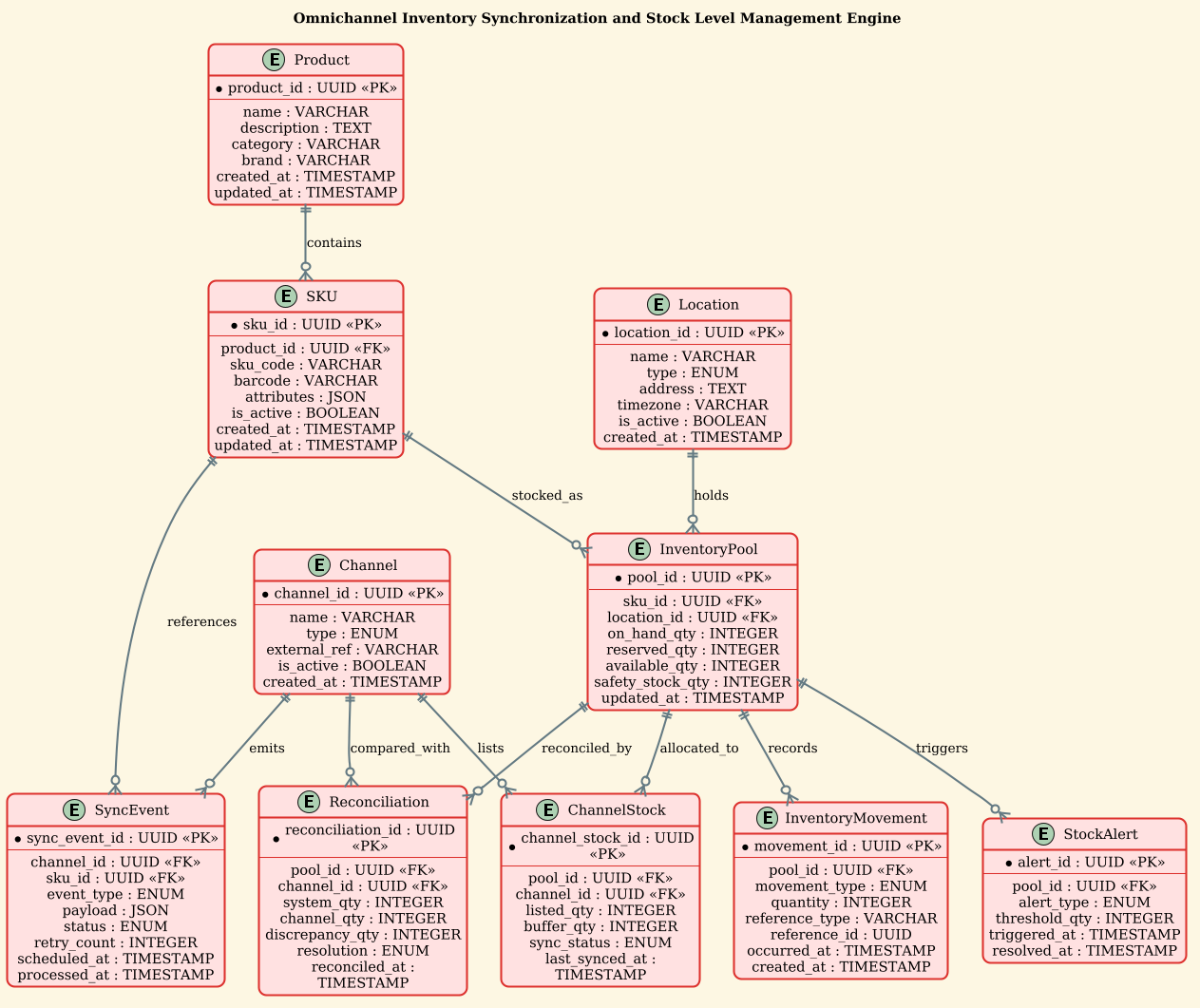
Below is the complete, full PlantUML source code for this diagram. You can copy this entire block and paste it directly into the VPasCode editor to render the diagram instantly.
@startuml
!theme sunlust
title Omnichannel Inventory Synchronization and Stock Level Management Engine

/'
This ERD models the core data structures for an omnichannel inventory engine that
synchronizes stock across multiple sales channels (web, mobile app, marketplace,
retail POS) and maintains accurate, near-real-time stock levels. It captures
products, SKUs, locations, channel-specific stock allocations, inventory
movements, sync events, and reconciliation records to support consistent
availability and prevent overselling.
'/

entity "Product" as product {
  * product_id : UUID <<PK>>
  --
  name : VARCHAR
  description : TEXT
  category : VARCHAR
  brand : VARCHAR
  created_at : TIMESTAMP
  updated_at : TIMESTAMP
}

entity "SKU" as sku {
  * sku_id : UUID <<PK>>
  --
  product_id : UUID <<FK>>
  sku_code : VARCHAR
  barcode : VARCHAR
  attributes : JSON
  is_active : BOOLEAN
  created_at : TIMESTAMP
  updated_at : TIMESTAMP
}

entity "Location" as location {
  * location_id : UUID <<PK>>
  --
  name : VARCHAR
  type : ENUM
  address : TEXT
  timezone : VARCHAR
  is_active : BOOLEAN
  created_at : TIMESTAMP
}

entity "Channel" as channel {
  * channel_id : UUID <<PK>>
  --
  name : VARCHAR
  type : ENUM
  external_ref : VARCHAR
  is_active : BOOLEAN
  created_at : TIMESTAMP
}

entity "InventoryPool" as inventory_pool {
  * pool_id : UUID <<PK>>
  --
  sku_id : UUID <<FK>>
  location_id : UUID <<FK>>
  on_hand_qty : INTEGER
  reserved_qty : INTEGER
  available_qty : INTEGER
  safety_stock_qty : INTEGER
  updated_at : TIMESTAMP
}

entity "ChannelStock" as channel_stock {
  * channel_stock_id : UUID <<PK>>
  --
  pool_id : UUID <<FK>>
  channel_id : UUID <<FK>>
  listed_qty : INTEGER
  buffer_qty : INTEGER
  sync_status : ENUM
  last_synced_at : TIMESTAMP
}

entity "InventoryMovement" as inventory_movement {
  * movement_id : UUID <<PK>>
  --
  pool_id : UUID <<FK>>
  movement_type : ENUM
  quantity : INTEGER
  reference_type : VARCHAR
  reference_id : UUID
  occurred_at : TIMESTAMP
  created_at : TIMESTAMP
}

entity "SyncEvent" as sync_event {
  * sync_event_id : UUID <<PK>>
  --
  channel_id : UUID <<FK>>
  sku_id : UUID <<FK>>
  event_type : ENUM
  payload : JSON
  status : ENUM
  retry_count : INTEGER
  scheduled_at : TIMESTAMP
  processed_at : TIMESTAMP
}

entity "Reconciliation" as reconciliation {
  * reconciliation_id : UUID <<PK>>
  --
  pool_id : UUID <<FK>>
  channel_id : UUID <<FK>>
  system_qty : INTEGER
  channel_qty : INTEGER
  discrepancy_qty : INTEGER
  resolution : ENUM
  reconciled_at : TIMESTAMP
}

entity "StockAlert" as stock_alert {
  * alert_id : UUID <<PK>>
  --
  pool_id : UUID <<FK>>
  alert_type : ENUM
  threshold_qty : INTEGER
  triggered_at : TIMESTAMP
  resolved_at : TIMESTAMP
}

product ||--o{ sku : contains
sku ||--o{ inventory_pool : stocked_as
location ||--o{ inventory_pool : holds
inventory_pool ||--o{ channel_stock : allocated_to
channel ||--o{ channel_stock : lists
inventory_pool ||--o{ inventory_movement : records
channel ||--o{ sync_event : emits
sku ||--o{ sync_event : references
inventory_pool ||--o{ reconciliation : reconciled_by
channel ||--o{ reconciliation : compared_with
inventory_pool ||--o{ stock_alert : triggers

@endumlStep-by-Step Architectural Walkthrough
Phase 1: Canvas Configuration & Layout Directives
The first step in building any professional diagram is setting the stage. In PlantUML, this involves defining the theme and the overall layout direction. For this retail inventory diagram, we want a clean, modern look that emphasizes clarity. We use the !theme sunlust directive to apply a vibrant, high-contrast color scheme suitable for technical documentation. We also define a descriptive title at the top of the diagram to immediately contextualize the model for stakeholders.
!theme sunlust
title Omnichannel Inventory Synchronization and Stock Level Management Engine
Additionally, we include a comment block using the /' ... '/ syntax. This is a powerful feature for documentation; it allows us to embed a detailed description of the diagram’s purpose directly within the code without affecting the visual rendering. This ensures that the diagram remains self-documenting, a best practice for long-term maintainability.
Phase 2: Declaring Core Entities, Actors, and Boundaries
With the canvas ready, we define the fundamental building blocks of our data model. In an ERD, these are the entities. We start with the foundational entities: Product and SKU. The Product entity represents the abstract item, while the SKU entity represents the specific instance with attributes like barcode and size. Notice the use of UUID as the Primary Key (PK) and the FK marker for Foreign Keys, which clearly indicates the relational integrity constraints.
entity "Product" as product {
  * product_id : UUID <>
  --
  name : VARCHAR
  description : TEXT
  ...
Next, we introduce the environmental context with Location and Channel. The Location entity captures physical warehouses or stores, while the Channel entity represents the sales outlets (e.g., “Web Store”, “Amazon”, “POS”). These entities act as the anchors for the inventory logic, ensuring that stock is always tied to a physical place and a logical sales point.
Phase 3: Mapping Data Flows & Key Interactions
The heart of the omnichannel engine lies in the InventoryPool and ChannelStock entities. The InventoryPool represents the physical reality: how many items are actually on the shelf at a specific location. The ChannelStock represents the logical availability: how many items are visible and sellable on a specific channel. By linking these two, we can implement complex logic like “reserve stock for web but keep buffer for in-store pickup.” We also define the InventoryMovement and SyncEvent entities to track the history of changes and the communication with external systems.
entity "InventoryPool" as inventory_pool {
* pool_id : UUID <>
--
sku_id : UUID <>
location_id : UUID < >
on_hand_qty : INTEGER
... We then establish the relationships between these entities. For example, a Product can contain many SKUs (product ||--o{ sku), and an InventoryPool can record many InventoryMovements (inventory_pool ||--o{ inventory_movement). These lines define the cardinality and the direction of the data flow.
Phase 4: Grouping, Annotations & Visual Polish
To complete the diagram, we refine the visual presentation. The !theme sunlust directive handles the colors, but we also ensure that the relationship labels (e.g., contains, stocked_as, reconciled_by) are descriptive. These labels act as verbs, making the diagram readable as a sentence. For instance, “InventoryPool reconciled_by Reconciliation” tells a clear story about the data lifecycle. We also ensure that all timestamps and data types are explicitly defined to assist database engineers in schema generation.
Syntax & Keyword Deep Dive
To fully leverage PlantUML for ERD creation, it is essential to understand the specific syntax elements used in this model. These keywords allow for precise control over entity definition and relationship mapping.
entity "Name" as alias: Defines a new entity (table) with a readable display name and a shorthand alias used in relationship definitions. This keeps the code clean and the diagram uncluttered.*(Primary Key Marker): Placed before a field name (e.g.,* product_id) to denote it as the Primary Key. This is visually rendered as a key icon or bold text depending on the theme.<<PK>>and<<FK>>(Stereotypes): These are PlantUML stereotypes used to add metadata to fields.<<PK>>explicitly marks a Primary Key, while<<FK>>marks a Foreign Key, aiding in database schema generation.||--o{(Cardinality): This is the crow’s foot notation.||means “one and only one” (mandatory), ando{means “zero or many” (optional). For example,product ||--o{ skumeans one product must have zero or more SKUs.: label(Relationship Label): Placed after the cardinality (e.g.,: contains) to add a descriptive verb to the relationship line, improving readability./' ... '/(Comment Block): Allows for multi-line comments that are rendered as text within the diagram but do not affect the layout or logic.
Best Practices & Pitfalls to Avoid
When designing complex ERDs like the Omnichannel Inventory model, adhering to best practices ensures the diagram remains a useful asset rather than a source of confusion.
- Maintain Consistent Naming Conventions: Always use the
as aliassyntax for entities. This prevents the diagram from becoming cluttered with long entity names in relationship lines. For example, useinventory_poolinstead ofInventoryPoolin the relationship definition. - Separate Physical and Logical Stock: As demonstrated in this model, distinct entities for InventoryPool (physical) and ChannelStock (logical) are crucial for omnichannel logic. Avoid merging them into a single table, as this leads to complex join conditions and data integrity issues.
- Document with Comments: Never rely solely on the visual diagram. Use the
/' ... '/comment block to explain the business rules and domain context, as these details are often lost when the diagram is viewed in isolation. - Use Appropriate Data Types: Explicitly define data types (e.g.,
UUID,JSON,ENUM) to ensure the diagram accurately reflects the underlying database schema requirements.
Start Building Omnichannel ERDs Faster with VPasCode
Design complex inventory schemas instantly with zero setup, preview changes in real-time, and export your diagrams directly from your browser.