


In the rapidly evolving landscape of e-commerce, the ‘fit problem’ remains one of the most significant friction points for online shoppers. Apparel sizing is notoriously inconsistent; a Medium in one brand might fit like a Large in another, leading to high return rates, increased logistics costs, and diminished customer trust. To solve this, modern retail platforms are moving beyond simple inventory management to sophisticated size recommendation engines that leverage machine learning, user biometrics, and historical feedback data.
Designing the data architecture for such a system requires a precise Entity-Relationship Diagram (ERD) that captures not just static product information, but dynamic user interactions, body measurements, and feedback loops. By using diagram-as-code with PlantUML, architects can diagram-as-code modeling their data models, iterate quickly, and ensure that the relationship between a user’s specific body measurements and a brand’s unique size chart is accurately represented before a single line of backend code is written.
This tutorial serves as a masterclass in building a complex retail domain model. We will walk through the creation of a comprehensive ERD for a Fashion Apparel Size Recommendation and Fit Analytics Platform using VPasCode. This model addresses the core challenge of mapping diverse user biometrics to varying brand sizing systems, while tracking the feedback loop necessary to refine recommendation algorithms over time.
Understanding the Model: Purpose, Scope & Problem Framing
This ERD is designed to model a multi-tenant retail ecosystem where the primary value proposition is personalization through data. Unlike a standard e-commerce schema, this model introduces a critical layer of abstraction: the BodyMeasurement entity. This allows the system to decouple user identity from physical attributes, enabling a “one-time measurement” workflow that applies across thousands of products.
The scope of this diagram covers the entire lifecycle of a size recommendation interaction. It begins with User and BodyMeasurement registration, moves through the complex mapping of Products to Brand and Category specific SizeCharts, and concludes with the capture of FitFeedback and Return data. This feedback data is the fuel for the recommendation engine, allowing the system to learn that, for example, a specific user tends to size up in denim but size down in fitted shirts.
By visualizing this architecture, developers gain clarity on several critical design decisions: how to handle SizeChart versioning (as brands update sizing), how to link ProductVariants to specific size entries, and how to maintain referential integrity between an Order and the specific SizeRecommendation that was presented to the user at checkout.
Complete Diagram & Full Source Code
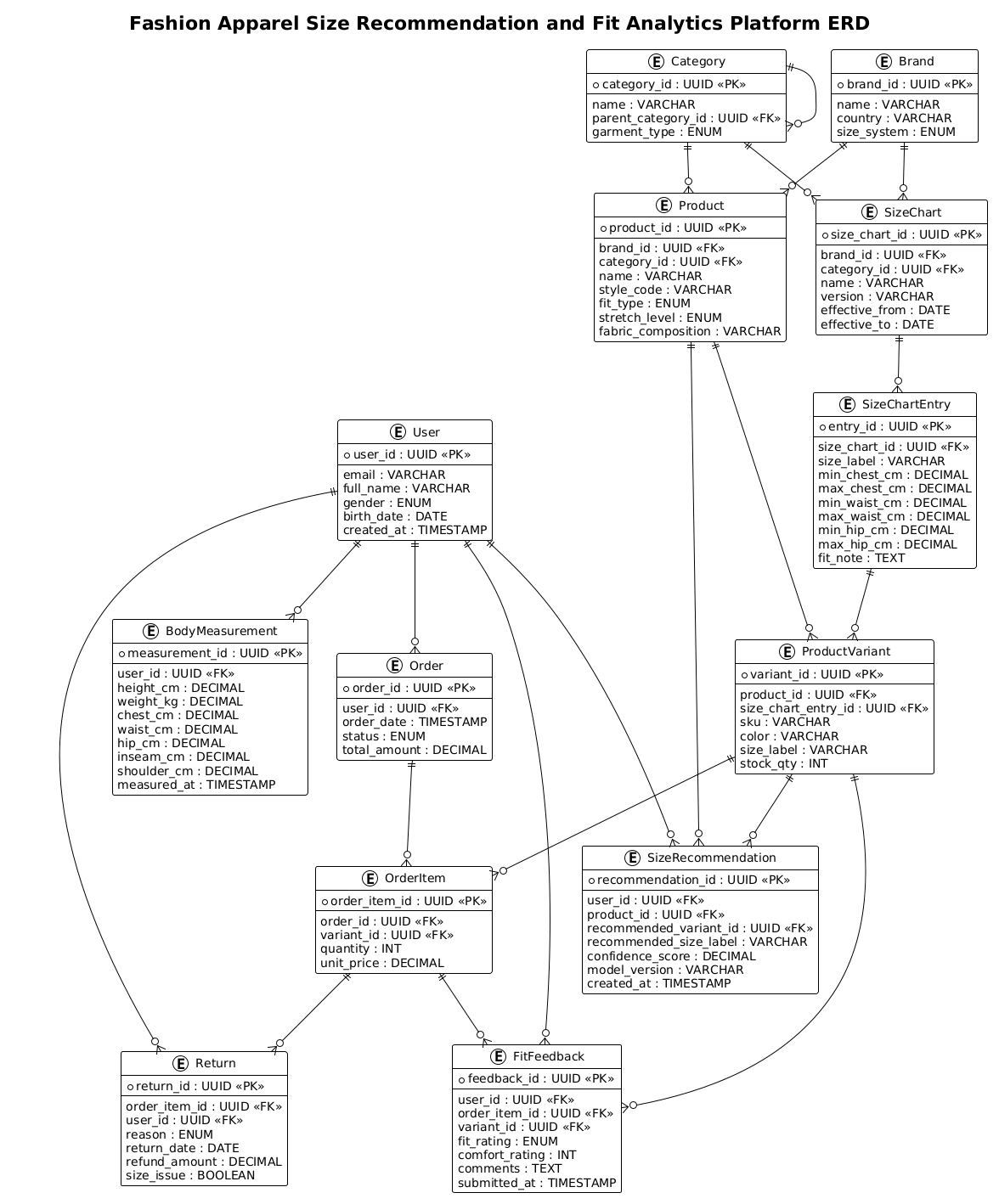
Below is the complete, rendered Entity-Relationship Diagram for the Fashion Apparel Size Recommendation platform. This visual blueprint illustrates the relationships between users, brands, products, and the critical feedback mechanisms that drive the recommendation logic.
@startuml
!theme plain
title Fashion Apparel Size Recommendation and Fit Analytics Platform ERD

/'
This ERD models a fashion apparel platform that provides size recommendations and fit analytics
to online shoppers. The core problem is that apparel sizing varies across brands and garment types,
causing high return rates and poor customer experience. The diagram captures shoppers, their body
measurements, brand-specific size charts, garment fit attributes, purchase history, returns, and
fit feedback so the platform can learn from real outcomes and recommend the most likely correct
size for each user and item.
'/

entity "User" as user {
  * user_id : UUID <<PK>>
  --
  email : VARCHAR
  full_name : VARCHAR
  gender : ENUM
  birth_date : DATE
  created_at : TIMESTAMP
}

entity "BodyMeasurement" as body_measurement {
  * measurement_id : UUID <<PK>>
  --
  user_id : UUID <<FK>>
  height_cm : DECIMAL
  weight_kg : DECIMAL
  chest_cm : DECIMAL
  waist_cm : DECIMAL
  hip_cm : DECIMAL
  inseam_cm : DECIMAL
  shoulder_cm : DECIMAL
  measured_at : TIMESTAMP
}

entity "Brand" as brand {
  * brand_id : UUID <<PK>>
  --
  name : VARCHAR
  country : VARCHAR
  size_system : ENUM
}

entity "Category" as category {
  * category_id : UUID <<PK>>
  --
  name : VARCHAR
  parent_category_id : UUID <<FK>>
  garment_type : ENUM
}

entity "SizeChart" as size_chart {
  * size_chart_id : UUID <<PK>>
  --
  brand_id : UUID <<FK>>
  category_id : UUID <<FK>>
  name : VARCHAR
  version : VARCHAR
  effective_from : DATE
  effective_to : DATE
}

entity "SizeChartEntry" as size_chart_entry {
  * entry_id : UUID <<PK>>
  --
  size_chart_id : UUID <<FK>>
  size_label : VARCHAR
  min_chest_cm : DECIMAL
  max_chest_cm : DECIMAL
  min_waist_cm : DECIMAL
  max_waist_cm : DECIMAL
  min_hip_cm : DECIMAL
  max_hip_cm : DECIMAL
  fit_note : TEXT
}

entity "Product" as product {
  * product_id : UUID <<PK>>
  --
  brand_id : UUID <<FK>>
  category_id : UUID <<FK>>
  name : VARCHAR
  style_code : VARCHAR
  fit_type : ENUM
  stretch_level : ENUM
  fabric_composition : VARCHAR
}

entity "ProductVariant" as product_variant {
  * variant_id : UUID <<PK>>
  --
  product_id : UUID <<FK>>
  size_chart_entry_id : UUID <<FK>>
  sku : VARCHAR
  color : VARCHAR
  size_label : VARCHAR
  stock_qty : INT
}

entity "Order" as order {
  * order_id : UUID <<PK>>
  --
  user_id : UUID <<FK>>
  order_date : TIMESTAMP
  status : ENUM
  total_amount : DECIMAL
}

entity "OrderItem" as order_item {
  * order_item_id : UUID <<PK>>
  --
  order_id : UUID <<FK>>
  variant_id : UUID <<FK>>
  quantity : INT
  unit_price : DECIMAL
}

entity "SizeRecommendation" as size_recommendation {
  * recommendation_id : UUID <<PK>>
  --
  user_id : UUID <<FK>>
  product_id : UUID <<FK>>
  recommended_variant_id : UUID <<FK>>
  recommended_size_label : VARCHAR
  confidence_score : DECIMAL
  model_version : VARCHAR
  created_at : TIMESTAMP
}

entity "FitFeedback" as fit_feedback {
  * feedback_id : UUID <<PK>>
  --
  user_id : UUID <<FK>>
  order_item_id : UUID <<FK>>
  variant_id : UUID <<FK>>
  fit_rating : ENUM
  comfort_rating : INT
  comments : TEXT
  submitted_at : TIMESTAMP
}

entity "Return" as return {
  * return_id : UUID <<PK>>
  --
  order_item_id : UUID <<FK>>
  user_id : UUID <<FK>>
  reason : ENUM
  return_date : DATE
  refund_amount : DECIMAL
  size_issue : BOOLEAN
}

user ||--o{ body_measurement
user ||--o{ order
user ||--o{ size_recommendation
user ||--o{ fit_feedback
user ||--o{ return

brand ||--o{ product
brand ||--o{ size_chart

category ||--o{ product
category ||--o{ size_chart
category ||--o{ category

size_chart ||--o{ size_chart_entry
size_chart_entry ||--o{ product_variant

product ||--o{ product_variant
product ||--o{ size_recommendation

order ||--o{ order_item
order_item ||--o{ fit_feedback
order_item ||--o{ return

product_variant ||--o{ order_item
product_variant ||--o{ size_recommendation
product_variant ||--o{ fit_feedback

@endumlStep-by-Step Architectural Walkthrough
Phase 1: Canvas Configuration & Layout Directives
Before defining any entities, we must set the stage for the diagram. We use the @startuml directive to initialize the PlantUML engine. Crucially, we apply the !theme plain directive. In complex ERDs with many relationships, a busy theme can obscure the data flow. The plain theme ensures that the focus remains on the entity structure and the cardinality lines. We also define a title to provide immediate context for anyone viewing the rendered output.
@startuml
!theme plain
title Fashion Apparel Size Recommendation and Fit Analytics Platform ERD
Phase 2: Declaring Core Entities, Actors, and Boundaries
The foundation of this model lies in the User and BodyMeasurement entities. We use the entity keyword to define the table structure. Notice the use of the * symbol to denote the Primary Key (PK) and the -- separator to distinguish keys from regular attributes. We also use the <
entity "User" as user {
* user_id : UUID <>
--
email : VARCHAR
full_name : VARCHAR
gender : ENUM
birth_date : DATE
created_at : TIMESTAMP
}
entity "BodyMeasurement" as body_measurement {
* measurement_id : UUID < >
--
user_id : UUID <>
height_cm : DECIMAL
weight_kg : DECIMAL
chest_cm : DECIMAL
waist_cm : DECIMAL
hip_cm : DECIMAL
inseam_cm : DECIMAL
shoulder_cm : DECIMAL
measured_at : TIMESTAMP
}
Phase 3: Mapping Data Flows & Key Interactions
The most complex part of this retail model is the SizeChart hierarchy. A brand does not have a single size chart; they have charts per category (e.g., “Men’s Denim” vs “Women’s Dresses”). We model this by linking Brand and Category to SizeChart, which then links to SizeChartEntry. This entry defines the specific measurement ranges (min/max chest, waist, etc.) for a given size label (e.g., “M”). This granular approach allows the recommendation engine to perform precise mathematical matching against user measurements.
entity "SizeChart" as size_chart {
* size_chart_id : UUID <>
--
brand_id : UUID <>
category_id : UUID < >
name : VARCHAR
version : VARCHAR
effective_from : DATE
effective_to : DATE
}
entity "SizeChartEntry" as size_chart_entry {
* entry_id : UUID <>
--
size_chart_id : UUID <>
size_label : VARCHAR
min_chest_cm : DECIMAL
max_chest_cm : DECIMAL
min_waist_cm : DECIMAL
max_waist_cm : DECIMAL
min_hip_cm : DECIMAL
max_hip_cm : DECIMAL
fit_note : TEXT
}
Phase 4: Grouping, Annotations & Visual Polish
To make the diagram readable, we define the relationships using PlantUML’s cardinality syntax. The ||--o{ notation indicates a “one-to-many” relationship where the entity on the left is mandatory (one) and the entity on the right is optional (zero or many). For example, a User can have many BodyMeasurements over time, but a single measurement belongs to exactly one user. We also include the Feedback and Return entities to close the loop, ensuring that the system can track why a recommendation failed and update its models accordingly.
user ||--o{ body_measurement
user ||--o{ order
user ||--o{ size_recommendation
user ||--o{ fit_feedback
user ||--o{ return

brand ||--o{ product
brand ||--o{ size_chart

category ||--o{ product
category ||--o{ size_chart
category ||--o{ category

size_chart ||--o{ size_chart_entry
size_chart_entry ||--o{ product_variant

product ||--o{ product_variant
product ||--o{ size_recommendation

order ||--o{ order_item
order_item ||--o{ fit_feedback
order_item ||--o{ return

product_variant ||--o{ order_item
product_variant ||--o{ size_recommendation
product_variant ||--o{ fit_feedback
Syntax & Keyword Deep Dive
PlantUML provides a powerful set of keywords that make it an ideal tool for defining database schemas. Understanding these specific syntax elements is key to mastering ERD creation.
entity: This keyword defines a new table or entity. It takes a display name (e.g.,"User") and an internal alias (e.g.,as user) which is used for drawing relationships.||--o{: This is the cardinality notation.||means “mandatory one” (the relationship must exist), ando{means “optional many” (zero or more). This is standard notation for foreign key relationships in ERDs.<and> <: These are stereotypes used to visually annotate the diagram. They tell the reader which fields are Primary Keys and which are Foreign Keys, aiding in database schema generation.> entity ... { ... }: The curly braces allow for a block definition of attributes. Inside, each line defines a column name, data type, and optional stereotype.!theme plain: A directive to load a specific visual theme. This is essential for keeping the diagram clean when dealing with complex data models.
Best Practices & Pitfalls to Avoid
When building complex ERDs like this retail model, adherence to best practices ensures the diagram remains maintainable and readable.
1. Use Internal Aliases Consistently: Always define an internal alias (e.g., as user) for your entities. This prevents the diagram from becoming cluttered with long entity names when drawing relationships. Instead of writing User ||--o{ BodyMeasurement, you can write user ||--o{ body_measurement, which is cleaner and easier to read.
2. Group Related Entities: While PlantUML doesn’t have strict “packages” like some tools, you can use the entitygroup command or simply arrange your code logically. In this tutorial, we grouped User data, Brand data, and Product data separately to make the code easier to navigate.
3. Avoid Over-Normalization in Diagrams: While your database might be highly normalized, an ERD should tell a story. Ensure that the relationships clearly reflect the business logic (e.g., linking FitFeedback to OrderItem) rather than just technical constraints.
4. Leverage the Comment Block: The /' ... '/ syntax is powerful for adding context. Use it to explain the “why” behind the model, such as the business problem of sizing inconsistency, which helps stakeholders understand the diagram’s purpose immediately.
Start Building Fashion Retail ERDs Faster with VPasCode
Instantly visualize your retail data architecture, test complex relationships, and export professional diagrams online without installing any tools.