


In the high-velocity environment of modern retail, the post-purchase experience is often just as critical as the sale itself. A robust returns and refunds workflow is not merely a customer service convenience; it is a complex logistical and financial operation that requires rigorous data integrity. From the moment a customer initiates a return request to the final settlement of a refund, dozens of data points must be tracked, validated, and linked across multiple systems. Without a clear architectural blueprint, these processes can become fragmented, leading to inventory discrepancies, financial losses, and frustrated customers.

Visualizing this complexity through an Entity-Relationship Diagram (ERD) provides the necessary clarity for software architects and database administrators. By modeling the relationships between customers, sales orders, returned items, and payment methods, teams can ensure that every return flows logically through authorization checks, inspection protocols, and refund calculations. Using diagram-as-code with PlantUML allows these models to be versioned, reviewed, and iterated upon with the same rigor as the application code itself. This tutorial demonstrates how to construct a professional-grade ERD for a retail returns system using VPasCode, turning abstract requirements into a concrete, executable schema.
Understanding the Model: Purpose, Scope & Problem Framing
This ERD is designed to solve a specific domain challenge: managing the lifecycle of a product return from initiation to financial closure. Unlike simple transaction logs, a returns system must handle conditional logic, such as merchandise authorization (approving a return before the item is received) and variable refund amounts based on item condition or restocking fees.
Diagram Abstraction & Representation
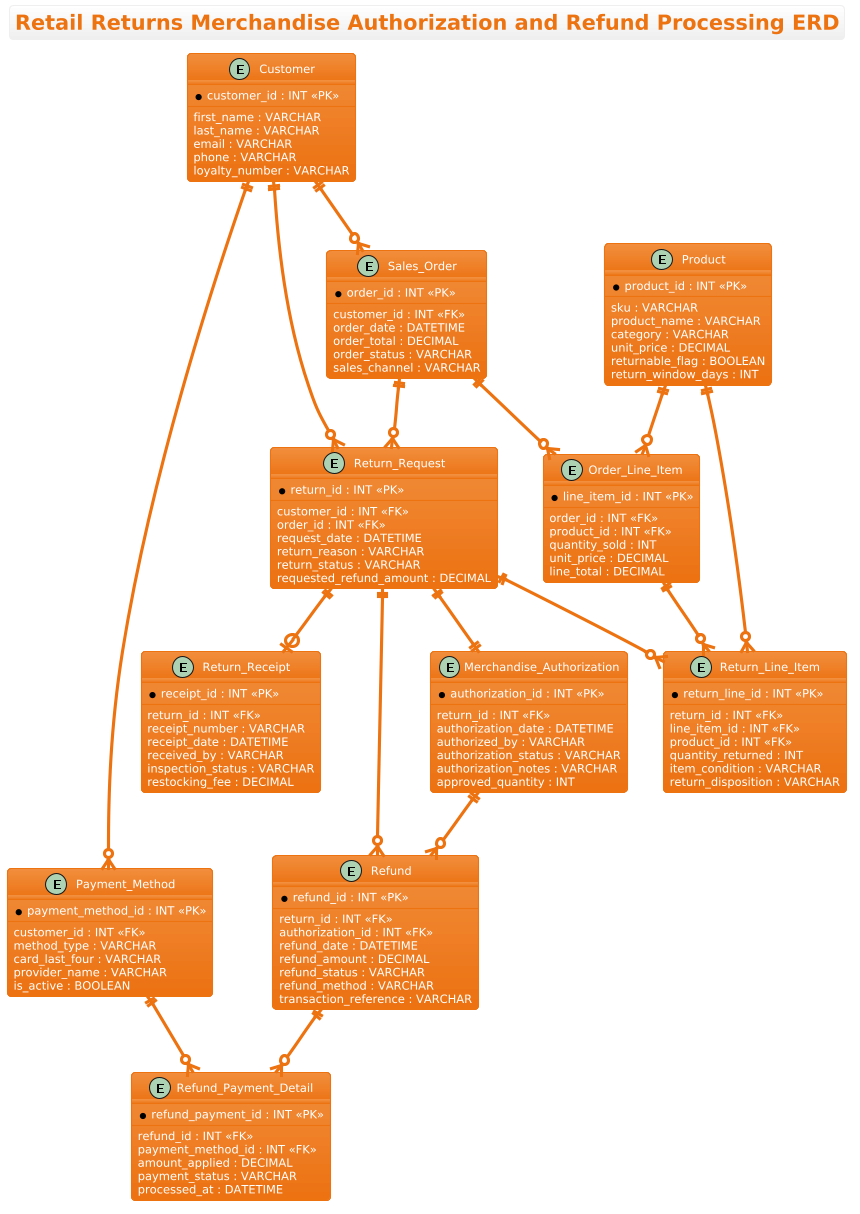
As an Entity-Relationship Diagram, this model focuses on the static structure of data rather than dynamic behavior. It defines Entities (the core nouns like Customer, Product, ReturnRequest) and their Attributes (specific data points like email, SKU, or refund amount). The Relationships (lines connecting entities) define the cardinality of interactions, such as a Customer placing multiple Sales Orders or a Return Request being linked to a specific Sales Order. This abstraction allows developers to visualize the “schema” of the business process without getting bogged down in implementation details.
Target Domain Scope & Scenario
The scope of this diagram covers the end-to-end returns workflow in a retail setting. It explicitly models the boundary between the Sales System (where the original order lives) and the Returns Management System (where the return is processed). Key scenarios included are: validating a customer’s eligibility, recording the physical return of items, calculating the refund amount (potentially deducting fees), and routing the refund to the original payment method.
Key Takeaways & Educational Insights
By building this diagram, you will gain insights into how to model one-to-many relationships (e.g., one customer has many orders) and one-to-one or optional relationships (e.g., a return request may or may not have an authorization). You will also learn how to structure composite entities like OrderLineItem and ReturnLineItem to handle the granular details of individual products within a transaction.
Complete Diagram & Full Source Code
Below is the complete visualization of the Retail Returns ERD, rendered using the aws-orange theme for a clean, professional look. This diagram captures the full hierarchy of data required for a production-ready returns system.
@startuml
!theme aws-orange
title Retail Returns Merchandise Authorization and Refund Processing ERD

/'
Diagram Context:
This ERD models the core entities and relationships involved in retail returns,
merchandise authorization, and refund processing. It captures customer return
requests, the approval or rejection of those requests, returned item details,
receipt validation, refund calculation and issuance, and the payment methods
used for reimbursement. The diagram supports tracking the full lifecycle from
return initiation through merchandise authorization to final refund settlement.
'/

entity "Customer" as Customer {
  * customer_id : INT <<PK>>
  --
  first_name : VARCHAR
  last_name : VARCHAR
  email : VARCHAR
  phone : VARCHAR
  loyalty_number : VARCHAR
}

entity "Sales_Order" as SalesOrder {
  * order_id : INT <<PK>>
  --
  customer_id : INT <<FK>>
  order_date : DATETIME
  order_total : DECIMAL
  order_status : VARCHAR
  sales_channel : VARCHAR
}

entity "Order_Line_Item" as OrderLineItem {
  * line_item_id : INT <<PK>>
  --
  order_id : INT <<FK>>
  product_id : INT <<FK>>
  quantity_sold : INT
  unit_price : DECIMAL
  line_total : DECIMAL
}

entity "Product" as Product {
  * product_id : INT <<PK>>
  --
  sku : VARCHAR
  product_name : VARCHAR
  category : VARCHAR
  unit_price : DECIMAL
  returnable_flag : BOOLEAN
  return_window_days : INT
}

entity "Return_Request" as ReturnRequest {
  * return_id : INT <<PK>>
  --
  customer_id : INT <<FK>>
  order_id : INT <<FK>>
  request_date : DATETIME
  return_reason : VARCHAR
  return_status : VARCHAR
  requested_refund_amount : DECIMAL
}

entity "Return_Line_Item" as ReturnLineItem {
  * return_line_id : INT <<PK>>
  --
  return_id : INT <<FK>>
  line_item_id : INT <<FK>>
  product_id : INT <<FK>>
  quantity_returned : INT
  item_condition : VARCHAR
  return_disposition : VARCHAR
}

entity "Merchandise_Authorization" as MerchandiseAuthorization {
  * authorization_id : INT <<PK>>
  --
  return_id : INT <<FK>>
  authorization_date : DATETIME
  authorized_by : VARCHAR
  authorization_status : VARCHAR
  authorization_notes : VARCHAR
  approved_quantity : INT
}

entity "Return_Receipt" as ReturnReceipt {
  * receipt_id : INT <<PK>>
  --
  return_id : INT <<FK>>
  receipt_number : VARCHAR
  receipt_date : DATETIME
  received_by : VARCHAR
  inspection_status : VARCHAR
  restocking_fee : DECIMAL
}

entity "Refund" as Refund {
  * refund_id : INT <<PK>>
  --
  return_id : INT <<FK>>
  authorization_id : INT <<FK>>
  refund_date : DATETIME
  refund_amount : DECIMAL
  refund_status : VARCHAR
  refund_method : VARCHAR
  transaction_reference : VARCHAR
}

entity "Payment_Method" as PaymentMethod {
  * payment_method_id : INT <<PK>>
  --
  customer_id : INT <<FK>>
  method_type : VARCHAR
  card_last_four : VARCHAR
  provider_name : VARCHAR
  is_active : BOOLEAN
}

entity "Refund_Payment_Detail" as RefundPaymentDetail {
  * refund_payment_id : INT <<PK>>
  --
  refund_id : INT <<FK>>
  payment_method_id : INT <<FK>>
  amount_applied : DECIMAL
  payment_status : VARCHAR
  processed_at : DATETIME
}

Customer ||--o{ SalesOrder
Customer ||--o{ ReturnRequest
Customer ||--o{ PaymentMethod

SalesOrder ||--o{ OrderLineItem
SalesOrder ||--o{ ReturnRequest

Product ||--o{ OrderLineItem
Product ||--o{ ReturnLineItem

ReturnRequest ||--o{ ReturnLineItem
ReturnRequest ||--|| MerchandiseAuthorization
ReturnRequest ||--o| ReturnReceipt
ReturnRequest ||--o{ Refund

OrderLineItem ||--o{ ReturnLineItem

MerchandiseAuthorization ||--o{ Refund
Refund ||--o{ RefundPaymentDetail
PaymentMethod ||--o{ RefundPaymentDetail

@endumlStep-by-Step Architectural Walkthrough
Phase 1: Canvas Configuration & Layout Directives
The foundation of any PlantUML diagram lies in its configuration. In this ERD, we begin by setting the theme to aws-orange using the directive !theme aws-orange. This ensures the diagram adheres to a specific color palette often used in enterprise documentation, providing a consistent and professional aesthetic. We also define a title directive to give the diagram a clear, descriptive header that appears at the top of the rendered output. This phase sets the stage for readability and visual consistency.
Phase 2: Declaring Core Entities, Actors, and Boundaries
Next, we define the core entities using the entity keyword. Each entity represents a table in the database. For example, the Customer entity is defined with its primary key (customer_id) and relevant attributes like email and phone. Notice the use of < and < stereotypes. These are crucial for database modeling, explicitly marking Primary Keys and Foreign Keys. The SalesOrder and Product entities follow a similar pattern, establishing the core transactional and catalog data structures. We also include the Return_Request entity, which acts as the central hub for the returns workflow.
Phase 3: Mapping Data Flows & Key Interactions
Once the entities are declared, we define the relationships using cardinality notation. The syntax EntityA ||--o{ EntityB indicates a one-to-many relationship where EntityA must exist and EntityB is optional (zero or more). For instance, Customer ||--o{ SalesOrder means a customer must exist to have sales orders, but a customer might not have any orders yet. Conversely, ReturnRequest ||--|| MerchandiseAuthorization uses double bars on both ends, indicating a mandatory one-to-one relationship: every return request must have exactly one merchandise authorization record. This phase ensures the logical integrity of the data model.
Phase 4: Grouping, Annotations & Visual Polish
The final phase involves refining the diagram for clarity. We utilize the Return_Line_Item and Refund_Payment_Detail entities to handle the “many-to-many” resolution scenarios, ensuring that a single return can contain multiple items and that a refund can be split across multiple payment methods if necessary. The diagram concludes with the @enduml directive, signaling the end of the code block. The VPasCode editor then renders these definitions into a cohesive visual map, allowing you to instantly verify the relationships and structure.
Syntax & Keyword Deep Dive
PlantUML offers a rich set of keywords for ERD modeling. Here is a breakdown of the specific syntax features used in this tutorial:
entity: The primary keyword used to define a table or class. It is followed by the entity name and an alias (e.g.,"Sales_Order" as SalesOrder).[[PK]]and[[FK]]: Stereotypes used to annotate attributes.<marks a Primary Key, while> <marks a Foreign Key, essential for database schema generation.> ||--o{: A relationship connector representing a mandatory one-to-many relationship. The||means “one and only one” on the left, ando{means “zero or more” on the right.||--||: A mandatory one-to-one relationship connector. Both ends require an instance.!theme: A directive that applies a pre-defined visual style to the entire diagram, changing colors, fonts, and box styles.
Best Practices & Pitfalls to Avoid
When modeling complex ERDs for retail or financial systems, adhering to best practices ensures the diagram remains maintainable and accurate.
- Use Descriptive Aliases: While database tables might use underscores (e.g.,
sales_order), use camelCase aliases (e.g.,as SalesOrder) for the PlantUML entity name to improve visual flow and readability in the diagram. - Separate Logic from Data: Ensure that entities like
Return_ReceiptandMerchandise_Authorizationare distinct. Mixing operational status with data storage can lead to a cluttered and confusing model. - Validate Cardinality: Double-check your relationship lines. A common pitfall is marking a relationship as optional (
o{) when it should be mandatory (||), which can lead to data integrity issues in the actual database. - Keep it Modular: If the diagram becomes too large, consider breaking it down into subsystem views (e.g., one diagram for “Ordering” and another for “Returns”) rather than cramming everything into a single massive file.
Start Building PlantUML ERDs Faster with VPasCode
Instantly visualize your retail returns schema, test relationship syntax, and export clean diagrams directly from your browser with zero installation.