


In the high-stakes world of luxury goods, trust is the most valuable currency. From a rare handbag to a limited-edition timepiece, verifying the authenticity and provenance of an item is critical for maintaining market value and consumer confidence. The modern verification ecosystem requires a sophisticated data architecture capable of tracking an item’s journey from the manufacturer to the current owner, capturing every authentication check, ownership transfer, and provenance event along the way. This is not merely a database design challenge; it is a structural necessity for building audit trails that stand up to scrutiny.

Designing the database schema for such a system involves mapping complex relationships: a single luxury item may have a long history of owners, multiple authentication records from different experts, and a chain of provenance events spanning decades. Using a visual modeling tool like PlantUML allows architects to abstract these complex interactions into a clear, standardized blueprint. By leveraging VPasCode, a free web-based diagram-as-code editor, developers can rapidly prototype, refine, and validate this schema without the overhead of manual drawing tools or complex software installations.
Understanding the Model: Purpose, Scope & Problem Framing
This Entity-Relationship Diagram (ERD) serves as the architectural blueprint for a centralized registry system dedicated to luxury goods authentication. The core problem it addresses is the fragmentation of ownership data and the lack of a unified, immutable history for high-value assets. The diagram models a scenario where every physical item is digitally represented, linked to its brand, categorized for inventory management, and tracked through a lifecycle of ownership and verification.
Diagram Abstraction & Representation
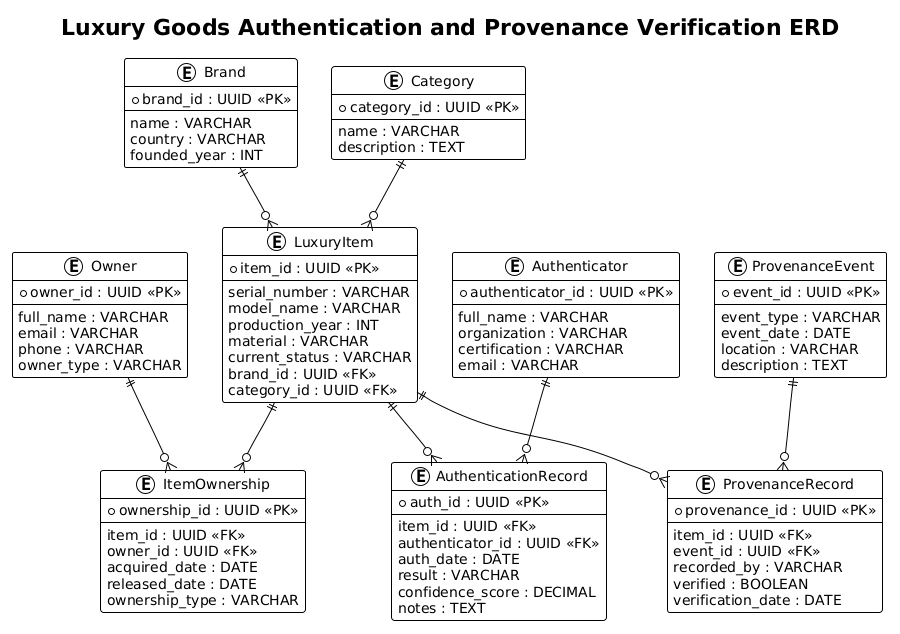
In this ERD, we move beyond simple data storage to model relationships. The LuxuryItem entity acts as the central hub, connecting to Brand and Category for static classification. The dynamic aspects of the item’s life are captured through the ItemOwnership junction table, which resolves the many-to-many relationship between items and owners. Similarly, the AuthenticationRecord and ProvenanceRecord entities decouple the verification logic from the item itself, allowing for a flexible history of inspections and custody events without bloating the core item table.
Target Domain Scope & Scenario The scope of this model covers the entire supply chain verification workflow. It includes the registration of brands and categories, the initial entry of items into the system, the tracking of every change in ownership (including dates and types), and the logging of professional authentication attempts. It also incorporates the verification of provenance events, ensuring that the history of the item is not just a list of events, but a verified chain of custody.
Key Takeaways & Educational Insights By studying this diagram, readers will understand how to model complex one-to-many and many-to-many relationships in a retail context. You will learn how to separate static metadata (like brand details) from dynamic transactional data (like ownership transfers and authentication results), a pattern essential for scalable database design in the luxury and collectibles sector.
Complete Diagram & Full Source Code
Below is the complete, rendered Entity-Relationship Diagram for the Luxury Goods Authentication system. This visual representation clearly maps the flow of data between brands, items, owners, and verification records.
Copy the code below to replicate this diagram in VPasCode. This single block contains the full schema definition, including entity attributes, primary/foreign keys, and relationship lines.
@startuml
!theme plain

title Luxury Goods Authentication and Provenance Verification ERD

/'
This diagram models a database for tracking luxury items from creation through ownership history,
authentication checks, and provenance verification. The core entity is LuxuryItem, which stores
the primary details of a branded product. Each item is linked to a Brand and a Category for
classification. An ItemOwner relationship tracks past and current owners, enabling chain-of-custody
records. Authentication records capture inspection results by authenticators, including verdicts
and confidence scores. ProvenanceRecord documents origin, transaction, and custody events to
establish the item's history. Supporting entities include Authenticator, Owner, and
ProvenanceEvent, which connect to the main item through structured relationships. Together,
these entities support verification workflows, audit trails, and trust assessment for
high-value goods.
'/

entity "Brand" as brand {
  * brand_id : UUID <<PK>>
  --
  name : VARCHAR
  country : VARCHAR
  founded_year : INT
}

entity "Category" as category {
  * category_id : UUID <<PK>>
  --
  name : VARCHAR
  description : TEXT
}

entity "LuxuryItem" as item {
  * item_id : UUID <<PK>>
  --
  serial_number : VARCHAR
  model_name : VARCHAR
  production_year : INT
  material : VARCHAR
  current_status : VARCHAR
  brand_id : UUID <<FK>>
  category_id : UUID <<FK>>
}

entity "Owner" as owner {
  * owner_id : UUID <<PK>>
  --
  full_name : VARCHAR
  email : VARCHAR
  phone : VARCHAR
  owner_type : VARCHAR
}

entity "ItemOwnership" as ownership {
  * ownership_id : UUID <<PK>>
  --
  item_id : UUID <<FK>>
  owner_id : UUID <<FK>>
  acquired_date : DATE
  released_date : DATE
  ownership_type : VARCHAR
}

entity "Authenticator" as authenticator {
  * authenticator_id : UUID <<PK>>
  --
  full_name : VARCHAR
  organization : VARCHAR
  certification : VARCHAR
  email : VARCHAR
}

entity "AuthenticationRecord" as auth_record {
  * auth_id : UUID <<PK>>
  --
  item_id : UUID <<FK>>
  authenticator_id : UUID <<FK>>
  auth_date : DATE
  result : VARCHAR
  confidence_score : DECIMAL
  notes : TEXT
}

entity "ProvenanceEvent" as provenance_event {
  * event_id : UUID <<PK>>
  --
  event_type : VARCHAR
  event_date : DATE
  location : VARCHAR
  description : TEXT
}

entity "ProvenanceRecord" as provenance_record {
  * provenance_id : UUID <<PK>>
  --
  item_id : UUID <<FK>>
  event_id : UUID <<FK>>
  recorded_by : VARCHAR
  verified : BOOLEAN
  verification_date : DATE
}

brand ||--o{ item
category ||--o{ item
item ||--o{ ownership
owner ||--o{ ownership
item ||--o{ auth_record
authenticator ||--o{ auth_record
item ||--o{ provenance_record
provenance_event ||--o{ provenance_record

@endumlStep-by-Step Architectural Walkthrough
Phase 1: Canvas Configuration & Layout Directives
The first step in building any PlantUML diagram is setting the stage. We begin by defining the theme and the diagram title. In this case, we use !theme plain to ensure a clean, minimalist look that focuses attention on the data structure rather than decorative elements. The title directive provides a clear header for the diagram, which is essential for documentation and sharing.
!theme plain

title Luxury Goods Authentication and Provenance Verification ERD
Immediately following the title, we define a comment block using the /' and '/ delimiters. This is a powerful feature for documentation-as-code, allowing you to embed detailed context about the diagram’s purpose directly within the source file without affecting the visual rendering.
Phase 2: Declaring Core Entities, Actors, and Boundaries
We then declare the foundational entities. The Brand and Category entities act as reference tables. They are defined using the entity keyword followed by the display name and an alias (e.g., as brand). Inside the curly braces, we define attributes. We use the * prefix to denote Primary Keys (PK) and UUID as the data type, which is standard for modern distributed systems to ensure unique identifiers. The -- separator visually divides keys from other attributes.
entity "Brand" as brand {
  * brand_id : UUID <>
  --
  name : VARCHAR
  country : VARCHAR
  founded_year : INT
}
The LuxuryItem entity is the central actor. It references the Brand and Category via Foreign Keys (FK), denoted by UUID <. This establishes the hierarchical relationship where an item belongs to one brand and one category.
Phase 3: Mapping Data Flows & Key Interactions
The complexity of this system lies in the relationships. We model the many-to-many relationship between LuxuryItem and Owner using a junction entity called ItemOwnership. This table breaks down the relationship into two one-to-many links: an item can have many ownership records, and an owner can have many items over time. This structure allows us to track acquired_date and released_date for each specific instance of ownership.
Similarly, the AuthenticationRecord and ProvenanceRecord entities act as transactional logs. They link back to the LuxuryItem and their respective source entities (Authenticator and ProvenanceEvent). This design ensures that the history of an item is never lost, even if the item is sold or authenticated by multiple parties.
Phase 4: Grouping, Annotations & Visual Polish
Finally, we draw the relationships using PlantUML’s relationship syntax. The ||--o{ notation is used to indicate a mandatory one-to-many relationship (or optional, depending on specific notation interpretation, but here o{ typically implies optional on the right side). For example, brand ||--o{ item means a Brand must have at least one item (or is defined as the parent), but the relationship allows for the item side to be optional in certain contexts, or more accurately in this ERD context, it visualizes the cardinality where one brand relates to zero or many items.
brand ||--o{ item
category ||--o{ item
item ||--o{ ownership
owner ||--o{ ownership
item ||--o{ auth_record
authenticator ||--o{ auth_record
item ||--o{ provenance_record
provenance_event ||--o{ provenance_record
Syntax & Keyword Deep Dive
PlantUML provides a rich set of keywords specifically tailored for Entity-Relationship Diagrams. Understanding these allows for precise control over the schema representation.
entity: Defines a table or class. It takes a display name (e.g.,"Brand") and an alias (e.g.,as brand) which is used for referencing in relationships.entity { ... }: The block syntax for defining attributes. Each line represents a column in the database table.*: A prefix used before an attribute name to indicate it is a Primary Key (PK).UUID,VARCHAR,DATE,INT,BOOLEAN,DECIMAL,TEXT: Standard SQL data types used to define the column’s data format.<<PK>>and<<FK>>: Stereotypes used to visually label Primary and Foreign keys in the diagram.--: A separator line used within an entity block to visually group attributes (e.g., separating keys from other fields).||--o{: The relationship syntax.||represents a mandatory one, ando{represents an optional many (zero or more). This creates the crow’s foot notation./' ... '/: A multi-line comment block used for adding detailed documentation that is ignored during rendering.
Best Practices & Pitfalls to Avoid
When designing ERDs for complex domains like luxury goods verification, adhering to best practices ensures your diagram remains maintainable and accurate.
- Use Junction Tables for Many-to-Many: Never try to connect two entities directly with a many-to-many relationship in a physical database design. Always introduce a junction entity (like
ItemOwnership) to store the attributes of the relationship, such as dates and ownership types. - Consistent Naming Conventions: Use clear, descriptive names for entities and attributes. Avoid abbreviations unless they are industry-standard. Use snake_case or camelCase consistently for attribute names to improve readability.
- Separate Static and Dynamic Data: Keep reference data (Brands, Categories) separate from transactional data (Ownership, Authentication). This modularity makes it easier to update the schema later without affecting historical records.
- Leverage Comments for Context: As demonstrated in this guide, use the
/' '/comment block to explain the why behind the diagram, not just the what. This is invaluable for future developers or auditors reviewing the schema.
Start Building Luxury Goods ERDs Faster with VPasCode
Design complex database schemas instantly in your browser with VPasCode, the free PlantUML editor that renders your ERD in real time without any installation.