


In the fast-paced world of Third-Party Logistics (3PL), operational efficiency hinges on the precise management of warehouse assets and the accurate billing of storage services. A 3PL provider often leases space to multiple clients, managing a complex matrix of warehouse facilities, specific storage bays, and individual pallet inventory. The challenge lies in translating these physical realities and contractual agreements into a structured data model that can support automated billing, space allocation, and financial reporting.
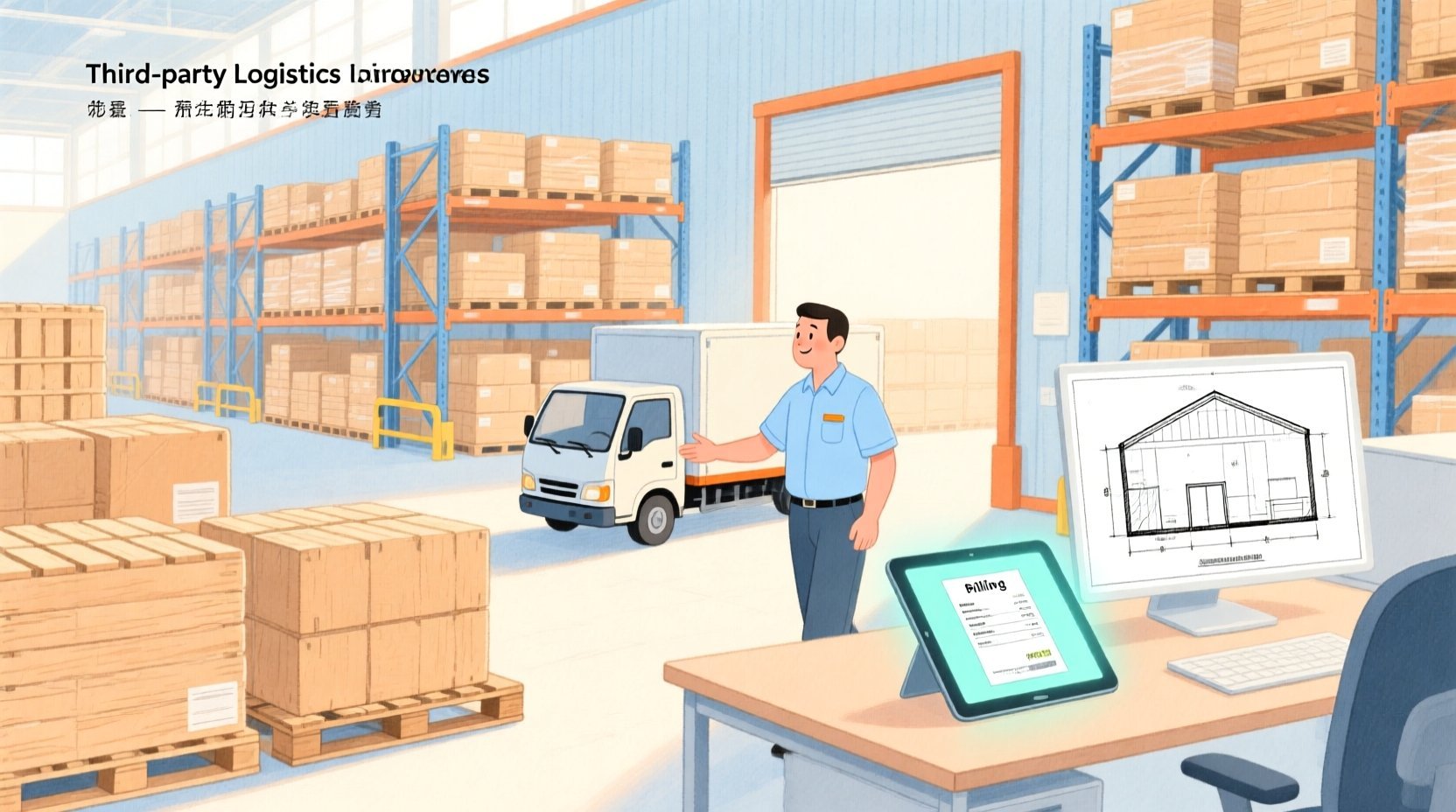
Without a robust data architecture, tracking which customer occupies which specific zone, calculating charges based on “pallet-days,” and generating invoices that accurately reflect lease terms becomes a manual nightmare prone to error. An Entity Relationship Diagram (ERD) serves as the architectural blueprint for this ecosystem, defining the relationships between customers, warehouses, lease agreements, and the granular storage records that drive the billing engine. By visualizing these connections, architects can ensure that every invoice generated is mathematically linked to a physical pallet and a valid lease agreement.
VPasCode, the free web-based diagram-as-code editor, empowers software architects to model this complex domain without the friction of desktop installations. By writing PlantUML code, you can instantly render, iterate, and refine your data model in the browser. This tutorial walks you through constructing a comprehensive ERD for a warehouse space leasing and pallet storage billing system, demonstrating how to leverage PlantUML’s entity syntax and relationship connectors to create a professional-grade data model.
Understanding the Model: Purpose, Scope & Problem Framing
Diagram Abstraction & Representation
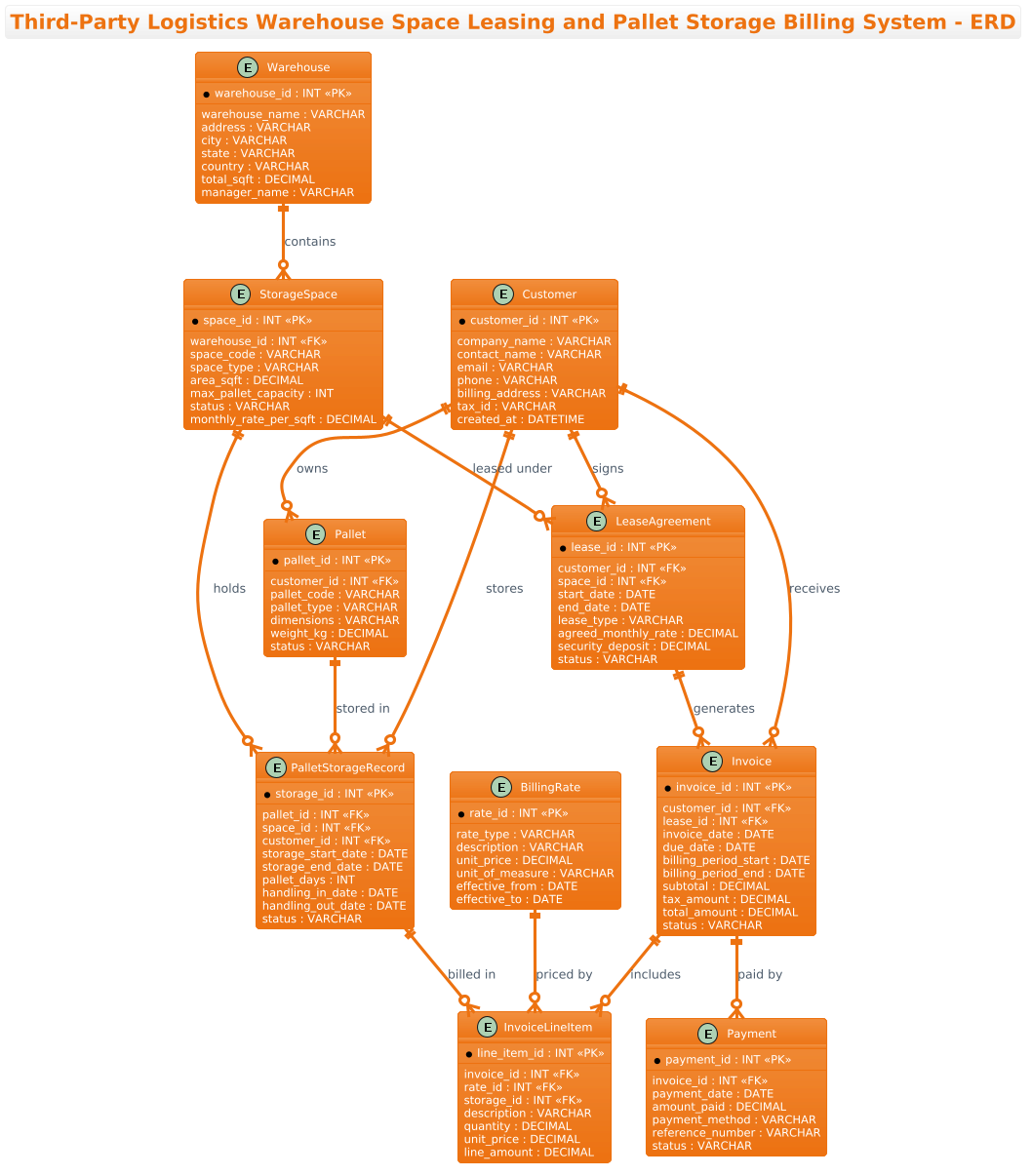
This diagram is an Entity Relationship Diagram (ERD) designed to model the static structure of a database system. In the context of logistics, the ERD is the most critical artifact for defining data integrity. It maps out the “Nouns” of the business: Customers, Warehouses, Spaces, Pallets, and Financials. The diagram uses standard crow’s foot notation to illustrate cardinality—showing, for instance, that one customer can own many pallets, but a single pallet belongs to only one customer at a time.
Target Domain Scope & Scenario
The scope of this model is strictly focused on the operational lifecycle of a 3PL billing cycle. It covers the entire journey from a Customer signing a Lease Agreement for a specific Storage Space, to the physical arrival of Pallets, their tracking via Storage Records, and finally the generation of Invoices and Payments. It intentionally excludes upstream supply chain events (like manufacturing) and downstream delivery, focusing solely on the storage and billing interface.
Key Takeaways & Educational Insights
By building this diagram, you will learn how to model many-to-many relationships (e.g., a storage record linking a pallet to a space) using junction entities, how to structure financial hierarchies (Invoices containing Line Items), and how to use comments to document complex business logic directly within the code.
Complete Diagram & Full Source Code
Below is the final rendered diagram representing the 3PL billing system. It features a clean, professional layout with the AWS Orange theme applied for visual consistency.
@startuml
!theme aws-orange
title Third-Party Logistics Warehouse Space Leasing and Pallet Storage Billing System - ERD
/'
Diagram Context:
This ERD models a third-party logistics (3PL) business that leases warehouse space to clients
and charges them for pallet storage and related handling services. The core entities capture
customers, warehouse facilities, leasable spaces (bays/zones), pallet inventory records,
storage agreements, billing rates, invoices, and payments. It supports tracking which customer
occupies which space, how many pallets are stored over time, how charges are calculated based
on space lease terms and pallet-days, and how invoices and payments are managed. This helps
the 3PL operator automate space allocation, pallet storage tracking, and periodic billing.
'/
' Entities
entity "Customer" as customer {
  * customer_id : INT <<PK>>
  --
  company_name : VARCHAR
  contact_name : VARCHAR
  email : VARCHAR
  phone : VARCHAR
  billing_address : VARCHAR
  tax_id : VARCHAR
  created_at : DATETIME
}

entity "Warehouse" as warehouse {
  * warehouse_id : INT <<PK>>
  --
  warehouse_name : VARCHAR
  address : VARCHAR
  city : VARCHAR
  state : VARCHAR
  country : VARCHAR
  total_sqft : DECIMAL
  manager_name : VARCHAR
}

entity "StorageSpace" as space {
  * space_id : INT <<PK>>
  --
  warehouse_id : INT <<FK>>
  space_code : VARCHAR
  space_type : VARCHAR
  area_sqft : DECIMAL
  max_pallet_capacity : INT
  status : VARCHAR
  monthly_rate_per_sqft : DECIMAL
}

entity "LeaseAgreement" as lease {
  * lease_id : INT <<PK>>
  --
  customer_id : INT <<FK>>
  space_id : INT <<FK>>
  start_date : DATE
  end_date : DATE
  lease_type : VARCHAR
  agreed_monthly_rate : DECIMAL
  security_deposit : DECIMAL
  status : VARCHAR
}

entity "Pallet" as pallet {
  * pallet_id : INT <<PK>>
  --
  customer_id : INT <<FK>>
  pallet_code : VARCHAR
  pallet_type : VARCHAR
  dimensions : VARCHAR
  weight_kg : DECIMAL
  status : VARCHAR
}

entity "PalletStorageRecord" as storage {
  * storage_id : INT <<PK>>
  --
  pallet_id : INT <<FK>>
  space_id : INT <<FK>>
  customer_id : INT <<FK>>
  storage_start_date : DATE
  storage_end_date : DATE
  pallet_days : INT
  handling_in_date : DATE
  handling_out_date : DATE
  status : VARCHAR
}

entity "BillingRate" as rate {
  * rate_id : INT <<PK>>
  --
  rate_type : VARCHAR
  description : VARCHAR
  unit_price : DECIMAL
  unit_of_measure : VARCHAR
  effective_from : DATE
  effective_to : DATE
}

entity "Invoice" as invoice {
  * invoice_id : INT <<PK>>
  --
  customer_id : INT <<FK>>
  lease_id : INT <<FK>>
  invoice_date : DATE
  due_date : DATE
  billing_period_start : DATE
  billing_period_end : DATE
  subtotal : DECIMAL
  tax_amount : DECIMAL
  total_amount : DECIMAL
  status : VARCHAR
}

entity "InvoiceLineItem" as lineitem {
  * line_item_id : INT <<PK>>
  --
  invoice_id : INT <<FK>>
  rate_id : INT <<FK>>
  storage_id : INT <<FK>>
  description : VARCHAR
  quantity : DECIMAL
  unit_price : DECIMAL
  line_amount : DECIMAL
}

entity "Payment" as payment {
  * payment_id : INT <<PK>>
  --
  invoice_id : INT <<FK>>
  payment_date : DATE
  amount_paid : DECIMAL
  payment_method : VARCHAR
  reference_number : VARCHAR
  status : VARCHAR
}

' Relationships
customer ||--o{ lease : "signs"
customer ||--o{ pallet : "owns"
customer ||--o{ storage : "stores"
customer ||--o{ invoice : "receives"
warehouse ||--o{ space : "contains"
space ||--o{ lease : "leased under"
space ||--o{ storage : "holds"
pallet ||--o{ storage : "stored in"
lease ||--o{ invoice : "generates"
invoice ||--o{ lineitem : "includes"
invoice ||--o{ payment : "paid by"
rate ||--o{ lineitem : "priced by"
storage ||--o{ lineitem : "billed in"

@endumlStep-by-Step Architectural Walkthrough
Phase 1: Canvas Configuration & Layout Directives
Every professional PlantUML diagram begins with configuration directives that set the visual tone and context. In this 3PL model, we want a clean, modern look that aligns with cloud infrastructure aesthetics. We start by setting the theme to aws-orange, which applies a warm, professional color palette to the entities and relationships.
We also define the diagram title using the title directive. This ensures the diagram is self-explanatory when shared. Crucially, we insert a comment block using /' and '/ to provide a high-level business context. This is a best practice for ERDs, as it documents the “why” behind the model for future developers.
@startuml
!theme aws-orange
title Third-Party Logistics Warehouse Space Leasing and Pallet Storage Billing System - ERD
/'
Diagram Context:
This ERD models a third-party logistics (3PL) business...
'/
Phase 2: Declaring Core Entities, Actors, and Boundaries
The foundation of an ERD is the entity definition. In PlantUML, we use the entity keyword followed by the entity name and an alias for the relationship syntax. We structure the attributes using a clear hierarchy: Primary Keys (*), a separator (--), and then the standard attributes.
For example, the Customer entity captures the client’s identity. We define customer_id as the Primary Key using the * prefix and the INT data type. We use the stereotype <<PK>> to visually emphasize this key in the diagram. Similarly, Foreign Keys (FK) are marked with <<FK>> to indicate relationships to other tables.
entity "Customer" as customer {
  * customer_id : INT <>
  --
  company_name : VARCHAR
  contact_name : VARCHAR
  email : VARCHAR
  phone : VARCHAR
  billing_address : VARCHAR
  tax_id : VARCHAR
  created_at : DATETIME
}
We repeat this pattern for Warehouse, StorageSpace, and Pallet. Notice how StorageSpace includes attributes like max_pallet_capacity and monthly_rate_per_sqft, which are critical for the billing logic.
Phase 3: Mapping Data Flows & Key Interactions
Once entities are defined, we must establish the relationships that bind them. PlantUML uses the ||--o{ syntax to represent a “one-to-many” relationship. The || indicates a mandatory one (the “one” side), and o{ indicates zero or many (the “many” side).
In our logistics model, the relationship between Customer and LeaseAgreement is fundamental. A customer must sign a lease to occupy space, but a specific lease is signed by only one customer. Conversely, a customer can sign multiple leases over time.
customer ||--o{ lease : "signs"
warehouse ||--o{ space : "contains"
space ||--o{ lease : "leased under"
A critical architectural pattern here is the PalletStorageRecord. This acts as a junction entity (or associative entity) linking Pallet, Space, and Customer. This allows us to track the history of where a specific pallet was stored over time, including start/end dates and pallet-days, which is essential for accurate billing.
Phase 4: Grouping, Annotations & Visual Polish
The final phase involves the financial hierarchy. The Invoice entity is the parent of InvoiceLineItem. This structure allows a single invoice to contain multiple line items, each representing a specific charge (e.g., storage fees, handling fees).
We define the relationship invoice ||--o{ lineitem : "includes". This ensures that the database schema supports the complexity of a billing statement where multiple services are aggregated into one bill. We also link Invoice to Payment to track the financial settlement of these bills.
invoice ||--o{ lineitem : "includes"
invoice ||--o{ payment : "paid by"
rate ||--o{ lineitem : "priced by"
Syntax & Keyword Deep Dive
To master PlantUML ERDs, it is essential to understand the specific syntax elements used in this diagram:
entity: The primary keyword used to define a database table or entity. It is followed by the display name (in quotes) and the alias (used for relationships).*(Asterisk): Placed before an attribute name to denote a Primary Key. This visually distinguishes the unique identifier from other fields.<<PK>>&<<FK>>: These are stereotypes that add visual icons or labels to indicate Primary Keys and Foreign Keys, improving diagram readability.--(Double Dash): A separator line used within an entity block to divide keys from other attributes, mimicking the visual style of physical database tables.||--o{: The relationship connector.||represents the “one” side (mandatory), ando{represents the “many” side (optional). The colon:allows you to add a relationship label (e.g.,: "signs")./' ... '/: The block comment syntax. Unlike standard'comments which are single-line, this multi-line block allows for detailed documentation of the diagram’s context without affecting the rendering.
Best Practices & Pitfalls to Avoid
When modeling complex logistics systems, adherence to best practices ensures your diagrams remain maintainable and clear:
- Use Descriptive Aliases: Always use short, consistent aliases (e.g.,
as customer) for your entities. This prevents the relationship lines from becoming cluttered and makes the code easier to read. - Separate Keys from Attributes: Always use the
--separator to visually distinguish Primary Keys from regular attributes. This immediately helps database architects identify the structure of the table. - Document the “Why”: Use the
/' ... '/comment block to explain the business logic. A diagram shows what the data is, but the comment explains why the data is structured that way. - Avoid Over-Normalization in Diagrams: While your database might be highly normalized, your ERD should focus on the logical relationships relevant to the business process. Don’t over-complicate the visual with unnecessary technical constraints.
Start Building 3PL ERDs Faster with VPasCode
Instantly prototype your warehouse billing data models in the browser with VPasCode’s free PlantUML editor, no installation required.