


In the high-stakes world of propane gas distribution, operational efficiency relies heavily on precise data modeling. Logistics managers and system architects face the complex challenge of tracking thousands of cylinders across dynamic exchange routes while simultaneously monitoring tank inventory levels at various storage depots. Without a unified data model, optimizing route density, predicting demand spikes, and ensuring safety compliance becomes a fragmented exercise in spreadsheets and guesswork.

Visualizing this ecosystem through an Entity-Relationship Diagram (ERD) provides the architectural clarity needed to streamline operations. By mapping the relationships between customers, delivery routes, individual cylinders, and bulk tanks, organizations can transform raw operational data into actionable insights. This tutorial demonstrates how to construct a comprehensive ERD for a Propane Cylinder Exchange Route Density and Tank Inventory Tracker using PlantUML within the VPasCode editor, enabling you to prototype, validate, and document complex logistics workflows in minutes.
Understanding the Model: Purpose, Scope & Problem Framing
This ERD is designed to solve a specific logistical problem: the need to correlate physical asset movement (cylinders) with geographic service routes and bulk storage levels. In a typical propane distribution network, the “cylinder exchange” is the primary revenue driver, but it is also the most data-intensive process. Every time a driver swaps an empty cylinder for a full one, that event must be recorded against a specific customer, a specific route, and a specific time window.
Diagram Abstraction & Representation
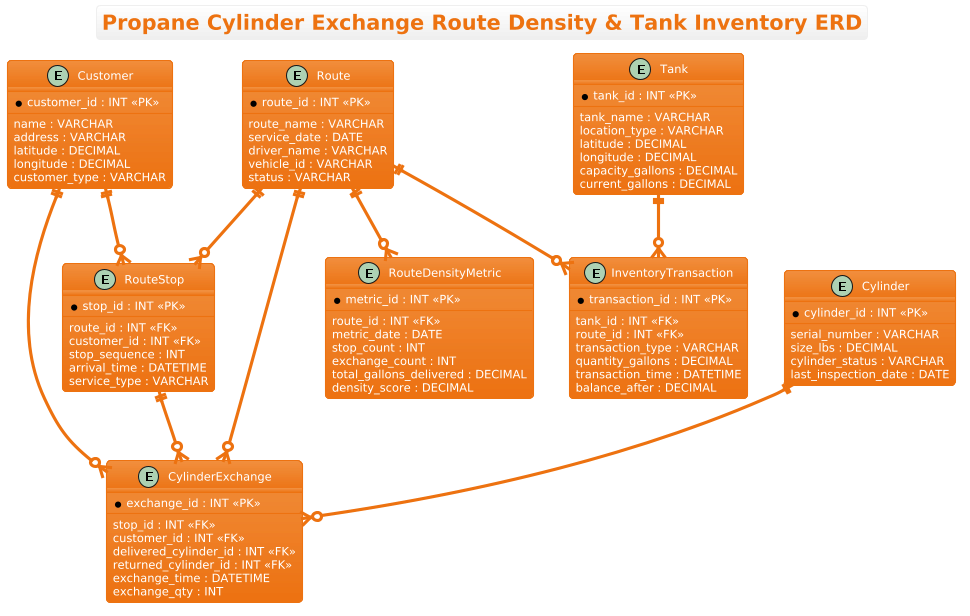
The diagram utilizes the Entity-Relationship modeling paradigm to represent the static structure of the logistics database. It defines the “nouns” of the system (Customers, Routes, Cylinders, Tanks) and the “verbs” of the system (Exchanges, Inventory Transactions). By visualizing cardinality (one-to-many, many-to-one), the model clarifies that a single Route can contain multiple Stops, and a single Stop can trigger multiple Cylinder Exchanges. This abstraction allows architects to understand data flow without getting bogged down in code implementation details.
Target Domain Scope & Scenario
The scope of this model covers the end-to-end lifecycle of a delivery run. It begins with the definition of a Route and its associated Route Stops. It captures the core transaction of a Cylinder Exchange, linking the driver’s activity to specific customer assets. Finally, it extends to the bulk infrastructure by modeling Tanks and their Inventory Transactions, allowing the system to track how much propane is consumed or delivered at the depot level. The inclusion of a RouteDensityMetric entity specifically addresses the analytical need to measure route efficiency over time.
Key Takeaways & Educational Insights
By building this model, readers will gain insights into:
- Normalization: How to separate customer location data from route execution data to avoid redundancy.
- Temporal Tracking: The importance of storing timestamps (arrival, exchange, transaction) for audit trails and density analysis.
- Asset Linking: How to link physical cylinder serial numbers to abstract route events.
Complete Diagram & Full Source Code
Before diving into the step-by-step construction, here is the complete, rendered view of the Propane Cylinder Exchange Route Density & Tank Inventory ERD. This blueprint encapsulates all entities, attributes, and relationships required for a production-grade logistics system.
@startuml
!theme aws-orange

title Propane Cylinder Exchange Route Density & Tank Inventory ERD

/'
Diagram Context:
This ERD models the operational data needed to analyze propane gas cylinder exchange
route density and track tank inventory across a distribution network. It supports
understanding where exchange activity is concentrated, how full and empty cylinders
flow through routes, and how much propane inventory remains at each tank or storage
location. The central entities connect customers, exchange routes, cylinders, tanks,
and inventory transactions so that route-level demand, cylinder turnover, and
stock levels can be measured and optimized.
'/

entity "Customer" as customer {
  * customer_id : INT <<PK>>
  --
  name : VARCHAR
  address : VARCHAR
  latitude : DECIMAL
  longitude : DECIMAL
  customer_type : VARCHAR
}

entity "Route" as route {
  * route_id : INT <<PK>>
  --
  route_name : VARCHAR
  service_date : DATE
  driver_name : VARCHAR
  vehicle_id : VARCHAR
  status : VARCHAR
}

entity "RouteStop" as route_stop {
  * stop_id : INT <<PK>>
  --
  route_id : INT <<FK>>
  customer_id : INT <<FK>>
  stop_sequence : INT
  arrival_time : DATETIME
  service_type : VARCHAR
}

entity "Cylinder" as cylinder {
  * cylinder_id : INT <<PK>>
  --
  serial_number : VARCHAR
  size_lbs : DECIMAL
  cylinder_status : VARCHAR
  last_inspection_date : DATE
}

entity "CylinderExchange" as exchange {
  * exchange_id : INT <<PK>>
  --
  stop_id : INT <<FK>>
  customer_id : INT <<FK>>
  delivered_cylinder_id : INT <<FK>>
  returned_cylinder_id : INT <<FK>>
  exchange_time : DATETIME
  exchange_qty : INT
}

entity "Tank" as tank {
  * tank_id : INT <<PK>>
  --
  tank_name : VARCHAR
  location_type : VARCHAR
  latitude : DECIMAL
  longitude : DECIMAL
  capacity_gallons : DECIMAL
  current_gallons : DECIMAL
}

entity "InventoryTransaction" as inventory {
  * transaction_id : INT <<PK>>
  --
  tank_id : INT <<FK>>
  route_id : INT <<FK>>
  transaction_type : VARCHAR
  quantity_gallons : DECIMAL
  transaction_time : DATETIME
  balance_after : DECIMAL
}

entity "RouteDensityMetric" as density {
  * metric_id : INT <<PK>>
  --
  route_id : INT <<FK>>
  metric_date : DATE
  stop_count : INT
  exchange_count : INT
  total_gallons_delivered : DECIMAL
  density_score : DECIMAL
}

customer ||--o{ route_stop
route ||--o{ route_stop
route ||--o{ exchange
customer ||--o{ exchange
cylinder ||--o{ exchange
route ||--o{ density
tank ||--o{ inventory
route ||--o{ inventory
route_stop ||--o{ exchange

@endumlStep-by-Step Architectural Walkthrough
Phase 1: Canvas Configuration & Layout Directives
The foundation of any professional PlantUML diagram lies in its configuration. In this scenario, we want the diagram to reflect a modern, clean aesthetic suitable for technical documentation. We begin by setting the theme to aws-orange, which provides a distinct color palette often associated with cloud infrastructure and enterprise dashboards.
We also define a global title to ensure the diagram is self-documenting. Finally, we insert a comment block using the /' and '/ syntax. This block serves as a living document, explaining the business context of the ERD to future maintainers without cluttering the visual rendering.
@startuml
!theme aws-orange

title Propane Cylinder Exchange Route Density & Tank Inventory ERD

/'
Diagram Context:
This ERD models the operational data needed to analyze propane gas cylinder exchange
route density and track tank inventory across a distribution network...
'/
Phase 2: Declaring Core Entities, Actors, and Boundaries
Next, we define the core entities. In PlantUML, we use the entity keyword. Each entity block contains the primary key (marked with *), a separator (--), and the remaining attributes. For the Customer entity, we include geographic data (latitude/longitude) which is critical for route density analysis. For the Cylinder entity, we track physical attributes like size and inspection dates, ensuring safety compliance is part of the data model.
entity "Customer" as customer {
* customer_id : INT <>
--
name : VARCHAR
address : VARCHAR
latitude : DECIMAL
longitude : DECIMAL
customer_type : VARCHAR
}
entity "Cylinder" as cylinder {
* cylinder_id : INT < >
--
serial_number : VARCHAR
size_lbs : DECIMAL
cylinder_status : VARCHAR
last_inspection_date : DATE
}
Phase 3: Mapping Data Flows & Key Interactions
The heart of a logistics ERD is the transactional entity that links static data to dynamic events. Here, we create the CylinderExchange entity. This is a junction table that connects the Route, the Customer, and the specific Cylinders involved in a swap. By including foreign keys (FK) for the delivered and returned cylinders, we create a complete audit trail of asset movement.
We also introduce the RouteDensityMetric entity. This is an analytical entity designed to store pre-calculated metrics (like density_score) derived from the raw transaction data, allowing for faster reporting on route efficiency.
entity "CylinderExchange" as exchange {
* exchange_id : INT <>
--
stop_id : INT <>
customer_id : INT < >
delivered_cylinder_id : INT < >
returned_cylinder_id : INT < >
exchange_time : DATETIME
exchange_qty : INT
}
entity "RouteDensityMetric" as density {
* metric_id : INT <>
--
route_id : INT <>
metric_date : DATE
stop_count : INT
exchange_count : INT
total_gallons_delivered : DECIMAL
density_score : DECIMAL
}
Phase 4: Grouping, Annotations & Visual Polish
Finally, we establish the relationships between these entities using cardinality notation. The ||--o{ syntax indicates a one-to-many relationship (e.g., one Route has zero or many Route Stops). We ensure that the InventoryTransaction and RouteDensityMetric entities are correctly linked to their parent Route and Tank entities to maintain referential integrity. This visual mapping confirms that every inventory adjustment is tied to a specific delivery route, enabling precise cost allocation.
route ||--o{ route_stop
customer ||--o{ exchange
cylinder ||--o{ exchange
route ||--o{ density
tank ||--o{ inventory
Syntax & Keyword Deep Dive
To fully leverage PlantUML for ERD creation, it is essential to understand the specific syntax elements used in this model:
entityKeyword: Defines a new table or entity. The syntaxentity "Display Name" as aliasallows for a user-friendly label while keeping the code concise with an alias.<and> <Stereotypes: These double-angle brackets denote Primary Keys and Foreign Keys. The asterisk> *preceding the attribute name visually reinforces the primary key status in the rendered diagram.||--o{Relationship Syntax: This is the standard ERD cardinality notation. The||represents "one and only one" (mandatory one), and theo{represents "zero or many" (optional many). This precisely models the logic that a Route must exist to have Stops, but a specific Stop might not have a Cylinder Exchange yet./'and'/Comments: This syntax allows for multi-line comments. Unlike standard code comments, this text is rendered as a text box within the diagram, perfect for documentation headers.!themeDirective: A global directive that applies a specific color scheme (e.g.,aws-orange) to the entire diagram, ensuring visual consistency without manual styling of each box.
Best Practices & Pitfalls to Avoid
When constructing complex ERDs for logistics systems, adhering to best practices ensures the diagram remains maintainable and readable:
- Consistent Naming Conventions: Always use aliases (e.g.,
as customer) that match the entity name or are semantically consistent. Avoid mixing snake_case and camelCase in entity references. - Separation of Concerns: Do not mix analytical metrics (like
RouteDensityMetric) with transactional data in the same entity. Keep them separate to maintain data integrity and query performance. - Geospatial Data Handling: When modeling logistics, always include latitude and longitude as separate decimal fields. Do not attempt to store coordinates as a single string, as this prevents efficient spatial querying in the backend database.
- Cardinality Accuracy: Double-check your relationship arrows. A common pitfall is modeling a mandatory one-to-many relationship where a zero-or-many is intended (or vice versa), which can lead to database constraint errors.
Start Building Propane Logistics ERDs Faster with VPasCode
Design and refine your Propane Cylinder Exchange Route diagrams instantly in your browser with VPasCode, the free PlantUML editor for logistics architects.