


In the high-stakes environment of steel manufacturing, precision is not just a metric; it is the difference between a successful production run and a costly batch rejection. Every ton of molten metal produced in a blast furnace represents a complex chain of operational events, from the initial tap schedule to the final chemistry verification. For data architects and operations engineers, capturing this intricate workflow in a structured data model is critical for ensuring traceability, quality control, and real-time decision-making.
Traditional diagramming tools often struggle to keep up with the dynamic nature of manufacturing data requirements. As production lines evolve and new quality metrics are introduced, static diagrams become obsolete. This is where the diagram-as-code approach shines. By defining the data structure through code, teams can version their documentation alongside their applications, ensuring that the visual representation of the system always matches the database schema. Using PlantUML within the VPasCode editor allows engineers to rapidly prototype and refine these complex relationships, focusing on the logic of the data flow rather than the mechanics of drawing boxes and lines.
This tutorial guides you through building a comprehensive Entity-Relationship Diagram (ERD) specifically designed for a steel mill’s blast furnace operations. We will model the lifecycle of a heat, from the scheduled tap time to the actual execution, ladle assignment, and the subsequent molten metal chemistry sampling. This model ensures that every sample can be traced back to a specific tap event, and every chemical result is linked to the precise furnace and ladle conditions, providing the data integrity necessary for modern Industry 4.0 manufacturing systems.
Understanding the Model: Purpose, Scope & Problem Framing
Diagram Abstraction & Representation
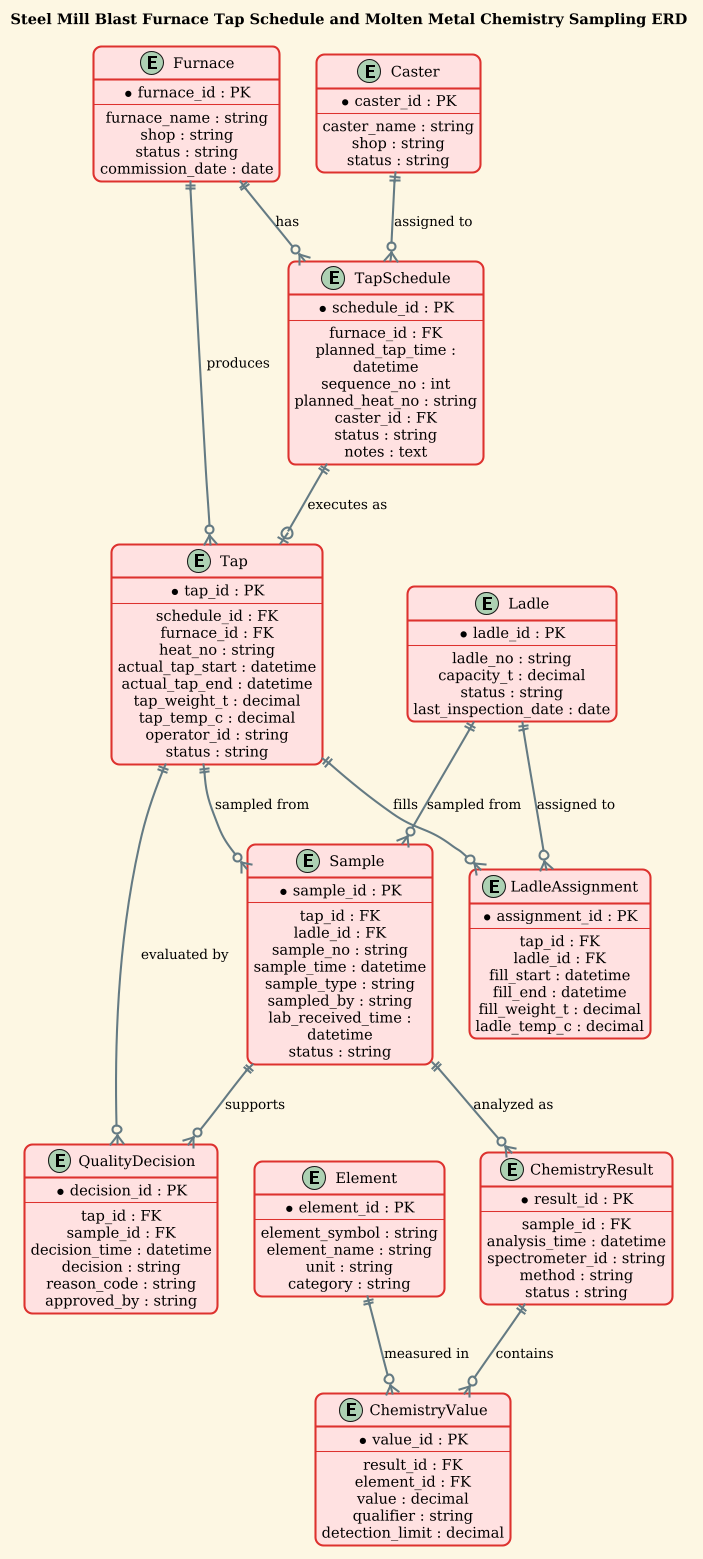
Entity-Relationship Diagrams (ERDs) are the blueprint for relational databases, illustrating how data entities relate to one another. In the context of this manufacturing scenario, the ERD serves as a semantic map of the physical production process. Each entity represents a tangible object (like a Furnace or Ladle) or a discrete event (like a Tap or Sample). The relationships (lines) between these entities define the cardinality and logic of the data: for instance, a single Furnace can produce many Taps, but a specific Tap belongs to only one Furnace. This abstraction allows engineers to visualize the flow of information without getting bogged down in SQL syntax, making it an ideal tool for cross-functional communication between IT and operations teams.
Target Domain Scope & Scenario
The scope of this model is strictly limited to the blast furnace tapping and quality assurance workflow. It covers the planning phase (TapSchedule), the execution phase (Tap, LadleAssignment), and the quality verification phase (Sample, ChemistryResult, QualityDecision). It deliberately excludes upstream raw material handling or downstream rolling mill processes to maintain focus on the core thermal processing and quality sampling loop. The diagram captures the critical link between the physical act of tapping molten metal and the digital record of its chemical composition, ensuring that no data point is orphaned.
Key Takeaways & Educational Insights
By constructing this diagram, you will gain a deep understanding of how to model one-to-many relationships in a manufacturing context, handle temporal data (scheduled vs. actual times), and implement a many-to-many resolution pattern for chemical analysis (linking results to multiple elements). You will learn how to use PlantUML’s entity notation to define complex attributes with primary and foreign keys, and how to use relationship arrows to denote optional vs. mandatory connections.
Complete Diagram & Full Source Code
Below is the final, rendered ERD representing the Steel Mill Blast Furnace Tap Schedule and Molten Metal Chemistry Sampling database. This diagram visualizes the connections between the furnace, the tap events, the ladle assignments, and the detailed chemical analysis results.
To build this diagram, you can copy the complete source code below. This code includes the theme configuration, entity definitions, and relationship mappings required to render the full model.
@startuml
!theme sunlust
title Steel Mill Blast Furnace Tap Schedule and Molten Metal Chemistry Sampling ERD

/'
This ERD models the operational and quality data for blast furnace tapping and molten metal chemistry sampling in a steel mill.
It captures the tap schedule (planned vs actual tap times, furnace and caster/ladle assignments) and links each tap to molten metal chemistry samples.
The diagram supports traceability from a specific tap to its sample results, heat/ladle identification, and quality decisions.
Core entities include Furnace, Tap, Ladle, Sample, ChemistryResult, and Element/Assay definitions.
Relationships show how taps are scheduled, executed, sampled, and analyzed for chemical composition.
'/

' Entities
entity "Furnace" as furnace {
  * furnace_id : PK
  --
  furnace_name : string
  shop : string
  status : string
  commission_date : date
}

entity "TapSchedule" as tap_schedule {
  * schedule_id : PK
  --
  furnace_id : FK
  planned_tap_time : datetime
  sequence_no : int
  planned_heat_no : string
  caster_id : FK
  status : string
  notes : text
}

entity "Tap" as tap {
  * tap_id : PK
  --
  schedule_id : FK
  furnace_id : FK
  heat_no : string
  actual_tap_start : datetime
  actual_tap_end : datetime
  tap_weight_t : decimal
  tap_temp_c : decimal
  operator_id : string
  status : string
}

entity "Caster" as caster {
  * caster_id : PK
  --
  caster_name : string
  shop : string
  status : string
}

entity "Ladle" as ladle {
  * ladle_id : PK
  --
  ladle_no : string
  capacity_t : decimal
  status : string
  last_inspection_date : date
}

entity "LadleAssignment" as ladle_assignment {
  * assignment_id : PK
  --
  tap_id : FK
  ladle_id : FK
  fill_start : datetime
  fill_end : datetime
  fill_weight_t : decimal
  ladle_temp_c : decimal
}

entity "Sample" as sample {
  * sample_id : PK
  --
  tap_id : FK
  ladle_id : FK
  sample_no : string
  sample_time : datetime
  sample_type : string
  sampled_by : string
  lab_received_time : datetime
  status : string
}

entity "ChemistryResult" as chem_result {
  * result_id : PK
  --
  sample_id : FK
  analysis_time : datetime
  spectrometer_id : string
  method : string
  status : string
}

entity "Element" as element {
  * element_id : PK
  --
  element_symbol : string
  element_name : string
  unit : string
  category : string
}

entity "ChemistryValue" as chem_value {
  * value_id : PK
  --
  result_id : FK
  element_id : FK
  value : decimal
  qualifier : string
  detection_limit : decimal
}

entity "QualityDecision" as quality_decision {
  * decision_id : PK
  --
  tap_id : FK
  sample_id : FK
  decision_time : datetime
  decision : string
  reason_code : string
  approved_by : string
}

' Relationships
furnace ||--o{ tap_schedule : "has"
furnace ||--o{ tap : "produces"
tap_schedule ||--o| tap : "executes as"
caster ||--o{ tap_schedule : "assigned to"
tap ||--o{ ladle_assignment : "fills"
ladle ||--o{ ladle_assignment : "assigned to"
tap ||--o{ sample : "sampled from"
ladle ||--o{ sample : "sampled from"
sample ||--o{ chem_result : "analyzed as"
chem_result ||--o{ chem_value : "contains"
element ||--o{ chem_value : "measured in"
tap ||--o{ quality_decision : "evaluated by"
sample ||--o{ quality_decision : "supports"

@endumlStep-by-Step Architectural Walkthrough
Building a complex ERD requires a structured approach to ensure data integrity and readability. We will construct this diagram in four distinct phases: configuring the visual theme, defining the core entities, establishing the relationships, and adding annotations.
Phase 1: Canvas Configuration & Layout Directives
Before defining any data structures, we set the stage for the diagram. In PlantUML, this is done using directives at the very top of the code. We use @startuml to begin the diagram and @enduml to close it. Crucially, we apply the !theme sunlust directive. This applies a warm, industrial color palette to the diagram, making it visually distinct and easier to read in a manufacturing dashboard context.
We also include a title directive to provide a clear heading for the diagram. Additionally, we wrap our context description in a comment block using /' ... '/. This ensures the text is visible in the diagram’s documentation but does not render as a graphical element.
@startuml
!theme sunlust
title Steel Mill Blast Furnace Tap Schedule and Molten Metal Chemistry Sampling ERD

/'
Context description goes here...
'/
Phase 2: Declaring Core Entities, Actors, and Boundaries
The heart of the ERD lies in the entity blocks. Each entity represents a table in the database. We define the entity name, an alias for use in relationships, and a list of attributes. In PlantUML, attributes are separated by --. Primary Keys (PK) and Foreign Keys (FK) are explicitly marked with an asterisk (*) to ensure database designers can immediately identify the keys.
For example, the Furnace entity defines the physical asset, while the Tap entity captures the event data. Notice how we use specific data types like datetime for timing events and decimal for weight and temperature measurements, which is critical for manufacturing precision.
entity "Furnace" as furnace {
  * furnace_id : PK
  --
  furnace_name : string
  shop : string
  status : string
  commission_date : date
}

entity "Tap" as tap {
  * tap_id : PK
  --
  schedule_id : FK
  furnace_id : FK
  heat_no : string
  actual_tap_start : datetime
  actual_tap_end : datetime
  tap_weight_t : decimal
  tap_temp_c : decimal
  operator_id : string
  status : string
}
Phase 3: Mapping Data Flows & Key Interactions
Once the entities are defined, we connect them using relationship arrows. The syntax entity1 ||--o{ entity2 : "label" defines the cardinality and direction. The || indicates a mandatory one-to-one connection, while o{ indicates an optional one-to-many connection.
In our manufacturing scenario, a Furnace can produce many Tap events (||--o{), but a Tap must belong to exactly one Furnace. We also model the complex relationship of sampling: a Tap can be sampled multiple times (or by different ladles), and a Ladle can also be sampled. The relationships clearly map the flow from the physical tap to the chemical analysis.
furnace ||--o{ tap : "produces"
tap ||--o{ sample : "sampled from"
ladle ||--o{ sample : "sampled from"
sample ||--o{ chem_result : "analyzed as"
chem_result ||--o{ chem_value : "contains"
element ||--o{ chem_value : "measured in"
Phase 4: Grouping, Annotations & Visual Polish
To make the diagram professional and self-documenting, we use the title directive and the comment block. We also ensure consistent naming conventions: using plural nouns for collections (e.g., ChemistryValue) and singular nouns for instances (e.g., Element). The label on the relationship lines (e.g., "executes as") provides immediate context for the nature of the relationship, which is vital for stakeholders who may not be database experts.
Syntax & Keyword Deep Dive
Understanding the specific PlantUML syntax is essential for mastering diagram-as-code. Here is a breakdown of the key keywords and conventions used in this manufacturing ERD:
entity: Defines a new entity (table). The syntax isentity "Display Name" as alias { attributes }. The alias is used for brevity in relationship definitions.*(Asterisk): Preceding an attribute name (e.g.,* furnace_id) marks it as a Primary Key or Foreign Key, visually distinguishing it from regular columns.--(Double Dash): A separator line within an entity block that visually groups attributes, often used to separate keys from other fields.||--o{: A relationship arrow notation.||means “one and only one” (mandatory), ando{means “zero or many” (optional). This is the standard Crow’s Foot notation in PlantUML.!theme: A directive to load a specific visual theme.!theme sunlustapplies a specific color scheme to the entire diagram canvas./' ... '/: A multi-line comment block. Text inside these delimiters is rendered as a note in the diagram but is ignored by the layout engine for positioning.
Best Practices & Pitfalls to Avoid
When modeling complex manufacturing data structures, following best practices ensures your diagrams remain maintainable and clear:
- Use Aliases for Relationships: Instead of repeating long entity names like
entity "ChemistryResult"in every relationship line, define an alias (e.g.,as chem_result) and use it. This keeps the relationship section clean and reduces syntax errors. - Consistent Naming Conventions: Stick to a standard for table names (e.g., singular nouns for entities, plural for collections) and attribute names (snake_case). This makes the diagram easier to read and map to actual database schemas.
- Separate Logic from Presentation: Keep the entity definitions separate from the relationship definitions in your code. This makes it easier to add new entities or relationships without hunting through a long, linear list of code.
- Document Cardinality Explicitly: Always use the specific cardinality arrows (
||--o{,--o{, etc.) rather than simple lines. Ambiguity in relationships can lead to database design flaws where data integrity is compromised.
Start Building Manufacturing ERDs Faster with VPasCode
Design complex blast furnace data models instantly in your browser with VPasCode’s free PlantUML editor—no local setup required.