


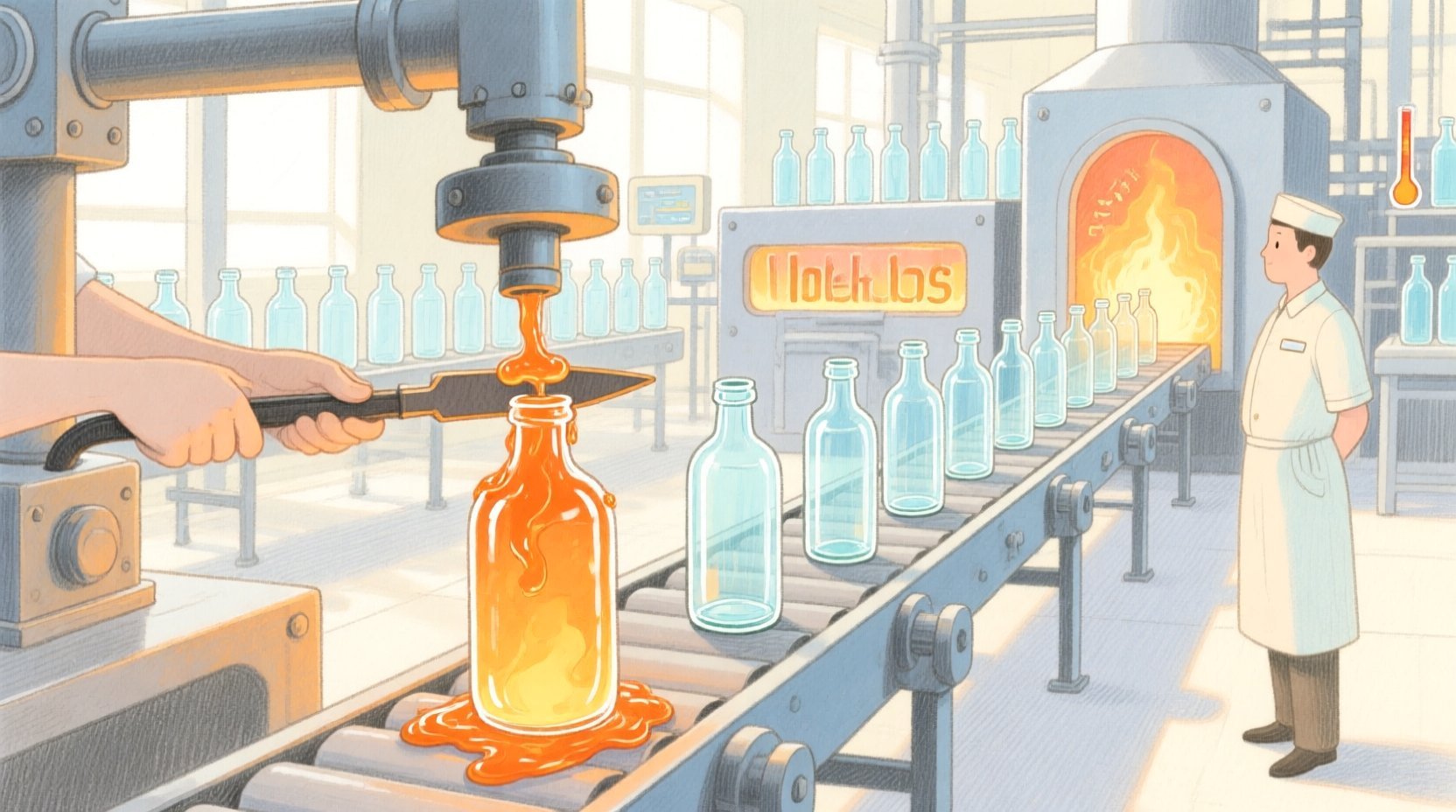
In the high-speed environment of glass bottle manufacturing, maintaining product consistency is a matter of precise engineering and rigorous data tracking. Every bottle produced is the result of a delicate interplay between mechanical forming processes and thermal annealing cycles. When a glass gob (a precise amount of molten glass) is cut, its weight must be exact; if it is too heavy or too light, the final bottle will be structurally unsound or fail quality checks. Simultaneously, as these bottles travel through the annealing lehr, they must be cooled at a strictly controlled rate to prevent internal stresses that could cause spontaneous shattering later in the supply chain. Modern manufacturing systems rely on capturing these physical events as digital data points to enable real-time adjustments and long-term process optimization.
Designing a robust database schema for such a system requires more than just listing tables; it demands a clear visualization of how data entities relate to one another. An Entity Relationship Diagram (ERD) serves as the blueprint for this data architecture, illustrating how a single “Gob” is weighed, adjusted, formed into a “Bottle,” and then monitored through various temperature zones in the “Annealing Lehr.” This tutorial leverages PlantUML, a powerful diagram-as-code language, to construct a professional ERD within VPasCode. By using code to define the diagram, engineers can version their data models, easily update constraints, and ensure that the documentation remains synchronized with the actual database implementation.
Understanding the Model: Purpose, Scope & Problem Framing
Diagram Abstraction & Representation
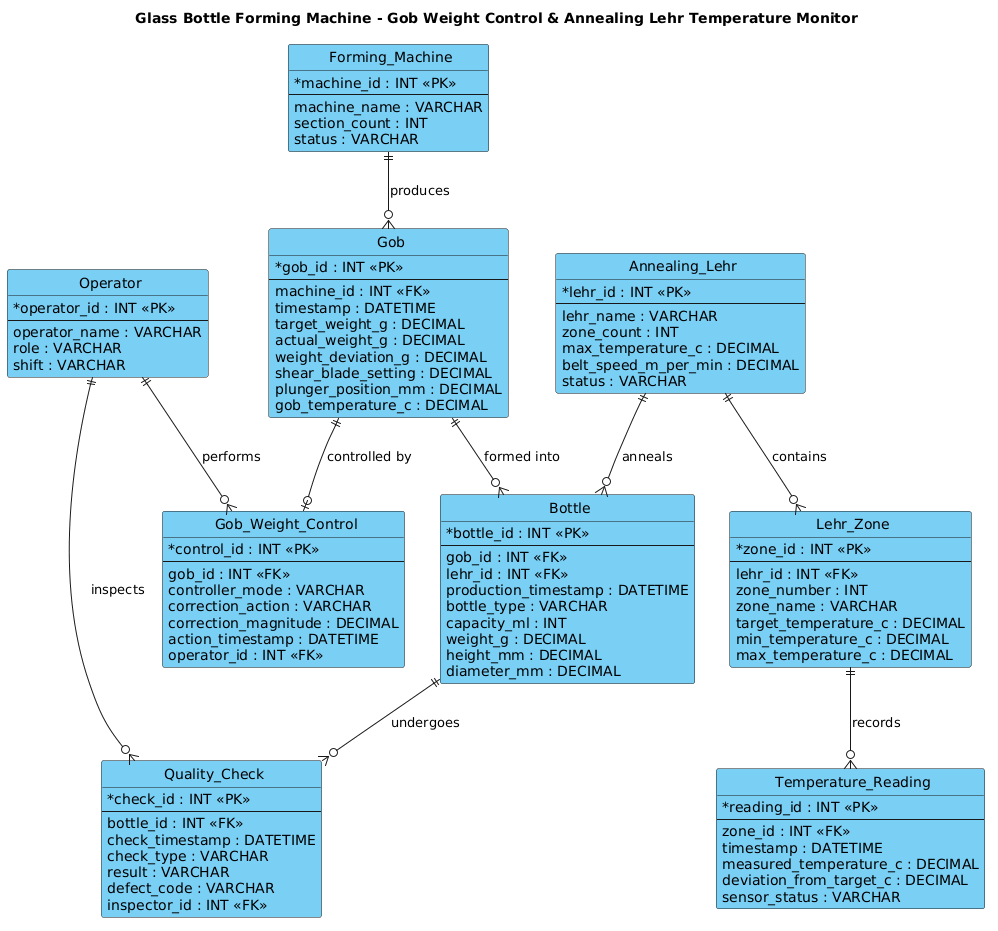
An Entity Relationship Diagram (ERD) is the standard visual language for describing the logical structure of a database. In this specific context, the diagram abstracts the physical manufacturing line into digital entities. The “Forming Machine” represents the source of the raw material input, while the “Gob” entity captures the critical intermediate state where weight is measured and corrected. The “Annealing Lehr” represents the thermal processing stage, broken down into “Zones” to allow for granular temperature monitoring. Finally, the “Bottle” and “Quality_Check” entities represent the final output and the verification loop that closes the feedback cycle. This abstraction allows architects to see at a glance how a deviation in weight (at the gob stage) propagates to the final product and how temperature anomalies are linked to specific production batches.
Target Domain Scope & Scenario
This model focuses specifically on the end-to-end data lineage for a single production cycle in a glass bottle factory. It intentionally scopes out the broader factory floor management (like HR or inventory) to focus on the core operational data: the physical transformation of glass. The boundaries include the Forming Machine (input), the Annealing Lehr (processing), and the Quality Control station (output). It explicitly models the relationship between the mechanical settings (plunger position, shear blade) and the resulting physical attributes (weight, temperature), ensuring that traceability is maintained from the raw gob to the final inspected bottle.
Key Takeaways & Educational Insights
By building this diagram, you will gain insights into how to model one-to-many relationships (e.g., one machine produces many gobs), how to handle foreign keys to link process stages (e.g., linking a temperature reading to a specific zone), and how to structure entities for traceability. You will learn to use PlantUML’s entity notation to clearly define primary keys (PK) and foreign keys (FK), ensuring the resulting database schema is normalized and efficient.
Complete Diagram & Full Source Code
Below is the complete, rendered ERD representing the glass bottle forming machine’s data model. This diagram captures the entities for the forming machine, the gob weight control system, the annealing lehr temperature zones, and the final quality checks.
@startuml
!include https://static.visual-paradigm.com/web/resources/plantuml-stdlib/themes/vp.puml

title Glass Bottle Forming Machine - Gob Weight Control & Annealing Lehr Temperature Monitor

/'
Diagram Context:
This ERD models the core data structures for monitoring and controlling two critical
glass bottle manufacturing processes: (1) gob weight control at the forming machine,
and (2) temperature monitoring inside the annealing lehr. The diagram captures how
individual glass gobs are weighed, how the forming machine's plunger and shear
settings are adjusted to maintain target weight, and how temperature readings
along the lehr's zones are recorded to ensure proper annealing. It also links
finished bottle quality measurements back to the corresponding gob and lehr
conditions for traceability and process improvement.
'/

' ==================== ENTITIES ====================

entity "Forming_Machine" as FM {
  * machine_id : INT <<PK>>
  --
  machine_name : VARCHAR
  section_count : INT
  status : VARCHAR
}

entity "Gob" as GOB {
  * gob_id : INT <<PK>>
  --
  machine_id : INT <<FK>>
  timestamp : DATETIME
  target_weight_g : DECIMAL
  actual_weight_g : DECIMAL
  weight_deviation_g : DECIMAL
  shear_blade_setting : DECIMAL
  plunger_position_mm : DECIMAL
  gob_temperature_c : DECIMAL
}

entity "Gob_Weight_Control" as GWC {
  * control_id : INT <<PK>>
  --
  gob_id : INT <<FK>>
  controller_mode : VARCHAR
  correction_action : VARCHAR
  correction_magnitude : DECIMAL
  action_timestamp : DATETIME
  operator_id : INT <<FK>>
}

entity "Annealing_Lehr" as AL {
  * lehr_id : INT <<PK>>
  --
  lehr_name : VARCHAR
  zone_count : INT
  max_temperature_c : DECIMAL
  belt_speed_m_per_min : DECIMAL
  status : VARCHAR
}

entity "Lehr_Zone" as LZ {
  * zone_id : INT <<PK>>
  --
  lehr_id : INT <<FK>>
  zone_number : INT
  zone_name : VARCHAR
  target_temperature_c : DECIMAL
  min_temperature_c : DECIMAL
  max_temperature_c : DECIMAL
}

entity "Temperature_Reading" as TR {
  * reading_id : INT <<PK>>
  --
  zone_id : INT <<FK>>
  timestamp : DATETIME
  measured_temperature_c : DECIMAL
  deviation_from_target_c : DECIMAL
  sensor_status : VARCHAR
}

entity "Bottle" as BTL {
  * bottle_id : INT <<PK>>
  --
  gob_id : INT <<FK>>
  lehr_id : INT <<FK>>
  production_timestamp : DATETIME
  bottle_type : VARCHAR
  capacity_ml : INT
  weight_g : DECIMAL
  height_mm : DECIMAL
  diameter_mm : DECIMAL
}

entity "Quality_Check" as QC {
  * check_id : INT <<PK>>
  --
  bottle_id : INT <<FK>>
  check_timestamp : DATETIME
  check_type : VARCHAR
  result : VARCHAR
  defect_code : VARCHAR
  inspector_id : INT <<FK>>
}

entity "Operator" as OPR {
  * operator_id : INT <<PK>>
  --
  operator_name : VARCHAR
  role : VARCHAR
  shift : VARCHAR
}

' ==================== RELATIONSHIPS ====================

FM ||--o{ GOB : produces
GOB ||--o| GWC : "controlled by"
GOB ||--o{ BTL : "formed into"
AL ||--o{ LZ : contains
LZ ||--o{ TR : records
AL ||--o{ BTL : anneals
BTL ||--o{ QC : undergoes
OPR ||--o{ GWC : performs
OPR ||--o{ QC : inspects

@endumlStep-by-Step Architectural Walkthrough
Phase 1: Canvas Configuration & Layout Directives
The foundation of any PlantUML diagram lies in its setup. We begin by including the standard library theme to ensure a professional, consistent look. This directive loads the VP (Visual Paradigm) theme, which provides modern styling for entities and relationships.
@startuml
!include https://static.visual-paradigm.com/web/resources/plantuml-stdlib/themes/vp.puml

title Glass Bottle Forming Machine - Gob Weight Control & Annealing Lehr Temperature Monitor
Following the theme, we define the title directive. This is crucial for ERDs as it provides immediate context to anyone viewing the diagram, explaining exactly what manufacturing process is being modeled. We also insert a comment block using /' ... '/ to document the diagram’s scope and business logic, ensuring that the code itself serves as living documentation.
Phase 2: Declaring Core Entities, Actors, and Boundaries
Next, we define the core entities. In PlantUML, the entity keyword is used to create a table-like structure. We start with the Forming_Machine and Annealing_Lehr, which are the physical assets driving the process.
entity "Forming_Machine" as FM {
* machine_id : INT <>
--
machine_name : VARCHAR
section_count : INT
status : VARCHAR
}
entity "Annealing_Lehr" as AL {
* lehr_id : INT < >
--
lehr_name : VARCHAR
zone_count : INT
max_temperature_c : DECIMAL
belt_speed_m_per_min : DECIMAL
status : VARCHAR
}
Notice the use of * before the primary key field (machine_id, lehr_id) and the <<PK>> stereotype. This explicitly tells the database designer that these columns cannot be null and uniquely identify a row. The -- separator visually divides the primary key from the other attributes in the diagram.
We then define the Gob entity, which is the critical link between the forming machine and the final product. It includes fields for target_weight_g and actual_weight_g, capturing the real-time data needed for control algorithms. We also define the Operator entity to track human intervention, which is essential for audit trails in manufacturing.
Phase 3: Mapping Data Flows & Key Interactions
With entities defined, we must establish the relationships that bind them. In PlantUML, relationships are drawn using the ||--o{ syntax, which represents a one-to-many relationship. The || indicates mandatory participation (the entity on the left must exist for the relationship to hold), and the o{ indicates optional participation on the right (or a collection).
FM ||--o{ GOB : produces
AL ||--o{ LZ : contains
LZ ||--o{ TR : records
For example, FM ||--o{ GOB : produces means one Forming Machine produces zero or many Gobs. This accurately reflects the physical reality: a machine is always active (or exists) and produces a stream of gobs. We also model the Gob_Weight_Control relationship, where a Gob is “controlled by” a specific control action, linking the physical object to the control logic.
We also link the Bottle entity to both the Gob (via gob_id) and the Lehr (via lehr_id). This creates a complete traceability chain: we can query a specific bottle and find out exactly which machine made the gob, what the temperature was in the lehr, and who inspected it.
Phase 4: Grouping, Annotations & Visual Polish
Finally, we ensure the diagram is readable by using clear aliases (like FM, GOB, AL) and descriptive relationship labels. We also include the Operator relationships to show human involvement. The OPR ||--o{ GWC : performs relationship indicates that an operator performs a weight control action, which is vital for compliance and troubleshooting.
Syntax & Keyword Deep Dive
To master PlantUML ERDs, it is essential to understand the specific keywords and symbols used in this diagram:
- entity: The keyword used to define a table or entity. It takes a label (e.g., “Forming_Machine”) and an alias (e.g., as FM).
- <<PK>>: A stereotype indicating a Primary Key. This is a unique identifier for the entity’s records.
- <<FK>>: A stereotype indicating a Foreign Key. This links the entity to another entity, establishing the relationship.
- ||–o{: A relationship arrow.
||means “one and only one” (mandatory) on the left, ando{means “zero or many” (optional/collection) on the right. This is the standard notation for one-to-many relationships in ERDs. - —: A separator line used inside an entity block to visually distinguish the primary key from the rest of the attributes.
- /’ … ‘/: The syntax for a multi-line comment block. This allows you to write extensive documentation directly within the code without affecting the rendering.
- data-type: PlantUML supports standard SQL data types like
INT,VARCHAR,DECIMAL, andDATETIMEto define the schema structure.
Best Practices & Pitfalls to Avoid
When creating ERDs for complex manufacturing systems, follow these best practices to ensure your diagrams remain useful and scalable:
- Use Descriptive Aliases: Avoid generic names like
E1orT1. Use meaningful aliases likeGOBorQCthat match your database schema. This makes the diagram readable for both developers and domain experts. - Separate Logic from Data: Keep your data entities (like
Gob) separate from your control logic entities (likeGob_Weight_Control). This separation clarifies the distinction between the physical object and the process acting upon it. - Document Relationships Clearly: Always provide a label for your relationships (e.g., “produces”, “anneals”). A line without a label forces the reader to guess the nature of the connection, which can lead to misinterpretation of the business rules.
- Validate Cardinality: Double-check your
||--o{vs--o{relationships. In manufacturing, a machine usually must exist to produce a part (mandatory), but a part might not have a recorded weight deviation (optional). Getting this right ensures the diagram accurately reflects real-world constraints.
Start Building Manufacturing ERDs Faster with VPasCode
Design complex data models for your factory floor instantly in your browser with VPasCode, the free PlantUML editor that requires zero setup.