


In the high-temperature, continuous operation environment of modern cement manufacturing, data integrity is as critical as thermal stability. A single deviation in the raw mix proportioning or a lag in the clinker cooler grate speed can compromise clinker quality, increase energy consumption, and trigger costly maintenance cycles. To manage these complex, interdependent processes, engineers must first define a robust data architecture that captures the precise relationships between raw materials, chemical targets, feed rates, and cooling parameters.
Traditional diagramming tools often struggle to keep documentation synchronized with evolving database schemas, leading to “living documents” that quickly become obsolete. By adopting a diagram-as-code approach with PlantUML, manufacturing architects can treat their Entity Relationship Diagrams (ERD) as version-ready source code. This allows for precise definition of entities like RawMaterial, ProportioningRecipe, and GrateSpeedController, ensuring that the data model accurately reflects the physical reality of the kiln and cooler operations.
This tutorial leverages VPasCode, a free, browser-based diagram editor, to walk you through the construction of a professional ERD for a cement kiln system. You will learn how to model the flow of materials from stockpiles to the kiln, the calculation of chemical ratios (LSF, SM, AM), and the feedback loops controlling the grate speed for optimal heat recovery. By the end, you will have a complete, render-ready PlantUML source code that serves as a living specification for your manufacturing data infrastructure.
Understanding the Model: Purpose, Scope & Problem Framing
Diagram Abstraction & Representation
An Entity Relationship Diagram (ERD) is the blueprint for a relational database, defining how data is stored, linked, and retrieved. In the context of industrial manufacturing, an ERD is not just a list of tables; it is a logical map of the physical process. For a cement kiln, this means mapping the RawMaterial entities (limestone, clay, iron ore) to the ProportioningRecipe that dictates their blend ratios, and linking the resulting KilnFeed to the ClinkerCooler performance metrics.
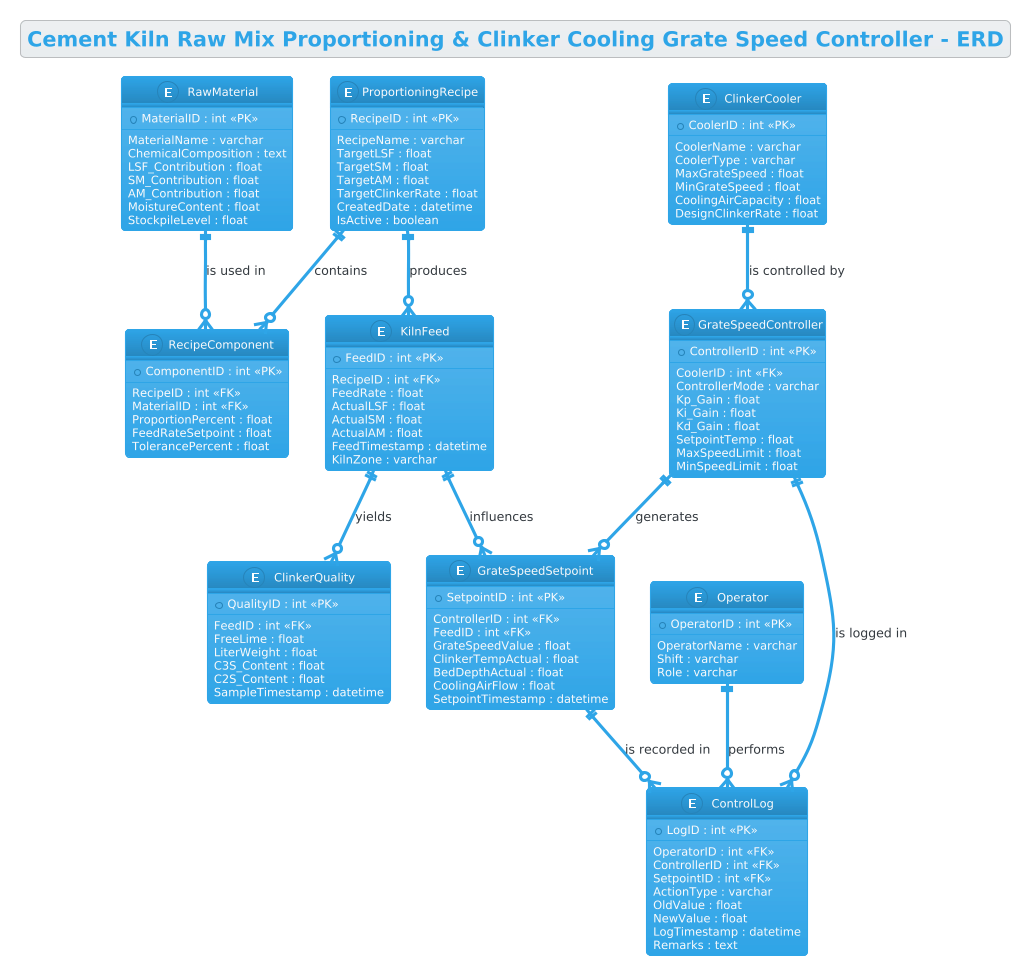
This specific diagram focuses on two critical control loops: the Input Loop (Raw Mix Proportioning) and the Output Loop (Clinker Cooling). The diagram abstracts the physical machinery into data entities, allowing developers to see how a change in MoistureContent in the RawMaterial table propagates through the RecipeComponent to affect the ActualLSF in the KilnFeed, and subsequently how the GrateSpeedController adjusts to maintain the target temperature.
Target Domain Scope & Scenario
The scope of this model covers the data lifecycle from raw material intake to the final clinker quality check. It explicitly models:
- Raw Material Management: Tracking chemical contributions (LSF, SM, AM) and stockpile levels.
- Recipe Engineering: Defining target ratios and active recipes.
- Kiln Feed Dynamics: Recording actual feed rates and real-time chemical analysis.
- Cooler Control: Managing grate speed setpoints based on temperature and bed depth.
- Operational Logging: Capturing operator interventions and system logs.
Key Takeaways & Educational Insights
By studying this model, you will gain insights into how to structure a database for a closed-loop control system. You will learn how to use foreign keys to link recipes to components, how to timestamp data points for historical analysis, and how to separate static configuration (like Operator roles) from dynamic process data (like GrateSpeedSetpoint).
Complete Diagram & Full Source Code
Below is the complete, rendered Entity Relationship Diagram for the Cement Kiln system. This visual representation shows the one-to-many relationships between raw materials, recipes, and the cooling control logic.
The following source code is ready to be pasted directly into the VPasCode editor. It utilizes the cerulean theme for a clean, professional look suitable for technical documentation.
@startuml
!theme cerulean

title Cement Kiln Raw Mix Proportioning & Clinker Cooling Grate Speed Controller - ERD

/'
Context: This ERD models the data relationships within a cement kiln control system
that manages two critical processes: (1) raw mix proportioning, where limestone, clay,
iron ore, and other additives are blended in precise ratios to achieve the desired
chemical composition (LSF, SM, AM) before entering the kiln, and (2) clinker cooling
grate speed control, where the grate speed is adjusted based on clinker temperature,
bed depth, and cooling air flow to ensure proper clinker quality and heat recovery.
The diagram captures how raw materials, proportioning recipes, kiln feed parameters,
clinker cooler operating conditions, and grate speed setpoints are interrelated
to maintain stable kiln operation and clinker quality.
'/

entity "RawMaterial" as rawmat {
  * MaterialID : int <<PK>>
  --
  MaterialName : varchar
  ChemicalComposition : text
  LSF_Contribution : float
  SM_Contribution : float
  AM_Contribution : float
  MoistureContent : float
  StockpileLevel : float
}

entity "ProportioningRecipe" as recipe {
  * RecipeID : int <<PK>>
  --
  RecipeName : varchar
  TargetLSF : float
  TargetSM : float
  TargetAM : float
  TargetClinkerRate : float
  CreatedDate : datetime
  IsActive : boolean
}

entity "RecipeComponent" as comp {
  * ComponentID : int <<PK>>
  --
  RecipeID : int <<FK>>
  MaterialID : int <<FK>>
  ProportionPercent : float
  FeedRateSetpoint : float
  TolerancePercent : float
}

entity "KilnFeed" as kilnfeed {
  * FeedID : int <<PK>>
  --
  RecipeID : int <<FK>>
  FeedRate : float
  ActualLSF : float
  ActualSM : float
  ActualAM : float
  FeedTimestamp : datetime
  KilnZone : varchar
}

entity "ClinkerCooler" as cooler {
  * CoolerID : int <<PK>>
  --
  CoolerName : varchar
  CoolerType : varchar
  MaxGrateSpeed : float
  MinGrateSpeed : float
  CoolingAirCapacity : float
  DesignClinkerRate : float
}

entity "GrateSpeedController" as controller {
  * ControllerID : int <<PK>>
  --
  CoolerID : int <<FK>>
  ControllerMode : varchar
  Kp_Gain : float
  Ki_Gain : float
  Kd_Gain : float
  SetpointTemp : float
  MaxSpeedLimit : float
  MinSpeedLimit : float
}

entity "GrateSpeedSetpoint" as setpoint {
  * SetpointID : int <<PK>>
  --
  ControllerID : int <<FK>>
  FeedID : int <<FK>>
  GrateSpeedValue : float
  ClinkerTempActual : float
  BedDepthActual : float
  CoolingAirFlow : float
  SetpointTimestamp : datetime
}

entity "ClinkerQuality" as quality {
  * QualityID : int <<PK>>
  --
  FeedID : int <<FK>>
  FreeLime : float
  LiterWeight : float
  C3S_Content : float
  C2S_Content : float
  SampleTimestamp : datetime
}

entity "Operator" as operator {
  * OperatorID : int <<PK>>
  --
  OperatorName : varchar
  Shift : varchar
  Role : varchar
}

entity "ControlLog" as log {
  * LogID : int <<PK>>
  --
  OperatorID : int <<FK>>
  ControllerID : int <<FK>>
  SetpointID : int <<FK>>
  ActionType : varchar
  OldValue : float
  NewValue : float
  LogTimestamp : datetime
  Remarks : text
}

rawmat ||--o{ comp : "is used in"
recipe ||--o{ comp : "contains"
recipe ||--o{ kilnfeed : "produces"
cooler ||--o{ controller : "is controlled by"
controller ||--o{ setpoint : "generates"
kilnfeed ||--o{ setpoint : "influences"
kilnfeed ||--o{ quality : "yields"
operator ||--o{ log : "performs"
controller ||--o{ log : "is logged in"
setpoint ||--o{ log : "is recorded in"

@endumlStep-by-Step Architectural Walkthrough
Building a complex ERD requires a structured approach. We will break down the construction of this Cement Kiln model into four logical phases, starting with the environment setup and moving through entity declaration, relationship mapping, and final polish.
Phase 1: Canvas Configuration & Layout Directives
Before defining any data structures, we must set the stage. PlantUML allows us to control the visual theme and title of the diagram. We start with the @startuml directive to open the diagram block. Immediately after, we apply the !theme cerulean directive. This is a built-in PlantUML theme that provides a clean, blue-tinted aesthetic suitable for technical documentation, ensuring the diagram looks professional without manual styling.
We also define the title to provide immediate context. Crucially, we insert a comment block using /' ... '/. This block is visible in the rendered diagram as a text note, describing the operational context of the cement kiln system without cluttering the data structure definitions.
@startuml
!theme cerulean

title Cement Kiln Raw Mix Proportioning & Clinker Cooling Grate Speed Controller - ERD

/'
Context: This ERD models the data relationships within a cement kiln control system...
'/
Phase 2: Declaring Core Entities, Actors, and Boundaries
The core of the ERD is the definition of entities (tables). In PlantUML, we use the entity keyword followed by the table name, an alias (for shorthand in relationships), and a block containing the attributes.
We begin with RawMaterial and ProportioningRecipe. Notice the use of * to denote the Primary Key (PK) and -- to separate keys from other attributes. We define specific manufacturing fields like LSF_Contribution (Lime Saturation Factor) and SM_Contribution (Silica Modulus), which are critical for cement chemistry.
entity "RawMaterial" as rawmat {
  * MaterialID : int <>
  --
  MaterialName : varchar
  LSF_Contribution : float
  ...
We continue by defining the GrateSpeedController and ClinkerCooler entities. These represent the cooling section of the kiln. We include PID control parameters like Kp_Gain, Ki_Gain, and Kd_Gain, which are essential for modeling the control logic within the database schema.
Phase 3: Mapping Data Flows & Key Interactions
Once entities are defined, we map the relationships using the ||--o{ syntax. This represents a one-to-many relationship (One entity on the left, zero or many on the right).
For example, recipe ||--o{ comp : "contains" indicates that one Proportioning Recipe can contain many Recipe Components (different materials). Similarly, kilnfeed ||--o{ setpoint : "influences" shows that the current feed rate influences the grate speed setpoint, capturing the feedback loop between the kiln input and the cooler output.
recipe ||--o{ comp : "contains"
controller ||--o{ setpoint : "generates"
kilnfeed ||--o{ quality : "yields"
We also link the Operator entity to the ControlLog, ensuring that every change in the system is traceable to a specific shift and role, which is a standard requirement in manufacturing compliance.
Phase 4: Grouping, Annotations & Visual Polish
The final phase involves ensuring the diagram is self-documenting. We utilized the comment block at the top to explain the system context. We also used aliases (e.g., as rawmat) to keep the relationship lines clean and readable, avoiding long entity names in the diagram labels. The cerulean theme automatically handles the grouping and styling, but the logical grouping of entities (Input vs. Output) is achieved through the placement of relationships and the flow of foreign keys.
Syntax & Keyword Deep Dive
To fully customize and understand the PlantUML ERD syntax used in this tutorial, here is a breakdown of the key keywords and conventions:
entity "Name" as alias: Defines a new database table. The"Name"is the display label, andaliasis the short variable name used in relationship definitions.* AttributeName : Type: Declares a Primary Key (PK). The asterisk is a visual indicator in the diagram.--: A separator line within an entity block that visually distinguishes keys from regular attributes.<and> <: Stereotypes used to explicitly label Primary Keys and Foreign Keys in the diagram, enhancing readability.> ||--o{: The cardinality notation for a one-to-many relationship. The double bar||means “one” (mandatory), and the circle-arrowo{means “zero or many”.:'Label': Used to add a descriptive label to a relationship line, explaining the nature of the connection (e.g., “is used in”, “contains”)./' ... '/: The syntax for a comment block that renders as a text box within the diagram, useful for context without affecting the layout.
Best Practices & Pitfalls to Avoid
When modeling complex manufacturing systems like a cement kiln, following best practices ensures your ERD remains maintainable and accurate.
- Consistent Naming Conventions: Use clear, descriptive names for entities (e.g.,
GrateSpeedControllerinstead ofGC). This reduces ambiguity when multiple engineers are reviewing the model. - Separate Static from Dynamic Data: Keep configuration data (like
Operatorroles orClinkerCoolerspecs) in separate entities from high-frequency transactional data (likeGrateSpeedSetpointlogs). This improves database performance and diagram clarity. - Use Foreign Keys Explicitly: Always define the foreign key attribute (e.g.,
RecipeID : int <) within the child entity. This makes the data dependencies explicit and helps prevent orphaned records in the actual database.> - Contextual Comments: For complex domains, always include a comment block explaining the business logic (as done in the
/' ... '/section). This is invaluable for onboarding new team members.
Start Building Cement Kiln ERDs Faster with VPasCode
Design complex manufacturing data models instantly in your browser with VPasCode, the free PlantUML editor that brings your ERD to life without any installation.