


In the high-stakes world of ceramic tile manufacturing, the difference between a premium product and a defective batch often lies in the precision of the firing curve and the exactness of the glaze application. Modern factories rely on sophisticated data systems to track kiln temperatures across multiple zones, monitor batch histories, and record microscopic thickness variations. Without a clear visual model of these data relationships, engineers struggle to trace quality issues, optimize energy consumption, or ensure traceability across thousands of production cycles.
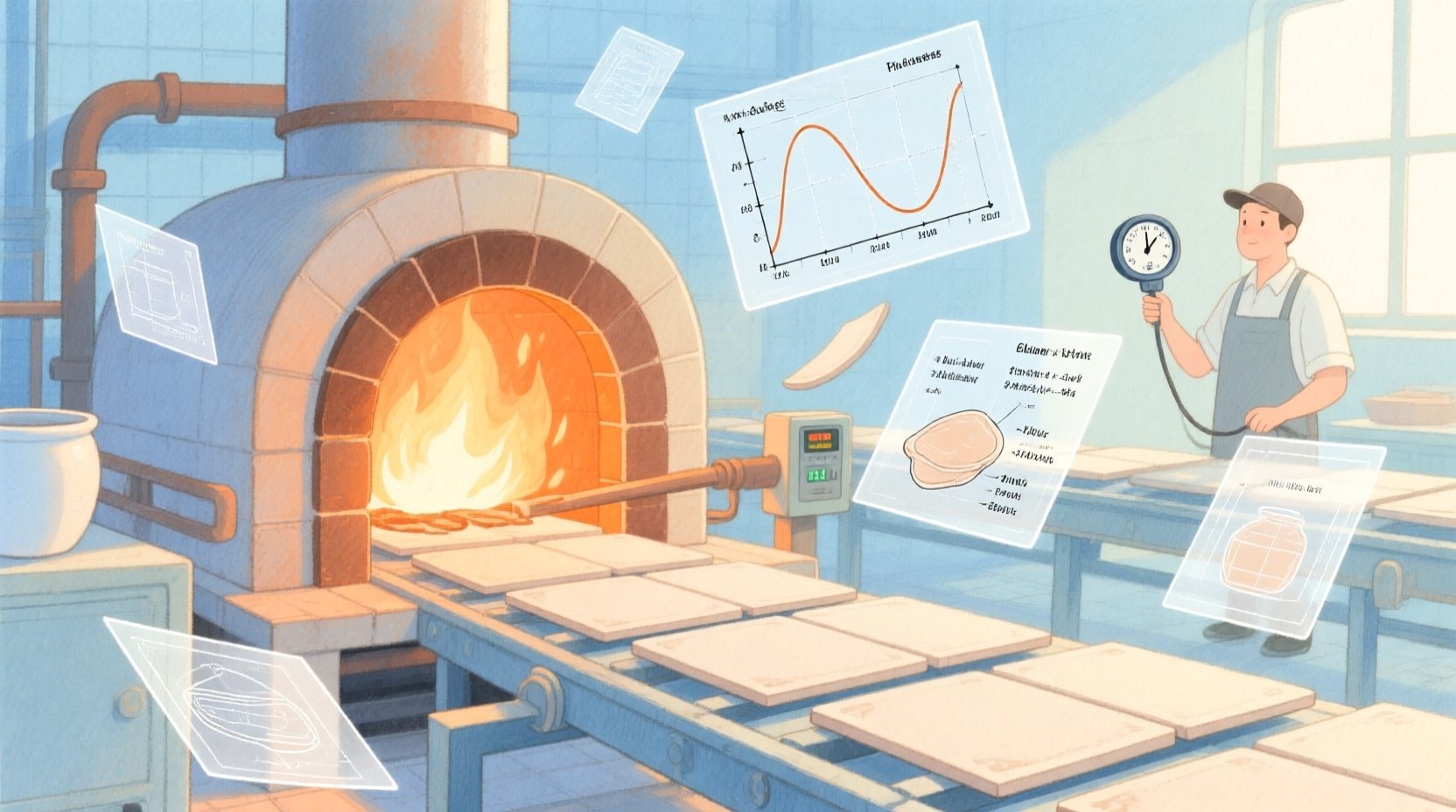
Visualizing this complex ecosystem requires more than just a list of database tables; it demands a structural blueprint that clarifies how a single tile batch interacts with kiln zones, firing profiles, and glaze application events. By adopting a diagram-as-code approach using PlantUML, architects can define these relationships with surgical precision, ensuring that every foreign key, entity, and constraint is logically sound before a single line of SQL is written. This tutorial leverages VPasCode to demonstrate how to build a comprehensive Entity-Relationship Diagram (ERD) that captures the nuances of kiln firing curves and glaze thickness gauges, turning abstract manufacturing requirements into a clear, actionable data model.
Understanding the Model: Purpose, Scope & Problem Framing
Diagram Abstraction & Representation
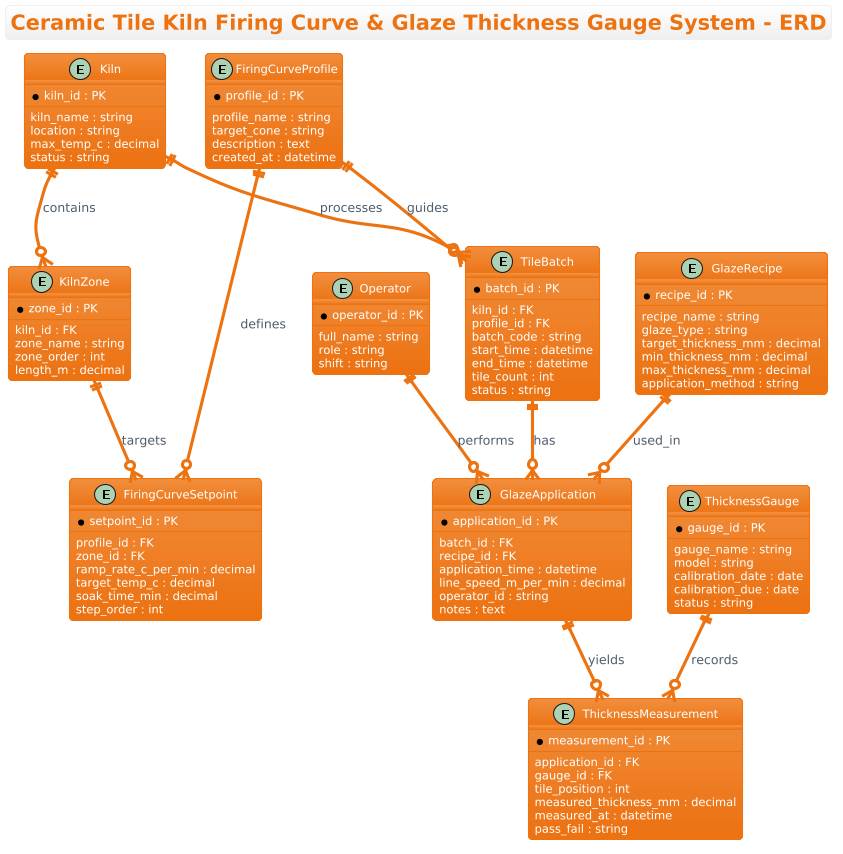
This Entity-Relationship Diagram (ERD) serves as the architectural backbone for a Quality Control and Process Optimization system in a ceramic tile factory. Unlike a simple inventory list, this model captures the temporal and causal relationships inherent in the manufacturing process. It represents the “Firing Curve” as a set of time-based temperature setpoints tied to specific kiln zones, and the “Glaze Application” as a discrete event linked to a specific batch and a recipe. The diagram abstracts the physical world (kilns, tiles, gauges) into logical entities, allowing developers to map how a temperature deviation in Zone 3 might impact the final thickness measurement recorded by a specific gauge.
Target Domain Scope & Scenario
The scope of this model is strictly limited to the production line data flow, excluding human resources or supply chain procurement. It focuses on the lifecycle of a Tile Batch from its entry into the kiln, through the firing process defined by a Firing Curve Profile, to the application of glaze and the subsequent Thickness Measurements. The model explicitly handles the one-to-many relationships where a single kiln contains multiple zones, a single batch undergoes multiple glaze applications, and a single application yields multiple thickness readings. This ensures that the data structure supports granular traceability required for ISO compliance and defect analysis.
Key Takeaways & Educational Insights
By constructing this diagram, readers will gain insights into how to model complex manufacturing workflows using PlantUML. You will learn how to structure hierarchical data (Kiln → Zones → Setpoints), manage temporal data (Start/End times, Calibration dates), and link quality control events (Measurements) back to their source (Batches). The resulting model provides a clear roadmap for database designers to implement a robust schema that supports real-time monitoring and historical analysis.
Complete Diagram & Full Source Code
Before diving into the step-by-step construction, here is the complete, rendered view of the Ceramic Tile Kiln & Glaze System ERD. This diagram illustrates the interconnected nature of the manufacturing data, highlighting the flow from kiln configuration to final quality assurance.
@startuml
!theme aws-orange
title Ceramic Tile Kiln Firing Curve & Glaze Thickness Gauge System - ERD

/'
Diagram Context:
This ERD models the data relationships for a ceramic tile manufacturing line that monitors
kiln firing curves and glaze application thickness. A tile batch is fired in a kiln according
to a firing curve profile (temperature setpoints over time). Each fired batch may have one or
more glaze thickness measurements taken by an in-line gauge. The system tracks kiln zones,
curve setpoints, batch runs, glaze recipes, thickness readings, and gauge devices to support
quality control, traceability, and process optimization.
'/

' ---------- Core Entities ----------

entity "Kiln" as kiln {
  * kiln_id : PK
  --
  kiln_name : string
  location : string
  max_temp_c : decimal
  status : string
}

entity "KilnZone" as kiln_zone {
  * zone_id : PK
  --
  kiln_id : FK
  zone_name : string
  zone_order : int
  length_m : decimal
}

entity "FiringCurveProfile" as curve_profile {
  * profile_id : PK
  --
  profile_name : string
  target_cone : string
  description : text
  created_at : datetime
}

entity "FiringCurveSetpoint" as curve_setpoint {
  * setpoint_id : PK
  --
  profile_id : FK
  zone_id : FK
  ramp_rate_c_per_min : decimal
  target_temp_c : decimal
  soak_time_min : decimal
  step_order : int
}

entity "TileBatch" as tile_batch {
  * batch_id : PK
  --
  kiln_id : FK
  profile_id : FK
  batch_code : string
  start_time : datetime
  end_time : datetime
  tile_count : int
  status : string
}

entity "GlazeRecipe" as glaze_recipe {
  * recipe_id : PK
  --
  recipe_name : string
  glaze_type : string
  target_thickness_mm : decimal
  min_thickness_mm : decimal
  max_thickness_mm : decimal
  application_method : string
}

entity "GlazeApplication" as glaze_application {
  * application_id : PK
  --
  batch_id : FK
  recipe_id : FK
  application_time : datetime
  line_speed_m_per_min : decimal
  operator_id : string
  notes : text
}

entity "ThicknessGauge" as thickness_gauge {
  * gauge_id : PK
  --
  gauge_name : string
  model : string
  calibration_date : date
  calibration_due : date
  status : string
}

entity "ThicknessMeasurement" as thickness_measurement {
  * measurement_id : PK
  --
  application_id : FK
  gauge_id : FK
  tile_position : int
  measured_thickness_mm : decimal
  measured_at : datetime
  pass_fail : string
}

entity "Operator" as operator {
  * operator_id : PK
  --
  full_name : string
  role : string
  shift : string
}

' ---------- Relationships ----------

kiln ||--o{ kiln_zone : contains
kiln ||--o{ tile_batch : processes
curve_profile ||--o{ curve_setpoint : defines
kiln_zone ||--o{ curve_setpoint : targets
curve_profile ||--o{ tile_batch : guides
tile_batch ||--o{ glaze_application : has
glaze_recipe ||--o{ glaze_application : used_in
glaze_application ||--o{ thickness_measurement : yields
thickness_gauge ||--o{ thickness_measurement : records
operator ||--o{ glaze_application : performs

@endumlStep-by-Step Architectural Walkthrough
Phase 1: Canvas Configuration & Layout Directives
The foundation of any professional PlantUML diagram lies in its configuration. Before defining entities, we set the visual theme and the diagram title to ensure consistency with the broader documentation. In this manufacturing context, we utilize the !theme aws-orange directive to provide a clean, high-contrast look that is easy to read in technical reports. We also define a descriptive title that immediately informs the reader of the system’s scope.
We begin by initializing the diagram and setting the theme:
@startuml
!theme aws-orange
title Ceramic Tile Kiln Firing Curve & Glaze Thickness Gauge System - ERD
Immediately following the title, we insert a comment block using the /' ... '/ syntax. This is crucial for documentation; it allows us to embed a detailed context description directly within the code file without affecting the rendered diagram. This ensures that anyone reading the source code understands the “why” behind the model, not just the “what”.
Phase 2: Declaring Core Entities, Actors, and Boundaries
The core of the ERD is the definition of entities. In PlantUML, we use the entity keyword followed by the display name and an alias (used for relationships). We define the primary keys (PK) and foreign keys (FK) explicitly to clarify the data integrity rules.
For example, the Kiln entity represents the physical hardware. We define its attributes including max_temp_c and status. The entity block structure is:
entity "Kiln" as kiln {
  * kiln_id : PK
  --
  kiln_name : string
  location : string
  max_temp_c : decimal
  status : string
}
We repeat this pattern for KilnZone, FiringCurveProfile, and TileBatch. Notice how FiringCurveSetpoint is defined with attributes like ramp_rate_c_per_min and soak_time_min, which are critical for the manufacturing process logic. The separation of the header (PK) and the body (attributes) using -- is a standard PlantUML convention that improves readability.
Phase 3: Mapping Data Flows & Key Interactions
Once entities are defined, the most critical step is establishing the relationships. In PlantUML, we use the ||--o{ syntax to denote a “One-to-Many” relationship, where the || indicates mandatory participation (one) and the o{ indicates optional participation (zero or many).
Consider the relationship between a Kiln and a TileBatch. A kiln processes many batches, but a batch is processed by exactly one kiln at a time. This is modeled as:
kiln ||--o{ tile_batch : processesSimilarly, we map the complex interaction between the GlazeApplication and ThicknessMeasurement. A single application event yields multiple measurements as tiles pass the gauge. This relationship is defined as:
glaze_application ||--o{ thickness_measurement : yieldsWe also link the Operator entity to the GlazeApplication to ensure traceability of who performed the action:
operator ||--o{ glaze_application : performsPhase 4: Grouping, Annotations & Visual Polish
While the current model is flat, PlantUML allows for further grouping using package or box directives if the diagram grows larger. In this tutorial, we rely on clear naming conventions and the title block to keep the diagram organized. The !theme aws-orange directive automatically applies consistent styling to the entity boxes, borders, and text, ensuring a professional appearance without manual CSS adjustments. The final step is simply closing the diagram with @enduml to signal the end of the code block.
Syntax & Keyword Deep Dive
To fully master PlantUML for ERD modeling, it is essential to understand the specific syntax keywords used in this diagram. These keywords dictate how the data structure is interpreted and rendered.
entity: The primary keyword used to define a table or object in the diagram. It is followed by the display name (e.g., “Kiln”) and an alias (e.g.,as kiln) which is used for referencing in relationships.PKandFK: These are custom tags used within the entity definition to denote Primary Keys and Foreign Keys. While PlantUML does not enforce database constraints, these labels are vital for communicating the data model’s integrity rules to developers.||--o{: This is the standard Crow’s Foot notation for a One-to-Many relationship. The||represents the “One” side (mandatory), and theo{represents the “Many” side (optional). This is the most common relationship in manufacturing ERDs.!theme: A directive that applies a predefined color scheme and style to the entire diagram.aws-orangeis one of the built-in themes that provides a modern, high-contrast look suitable for technical documentation./' ... '/: The syntax for a multi-line comment block. Unlike single-line comments (which start with'), this block allows for rich text descriptions of the diagram’s purpose, which are hidden from the renderer but visible in the source code.
Best Practices & Pitfalls to Avoid
When building complex manufacturing ERDs, adhering to best practices ensures the model remains maintainable and scalable.
- Consistent Naming Conventions: Always use the same alias for an entity throughout the diagram (e.g., always use
tile_batchinstead of mixingtile_batchandbatch). This prevents confusion when defining relationships. - Explicit Primary Keys: Never omit the
PKtag. In manufacturing systems, traceability is key; every entity must have a unique identifier to link back to specific batches or measurements. - Logical Grouping: If the diagram becomes too large, consider grouping related entities (e.g., all “Firing” entities) into a package or box. However, for this specific scope, a flat layout with clear relationships is often more readable.
- Use of Aliases: Always define an alias (e.g.,
as kiln) for entities. Without an alias, you cannot reference the entity in the relationship syntax, making it impossible to draw the lines connecting the data.
Start Building Manufacturing ERDs Faster with VPasCode
Instantly prototype and refine your ceramic kiln and glaze system data models online in VPasCode without installing any database tools.