


In the rapidly evolving landscape of industrial additive manufacturing, data integrity is the backbone of quality assurance. Modern 3D printers, particularly those utilizing powder bed fusion technologies, generate vast amounts of telemetry data for every single layer printed. Engineers and quality control specialists must track a multitude of variables simultaneously: the specific powder bed recoater settings used to spread each layer, the precise laser power parameters applied during sintering, and real-time sensor measurements to detect anomalies. Without a structured data model, this critical information remains fragmented, making it impossible to trace defects back to their root cause or optimize future print jobs.
Visualizing this complex data ecosystem through an Entity Relationship Diagram (ERD) is essential for database architects and manufacturing engineers. A well-designed ERD clarifies the relationships between high-level build jobs and the granular layer-level parameters that define the physical outcome of a print. By modeling these entities using diagram-as-code, teams can version their data schemas alongside their CAD files, ensuring that the database structure evolves in lockstep with the manufacturing process. This approach not only documents the current system but also serves as a living specification for developers building the logging infrastructure.
Understanding the Model: Purpose, Scope & Problem Framing
This tutorial focuses on constructing a specialized ERD designed for the additive manufacturing domain. The primary challenge addressed here is the hierarchical nature of 3D printing data. A single Build Job consists of hundreds or thousands of individual Build Layers. Each layer is a unique event that triggers a specific set of physical actions, including the deployment of the recoater mechanism and the activation of the laser system. Consequently, the data model must reflect a strict parent-child relationship where the layer acts as the central anchor for all process parameters.
The scope of this diagram is strictly limited to the logging of process parameters and sensor data. It does not model the mechanical design of the printer itself, nor does it include user management or inventory tracking for raw materials. Instead, it zooms in on the telemetry aspect: capturing the exact state of the machine at the moment a layer is created. This abstraction is crucial for implementing traceability systems required in aerospace and medical device manufacturing, where every component must be auditable.
By the end of this guide, you will gain a clear understanding of how to structure a database schema that supports high-frequency data logging. You will learn how to define one-to-many relationships between jobs and layers, and how to link multiple distinct parameter sets (recoater, laser, sensors) to a single layer instance. This architectural clarity ensures that your database can efficiently store and query the massive datasets generated by modern industrial 3D printers.
Complete Diagram & Full Source Code
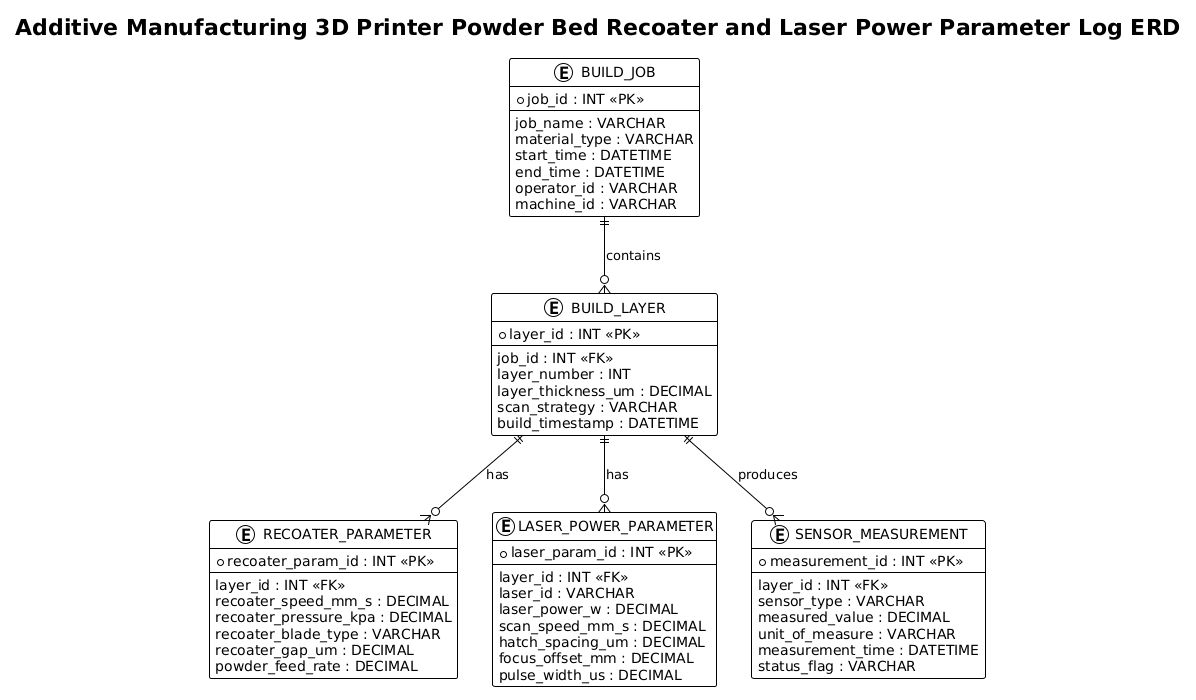
Below is the complete, finalized Entity Relationship Diagram. It visualizes the Build Job as the root entity, branching out to Build Layer, which in turn branches out to three specific parameter types: Recoater Parameter, Laser Power Parameter, and Sensor Measurement.
@startuml
!theme plain
title Additive Manufacturing 3D Printer Powder Bed Recoater and Laser Power Parameter Log ERD

/'
Diagram context:
This ERD models the parameter logging structure for an additive manufacturing 3D printer.
It captures build jobs, powder bed recoater settings, laser power parameters, layer-level process data,
and sensor measurements used to monitor and trace print quality. The central entity is the build layer,
which links each manufactured layer to its recoater and laser parameter records.
'/

entity "BUILD_JOB" as build_job {
  * job_id : INT <<PK>>
  --
  job_name : VARCHAR
  material_type : VARCHAR
  start_time : DATETIME
  end_time : DATETIME
  operator_id : VARCHAR
  machine_id : VARCHAR
}

entity "BUILD_LAYER" as build_layer {
  * layer_id : INT <<PK>>
  --
  job_id : INT <<FK>>
  layer_number : INT
  layer_thickness_um : DECIMAL
  scan_strategy : VARCHAR
  build_timestamp : DATETIME
}

entity "RECOATER_PARAMETER" as recoater_param {
  * recoater_param_id : INT <<PK>>
  --
  layer_id : INT <<FK>>
  recoater_speed_mm_s : DECIMAL
  recoater_pressure_kpa : DECIMAL
  recoater_blade_type : VARCHAR
  recoater_gap_um : DECIMAL
  powder_feed_rate : DECIMAL
}

entity "LASER_POWER_PARAMETER" as laser_param {
  * laser_param_id : INT <<PK>>
  --
  layer_id : INT <<FK>>
  laser_id : VARCHAR
  laser_power_w : DECIMAL
  scan_speed_mm_s : DECIMAL
  hatch_spacing_um : DECIMAL
  focus_offset_mm : DECIMAL
  pulse_width_us : DECIMAL
}

entity "SENSOR_MEASUREMENT" as sensor_measurement {
  * measurement_id : INT <<PK>>
  --
  layer_id : INT <<FK>>
  sensor_type : VARCHAR
  measured_value : DECIMAL
  unit_of_measure : VARCHAR
  measurement_time : DATETIME
  status_flag : VARCHAR
}

build_job ||--o{ build_layer : contains
build_layer ||--o{ recoater_param : has
build_layer ||--o{ laser_param : has
build_layer ||--o{ sensor_measurement : produces

@endumlStep-by-Step Architectural Walkthrough
Phase 1: Canvas Configuration & Layout Directives
Every PlantUML diagram begins with configuration directives that set the visual style and structural rules. In this manufacturing context, we prioritize clarity and a clean, industrial look. We start by declaring the theme.
Using the !theme plain directive ensures the diagram uses a minimalist style without complex graphical decorations, allowing the focus to remain on the data structure and relationships. We also define the diagram type as @startuml to initialize the ERD parser.
@startuml
!theme plain
title Additive Manufacturing 3D Printer Powder Bed Recoater and Laser Power Parameter Log ERD
Phase 2: Declaring Core Entities, Actors, and Boundaries
The foundation of an ERD is the entity definition. In PlantUML, we use the entity keyword to define database tables. Each entity is represented as a box containing its name and a list of attributes.
We begin with the BUILD_JOB entity. This represents the top-level container for a print session. We define the primary key using the * symbol and the PK stereotype. This ensures the database can uniquely identify each job. Attributes like material_type, start_time, and machine_id capture the essential metadata for the print run.
entity "BUILD_JOB" as build_job {
  * job_id : INT <>
  --
  job_name : VARCHAR
  material_type : VARCHAR
  start_time : DATETIME
  end_time : DATETIME
  operator_id : VARCHAR
  machine_id : VARCHAR
}
Next, we define the BUILD_LAYER entity. This is the critical pivot point of our model. It includes a foreign key job_id to link back to the parent job. This relationship is essential for organizing thousands of layers into specific print jobs.
entity "BUILD_LAYER" as build_layer {
  * layer_id : INT <>
  --
  job_id : INT <>
  layer_number : INT
  layer_thickness_um : DECIMAL
  scan_strategy : VARCHAR
  build_timestamp : DATETIME
}
Phase 3: Mapping Data Flows & Key Interactions
With the core entities defined, we must now model the specific process parameters. In additive manufacturing, the recoater and laser settings are distinct but equally important. We define the RECOATER_PARAMETER and LASER_POWER_PARAMETER entities. Notice that both entities include a layer_id foreign key. This signifies that these parameters are specific to a single layer and cannot exist independently of it.
entity "RECOATER_PARAMETER" as recoater_param {
  * recoater_param_id : INT <>
  --
  layer_id : INT <>
  recoater_speed_mm_s : DECIMAL
  recoater_pressure_kpa : DECIMAL
  recoater_blade_type : VARCHAR
  recoater_gap_um : DECIMAL
  powder_feed_rate : DECIMAL
}

entity "LASER_POWER_PARAMETER" as laser_param {
  * laser_param_id : INT <>
  --
  layer_id : INT <>
  laser_id : VARCHAR
  laser_power_w : DECIMAL
  scan_speed_mm_s : DECIMAL
  hatch_spacing_um : DECIMAL
  focus_offset_mm : DECIMAL
  pulse_width_us : DECIMAL
}
Finally, we add the SENSOR_MEASUREMENT entity. This table is designed to be flexible, storing various types of sensor data (temperature, humidity, laser output) using a sensor_type attribute and a generic measured_value field.
entity "SENSOR_MEASUREMENT" as sensor_measurement {
  * measurement_id : INT <>
  --
  layer_id : INT <>
  sensor_type : VARCHAR
  measured_value : DECIMAL
  unit_of_measure : VARCHAR
  measurement_time : DATETIME
  status_flag : VARCHAR
}
Phase 4: Grouping, Annotations & Visual Polish
The final phase involves connecting the entities to define the data flow and cardinality. In PlantUML, we use the ||--o{ syntax to represent a one-to-many relationship. The || indicates the “one” side (the parent) and the o{ indicates the “zero or many” side (the child).
We establish that a BUILD_JOB contains many BUILD_LAYERS. Then, we establish that a single BUILD_LAYER has one set of recoater parameters, one set of laser parameters, and produces many sensor measurements. This structure accurately reflects the physical reality of the 3D printing process.
build_job ||--o{ build_layer : contains
build_layer ||--o{ recoater_param : has
build_layer ||--o{ laser_param : has
build_layer ||--o{ sensor_measurement : produces
Syntax & Keyword Deep Dive
To fully leverage the power of VPasCode for ERD modeling, it is essential to understand the specific PlantUML syntax used in this diagram. The following keywords and conventions are critical for constructing accurate data models.
entity: The keyword used to define a database table or entity. It is followed by the table name in quotes and an alias for the entity (e.g.,entity "NAME" as alias).entity { ... }: A block containing the attributes of the entity. Attributes are listed line by line within the curly braces.* attribute : TYPE: Defines a column. The asterisk*before the attribute name marks it as a Primary Key (PK). TheTYPEspecifies the data type (e.g., INT, VARCHAR, DECIMAL).<<PK>>and<<FK>>: Stereotypes used to visually label attributes as Primary Keys or Foreign Keys. While*marks the PK, the stereotype adds clarity to the diagram.--: A separator line inside an entity block. It visually divides the primary key from the other attributes, improving readability.||--o{: A relationship arrow. The double bar||represents the “one” side (mandatory), and the circle-braceo{represents the “zero or many” side (optional collection). This creates a standard one-to-many ERD relationship.: label: The text following the relationship arrow defines the name of the relationship (e.g.,: contains).
Best Practices & Pitfalls to Avoid
When modeling complex manufacturing data, adherence to best practices ensures your ERD remains scalable and maintainable.
- Use Descriptive Aliases: While the entity name might be “BUILD_JOB”, using a shorter alias like
build_jobin the relationship definitions makes the code cleaner and easier to read. This is especially helpful in complex diagrams with many relationships. - Standardize Data Types: Be consistent with data types. For manufacturing parameters involving physical measurements (like speed or thickness), always use
DECIMALrather thanINTto preserve precision. Mixing types can lead to data loss in the actual database. - Avoid Circular Dependencies: Ensure your relationships flow logically from parent to child. In this model, the BUILD_LAYER is the central hub. Avoid creating direct links between RECOATER_PARAMETER and LASER_POWER_PARAMETER unless there is a specific cross-dependency, as this can complicate the data model unnecessarily.
- Comment Your Logic: Use the
/' ... '/block to add context. As seen in the diagram, a well-written comment block at the top explains the *why* and *what* of the model, which is invaluable for future developers or auditors reviewing the schema.
Start Building Manufacturing ERDs Faster with VPasCode
Design and visualize your additive manufacturing data schemas instantly in your browser with VPasCode, the free PlantUML editor for industrial documentation.