


In the rapidly evolving landscape of telecommunications, Internet Protocol Television (IPTV) services rely on robust data architectures to manage the intricate relationship between subscribers, their hardware, and the vast libraries of video content available on demand. As operators transition from linear broadcasting to on-demand streaming ecosystems, the complexity of tracking user entitlements, managing content hierarchies, and recording viewing sessions has skyrocketed. A single subscriber might access multiple devices, hold various subscription packages, and engage in both rental and purchase transactions for specific episodes or movies. Without a clear, normalized data model, these systems risk data redundancy, authorization errors, and a fragmented user experience.
Designing an Entity Relationship Diagram (ERD) for this domain requires a deep understanding of both database normalization principles and the specific business logic of media distribution. The challenge lies not just in defining tables, but in visualizing how a “Subscriber” entity links to a “Set-Top Box,” how an “Entitlement Package” grants access to a “Content Group,” and how a hierarchical “VOD Catalog” (Series -> Seasons -> Episodes) connects to the actual assets available for streaming. Using PlantUML as a diagram-as-code tool allows architects to version this logic, iterate quickly, and generate documentation that stays in sync with the codebase. This tutorial demonstrates how to construct a professional-grade ERD for an IPTV entitlement and VOD system using VPasCode.
Understanding the Model: Purpose, Scope & Problem Framing
This ERD serves as the architectural blueprint for the core data layer of an IPTV platform. It specifically addresses the Entitlement Management and Video-on-Demand (VOD) Asset Catalog domains. The primary purpose is to define how access rights are granted to users and how the content library is structured to support those rights.
Diagram Abstraction & Representation
As an Entity Relationship Diagram, this model uses standard notation to represent Entities (tables), Attributes (columns), and Relationships (foreign keys). In this specific context:
- Entities represent core business objects like Subscriber, SetTopBox, EntitlementPackage, and VODAsset.
- Attributes define the properties of these objects, such as subscriber_id (Primary Key) or serial_number (Unique Key).
- Relationships (lines with cardinality indicators like
||--o{) define the logical connections, such as a Subscriber owns a Set-Top Box or a Package contains a Content Group.
Target Domain Scope & Scenario
The scope of this diagram covers the entire lifecycle of a user’s interaction with the VOD platform, from registration and device pairing to content discovery and playback. It intentionally excludes external billing gateway integrations or third-party authentication providers to focus purely on the internal data topology. The model handles:
- Device Management: Linking physical hardware (STBs) to user accounts.
- Access Control: Mapping subscription packages to specific content groups.
- Content Hierarchy: Organizing movies and TV shows into a nested structure (Series -> Seasons -> Episodes).
- Transaction Tracking: Recording rental purchases and viewing sessions for analytics and billing.
Key Takeaways & Educational Insights
By studying this diagram, readers will gain insights into how to model many-to-many relationships (e.g., a subscriber having multiple packages), recursive relationships (e.g., categories having parent categories), and associative entities (e.g., linking subscribers to sessions). It demonstrates how to keep the catalog flexible while maintaining strict referential integrity for access control.
Complete Diagram & Full Source Code
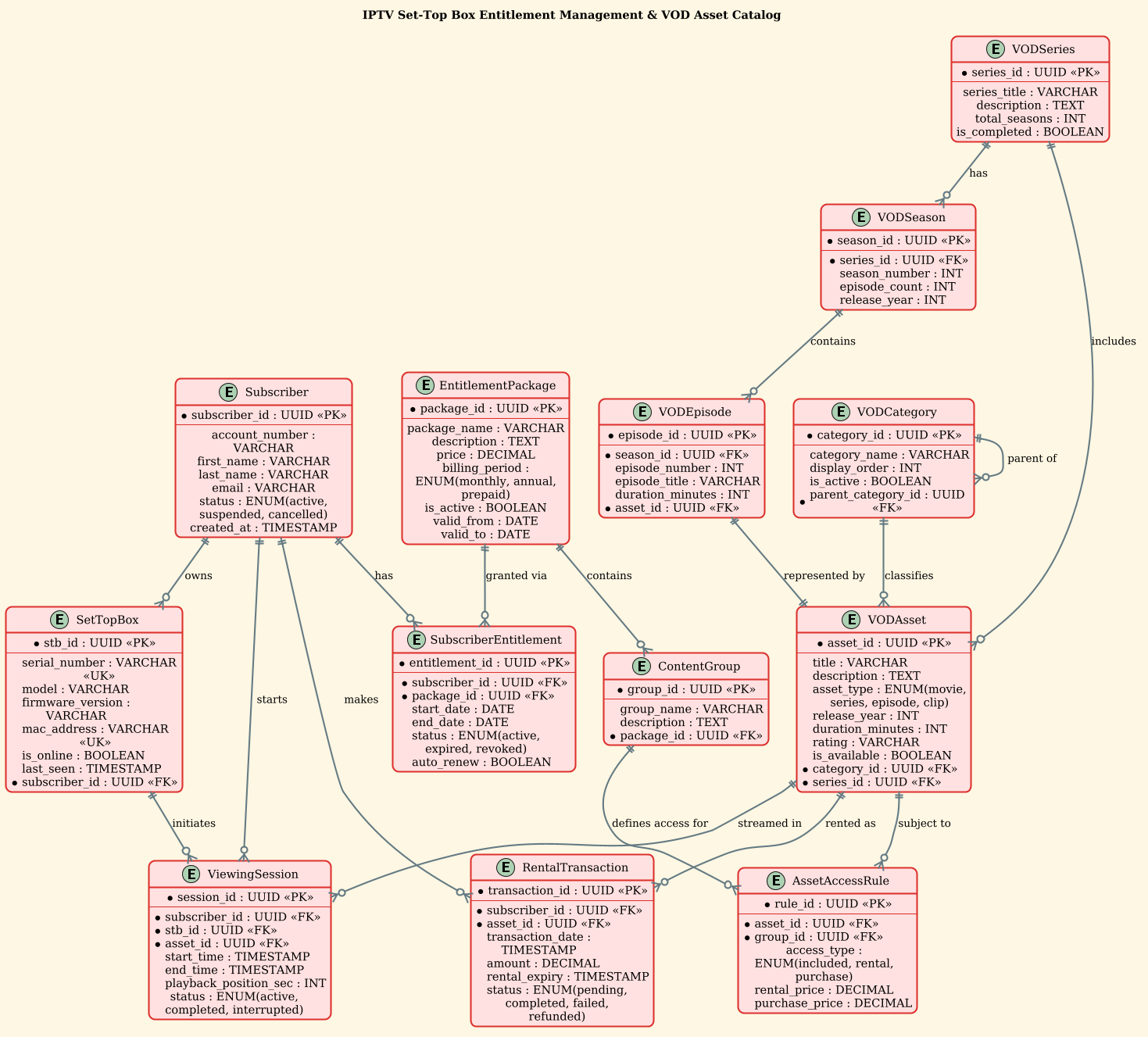
Below is the finalized ERD visualizing the IPTV entitlement and VOD catalog structure. This diagram utilizes the sunlust theme for a clean, modern aesthetic.
@startuml
!theme sunlust
title IPTV Set-Top Box Entitlement Management & VOD Asset Catalog

/'
Diagram Context:
This ERD models the core data structures for managing subscriber entitlements
and the video-on-demand asset catalog in an IPTV environment. It addresses:
1. Subscriber and Set-Top Box (STB) registration and association.
2. Entitlement packages that grant access to specific content groups.
3. A hierarchical VOD asset catalog (categories, series, seasons, episodes).
4. The relationship between subscribers, their entitlements, and the
   content they are allowed to access.
5. Tracking of viewing sessions and rental/purchase transactions.
The diagram helps visualize how access control (entitlements) is linked
to the content catalog and subscriber devices, enabling precise
authorization for VOD playback.
'/

' ---------- Core Entities ----------

entity "Subscriber" as sub {
  * subscriber_id : UUID <<PK>>
  --
  account_number : VARCHAR
  first_name : VARCHAR
  last_name : VARCHAR
  email : VARCHAR
  status : ENUM(active, suspended, cancelled)
  created_at : TIMESTAMP
}

entity "SetTopBox" as stb {
  * stb_id : UUID <<PK>>
  --
  serial_number : VARCHAR <<UK>>
  model : VARCHAR
  firmware_version : VARCHAR
  mac_address : VARCHAR <<UK>>
  is_online : BOOLEAN
  last_seen : TIMESTAMP
  * subscriber_id : UUID <<FK>>
}

entity "EntitlementPackage" as pkg {
  * package_id : UUID <<PK>>
  --
  package_name : VARCHAR
  description : TEXT
  price : DECIMAL
  billing_period : ENUM(monthly, annual, prepaid)
  is_active : BOOLEAN
  valid_from : DATE
  valid_to : DATE
}

entity "SubscriberEntitlement" as sub_ent {
  * entitlement_id : UUID <<PK>>
  --
  * subscriber_id : UUID <<FK>>
  * package_id : UUID <<FK>>
  start_date : DATE
  end_date : DATE
  status : ENUM(active, expired, revoked)
  auto_renew : BOOLEAN
}

entity "ContentGroup" as cgroup {
  * group_id : UUID <<PK>>
  --
  group_name : VARCHAR
  description : TEXT
  * package_id : UUID <<FK>>
}

' ---------- VOD Catalog ----------

entity "VODCategory" as cat {
  * category_id : UUID <<PK>>
  --
  category_name : VARCHAR
  display_order : INT
  is_active : BOOLEAN
  * parent_category_id : UUID <<FK>>
}

entity "VODAsset" as asset {
  * asset_id : UUID <<PK>>
  --
  title : VARCHAR
  description : TEXT
  asset_type : ENUM(movie, series, episode, clip)
  release_year : INT
  duration_minutes : INT
  rating : VARCHAR
  is_available : BOOLEAN
  * category_id : UUID <<FK>>
  * series_id : UUID <<FK>>
}

entity "VODSeries" as series {
  * series_id : UUID <<PK>>
  --
  series_title : VARCHAR
  description : TEXT
  total_seasons : INT
  is_completed : BOOLEAN
}

entity "VODSeason" as season {
  * season_id : UUID <<PK>>
  --
  * series_id : UUID <<FK>>
  season_number : INT
  episode_count : INT
  release_year : INT
}

entity "VODEpisode" as episode {
  * episode_id : UUID <<PK>>
  --
  * season_id : UUID <<FK>>
  episode_number : INT
  episode_title : VARCHAR
  duration_minutes : INT
  * asset_id : UUID <<FK>>
}

' ---------- Access & Transactions ----------

entity "AssetAccessRule" as access_rule {
  * rule_id : UUID <<PK>>
  --
  * asset_id : UUID <<FK>>
  * group_id : UUID <<FK>>
  access_type : ENUM(included, rental, purchase)
  rental_price : DECIMAL
  purchase_price : DECIMAL
}

entity "ViewingSession" as session {
  * session_id : UUID <<PK>>
  --
  * subscriber_id : UUID <<FK>>
  * stb_id : UUID <<FK>>
  * asset_id : UUID <<FK>>
  start_time : TIMESTAMP
  end_time : TIMESTAMP
  playback_position_sec : INT
  status : ENUM(active, completed, interrupted)
}

entity "RentalTransaction" as rental {
  * transaction_id : UUID <<PK>>
  --
  * subscriber_id : UUID <<FK>>
  * asset_id : UUID <<FK>>
  transaction_date : TIMESTAMP
  amount : DECIMAL
  rental_expiry : TIMESTAMP
  status : ENUM(pending, completed, failed, refunded)
}

' ---------- Relationships ----------

sub ||--o{ stb : "owns"
sub ||--o{ sub_ent : "has"
pkg ||--o{ sub_ent : "granted via"
pkg ||--o{ cgroup : "contains"
cgroup ||--o{ access_rule : "defines access for"

cat ||--o{ cat : "parent of"
cat ||--o{ asset : "classifies"
series ||--o{ season : "has"
season ||--o{ episode : "contains"
series ||--o{ asset : "includes"
episode ||--|| asset : "represented by"

asset ||--o{ access_rule : "subject to"
asset ||--o{ session : "streamed in"
asset ||--o{ rental : "rented as"

sub ||--o{ session : "starts"
sub ||--o{ rental : "makes"
stb ||--o{ session : "initiates"

@endumlStep-by-Step Architectural Walkthrough
Phase 1: Canvas Configuration & Layout Directives
Every PlantUML diagram begins with configuration directives that set the stage for rendering. In this IPTV model, we start by defining the theme and the diagram title to ensure the output is professional and self-explanatory.
We use the !theme sunlust directive. This applies a pre-defined color palette and styling that is particularly effective for technical diagrams, providing high contrast and a modern look without manual CSS tweaking. The title directive immediately identifies the diagram’s scope.
!theme sunlust
title IPTV Set-Top Box Entitlement Management & VOD Asset Catalog
Immediately following the title, we include a comment block (/' ... '/). This is a crucial best practice for diagram-as-code. It embeds the business context directly into the source file, ensuring that anyone reading the code understands the “why” behind the model without needing to look at external documentation.
Phase 2: Declaring Core Entities, Actors, and Boundaries
The foundation of the ERD lies in defining the entities. In PlantUML, we use the entity keyword. We define the Subscriber and SetTopBox entities first, as they represent the primary users and hardware in the system.
Inside the entity block, we use asterisks (*) to denote Primary Keys (PK). For example, * subscriber_id : UUID establishes the unique identifier for a user. We also use < to mark Unique Keys, such as the serial_number on a Set-Top Box, ensuring no two devices share the same serial number.
entity "Subscriber" as sub {
  * subscriber_id : UUID <>
  --
  account_number : VARCHAR
  first_name : VARCHAR
  last_name : VARCHAR
  email : VARCHAR
  status : ENUM(active, suspended, cancelled)
  created_at : TIMESTAMP
}
We also introduce the EntitlementPackage and SubscriberEntitlement entities. Notice the SubscriberEntitlement acts as an associative entity (a junction table) to resolve the many-to-many relationship between Subscribers and Packages. It captures not just the link, but the temporal validity (start_date, end_date) of that entitlement.
Phase 3: Mapping Data Flows & Key Interactions
The second major domain is the VOD Catalog. This requires a hierarchical structure. We define VODSeries, VODSeason, and VODEpisode to represent TV shows.
The relationships here are critical. A Series has many Seasons, and a Season contains many Episodes. We model this using PlantUML relationship syntax. The ||--o{ syntax indicates a “one or more” relationship (One-to-Many).
series ||--o{ season : "has"
season ||--o{ episode : "contains"
episode ||--|| asset : "represented by"
The relationship episode ||--|| asset uses ||--||, indicating a mandatory one-to-one relationship. This implies that every episode in the system must correspond to exactly one asset file (the video file), and every asset in this context represents exactly one episode. This strict cardinality ensures data integrity in the streaming pipeline.
Phase 4: Grouping, Annotations & Visual Polish
To make the diagram readable, we group related entities conceptually (though in PlantUML ERD, this is often done via spatial arrangement or comments). We also define the Access & Transactions layer. This includes AssetAccessRule, which links content to the entitlement groups, and ViewingSession / RentalTransaction for tracking user activity.
The relationships here bridge the gap between the catalog and the user. For instance, asset ||--o{ session : "streamed in" shows that an asset can be streamed in multiple sessions. We also link the Subscriber to the SetTopBox via the owns relationship, ensuring that a device is always tied to an account.
Syntax & Keyword Deep Dive
PlantUML offers a robust set of keywords specifically designed for ERD modeling. Understanding these is key to building complex schemas.
entity "Name" as alias: Defines a new entity table. Theas aliaspart allows you to refer to this entity later in the relationship definitions using a shorter variable (e.g.,subinstead ofSubscriber), which keeps relationship lines cleaner.* attribute : Type: The asterisk prefix explicitly marks the attribute as a Primary Key. PlantUML will render this with a specific icon.<,> <,> <: These are stereotypes.> PKstands for Primary Key,FKfor Foreign Key, andUKfor Unique Key. They help visual database designers quickly scan the schema for key constraints.ENUM(value1, value2): Defines a column that can only take one of a specific set of values. This is essential for fields likestatusorasset_typeto enforce data validation at the schema level.||--o{: This is the cardinality notation for “One-to-Many”. The||means “one and only one” on the source side, ando{means “zero or many” on the target side. For example, a Subscriber||--o{SetTopBox means one subscriber can own zero or many boxes./' ... '/: Multi-line comment syntax. Unlike single-line comments ('), this allows for detailed documentation blocks that are ignored by the renderer but visible in the source code.
Best Practices & Pitfalls to Avoid
When constructing ERDs for complex systems like IPTV, adherence to best practices ensures the diagram remains maintainable and accurate.
- Normalize Before You Diagram: Ensure your logical model is normalized (3NF) before drawing. Avoid putting repeating groups (like a list of favorite channels) directly in the Subscriber table. Instead, create a separate
SubscriberPreferencesentity. - Use Consistent Naming Conventions: Stick to snake_case (e.g.,
subscriber_id) for attributes and CamelCase for entity names. Consistency makes the diagram easier to scan. - Define Cardinality Explicitly: Don’t rely on implicit relationships. Always use the
||--o{or||--||syntax to define exactly how many records can exist on either side of a relationship. Ambiguity leads to database design errors. - Keep Relationships Descriptive: The labels on the relationship lines (e.g.,
"owns","streamed in") are not just decoration; they describe the semantic meaning of the link. Use verbs that make sense when read from left to right.
Start Building IPTV ERDs Faster with VPasCode
Design complex telecommunications data models instantly in your browser with VPasCode, the free PlantUML editor that renders your diagrams live without any installation.